Establishing secure connection… Loading editor… Preparing document…
Navigation

Fill and Sign the Executive Employee Form
Fill and Sign the Executive Employee Form

How it works

Open the document and fill out all its fields.
Apply your legally-binding eSignature.
Save and invite other recipients to sign it.

Rate template

4.8
67 votes
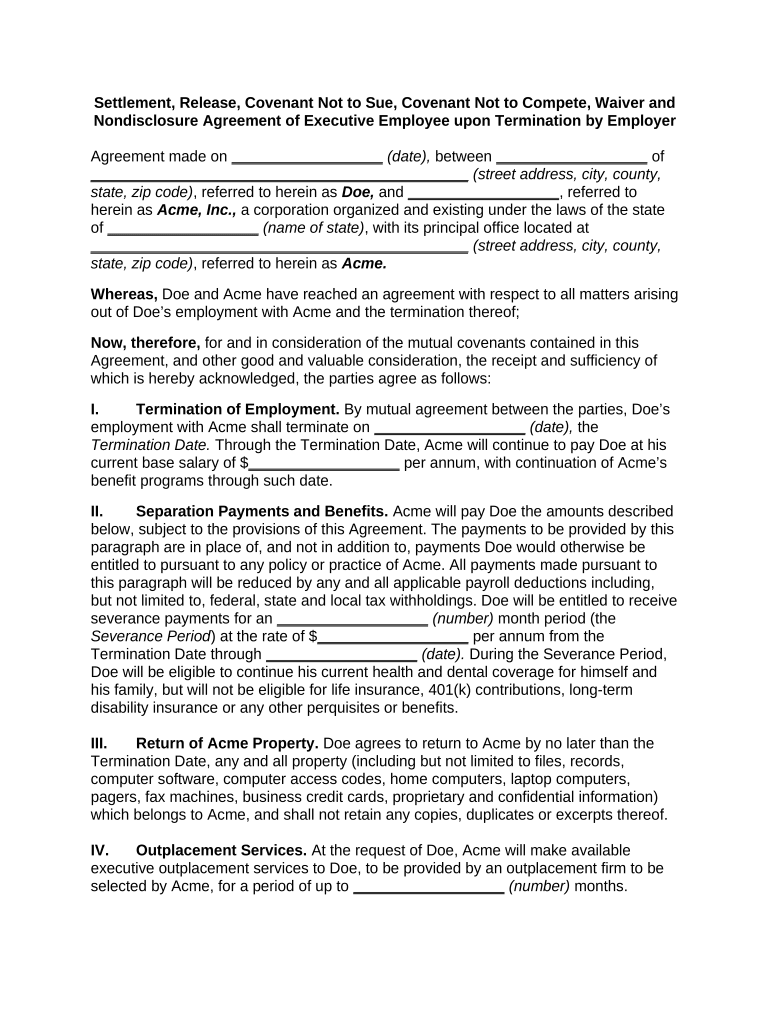
Settlement, Release, Covenant Not to Sue, Covenant Not to Compete, Waiver and Nondisclosure Agreement of Executive Employee upon Termination by Employer Agreement made on __________________ (date), between __________________ of _____________________________________________ (street address, city, county, state, zip code) , referred to herein as Doe, and __________________ , referred to herein as Acme, Inc., a corporation organized and existing under the laws of the state of __________________ (name of state) , with its principal office located at _____________________________________________ (street address, city, county, state, zip code) , referred to herein as Acme. Whereas, Doe and Acme have reached an agreement with respect to all matters arising out of Doe’s employment with Acme and the termination thereof; Now, therefore, for and in consideration of the mutual covenants contained in this Agreement, and other good and valuable consideration, the receipt and sufficiency of which is hereby acknowledged, the parties agree as follows: I. Termination of Employment. By mutual agreement between the parties, Doe’s employment with Acme shall terminate on __________________ (date), the Termination Date. Through the Termination Date, Acme will continue to pay Doe at his current base salary of $ __________________ per annum, with continuation of Acme’s benefit programs through such date. II. Separation Payments and Benefits. Acme will pay Doe the amounts described below, subject to the provisions of this Agreement. The payments to be provided by this paragraph are in place of, and not in addition to, payments Doe would otherwise be entitled to pursuant to any policy or practice of Acme. All payments made pursuant to this paragraph will be reduced by any and all applicable payroll deductions including, but not limited to, federal, state and local tax withholdings. Doe will be entitled to receive severance payments for an __________________ (number) month period (the Severance Period ) at the rate of $ __________________ per annum from the Termination Date through __________________ (date). During the Severance Period, Doe will be eligible to continue his current health and dental coverage for himself and his family, but will not be eligible for life insurance, 401(k) contributions, long-term disability insurance or any other perquisites or benefits. III. Return of Acme Property. Doe agrees to return to Acme by no later than the Termination Date, any and all property (including but not limited to files, records, computer software, computer access codes, home computers, laptop computers, pagers, fax machines, business credit cards, proprietary and confidential information) which belongs to Acme, and shall not retain any copies, duplicates or excerpts thereof. IV. Outplacement Services. At the request of Doe, Acme will make available executive outplacement services to Doe, to be provided by an outplacement firm to be selected by Acme, for a period of up to __________________ (number) months. V. Acme Options. Doe agrees that any options awarded to him under Acme’s Stock Option Plan (the Option Plan ) will be treated as provided in the Option Plan VI. Full Satisfaction . Doe, by entering into this Agreement, accepts the benefits to be conferred on him hereunder in full and complete satisfaction of any and all asserted and unasserted claims of any kind or description against Acme as of the date of this Agreement, including, but not limited to, claims arising under any federal, state and local fair employment practice law, workers’ compensation law, and any other Employee relations statute, executive order, law and ordinance, including, but not limited to, Title VII of the Civil Rights Act of 1964, as amended, the Age Discrimination in Employment Act of 1967, as amended, the Rehabilitation Act of 1973, as amended, the Family and Medical Leave Act, the Americans With Disabilities Act of 1990, as amended, the Civil Rights Acts of 1866 and 1871, and, except as otherwise expressly set forth herein, of any other duty and/or other employment related obligation (all of which are hereinafter referred to as employment relations laws ) as well as any claims arising from tort, tortious course of conduct, contract (including without limitation any claims arising under Doe’s Employment Agreement dated __________________ (date), any offer letter, obligations of good faith, public policy, statute, common law, equity, and all claims for wages and benefits, monetary and equitable relief, punitive and compensatory relief, and attorneys’ fees and costs. VII. Releases. A. In consideration of the covenants and undertakings above, Doe releases and discharges Acme from any and all liability, and waives any and all rights of any kind and description that he has or may have against Acme as of the date of this Agreement, including, but not limited to, any asserted and unasserted claims arising from any employment relations laws, tort, tortious course of conduct, contract [including without limitation any claims arising under Doe’s Employment Agreement dated __________________ (date), any offer letter, public policy, statute, common law, and equity, and claims for wages and benefits, monetary and equitable relief, punitive and compensatory relief, and attorneys’ fees and costs. The foregoing notwithstanding, Doe’s release and waiver do not apply to: 1. His rights arising out of this Agreement; 2. Any rights that Doe and any covered dependents may have to purchase health benefit continuation coverage under federal law commonly known as COBRA; 3. Any accrued and vested payouts or benefits under Acme qualified benefit plans; or 4. Any rights that Doe may have to indemnification under Acme’s general corporate indemnity for acts undertaken by Doe within the scope of his duties while employed at Acme. B. Acme releases and discharges Doe from any and all liability, and waives any and all rights of any kind and description that it has or may have against Doe as of the date of this Agreement, regarding which Acme has actual knowledge or should have had knowledge, other than rights under this Agreement or arising as a result of any criminal act of Doe. VIII. Covenant Not to Compete. F or a period of __________________ (number) years after the Termination Date , Doe will not directly or indirectly: A. Recruit, solicit, induce, or attempt to induce any of the employees or customers of Acme to terminate their employment or contractual relationship with Acme. B. Solicit, divert, take away, or attempt to divert or take away, from the Acme any of its business or the patronage of its customers, clients, accounts, vendors or suppliers for products or services sold by the Acme, and Doe shall not assist any other person to do so. C. If any restriction set forth in this Section VIII is found by any court of competent jurisdiction to be unenforceable because it extends for too long a period of time or over too great a range of activities or in too broad a geographic area, it shall be interpreted to extend only over the maximum period of time, range of activities or geographic area as to which it may be enforceable. D. The restrictions contained in this Section VIII are necessary for the protection of the business and goodwill of the Acme and are considered by Doe to be reasonable for such purpose. Doe agrees that any breach of this Section VIII will cause the Acme substantial and irrevocable damage and therefore, in the event of any such breach, in addition to such other remedies which may be available, the Acme shall have the right to seek specific performance and injunctive relief. IX. Non-Disparagement. Doe and Acme each agree that except, for truthful statements in any proceeding to enforce this Agreement or pursuant to a valid subpoena or court order, neither will make or publish any statement (orally or in writing) that becomes or reasonably could be expected to become publicly known, or instigate, assist or participate in the making or publication of any such statement, which would libel, slander or disparage (whether or not such disparagement legally constitutes libel or slander) the other or, with respect to Acme, any of its affiliates or any other entity or person within Acme or its affiliates, any of their affairs or operations, or the reputations of any of their past or present officers, directors, agents, representatives and employees. X. Unauthorized Disclosure. Without the prior written consent of Acme, except to the extent required by an order of a court having jurisdiction or under subpoena from an appropriate government agency, in which event, Doe shall use his best efforts to consult with Acme prior to responding to any such order or subpoena, Doe shall not disclose any confidential or proprietary trade secrets, customer lists, drawings, designs, programs, software, protocols, information regarding product development, marketing plans, sales plans, manufacturing plans, management organization information, operating policies or manuals, business plans, financial records, packaging design or other financial, commercial, business or technical information (i) relating to Acme or any of its Affiliates or (ii) that Acme or any of its Affiliates may receive belonging to suppliers, customers or others who do business with Acme or any of its Affiliates (collectively, Confidential Information ) to any third person unless such Confidential Information has been previously disclosed to the public or is in the public domain (other than by reason of Doe’s breach of this Section). The parties further agree that the terms of this Agreement, and the negotiations leading up to it shall not be disclosed by the parties to any person, other than in a proceeding to enforce the terms of this Agreement or pursuant to valid subpoena or court order, with the exception of the parties’ lawyers, accountants, tax preparers and, with respect to Doe, his immediate family, provided that the parties inform any such persons that they must not disclose the same to any person and they agree to that condition. In response to any inquiry from third parties, the parties and their attorneys may state only that the parties have resolved the matter. XI. Rights to Intellectual Property. Doe acknowledges and agrees that Acme is the sole and exclusive owner of all right, title and interest in and to all trademarks, copyrights and all other rights in and to all software, computer programs, works of authorship, writings (whether or not copyrightable), inventions (whether or not patentable), discoveries, methods, improvements, processes, ideas, systems, know- how, data, and any other intellectual creations of any nature whatsoever that Doe developed, or assisted in the development of, in the course of his employment by Acme (collectively, the Acme Intellectual Property ). All Acme Intellectual Property is deemed to be work made for hire pursuant to the United States Copyright Act of 1976 (the Act) and Acme thereby owns all right, title and interest in all Acme Intellectual Property. To the extent that the Acme Intellectual Property or any part thereof is deemed by any court of competent jurisdiction or any governmental or regulatory agency not to be a work made for hire within the meaning of the Act, the provisions of this section will still control and, for the consideration set forth herein, Doe hereby irrevocably and absolutely assigns, sets over and grants to Acme the Acme Intellectual Property and all of his rights therein. Doe further agrees to deliver or execute such documents and to do or refrain from doing such acts as Acme or its nominee may reasonably request to protect its rights in the Acme Intellectual Property. XII. Reemployment or Reinstatement. Doe agrees not to seek reinstatement or reemployment with Acme, and hereby waives any rights that may accrue to his from any rejection of any application for employment with Acme that he may make. XIII. No Admission of Liability. By entering into this Agreement, the parties do not admit to any liability, wrongdoing, breach of any contract, commission of any tort or the violation of any statute or law alleged by the other to have been violated or otherwise. XIV. Injunctive Relief. Doe acknowledges that a violation on Doe’s part of this Agreement, would cause irreparable damage to Acme. Accordingly, Doe agrees that Acme is entitled to injunctive relief from any court of competent jurisdiction for any actual or threatened violation of this Agreement in addition to any other remedies it may have. XV. Breach of Agreement. Doe agrees that, without limiting Acme’s remedies, should he commence, continue, join in, or in any other manner attempt to assert any claim released in connection herewith, or otherwise violate in a material fashion any of the terms of this Agreement, Acme shall not be required to make any further payments to Doe pursuant to this Agreement and that Acme shall be entitled to recover all payments already made by it (including interest thereon), in addition to all damages, attorney’s fees and costs, Acme incurs in connection with the Doe’s proven breach of this Agreement. Doe further agrees that Acme shall be entitled to the repayments and recovery of damages described above without waiver of or prejudice to the release granted by him in connection with this Agreement, and that his proven violation or breach of any provision of this Agreement shall forever release and discharge Acme from the performance of its obligations arising from the Agreement. XVI. Execution. A. Doe acknowledges that he has had up to forty-five (45) days from his receipt of this document to review it. Upon execution, Doe or his attorney must promptly send this document by overnight mail to the General Counsel at Acme. A copy may be retained by Doe. B. Following his signing of the Agreement, Doe has the right to revoke the Agreement at any time within seven (7) calendar days of his signing it, not including the date of his signing (the Revocation Period ). Notice of Revocation shall be given in writing and sent by overnight mail no later than the seventh day following the date Doe signs this Agreement to General Counsel, Acme, Inc., _____________________________________________ (street address, city, county, state, zip code). If Doe does not revoke the Agreement, this Agreement shall be deemed to be effective and to be enforceable as of the date of the execution of this Agreement. If Doe gives Notice of Revocation during the Revocation Period in the manner specified above, this Agreement shall become null and void and all rights and claims of the parties which would have existed, but for the execution of this Agreement shall be restored. STATEMENT BY DOE WHO IS SIGNING BELOW: ACME HAS ADVISED ME IN WRITING TO CONSULT WITH AN ATTORNEY PRIOR TO EXECUTING THIS RELEASE. I HAVE CAREFULLY READ AND FULLY UNDERSTAND THE PROVISIONS OF THIS RELEASE AND HAVE HAD SUFFICIENT TIME AND OPPORTUNITY TO CONSULT WITH MY PERSONAL TAX, FINANCIAL AND LEGAL ADVISORS PRIOR TO EXECUTING THIS DOCUMENT, AND I INTEND TO BE LEGALLY BOUND BY ITS TERMS. I UNDERSTAND THAT I MAY REVOKE THIS RELEASE WITHIN SEVEN (7) DAYS FOLLOWING MY SIGNING, AND THIS RELEASE WILL NOT BECOME ENFORCEABLE OR EFFECTIVE UNTIL THAT SEVEN (7) DAY PERIOD HAS EXPIRED. XVII . Severability. The invalidity of any portion of this Agreement will not and shall not be deemed to affect the validity of any other provision. If any provision of this Agreement is held to be invalid, the parties agree that the remaining provisions shall be deemed to be in full force and effect as if they had been executed by both parties subsequent to the expungement of the invalid provision. XVIII. No Waiver. The failure of either party to this Agreement to insist upon the performance of any of the terms and conditions of this Agreement, or the waiver of any breach of any of the terms and conditions of this Agreement, shall not be construed as subsequently waiving any such terms and conditions, but the same shall continue and remain in full force and effect as if no such forbearance or waiver had occurred. XIX. Governing Law. This Agreement shall be governed by, construed, and enforced in accordance with the laws of the State of __________________ (name of state). XX. Notices. Unless provided herein to the contrary, any notice provided for or concerning this Agreement shall be in writing and shall be deemed sufficiently given when sent by certified or registered mail if sent to the respective address of each party as set forth at the beginning of this Agreement. XXI. Mandatory Arbitration . Any dispute under this Agreement shall be required to be resolved by binding arbitration of the parties hereto. If the parties cannot agree on an arbitrator, each party shall select one arbitrator and both arbitrators shall then select a third. The third arbitrator so selected shall arbitrate said dispute. The arbitration shall be governed by the rules of the American Arbitration Association then in force and effect. XXI. Entire Agreement . This Agreement shall constitute the entire agreement between the parties and any prior understanding or representation of any kind preceding the date of this Agreement shall not be binding upon either party except to the extent incorporated in this Agreement. XXII. Modification of Agreement. Any modification of this Agreement or additional obligation assumed by either party in connection with this Agreement shall be binding only if placed in writing and signed by each party or an authorized representative of each party. XXIII. Assignment of Rights. The rights of each party under this Agreement are personal to that party and may not be assigned or transferred to any other person, firm, corporation, or other entity without the prior, express, and written consent of the other party. XXIV. Counterparts. This Agreement may be executed in any number of counterparts, each of which shall be deemed to be an original, but all of which together shall constitute but one and the same instrument. XXV. Compliance with Laws. In performing under this Agreement, all applicable governmental laws, regulations, orders, and other rules of duly-constituted authority will be followed and complied with in all respects by both parties. WITNESS our signatures as of the day and date first above stated. _____________________________ ACME, INC. ______________________ By__________________________ _____________________________ (Signature of Officer) _____________________________ (Name and Office in Corporation)

Useful Suggestions for Preparing Your ‘Executive Employee’ Online

Are you exhausted by the complexities of handling paperwork? Look no further than airSlate SignNow, the leading eSignature solution for individuals and companies. Bid farewell to the lengthy process of printing and scanning documents. With airSlate SignNow, you can effortlessly complete and sign documents online. Leverage the powerful features incorporated in this intuitive and cost-effective platform and transform your method of managing paperwork. Whether you need to sign forms or collect signatures, airSlate SignNow seamlessly takes care of everything with just a few clicks.

Follow these comprehensive instructions:

  1. Log into your account or register for a free trial with our service.
  2. Click +Create to upload a file from your device, cloud storage, or our template library.
  3. Open your ‘Executive Employee’ in the editor.
  4. Click Me (Fill Out Now) to complete the form on your end.
  5. Add and allocate fillable fields for others (if necessary).
  6. Proceed with the Send Invite settings to request eSignatures from others.
  7. Save, print your version, or convert it into a multi-use template.

No need to worry if you need to collaborate with others on your Executive Employee or send it for notarization—our platform provides all you require to accomplish such tasks. Sign up with airSlate SignNow today and enhance your document management to new levels!

Here is a list of the most common customer questions. If you can’t find an answer to your question, please don’t hesitate to reach out to us.

Need help? Contact Support

The best way to complete and sign your executive employee form

Save time on document management with airSlate SignNow and get your executive employee form eSigned quickly from anywhere with our fully compliant eSignature tool.

How to Sign a PDF Online How to Sign a PDF Online

How to fill out and sign forms online

Previously, dealing with paperwork required pretty much time and effort. But with airSlate SignNow, document management is fast and easy. Our robust and easy-to-use eSignature solution lets you easily complete and electronically sign your executive employee form online from any internet-connected device.

Follow the step-by-step guide to eSign your executive employee form template online:

  • 1.Sign up for a free trial with airSlate SignNow or log in to your account with password credentials or SSO authorization option.
  • 2.Click Upload or Create and add a file for eSigning from your device, the cloud, or our form catalogue.
  • 3.Click on the file name to open it in the editor and use the left-side toolbar to fill out all the blank areas appropriately.
  • 4.Put the My Signature field where you need to eSign your form. Provide your name, draw, or upload an image of your handwritten signature.
  • 5.Click Save and Close to finish editing your completed document.

After your executive employee form template is ready, download it to your device, export it to the cloud, or invite other parties to electronically sign it. With airSlate SignNow, the eSigning process only takes a couple of clicks. Use our powerful eSignature solution wherever you are to manage your paperwork productively!

How to Sign a PDF Using Google Chrome How to Sign a PDF Using Google Chrome

How to fill out and sign documents in Google Chrome

Completing and signing documents is easy with the airSlate SignNow extension for Google Chrome. Installing it to your browser is a quick and productive way to manage your forms online. Sign your executive employee form sample with a legally-binding electronic signature in a couple of clicks without switching between programs and tabs.

Follow the step-by-step guide to eSign your executive employee form in Google Chrome:

  • 1.Navigate to the Chrome Web Store, locate the airSlate SignNow extension for Chrome, and install it to your browser.
  • 2.Right-click on the link to a form you need to eSign and choose Open in airSlate SignNow.
  • 3.Log in to your account using your credentials or Google/Facebook sign-in option. If you don’t have one, you can start a free trial.
  • 4.Utilize the Edit & Sign toolbar on the left to complete your template, then drag and drop the My Signature option.
  • 5.Insert an image of your handwritten signature, draw it, or simply enter your full name to eSign.
  • 6.Verify all information is correct and click Save and Close to finish modifying your form.

Now, you can save your executive employee form sample to your device or cloud storage, email the copy to other people, or invite them to electronically sign your document with an email request or a secure Signing Link. The airSlate SignNow extension for Google Chrome enhances your document workflows with minimum effort and time. Start using airSlate SignNow today!

How to Sign a PDF in Gmail How to Sign a PDF in Gmail How to Sign a PDF in Gmail

How to complete and sign paperwork in Gmail

Every time you get an email with the executive employee form for approval, there’s no need to print and scan a document or download and re-upload it to another program. There’s a much better solution if you use Gmail. Try the airSlate SignNow add-on to rapidly eSign any documents right from your inbox.

Follow the step-by-step guide to eSign your executive employee form in Gmail:

  • 1.Go to the Google Workplace Marketplace and locate a airSlate SignNow add-on for Gmail.
  • 2.Install the program with a related button and grant the tool access to your Google account.
  • 3.Open an email with an attached file that needs signing and use the S sign on the right sidebar to launch the add-on.
  • 4.Log in to your airSlate SignNow account. Opt for Send to Sign to forward the document to other people for approval or click Upload to open it in the editor.
  • 5.Put the My Signature option where you need to eSign: type, draw, or import your signature.

This eSigning process saves efforts and only takes a few clicks. Take advantage of the airSlate SignNow add-on for Gmail to adjust your executive employee form with fillable fields, sign paperwork legally, and invite other individuals to eSign them al without leaving your inbox. Improve your signature workflows now!

How to Sign a PDF on a Mobile Device How to Sign a PDF on a Mobile Device How to Sign a PDF on a Mobile Device

How to fill out and sign forms in a mobile browser

Need to quickly submit and sign your executive employee form on a mobile phone while doing your work on the go? airSlate SignNow can help without the need to install extra software programs. Open our airSlate SignNow solution from any browser on your mobile device and create legally-binding electronic signatures on the go, 24/7.

Follow the step-by-step guidelines to eSign your executive employee form in a browser:

  • 1.Open any browser on your device and follow the link www.signnow.com
  • 2.Create an account with a free trial or log in with your password credentials or SSO option.
  • 3.Click Upload or Create and import a file that needs to be completed from a cloud, your device, or our form collection with ready-made templates.
  • 4.Open the form and complete the blank fields with tools from Edit & Sign menu on the left.
  • 5.Add the My Signature field to the form, then type in your name, draw, or upload your signature.

In a few simple clicks, your executive employee form is completed from wherever you are. As soon as you're finished editing, you can save the document on your device, create a reusable template for it, email it to other people, or invite them electronically sign it. Make your documents on the go prompt and efficient with airSlate SignNow!


How to Sign a PDF on iPhone How to Sign a PDF on iPhone

How to complete and sign forms on iOS

In today’s business world, tasks must be accomplished rapidly even when you’re away from your computer. With the airSlate SignNow application, you can organize your paperwork and approve your executive employee form with a legally-binding eSignature right on your iPhone or iPad. Set it up on your device to conclude agreements and manage forms from anywhere 24/7.

Follow the step-by-step guidelines to eSign your executive employee form on iOS devices:

  • 1.Go to the App Store, find the airSlate SignNow app by airSlate, and set it up on your device.
  • 2.Launch the application, tap Create to import a template, and select Myself.
  • 3.Choose Signature at the bottom toolbar and simply draw your autograph with a finger or stylus to eSign the sample.
  • 4.Tap Done -> Save after signing the sample.
  • 5.Tap Save or take advantage of the Make Template option to re-use this document in the future.

This method is so straightforward your executive employee form is completed and signed in just a couple of taps. The airSlate SignNow application works in the cloud so all the forms on your mobile device are kept in your account and are available any time you need them. Use airSlate SignNow for iOS to improve your document management and eSignature workflows!


How to Sign a PDF on Android How to Sign a PDF on Android

How to fill out and sign documents on Android

With airSlate SignNow, it’s simple to sign your executive employee form on the go. Install its mobile application for Android OS on your device and start boosting eSignature workflows right on your smartphone or tablet.

Follow the step-by-step guide to eSign your executive employee form on Android:

  • 1.Go to Google Play, search for the airSlate SignNow application from airSlate, and install it on your device.
  • 2.Log in to your account or create it with a free trial, then upload a file with a ➕ option on the bottom of you screen.
  • 3.Tap on the uploaded file and choose Open in Editor from the dropdown menu.
  • 4.Tap on Tools tab -> Signature, then draw or type your name to electronically sign the form. Complete empty fields with other tools on the bottom if necessary.
  • 5.Use the ✔ key, then tap on the Save option to finish editing.

With an easy-to-use interface and total compliance with major eSignature laws and regulations, the airSlate SignNow app is the perfect tool for signing your executive employee form. It even operates without internet and updates all document modifications when your internet connection is restored and the tool is synced. Complete and eSign documents, send them for eSigning, and make re-usable templates whenever you need and from anyplace with airSlate SignNow.

Sign up and try Executive employee form
  • Close deals faster
  • Improve productivity
  • Delight customers
  • Increase revenue
  • Save time & money
  • Reduce payment cycles







