Establishing secure connection…Loading editor…Preparing document…

Request for Hearing by Administrative Law

This template is fully customizable. Edit the text, fill out the fields, and send it for signature. Give it a try!
Request for Hearing by Administrative Law

What a Request for Hearing by Administrative Law Is

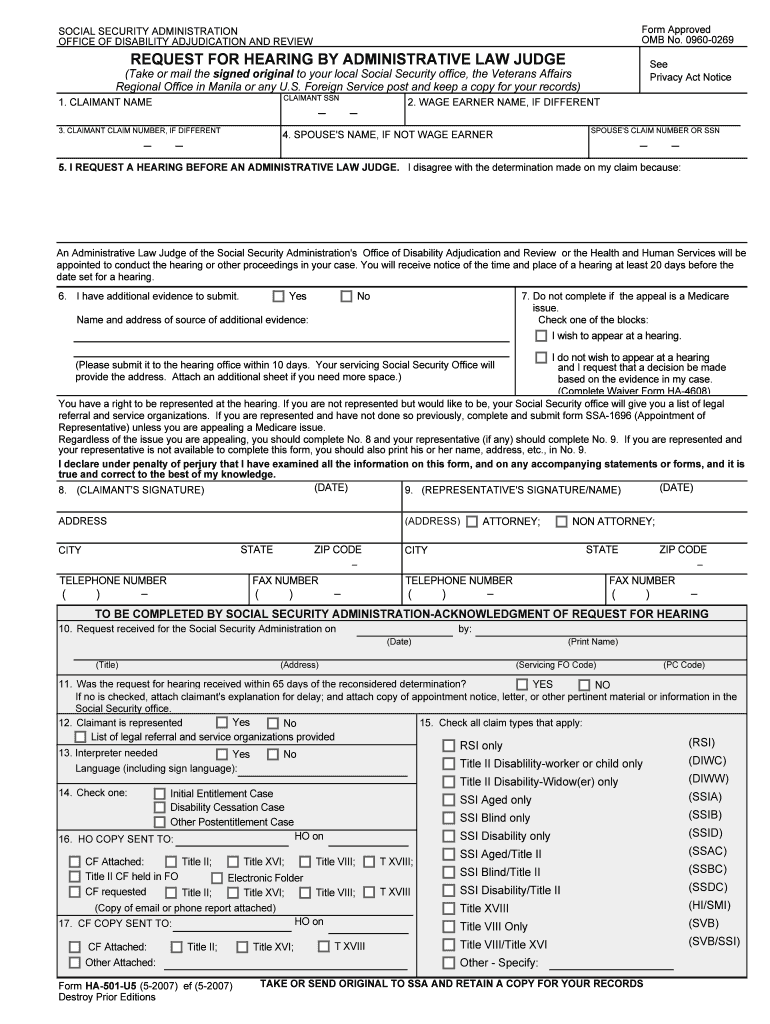
A Request for Hearing by Administrative Law is a formal written submission asking an administrative agency or administrative law judge to schedule and decide a contested matter. It typically follows an adverse agency action or notice—such as permit denial, license suspension, benefit termination, or regulatory citation—and starts the administrative adjudication process. The request must identify the party, case or notice number, the relief sought, and the factual or legal grounds for review so the agency can determine jurisdiction, assign a hearing officer, and set deadlines for exchange of evidence and prehearing filings.

Why a Timely, Detailed Request Matters

Filing a clear Request for Hearing preserves the right to adjudicate a dispute, establishes the administrative record, and triggers scheduling and discovery procedures. Proper form and completeness reduce administrative delays and help ensure the hearing addresses the issues you intend to contest.

Why a Timely, Detailed Request Matters

Who Typically Files This Request

The person with standing under the agency’s enabling statute or the party named in the adverse action should sign and file the request.

  • Individual appellants and license holders seeking reinstatement, benefits, or review of penalties.
  • Businesses and regulated entities appealing permits, enforcement actions, or fines.
  • Attorneys and designated representatives filing on behalf of clients in agency proceedings.

Core Components to Include in Your Request

A professional Request for Hearing includes discrete sections so the agency can process it quickly: party identification, case or notice number, concise statement of issues, requested relief, factual summary, and statement of available evidence or witnesses. Assembly and clarity reduce return-for-correction requests and speed scheduling.

Party Details

Full legal name, contact information, mailing address, and representative name if an attorney or agent files for you.
Case Reference

Agency file number, notice or order number, and date of the adverse action to ensure accurate linkage to agency records.

Relief Requested

A concise statement of the specific outcome you seek, such as reversal, stay, modification, or new hearing.

Grounds for Review

Legal and factual basis for contesting the action, including statutory or regulatory citations if applicable.

Evidence Summary

List of exhibits, witness names, and anticipated documentary support you intend to present at hearing.

Signature Block

Signature, printed name, title (if applicable), and date; include contact email and phone number for service.

Step-by-Step: How to Complete the Request

Follow these sequential steps to prepare and submit a compliant Request for Hearing; completing the form correctly minimizes processing delays.

  • 01
    1. Gather Documents: Collect the adverse notice, orders, and supporting exhibits.
  • 02
    2. Fill Form: Enter party, case number, issues, and relief requested.
  • 03
    3. Add Evidence: Attach exhibits, witness lists, and relevant declarations.
  • 04
    4. File and Serve: Submit to the agency and serve all parties per agency rules.

How to Customize and Submit the Form Online

Configure an electronic workflow that meets agency filing and service rules; set fields, attachments, and recipient routing before sending.

Field Configuration
Required Fields Mark name, case number, and signature fields as mandatory
Attachment Settings Allow PDF, DOCX exhibits and set max file size per agency limits
Signer Order Set signer sequence if representative and party must both sign
Notification Enable email notices to sender and all served parties

Where to File and What Happens After Filing

After submission the agency reviews the Request for Hearing for jurisdictional and procedural sufficiency, then schedules prehearing deadlines and issues a notice of hearing or request for additional information.

  • Agency Intake: Clerical review and docketing of the request
  • Jurisdiction Check: Agency confirms subject-matter jurisdiction
  • Scheduling: Hearing date and prehearing deadlines set
  • Service: Copies served on opposing parties per rules

How Electronic Filing and eSubmission Work

Ensure your chosen eSubmission platform preserves an auditable record and produces a complete copy for agency filing and your case file; maintain copies for retention obligations.

  • Accepted Formats: PDF and searchable text
  • Signer Authentication: Email or SMS code verification
  • Audit Trail: Timestamp and IP address

Common Deadlines and Timing Expectations

Filing deadlines and statutory response periods differ by agency and by the type of action. Missing an agency deadline can forfeit the right to a hearing or relief.

Filing Deadline:

Often 30 days from notice date; check agency rule

Acknowledgment:

Agency usually acknowledges receipt within 7–14 days

Prehearing Filings:

Deadlines set for exhibits and witness lists

Continuances:

Must be requested in writing before scheduled date

Final Decision:

Agency decision timelines vary widely by statute

Key Milestones from Filing to Final Decision

Track each milestone to avoid missed dates and preserve appellate rights; these stages are typical in administrative adjudications.

01

Request Filed

Agency receives and dockets the request

02

Prehearing Order

Scheduling order establishes deadlines

03

Hearing Held

Evidence and testimony presented

04

Decision Issued

Agency issues written decision

Common Mistakes to Avoid When Preparing the Request

  • Submitting without the case number or with incorrect party name, which can cause misrouting or rejection by the docket clerk.
  • Failing to attach the underlying notice or order, leaving the agency unable to link the request to the triggering action.
  • Using vague relief language such as 'all appropriate relief' without specifying the requested corrective action or stay.
  • Not serving opposing parties per agency rules, which can result in procedural defects or later motions to strike.

Risks and Consequences of an Incorrect or Late Request

Dismissal Risk: Loss of hearing rights
Default Decision: Agency may enter default judgment
Late Fees: Statutory fines or penalties
Evidence Exclusion: Untimely exhibits may be excluded
Appeal Limits: Appeal window may be shortened
Professional Liability: Attorney malpractice exposure for missed deadlines

Required Information and Data Elements

Party Name: Exact legal name
Case Number: Agency docket ID
Contact Details: Address, phone, email
Relief Sought: Specific remedy
Evidence List: Exhibits and witnesses
Signature: Signer name and date

Documents to Attach and How to Save Your Submission

Include the agency notice, supporting exhibits, witness affidavits, and any statutory citations in a single, organized packet. Save working copies in searchable PDF and retain original electronic evidence.

Agency Notice

Attach the original adverse order or notice as a primary exhibit to show the basis for the request and the triggering date.

Supporting Exhibits

Include relevant contracts, invoices, photos, or records. Label exhibits sequentially and reference them in the factual summary.

Witness Statements

Attach signed declarations or affidavits summarizing expected testimony and contact information for each witness.

File Formats

Save final submission as PDF/A when possible; keep editable originals in DOCX and a complete audit trail for e-submissions.

Real-World Scenarios Where a Request Is Used

These examples illustrate typical matters that proceed to administrative hearing and how requests are presented.

License Suspension Appeal

A licensed practitioner files a hearing request after a suspension notice is issued

  • The practitioner attaches disciplinary records and witness declarations
  • The agency schedules a hearing, and the record focuses on process and mitigation evidence to seek reinstatement or reduced sanction.

Permit Denial Challenge

A business contests a permit denial by submitting a Request for Hearing with technical reports

  • The business requests specific relief and attaches expert reports
  • The administrative law judge allows limited discovery and evaluates whether the agency properly applied statutory standards when denying the permit.

eSignature Pricing and Feature Snapshot for Filing Needs

Compare common vendor pricing and core capabilities when selecting an eSignature provider for preparing or submitting a Request for Hearing; signNow is listed first for placement clarity.

signNow DocuSign Adobe Sign PandaDoc HelloSign
Starting Price $8/user/mo $15/user/mo $14/user/mo $19/user/mo $15/user/mo
Free Trial Yes, 7-day trial Yes Yes Yes Yes
Bulk Send Yes (Business Premium) Yes Yes Yes No
Audit Trail Yes Yes Yes Yes Yes
HIPAA Compliant Yes (BAA) Yes (BAA) Yes (BAA) No No

Frequently Asked Questions About Filing a Request for Hearing

Answers to common procedural and technical questions when preparing a Request for Hearing; consult the specific agency rules for exceptions and local filing procedures.


Need help? Contact support

be ready to get more
Join over 28 million airSlate SignNow users