Establishing secure connection…Loading editor…Preparing document…

Final Decree of Adoption

This template is fully customizable. Edit the text, fill out the fields, and send it for signature. Give it a try!
Final Decree of Adoption

What the Final Decree of Adoption Is and Why It Matters

A Final Decree of Adoption is a court-issued order that legally establishes a permanent parent-child relationship and changes the child's legal status. The decree records the court's findings, terminates parental rights when required, and grants adoptive parents the same rights and duties as biological parents. Once entered and filed with the clerk, the decree serves as the child's legal proof of parentage for purposes such as birth certificate amendment, Social Security, and benefits. The document is typically prepared after a petition, home study, and any required hearings are completed.

Why a Clear, Complete Final Decree Matters

A properly drafted Final Decree of Adoption ensures the legal change of parentage is enforceable, minimizes delays in post-adoption administrative steps, and protects the adoptive family and child from future challenges. Clear findings and accurate identifiers prevent administrative rework and support record updates across agencies.

Why a Clear, Complete Final Decree Matters

Who Typically Prepares and Receives the Decree

The Final Decree of Adoption involves several participants from both legal and administrative roles.

  • Adoptive parents or their attorneys who prepare or review decree language before filing with the court.
  • Family court clerks and judges who review, sign, and enter the decree into the official record.
  • Adoption agencies or social workers who supply background reports, home study summaries, and placement documentation.

Each party has a specific role: petitioners supply facts, agencies provide supporting reports, and courts issue and file the decree.

Common Document Signatories

Petitioner — Adoptive Parent

The adoptive parent(s) sign and attest to facts in the petition and the accuracy of personal information; their signature finalizes parental status under the court order and on amended birth records.

Issuing Official — Judge

A judge signs the decree to effectuate the legal change; the judge's signature and the court clerk's file stamp create the official, enforceable record of adoption.

Essential Information Included in the Decree

Child Name: Full legal name
Child DOB: Date of birth
Birth Record: Original birth certificate details
Petitioners: Full legal names
Court Case: Court name and case number
Findings: Judicial findings and effective date

Step-by-Step: Completing the Final Decree of Adoption

Follow these steps in order to prepare, verify, and file a Final Decree of Adoption with the court and supporting agencies.

  • 01
    Gather Documents: Collect petition, home study, consents, and background checks.
  • 02
    Draft Decree: Prepare findings, ordering clauses, and the effective date.
  • 03
    Court Submission: File with clerk and schedule the final hearing or review.
  • 04
    Entry & Filing: Judge signs, clerk files, and copy is distributed to parties.

Where to File and How the Decree Moves Through the System

The filing and routing process typically involves the court clerk, adoption agency, and vital records office in sequence.

  • Clerk of Court: File the decree for official entry and docketing.
  • Judge: Judge reviews, signs, and orders the decree entered.
  • Adoption Agency: Agency retains a copy in case file and provides placement confirmation.
  • Vital Records: Use filed decree to request amended birth certificate and records updates.

Configuring an Online Decree Workflow

Set up e-filing and signing fields to mirror the paper decree and preserve an audit trail for court review.

Field Configuration
Signature Block Judge and petitioner signature fields; include date field
Attachment Home study and consents uploaded as PDF exhibits
Authentication Use multi-factor or clerk-approved method
Audit Trail Capture timestamps, IPs, and signer emails

Digital Signing and eSubmission Considerations

Confirm court and clerk acceptance of electronic submissions and the required signer authentication level before using e-signature workflows.

  • Accepted Formats: PDF, DOCX
  • Authentication: Email, SMS, or stronger KBA
  • Integrations: Court e-filing systems

Where courts permit e-filing, ensure the platform preserves a tamper-evident file, audit trail, and produces a signed PDF compatible with court record requirements.

Sample eSignature Pricing and Feature Comparison for Adoption Workflows

Compare common plan starters, basic capabilities, and compliance features relevant to handling sensitive court and health-related records.

signNow DocuSign Adobe Sign PandaDoc HelloSign
Starting Price $8/user/mo $15/user/mo $14/user/mo $19/user/mo $15/user/mo
Free Trial 7-day free trial No No Yes, limited Yes, limited
Bulk Send Yes Yes Yes Yes No
Audit Trail Yes Yes Yes Yes Yes
HIPAA Compliant Yes Yes Yes No No
Envelope Cap No envelope cap 100 envelopes/user/year Varies Varies Varies

Core Sections to Include in a Professional Final Decree

A well-structured decree contains discrete sections that courts and agencies expect to see for clarity and enforcement.

Caption

Court caption and docket number identify the matter and link the decree to the petition and case file for official records and subsequent inquiries.
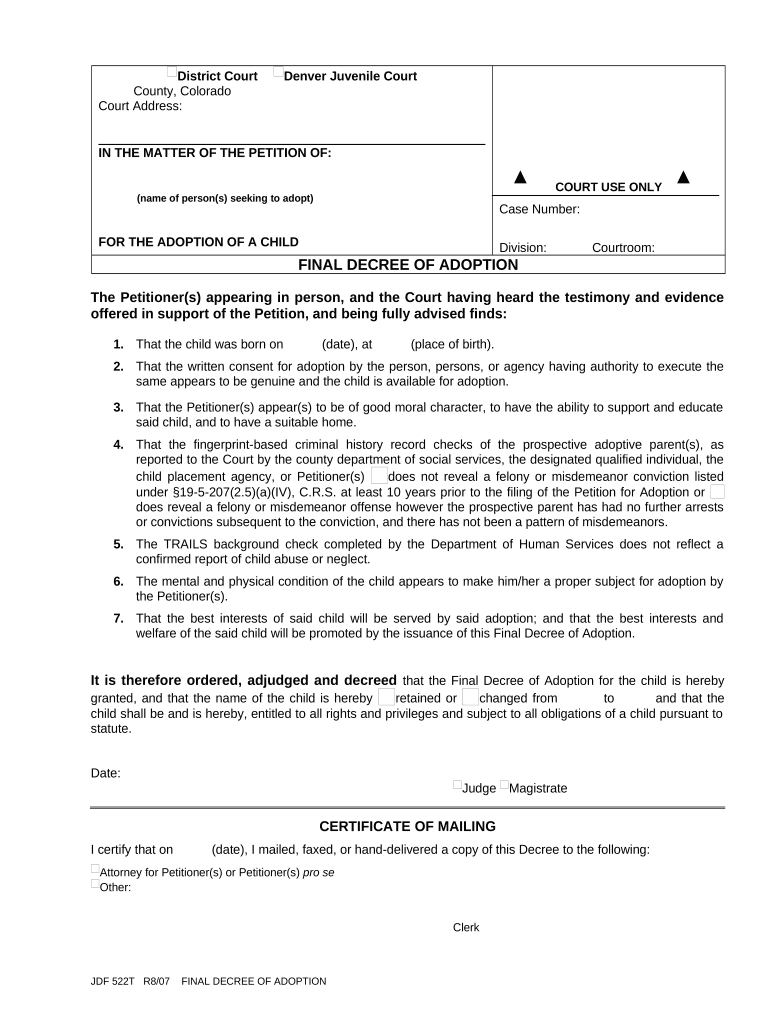
Findings of Fact

Explicit factual findings support the court's conclusion that adoption is in the child's best interest and document consent, termination, or relinquishment facts relied upon.

Conclusions of Law

Legal bases and statutory citations state the authority under which the court grants the adoption and adopts any statutory requirements or waivers.

Order Language

Clear ordering clauses effectuate the change in parentage, direct vital records updates, and specify any post-placement supervision or reporting obligations.

Signatures and Dates

Judge's signature, date of entry, and clerk stamp create the official record; include petitioner signature lines where required for administrative acceptance.

Exhibits

Attach home study, consents, background checks, and placement verification as exhibits referenced in the decree for completeness.

Practical Tips for Accurate and Efficient Completion

Follow these practical checks to reduce processing time and avoid common court rejections.

Verify Names and Dates
Cross-check spellings and DOBs against identification and birth records; mismatches cause delays in vital records updates.
Use Court Language
Adopt standard ordering phrases used by the issuing court to avoid ambiguity about the scope and effect of the decree.
Preserve Audit Trails
If using electronic signatures, retain tamper-evident PDFs and audit logs showing signer identity, timestamp, and actions.
Confirm Local Rules
Review local family court rules for signature, sealing, and filing requirements before submitting electronic or paper versions.

Common Preparation Problems to Avoid

  • Incomplete exhibits: failing to attach required home study or consent documents frequently causes the clerk to reject or delay entry of the decree.
  • Name mismatches: inconsistent spellings or use of nicknames on petition and birth records complicate issuance of amended vital records and Social Security updates.
  • Incorrect docketing: using the wrong court name or case number can misfile the decree and require reissuance or supplemental filings.
  • Improper signatures: submitting documents without the judge's signature, required petitioner attestations, or required notarizations leads to non-acceptance.

Risks and Consequences of an Incorrect or Incomplete Decree

Administrative Delay: Additional filings required
Record Rejection: Vital records may not update
Legal Challenge: Exposure to contested motions
Benefit Denial: Insurance or Social Security issues
Confidentiality Breach: Sensitive records improperly disclosed
Additional Cost: Re-filing and attorney fees

Real-World Examples of Final Decree Use

How different parties use a finalized decree in practice.

Family Law Practice Example

An attorney files a finalized decree to obtain an amended birth certificate

  • The court issues the decree with clear ordering language
  • The family used the certified decree to secure Social Security benefits and school records updates within weeks.

Agency Case Example

An adoption agency submits exhibits with the decree

  • The court reviews placement and home study
  • The agency retains a sealed copy in the permanent file and provides certified copies to the adoptive parents.

Typical Timeline Elements and When to Expect Them

Timeframes vary by jurisdiction, but the process commonly follows these dated milestones from petition to decree entry.

Petition Filing:

File petition to open case and schedule initial review.

Home Study Completion:

Home study often completed prior to hearing; timeline varies by provider.

Background Checks:

State and federal checks may take several weeks to return.

Final Hearing:

Judge conducts review and may enter the decree that day.

Record Amendment:

Use filed decree to request amended birth certificate after entry.

Frequently Asked Questions About Final Decrees of Adoption

Answers to common questions about validity, signatures, e-submission, and post-decree steps for adoptive families and practitioners.


Need help? Contact support

be ready to get more
Join over 28 million airSlate SignNow users