Establishing secure connection…Loading editor…Preparing document…

Agreement to Dissolve and Wind Up Partnership

This template is fully customizable. Edit the text, fill out the fields, and send it for signature. Give it a try!
Agreement to Dissolve and Wind Up Partnership

What the Agreement to Dissolve and Wind Up Partnership Is

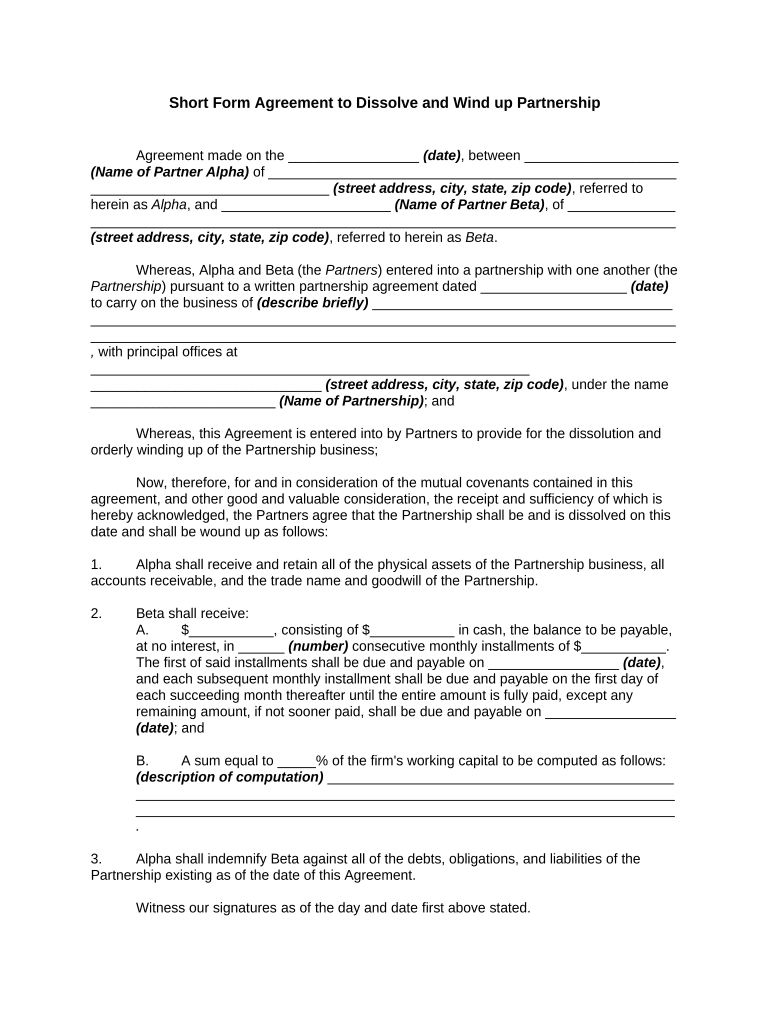
An Agreement to Dissolve and Wind Up Partnership is a written contract used when partners decide to end a partnership and settle its affairs. It records the effective date of dissolution, describes how partnership assets will be liquidated or distributed, allocates responsibility for outstanding debts and liabilities, and sets out procedures for final accounting, creditor notices, tax filings, and closing steps. The document helps limit future disputes by documenting releases, retained obligations, and any continuing roles for partners during the wind-up process.

Why a Formal Dissolution Agreement Matters

A clear agreement reduces legal and tax risk by assigning responsibility for debts, preserving creditor notice records, and documenting distributions and releases. It creates a definitive transition record for third parties and regulators.

Why a Formal Dissolution Agreement Matters

Who Typically Prepares or Signs This Agreement

Teams that commonly prepare and sign a dissolution agreement include partners, corporate counsel, and an appointed wind-up agent who executes the steps.

  • General partners and managing partners who administer the wind-up and sign distributions.
  • Limited partners or investors who need written releases and distribution schedules.
  • Outside counsel or accountants who prepare final tax returns and audits.

Core Elements to Include in a Professional Agreement

A complete agreement addresses identity, effective date, purpose, authority to wind up, accounting and distribution mechanics, creditor handling, tax filings, releases, and dispute resolution to minimize downstream risk.

Parties & Recitals

Identify each partner and the partnership entity, describe the reason for dissolution, and cite the partnership agreement provisions authorizing dissolution.
Effective Date

Specify the exact MM/DD/YYYY effective date for dissolution and whether this is retroactive for tax or contractual purposes.

Asset Distribution

Detail how cash, property, accounts receivable, and residual assets are allocated, sold, or retained, including valuation methods.

Liabilities Allocation

State which partners assume specific debts and how creditor claims will be resolved or escrowed during wind up.

Final Accounting

Require preparation of a closing balance sheet, final profit/loss allocation, and an agreed accounting period for tax purposes.

Releases & Indemnities

Include mutual releases, surviving obligations, indemnities for pre-dissolution acts, and dispute resolution procedures such as arbitration or jurisdiction.

Essential Information to Collect in the Agreement

Entity Names: Full partnership and partner legal names
Effective Date: MM/DD/YYYY
Addresses: Street, city, state, ZIP
Tax IDs: EIN and partner TINs
Distribution Terms: Detailed allocation method
Signatures: Typed or electronic signature entries

Step-by-Step: Fill Out, Approve, and Execute the Agreement

Follow these sequential steps to reduce errors and ensure proper notifications, filings, and final accounting during wind up.

  • 01
    Draft Agreement: Populate parties, dates, and distribution terms.
  • 02
    Partner Review: Circulate to partners and advisors for approval.
  • 03
    Sign and Notarize: Execute with required signatures and notarizations.
  • 04
    File and Notify: Submit required state filings and notify creditors.

Configure an Online Workflow for Execution

Set up fields and recipient order to automate signing, notarization steps, and final delivery to stakeholders.

Signature Authentication Email link with optional SMS code or KBA
Field Assignments Assign signature, date, and checkbox fields per signer
Signing Order Specify sequential or parallel recipient order
Notary Integration Include RON or in-person notary step if required
Final Distribution Auto-send signed copies to partners, counsel, and registered agent

Digital Signing Options and System Requirements

Choose a platform that supports PDF and Word uploads, audit trails, and the authentication level you need for partner signatures.

  • File Formats: PDF, DOCX, and editable templates
  • Integrations: Salesforce, NetSuite, Google Workspace, Box
  • Security: TLS in transit; AES-256 at rest

Typical Routing: Who Receives the Agreement and When

A clear routing plan avoids delays. Include partner signers, counsel review, any notary, and final archival recipients in the order of actions.

  • Drafting Party: Prepares initial agreement and supporting exhibits.
  • Partner Signers: Review and sign in agreed order.
  • Notary or Witness: Execute notarization or witness step if required.
  • Filing Recipients: Send signed copy to registered agent and state filing office.

Key Filing and Reporting Deadlines to Consider

Dissolution triggers administrative and tax deadlines; missing these can create penalties or extend liability. Confirm dates for tax returns and state filings.

Final Partnership Return:

File Form 1065 and schedule K-1s by the partnership return deadline, typically March 15 for calendar-year partnerships.

State Dissolution Filings:

File required dissolution or termination forms per the partnership's state of organization; deadlines vary by state.

Creditor Notices:

Provide notice windows in accordance with state law to preserve discharge defenses.

Employer Filings:

Submit final payroll reports and W-2s by Jan 31 and final deposits per IRS rules.

Tax Clearance:

Obtain any state tax clearance if required before final distribution.

Common Pitfalls to Avoid When Preparing the Agreement

  • Failing to identify all creditors and unresolved liabilities, which can leave partners exposed to claims after distribution.
  • Using vague distribution language instead of specific dollar amounts or percentage allocations, increasing the likelihood of disputes.
  • Neglecting required state filings or notifications, which may preserve successor liability against partners.
  • Skipping a final, signed accounting or failing to attach exhibits showing asset valuations and final balances.

Primary Risks and Consequences of Incomplete Dissolution

Tax Penalties: Late or incorrect returns incur IRS penalties
Creditor Claims: Unresolved debts can result in partner liability
State Sanctions: Failure to file may result in fines
Successor Liability: Improper wind up can preserve liability
Contract Breaches: Unterminated contracts may continue obligations
Recordkeeping Risk: Poor retention undermines defenses in disputes

Practical Tips for Accurate and Efficient Completion

Follow these practices to reduce friction, preserve defenses, and complete wind up reliably.

Plan the timeline early
Map deadlines for tax returns, creditor notices, and state filings before circulating the agreement. Assign responsible parties and include contingency dates to handle disputes or late claims.
Attach supporting schedules
Include valuation schedules, final balance sheets, and a list of known creditors as exhibits. Attach signed acknowledgments for any third-party consents to reduce later evidentiary disputes.
Use clear distribution language
Specify exact cash amounts, percentages, or sale procedures with valuation methods. Avoid phrases like 'reasonable value' which invite disagreement and litigation.
Document notifications
Keep records of all creditor and tenant notices, proof of service, and any published notices required by state law to preserve statutory discharge defenses.

E-signature Platform Pricing and Feature Snapshot for This Agreement

Compare common e-signature plans and key features that matter for executing dissolution agreements, including starting price and HIPAA support where relevant.

signNow DocuSign Adobe Sign PandaDoc HelloSign
Starting Price $8/user/mo $15/user/mo $14/user/mo $19/user/mo $15/user/mo
Free Trial 7-day free trial Varies by plan Varies by plan Varies by plan Varies by plan
Bulk Send Yes (Premium) Yes Yes Yes No
HIPAA Compliant Yes (BAA available) Yes Yes No No
Envelope Cap No cap 100 envelopes/user/year Varies by plan Varies by plan Varies by plan

Frequently Asked Questions About Dissolution Agreements and Electronic Execution

Answers to common questions about validity, signatures, notarization, filing, and revocation for partnership dissolution agreements.


Need help? Contact support

be ready to get more
Join over 28 million airSlate SignNow users