Establishing secure connection… Loading editor… Preparing document…
Navigation

Fill and Sign the Grantor Form
Fill and Sign the Grantor Form

How it works

Open the document and fill out all its fields.
Apply your legally-binding eSignature.
Save and invite other recipients to sign it.

Rate template

4.6
48 votes
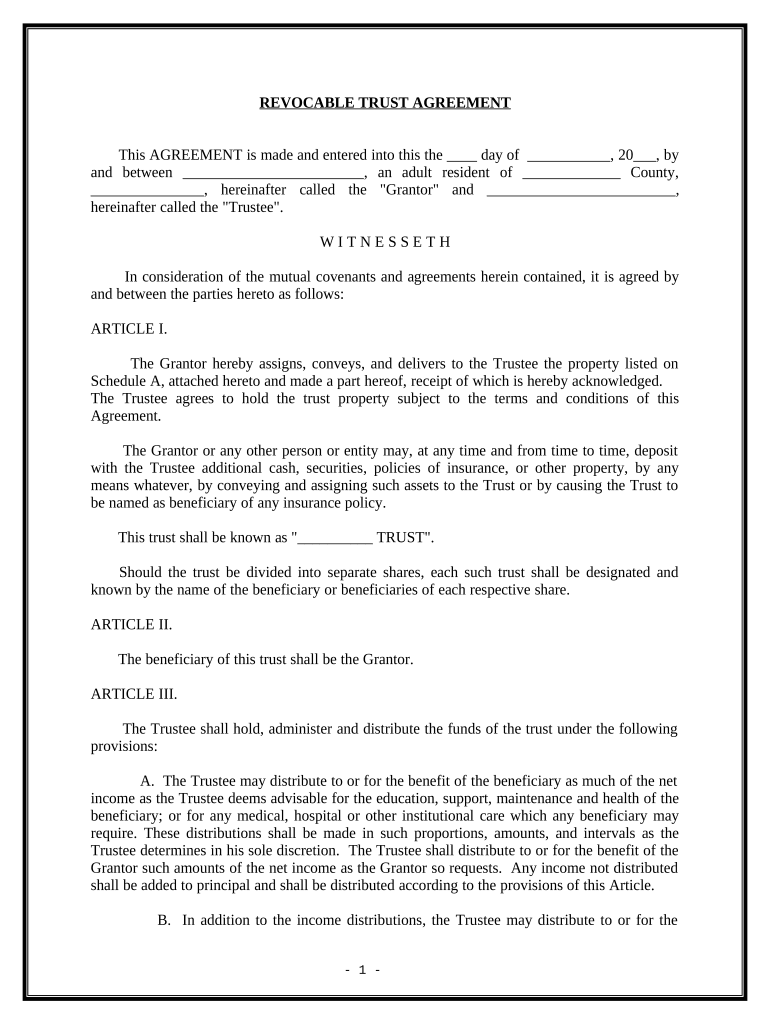
REVOCABLE TRUST AGREEMENT This AGREEMENT is made and entered into this the ____ day of ___________, 20___, by and between ________________________, an adult resident of _____________ County, _______________, hereinafter called the "Grantor" and _________________________, hereinafter called the "Trustee". W I T N E S S E T H In consideration of the mutual covenants and agreements herein contained, it is agreed by and between the parties hereto as follows: ARTICLE I. The Grantor hereby assigns, conveys, and delivers to the Trustee the property listed on Schedule A, attached hereto and made a part hereof, receipt of which is hereby acknowledged. The Trustee agrees to hold the trust property subject to the terms and conditions of this Agreement. The Grantor or any other person or entity may, at any time and from time to time, deposit with the Trustee additional cash, securities, policies of insurance, or other property, by any means whatever, by conveying and assigning such assets to the Trust or by causing the Trust to be named as beneficiary of any insurance policy. This trust shall be known as "__________ TRUST". Should the trust be divided into separate shares, each such trust shall be designated and known by the name of the beneficiary or beneficiaries of each respective share. ARTICLE II. The beneficiary of this trust shall be the Grantor. ARTICLE III. The Trustee shall hold, administer and distribute the funds of the trust under the following provisions: A. The Trustee may distribute to or for the benefit of the beneficiary as much of the net income as the Trustee deems advisable for the education, support, maintenance and health of the beneficiary; or for any medical, hospital or other institutional care which any beneficiary may require. These distributions shall be made in such proportions, amounts, and intervals as the Trustee determines in his sole discretion. The Trustee shall distribute to or for the benefit of the Grantor such amounts of the net income as the Grantor so requests. Any income not distributed shall be added to principal and shall be distributed according to the provisions of this Article. B. In addition to the income distributions, the Trustee may distribute to or for the - 1 - benefit of the beneficiaries as much principal as the Trustee deems advisable for the education, support, maintenance and health of the beneficiary; or for any medical, hospital or other institutional care which any beneficiary may require. The Trustee shall distribute to or for the benefit of the Grantor such amounts of the principal as the Grantor requests. C. This trust shall continue for the lifetime of the Grantor. Upon the death of the Grantor, the trust shall continue for the benefit of the children and other descendants of the Grantor if any or shall be terminated as provided herein. D. Following the death of the Grantor, when the administration of his estate has been completed and all estate taxes have been paid, the Trustee shall distribute to the estate of the Grantor all assets of the trust and this trust shall terminate. If the Grantor dies testate said trust assets shall be distributed in accordance with the terms of the Last Will and Testament of Grantor. E. Notwithstanding any other provisions herein to the contrary, if in the sole and complete judgment of the Trustee, a beneficiary (at any time such beneficiary would otherwise be entitled to receive a distribution of principal from the trust estate) shall not have manifested the ability which would qualify such beneficiary prudently to use and conserve the principal of the trust estate provided to be distributed to such beneficiary, the Trustee is fully authorized and directed to withhold and defer the delivery and conveyance of any part or all of such principal distribution until the Trustee shall deem such beneficiary to be qualified to prudently use and conserve such assets. Any principal so retained shall continue to be administered as an integral part of the beneficiary's trust estate and may thereafter, in the discretion of the Trustee, be paid over and delivered to such beneficiary in whole or in part and from time to time as and when the Trustee has determined such beneficiaries are qualified to prudently use and conserve the assets so distributed. F. None of the principal or income of this trust shall be liable for the debts or obligations of any beneficiary or be subject to seizure by creditors of any beneficiary. No beneficiary shall have any power to sell, assign, transfer, encumber or in any manner to anticipate or dispose of any part of his or her interest in the trust funds or the income produced from the funds. G. If all of the persons and classes designated as beneficiaries of this trust die prior to the distribution of all trust assets, upon death of the survivor of them, the assets shall be distributed to the heirs at law of the Grantor. ARTICLE IV. A. Unless otherwise provided herein, the terms "trust" and "trusts" may be used interchangeably and shall mean all trusts created by this instrument. Any trust created hereby is a private trust. B. The Trustee shall not be required to make physical division of the properties of any trust created herein, except where necessary, but may keep the trusts in one (or more) consolidated fund. The Trustee shall maintain books of account containing accurate records of separate principal, income and expense of each trust. - 2 - C. In making distributions to beneficiaries from a trust created hereby, and especially where a beneficiary is a minor or incapable of transacting business due to incapacity or illness, the Trustee may make distributions either (a) directly to the beneficiary, (b) to the legal or natural guardian of the beneficiary, (c) to a relative or guardian of the person of the beneficiary who has custody and care of the beneficiary, upon agreement of such person to expend such income or principal solely for the benefit of the beneficiary, or (d) by applying the payments for the benefit of the beneficiary by paying expenses directly. In any event, the Trustee shall require such reports and take such steps, as the Trustee deems necessary to assure and enforce the application of such payments for the exclusive benefit of the beneficiary. The Trustee shall have the power and authority to determine if a beneficiary is incapacitated and such determination shall be final and conclusive. D. If at any time in following the directions of this trust the Trustee is required to distribute outright to a beneficiary who is a minor or who is under any other legal disability, all or any part of the principal of a trust created herein, the Trustee is directed to continue to hold and manage the share of the beneficiary in trust for the beneficiary's benefit until the beneficiary attains age twenty-one (21) or until such other legal disability is removed. Until distribution is made, the Trustee is directed to expend such part of the income and/or principal of the share belonging to that beneficiary as the Trustee deems necessary to provide for the proper education, support, maintenance, health and medical care of the beneficiary. E. At the end of each taxable year of the trust, the Trustee shall determine the taxable income of the trust. At any time prior to the expiration of sixty-five (65) days following the end of each taxable year of the trust, the Trustee may distribute to the income beneficiaries all or any portion of the taxable income so determined, if such action is desirable in light of the overall tax situation of the trust and the beneficiaries and the standards for distributions set forth herein. F. The interest of every beneficiary of any trust created herein shall vest within the period prescribed by the Rule against Perpetuities. Upon vesting, any trust property held by the Trustee shall be distributed to the current income beneficiary or beneficiaries of the trust property (or to his or her legal guardian or other personal representative) as though such income beneficiary had reached the age at which final distribution was required. ARTICLE V. A. The Trustee shall not be required to enter into any bond as Trustee, to obtain the approval of any Court for the exercise of the powers and discretion granted herein, or to file with any Court any periodic or formal accounting of the administration of any trust. If at any time the Grantor is not serving as Trustee, the Trustee so serving shall render annual accounts to the Grantor or to the other beneficiaries (or to the guardian of any beneficiary who is a minor) of the trust. No persons paying money or delivering property to the Trustee shall be required to see to its application. The receipt of the Trustee shall be a complete acquittance and discharge therefore. B. The Trustee or any successor Trustee may resign at any time by giving the beneficiaries of the trust written notice specifying the desired effective date of such resignation, - 3 - which date shall be at least thirty (30) days after the date of the notice. The notice may be sent by personal delivery or by registered mail. C. If such Trustee resigns or becomes unable to serve, regardless of the cause, ________ shall serve as Trustee. The Trustee may appoint the Successor Trustee or a bank or other financial institution to serve as Co-Trustee or custodian for the Trust. If such an appointment is made, the Trustee and the institution shall enter into a specific agreement outlining the duties of the institution. The Trustee also shall remove or replace the institution upon thirty (30) days written notice. D. The resignation of any Trustee shall become effective upon the qualification of the successor Trustee and submission of a full accounting by the resigning Trustee; however, the successor Trustee and the adult beneficiaries (or the guardian of any minor beneficiary) may agree to waive such an accounting. The Successor Trustee shall execute an appropriate instrument evidencing the appointment as Successor Trustee. E. Any successor Trustee shall be vested with all the rights, powers, duties and discretion herein conferred upon the original Trustee. F. Any bank or financial institution serving as Trustee shall receive reasonable compensation based on the services it is required to perform. Any individual serving as Trustee shall receive reasonable compensation based on the then current hourly rates being charged in __________________________, for services comparable to those rendered by the individual Trustee. Compensation and expenses shall be paid regularly and shall be shown on the Trustee's annual account. G. Unless otherwise provided, in referring to the Trustee, any masculine terminology also includes the feminine and neuter or vice versa and any reference in the singular shall also include the plural or vice versa. ARTICLE VI. The Trustee named herein shall have the continuing, absolute discretion and power to deal with any property, real or personal, held in trust. Such power may be exercised independently without prior or subsequent approval of any judicial authority. No person dealing with the Trustee shall be required to inquire into the propriety of actions the Trustee may take. Without limiting the generality of the foregoing, the Trustee and any successor hereunder shall have the following specific powers and authority in addition to and not in substitution of powers conferred by law. A. The Trustee shall have all of the specific powers, duties and liabilities set forth in __________________, as now enacted or hereafter amended, except as herein modified. B. The Trustee may invest and reinvest in any property (real or personal) as the Trustee may deem advisable, including stock (whether listed or unlisted) and unsecured obligations, undivided interests, interests in investment trusts, legal and discretionary common trust funds, leases, and property which is outside of the trust's domicile, all without diversification as to kind - 4 - or amount without being restricted in any way by any statute or court decision (now or hereafter existing) regulating or limiting investments by fiduciaries. C. The Trustee shall treat all dividends payable in stock of the issuing corporation and all dividends in liquidation of all "rights" to subscribe to securities of the issuing corporation as principal, unless inconsistent with other provisions of this instrument. Any premiums and discounts on securities purchased at more or less than par shall be charged or credited as principal. All other dividends and rights received (except those declared and payable as of a "record date" preceding the survivor of the Grantors' death, which shall be considered and treated as principal) shall be treated as income. D. The Trustee may borrow money upon such terms and conditions as the Trustee may determine; may execute notes, security instruments or other documents necessary to secure such loans; and may mortgage and pledge trust assets as security for the repayment thereof. Any loan which the Trustee has not repaid at the time of the termination of the trust shall be treated as a liability thereof. The assets of the trust may be distributed to the beneficiaries subject to such liability. The Trustee may loan money to any beneficiary of the trust upon such terms as the Trustee may determine advisable. Any loan which has not been repaid at the time of the termination of the trust shall be treated as an asset thereof and shall be distributed to the beneficiaries as such. E. The Trustee may lease any real estate for such term or terms and upon such conditions and rentals in such manner as the Trustee may deem advisable (with or without privilege of purchase), including but not limited to oil, gas and mineral leases. Any lease so made shall be valid and binding for the full term thereof even though it shall extend beyond the term of any trust created hereunder. With regard to mineral rights, the Trustee shall have the authority to execute contracts, letter agreements, farm-out agreements, operating agreements, division orders, transfer orders, and any and all other related documents as needed in relation thereto. F. The Trustee shall have the authority to make any distribution in cash or in specific property, real or personal, or any such property, and may do so without regard to the income tax basis of specific property allocated to any beneficiary. The Trustee is also authorized to make in kind and non-pro rata distributions under this trust if practicable. Any asset distributed in kind shall be valued at its date of distribution value. G. The Trustee may receive property by gift or by will or otherwise from any person or persons as additions to the trust created herein and may hold and administer such property under the provisions hereof. H. The Trustee may terminate any trust if the Trustee determines the assets of the trust are of such small value that the continued existence and operation of the trust is not in the best interest of the beneficiaries and the remainder beneficiaries are the same and have the same interest in the trust, or if the beneficiaries or interests are different, only if the beneficiaries agree to a manner of termination and distribution of trust assets. No beneficiary shall have any right to require the Trustee to exercise this power. ARTICLE VII. - 5 - A. To facilitate payment of administrative expenses, debts, estate, inheritance or other death taxes by the Executor of the Estate of either Grantor, the Trustee may use all or any part of the property of this trust to the extent the Trustee determines advisable to: 1. purchase from the Executor or Administrator of _____________ Estate of the Grantor any property, real, personal or mixed, tangible or intangible and wherever situated that may comprise a part of such Estate; or 2. make loans to the Executor or Administrator of the Estate of the Grantor. ARTICLE VIII. A. The trust created herein is created under, is governed by, and is to be construed and administered within and according to the laws of the State of _____________. B. The trust created herein is declared to be revocable. The Grantor shall have the power to alter, amend, revoke or terminate this trust or any provision thereof. IN WITNESS WHEREOF, the Grantor and Trustee have caused this Agreement to be signed and delivered, all as of the date first above stated. _____________________________ Grantor ______________________________ Trustee STATE OF _________________ COUNTY OF _______________ PERSONALLY appeared before me, the undersigned authority in and for the aforesaid County and state, the within named _______________, who acknowledged as Grantor that he signed and delivered the above and foregoing Revocable Trust Agreement on the date and for the purposes therein set forth as his voluntary act and deed. GIVEN my hand and official seal, this the day of ___________, 20___. _________________________________ NOTARY PUBLIC My Commission Expires: ____________________ - 6 - STATE OF _____________ COUNTY OF ___________ PERSONALLY appeared before me, the undersigned authority in and for the aforesaid county and state, the within named _______________ who acknowledged as Trustee that he signed and delivered the above and foregoing Revocable Trust Agreement on the date and for the purposes therein set forth as his voluntary act and deed. GIVEN my hand and official seal, this the day of ___________, 20___. ___________________________________ NOTARY PUBLIC My Commission Expires: _________________________ - 7 -

Valuable advice on preparing your ‘Grantor Form’ online

Are you fed up with the inconvenience of managing paperwork? Look no further than airSlate SignNow, the leading electronic signature solution for individuals and businesses. Bid farewell to the tedious process of printing and scanning documents. With airSlate SignNow, you can easily complete and sign paperwork online. Utilize the extensive features offered by this user-friendly and cost-effective platform and transform your document management strategy. Whether you need to approve forms or gather signatures, airSlate SignNow manages it all effortlessly, with just a few clicks.

Follow this comprehensive guide:

  1. Access your account or initiate a free trial with our service.
  2. Click +Create to upload a document from your device, cloud, or our template library.
  3. Open your ‘Grantor Form’ within the editor.
  4. Click Me (Fill Out Now) to finalize the form on your part.
  5. Incorporate and designate fillable fields for others (if needed).
  6. Proceed with the Send Invite options to solicit eSignatures from others.
  7. Download, print your version, or convert it into a reusable template.

Don’t be concerned if you need to work with others on your Grantor Form or send it for notarization—our solution provides you with everything required to accomplish such tasks. Create an account with airSlate SignNow today and elevate your document management to new levels!

Here is a list of the most common customer questions. If you can’t find an answer to your question, please don’t hesitate to reach out to us.

Need help? Contact Support

The best way to complete and sign your grantor form

Save time on document management with airSlate SignNow and get your grantor form eSigned quickly from anywhere with our fully compliant eSignature tool.

How to Sign a PDF Online How to Sign a PDF Online

How to fill out and sign forms online

Previously, coping with paperwork took pretty much time and effort. But with airSlate SignNow, document management is easy and fast. Our robust and user-friendly eSignature solution lets you effortlessly complete and electronically sign your grantor form online from any internet-connected device.

Follow the step-by-step guidelines to eSign your grantor form template online:

  • 1.Register for a free trial with airSlate SignNow or log in to your account with password credentials or SSO authentication.
  • 2.Click Upload or Create and add a file for eSigning from your device, the cloud, or our form library.
  • 3.Click on the document name to open it in the editor and use the left-side toolbar to fill out all the empty areas properly.
  • 4.Put the My Signature field where you need to eSign your sample. Type your name, draw, or import a picture of your handwritten signature.
  • 5.Click Save and Close to finish editing your completed form.

As soon as your grantor form template is ready, download it to your device, save it to the cloud, or invite other individuals to electronically sign it. With airSlate SignNow, the eSigning process only takes a few clicks. Use our robust eSignature solution wherever you are to deal with your paperwork successfully!


How to Sign a PDF Using Google Chrome How to Sign a PDF Using Google Chrome

How to complete and sign paperwork in Google Chrome

Completing and signing paperwork is easy with the airSlate SignNow extension for Google Chrome. Adding it to your browser is a quick and beneficial way to deal with your forms online. Sign your grantor form sample with a legally-binding eSignature in just a couple of clicks without switching between programs and tabs.

Follow the step-by-step guide to eSign your grantor form in Google Chrome:

  • 1.Go to the Chrome Web Store, search for the airSlate SignNow extension for Chrome, and add it to your browser.
  • 2.Right-click on the link to a document you need to eSign and select Open in airSlate SignNow.
  • 3.Log in to your account with your password or Google/Facebook sign-in buttons. If you don’t have one, sign up for a free trial.
  • 4.Utilize the Edit & Sign toolbar on the left to fill out your template, then drag and drop the My Signature option.
  • 5.Insert a picture of your handwritten signature, draw it, or simply enter your full name to eSign.
  • 6.Make sure all information is correct and click Save and Close to finish editing your paperwork.

Now, you can save your grantor form sample to your device or cloud storage, send the copy to other people, or invite them to electronically sign your document with an email request or a protected Signing Link. The airSlate SignNow extension for Google Chrome improves your document workflows with minimum time and effort. Start using airSlate SignNow today!


How to Sign a PDF in Gmail How to Sign a PDF in Gmail How to Sign a PDF in Gmail

How to fill out and sign forms in Gmail

When you receive an email containing the grantor form for signing, there’s no need to print and scan a document or save and re-upload it to a different tool. There’s a better solution if you use Gmail. Try the airSlate SignNow add-on to promptly eSign any documents right from your inbox.

Follow the step-by-step guide to eSign your grantor form in Gmail:

  • 1.Navigate to the Google Workplace Marketplace and look for a airSlate SignNow add-on for Gmail.
  • 2.Install the program with a related button and grant the tool access to your Google account.
  • 3.Open an email with an attachment that needs signing and utilize the S key on the right panel to launch the add-on.
  • 4.Log in to your airSlate SignNow account. Select Send to Sign to forward the file to other parties for approval or click Upload to open it in the editor.
  • 5.Place the My Signature option where you need to eSign: type, draw, or import your signature.

This eSigning process saves time and only requires a few clicks. Use the airSlate SignNow add-on for Gmail to adjust your grantor form with fillable fields, sign documents legally, and invite other parties to eSign them al without leaving your inbox. Boost your signature workflows now!


How to Sign a PDF on a Mobile Device How to Sign a PDF on a Mobile Device How to Sign a PDF on a Mobile Device

How to fill out and sign forms in a mobile browser

Need to rapidly complete and sign your grantor form on a smartphone while working on the go? airSlate SignNow can help without the need to install extra software programs. Open our airSlate SignNow tool from any browser on your mobile device and create legally-binding electronic signatures on the go, 24/7.

Follow the step-by-step guidelines to eSign your grantor form in a browser:

  • 1.Open any browser on your device and follow the link www.signnow.com
  • 2.Sign up for an account with a free trial or log in with your password credentials or SSO authentication.
  • 3.Click Upload or Create and add a file that needs to be completed from a cloud, your device, or our form collection with ready-to go templates.
  • 4.Open the form and fill out the blank fields with tools from Edit & Sign menu on the left.
  • 5.Put the My Signature area to the sample, then enter your name, draw, or add your signature.

In a few simple clicks, your grantor form is completed from wherever you are. When you're finished editing, you can save the file on your device, generate a reusable template for it, email it to other individuals, or invite them electronically sign it. Make your documents on the go quick and effective with airSlate SignNow!


How to Sign a PDF on iPhone How to Sign a PDF on iPhone

How to complete and sign paperwork on iOS

In today’s business world, tasks must be done rapidly even when you’re away from your computer. With the airSlate SignNow app, you can organize your paperwork and approve your grantor form with a legally-binding eSignature right on your iPhone or iPad. Set it up on your device to close deals and manage documents from just about anywhere 24/7.

Follow the step-by-step guidelines to eSign your grantor form on iOS devices:

  • 1.Go to the App Store, find the airSlate SignNow app by airSlate, and set it up on your device.
  • 2.Open the application, tap Create to import a form, and select Myself.
  • 3.Opt for Signature at the bottom toolbar and simply draw your autograph with a finger or stylus to eSign the sample.
  • 4.Tap Done -> Save after signing the sample.
  • 5.Tap Save or use the Make Template option to re-use this document in the future.

This process is so easy your grantor form is completed and signed within a few taps. The airSlate SignNow application works in the cloud so all the forms on your mobile device remain in your account and are available whenever you need them. Use airSlate SignNow for iOS to enhance your document management and eSignature workflows!


How to Sign a PDF on Android How to Sign a PDF on Android

How to complete and sign paperwork on Android

With airSlate SignNow, it’s simple to sign your grantor form on the go. Set up its mobile app for Android OS on your device and start improving eSignature workflows right on your smartphone or tablet.

Follow the step-by-step guide to eSign your grantor form on Android:

  • 1.Open Google Play, find the airSlate SignNow app from airSlate, and install it on your device.
  • 2.Log in to your account or create it with a free trial, then add a file with a ➕ option on the bottom of you screen.
  • 3.Tap on the uploaded file and choose Open in Editor from the dropdown menu.
  • 4.Tap on Tools tab -> Signature, then draw or type your name to electronically sign the template. Fill out blank fields with other tools on the bottom if needed.
  • 5.Use the ✔ key, then tap on the Save option to finish editing.

With a user-friendly interface and total compliance with primary eSignature requirements, the airSlate SignNow application is the best tool for signing your grantor form. It even operates without internet and updates all form changes once your internet connection is restored and the tool is synced. Complete and eSign documents, send them for eSigning, and create re-usable templates whenever you need and from anyplace with airSlate SignNow.

Sign up and try Grantor form
  • Close deals faster
  • Improve productivity
  • Delight customers
  • Increase revenue
  • Save time & money
  • Reduce payment cycles


