Establishing secure connection…Loading editor…Preparing document…

Guaranty Note

This template is fully customizable. Edit the text, fill out the fields, and send it for signature. Give it a try!
Guaranty Note

What a Guaranty Note Is and When it Applies

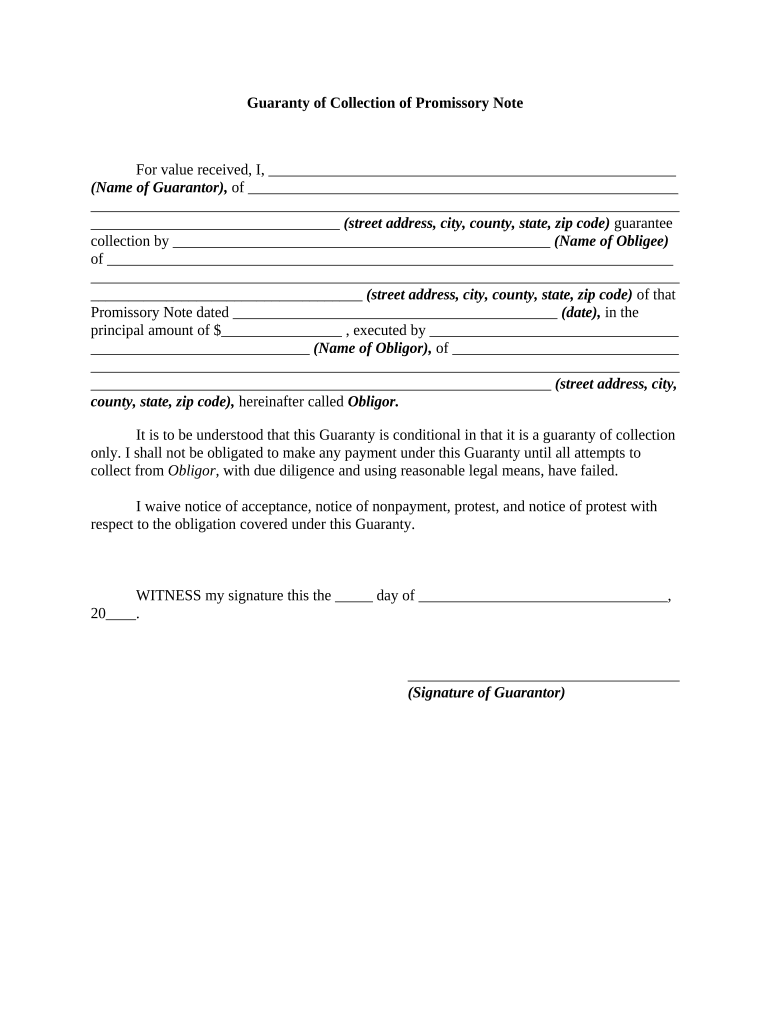
A Guaranty Note is a written promise by a guarantor to answer for another party’s debt or contractual obligation if that primary obligor defaults. It typically identifies the creditor, principal obligor, guarantor, the obligation being guaranteed, the maximum liability and conditions for demand or enforcement. Guaranty Notes are used in lending, leases, and commercial contracts to allocate credit risk rather than transfer property. Because they create secondary liability, clarity on scope, duration, and any collateral is essential for enforceability and for later collection or litigation efforts.

Why a Clear Guaranty Note Matters

A well-drafted Guaranty Note clarifies parties’ responsibilities, reduces disputes over enforcement, and preserves remedies if the primary obligor defaults under the primary contract or loan instrument.

Why a Clear Guaranty Note Matters

Who Typically Prepares and Signs a Guaranty Note

Guaranty Notes are common in lending, leasing, and commercial transactions where a creditor requires additional assurance of performance or repayment.

  • Lenders and creditors who need additional credit assurance for a borrower.
  • Landlords requiring lease guarantors for tenants with limited credit history.
  • Business owners or investors acting as corporate or personal guarantors.

Core Elements Found in a Professional Guaranty Note

A complete Guaranty Note combines identity details, the guaranteed obligation, liability limits, enforcement terms, and signature provisions to make obligations and remedies clear and enforceable.

Parties

Identify creditor, principal obligor, and guarantor by full legal name and entity type; include addresses and contact information for notices.
Guaranteed Obligation

Describe the underlying debt or contract precisely by agreement date, instrument type, principal amount, account number, or other unique identifier.

Scope of Guarantee

Specify whether guarantee is limited or unlimited, primary or secondary, continuing, and whether it covers interest, fees, and collection costs.

Duration

State when the guarantee starts and ends, events that terminate the guaranty, and whether automatic renewals or novations affect coverage.

Remedies and Demand

Set out creditor’s rights on default, required notices, cure periods, and whether demand must precede enforcement against the guarantor.

Signature Block

Provide explicit signature, printed name, title, date, and witness or notary lines if required by law or lender policy.

Step-by-Step: How to Complete a Guaranty Note

Follow these sequential steps to prepare a clear, enforceable Guaranty Note that aligns with the underlying obligation and applicable law.

  • 01
    Assemble Documents: Gather the primary contract, loan documents, and any collateral descriptions referenced in the guarantee.
  • 02
    Identify Parties: Confirm legal names, entity types, and authorized signers for creditor, obligor, and guarantor.
  • 03
    Define Scope: State exact obligations guaranteed, limits, durations, and whether obligations are joint or several.
  • 04
    Execute Properly: Ensure authorized signature, date, and any required notarization or witness acknowledgment are completed.

Typical Document Flow for a Guaranty Note

A straightforward workflow reduces processing time and preserves evidence of assent and delivery for enforcement.

  • Draft: Prepare guaranty language consistent with the primary agreement and creditor policy.
  • Review: Have counsel or credit team review material scope and risk allocation.
  • Sign: Obtain guarantor signature and required notarization or witness verification.
  • Distribute: Provide executed copies to creditor, guarantor, and file with loan records.

Configuring an Online Completion and eSigning Workflow

When completing a Guaranty Note online, set fields and authentication to ensure identity, intent, and retention meet legal standards.

Field Configuration
Signature Field Require full-name and date; lock after signing
Authentication Use email plus SMS code or stronger ID verification when available
Conditional Fields Show limit or collateral fields only if 'secured' is selected
Audit Trail Enable full event logging and download certificate

Technical Considerations for eSigning a Guaranty Note

Ensure the signing platform supports intent capture, audit trails, and secure storage aligned with ESIGN and UETA.

  • Supported Formats: PDF and Word DOCX
  • Integrations: Salesforce, NetSuite, Google Workspace
  • Authentication Options: Email link, SMS code, KBA, or certificate-based methods

How a Guaranty Note Compares with Similar Credit Instruments

Compare common attributes to decide whether a Guaranty Note, personal guarantee, letter of credit, or surety bond best meets a creditor’s needs.

Document Type Guaranty Note Personal Guarantee Letter of Credit Surety Bond
Security Interest sometimes rarely sometimes
Third-Party bank surety company
Typical Use loans/leases small loans trade finance contract performance
Enforceability contract law contract law banking rules bond claim process

Key Timing Items and Typical Deadlines

Track the effective date, notice windows, cure periods, and statute of limitations to preserve remedies and meet procedural prerequisites.

Effective Date:

Date the guaranty becomes operative; affects accrual and limitation periods.

Demand Notice:

If required, deliver written demand per notice clause before enforcing.

Cure Period:

Allow any contractually required cure period before acceleration or collection.

Enforcement Timing:

Prompt enforcement helps preserve evidence and recovery prospects.

Statute of Limitations:

State-specific; verify local limitation periods before filing suit.

Common Mistakes to Avoid When Preparing a Guaranty Note

  • Using informal or ambiguous descriptions of the guaranteed obligation that create disputes over scope and amount.
  • Failing to specify whether the guaranty is continuing or limited, which can create unintended perpetual liability.
  • Omitting signature authority verification for corporate guarantors or failing to include officer title and corporate seal where required.
  • Neglecting required notices, demand conditions, or cure periods specified in the guaranty or underlying agreement.

Penalties and Legal Risks of an Incorrect Guaranty Note

Enforceability Risk: Voidable terms
Liability Exposure: Unexpected unlimited loss
Collection Delay: Procedural defects
Defense Claims: Misrepresentation defenses
Statute Bar: Limitations expired
Regulatory Issues: Usury or consumer rules

Authentication, Notarization, and Witness Steps

Authentication and notarization steps vary by state and transaction type; follow the sequence below when a notary or witness is required.

01

Verify Identity

Obtain government ID and record signer details.

02

Confirm Authority

For corporate guarantors, confirm board resolution or officer authority.

03

Execute in Presence

Sign in front of notary or required witnesses.

04

Notarial Act

Notary completes acknowledgment or jurat per state law.

05

Record Journal

Notary retains journal entry and any RON audio-video as required.

06

Distribute Copies

Provide executed copies to all parties and file with loan records.

07

Optional Recording

Record only if guaranty attaches to a security instrument.

08

Retain Evidence

Keep signed copies and audit trail for litigation support.

Security and Compliance Considerations

ESIGN / UETA: Compliant with electronic signature laws
Encryption: TLS 1.2/1.3 in transit; AES-256 at rest
Audit Trail: Complete event log with timestamps
HIPAA: BAA required when PHI is present
21 CFR Part 11: Supports FDA-regulated record controls
Access Controls: Role-based access and SSO options

FAQs: Common Questions About Guaranty Notes

Answers to frequent questions regarding enforceability, eSigning, notarization, and remedies for Guaranty Notes in the United States.


Need help? Contact support

be ready to get more
Join over 28 million airSlate SignNow users