Decedent details
Include the decedent’s full legal name, any known aliases, date of death, last residence address, and Social Security number or last four digits to help institutions match records.
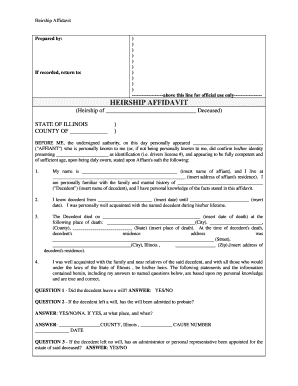
Use an Illinois Heirship Affidavit to document heirs and enable transfer of a decedent’s personal property without full probate. It can shorten administrative timelines, lower legal costs for small estates, and provide institutions with a sworn statement that supports release of funds or property.

Typical users include surviving spouses, adult children, named heirs, fiduciaries, and institutions verifying authority to collect estate assets.
Include the decedent’s full legal name, any known aliases, date of death, last residence address, and Social Security number or last four digits to help institutions match records.
List each heir by full legal name, relationship to the decedent, date of birth, and current address; indicate shares or specific property allocated to each heir.
Provide an itemized schedule of personal property, accounts, and vehicle information with estimated values and identifying numbers such as account or VIN numbers.
Include a clear sworn statement that the declarant is competent, that no known will exists, and that listed heirs are the only heirs entitled to the property.
Provide a proper notarial acknowledgement with venue, notary signature, commission expiration date, and any required witness lines consistent with Illinois requirements.
Attach certified death certificate, government-issued IDs for claimants, title documents, and any prior wills or letters of appointment if available.
| Field | Configuration |
|---|---|
| Signature field | Require signer name, date, and signature block |
| Notary block | Add notarization acknowledgement and seal area |
| Authentication | Enable email link and SMS code verification |
| Attachments | Require upload of death certificate and IDs |
Technology and integration considerations when completing and submitting heirship affidavits digitally, including file formats and common integrations with institutional systems.
| Criteria | Heirship Affidavit | Small Estate | Probate Petition |
|---|---|---|---|
| When used | personal property | limited-value estates | full administration |
| Court filing | sometimes | ||
| Typical timeline | days to weeks | weeks | months to years |
| Use with banks | often | often | required |
| signNow | DocuSign | Adobe Sign | PandaDoc | HelloSign | |
|---|---|---|---|---|---|
| Starting Price | $8/user/mo | $15/user/mo | $14/user/mo | $19/user/mo | $15/user/mo |
| Free Trial | 7-day free trial | Varies by vendor | Varies by vendor | Varies by vendor | Varies by vendor |
| Bulk Send | Yes | Varies by plan | Varies by plan | Varies by plan | Varies by plan |
| Audit Trail | Yes | Yes | Yes | Yes | Yes |
| HIPAA Compliant | Yes | Yes | Yes | Varies by plan | Varies by plan |
| Envelope Cap | No cap | 100 envelopes/user/year | Varies | Varies | Varies |
No specific statutory filing deadline; act promptly to preserve estate rights
Institutions often review within 7 to 21 business days; verification may extend processing
Title transfers vary by county; allow several weeks for processing
If estate exceeds statutory small estate limits, formal probate may be required
Keep original affidavit and attachments permanently or per institution policy
Collect death certificate, IDs, titles, and evidence of relationships.
Complete fields clearly, itemize assets, and list heirs.
Sign in presence of notary; add witnesses if state requires.
Deliver to institutions and track requests for additional documentation.
An adult heir who reports direct descent from the decedent may sign the affidavit to claim personal property. Provide full legal name, relationship, and supporting documents (birth certificate, prior wills, or decedent’s death certificate). Mismatched names can delay processing.
A court-appointed administrator or executor may use the affidavit when handling small or uncontested assets. The representative should include letters testamentary or letters of appointment if available and follow notarization and witness requirements to ensure third-party institutions accept the claim.
A decedent left no will and a bank held a small personal account; an heir used an affidavit to claim funds without probate.
A sibling used an Illinois Heirship Affidavit to transfer a vehicle title after the owner died intestate and the estate was below probate thresholds.