Establishing secure connection…Loading editor…Preparing document…

Indiana Appearance by Self-Represented Person in Civil Case

This template is fully customizable. Edit the text, fill out the fields, and send it for signature. Give it a try!
Indiana Appearance by Self-Represented Person in Civil Case

What the Indiana Appearance by Self-Represented Person in Civil Case Is

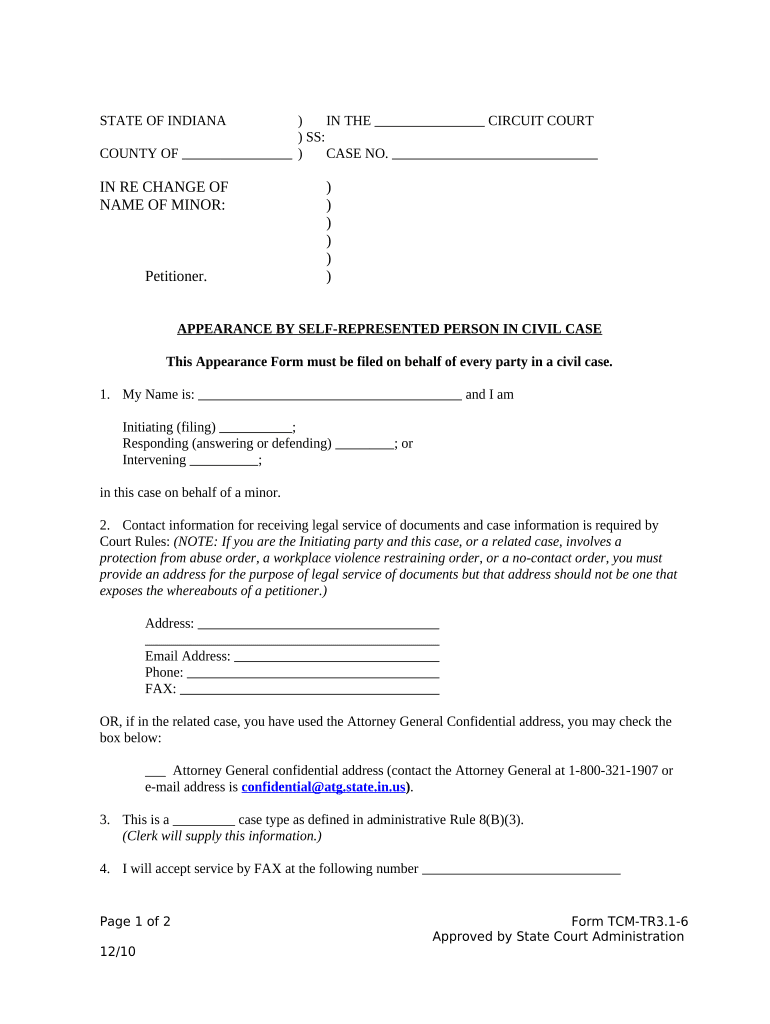
The Indiana Appearance by Self-Represented Person in Civil Case is a court filing used by individuals who proceed without an attorney to notify the court and parties that they will appear on their own behalf. It identifies the case, provides the self-represented party’s contact information, and lists the party’s role and preferred method for receiving notices. Courts use the form to update dockets, schedule hearings, and route documents; filing requirements and form formats vary by county and case type, so confirm local rules before submitting.

Why the Appearance Form Matters for Self-Represented Litigants

Filing an appearance ensures you receive official court notices, clarifies who is responsible for communications, and places your contact information on the record so deadlines and orders reach you directly.

Why the Appearance Form Matters for Self-Represented Litigants

Who Uses This Appearance Form and When

Self-represented litigants use the form at case initiation or when they begin representing themselves during ongoing litigation.

  • Plaintiffs proceeding pro se who initiated a civil suit and need official service addresses and contact details.
  • Defendants representing themselves who want to confirm their participation and receive court orders and notices directly.
  • Pro se parties substituting in for counsel mid-case after withdrawal whose contact and service information must be updated.

Typical People Who Sign This Form

Self-Represented Plaintiff

An individual who filed the initial complaint and is not using an attorney. They use the appearance form to provide a mailing address, phone number, and any email for service, and to indicate they will handle filings and hearings without counsel.

Self-Represented Defendant

A person defending against a civil action without lawyer representation. They file the appearance to receive service of pleadings, stay informed of scheduling orders, and supply the court with an address for official communications.

Essential Data Elements on the Appearance Form

Full Legal Name: As shown on ID
Case Number: Court-assigned number
Party Role: Plaintiff or Defendant
Mailing Address: Street, city, state, ZIP
Phone and Email: Primary contact details
Signature and Date: Signed and dated

Consequences of Incomplete or Incorrect Filings

Missed Notices: May forfeit deadlines
Service Failure: Orders not delivered
Sanctions Risk: Court may impose costs
Case Delay: Hearings rescheduled
Default Judgment: Possible for unresponsive parties
Record Inaccuracy: Impacts appeals

Common Preparation Pitfalls to Avoid

  • Entering an informal or incomplete address that prevents successful service and results in returned mail and missed deadlines.
  • Failing to date or sign the form correctly, which can render the filing void or prompt a court clerk to reject the submission.
  • Using an email address that you no longer monitor, causing you to miss electronic notices or scheduling changes from the court.
  • Assuming an appearance substitutes for other filings; you still must timely file required pleadings, responses, or fee waivers.

Step-by-step: Completing the Indiana Appearance by Self-Represented Person

Follow these steps in order to prepare and file the appearance form correctly and reduce the risk of procedural problems.

  • 01
    Identify Case: Enter the court name and case number exactly.
  • 02
    Provide Contact: List full address, phone, and monitored email.
  • 03
    State Role: Mark whether you are plaintiff or defendant.
  • 04
    Sign and Date: Sign where required and include today’s date.

How the Appearance Form Is Used by the Court

This overview shows how courts process the form after you file it and how it affects service and case management.

  • Clerk Acceptance: Clerk reviews and files the form on the docket.
  • Docket Update: Court updates party contact information.
  • Service Routing: Notices and orders are sent to provided contacts.
  • Hearing Notice: You will receive hearing dates and deadlines.

Key Sections to Complete Carefully

A professional, complete appearance form reduces clerical rejections and makes sure court communications reach you. Pay attention to identifiers, contact data, and signature fields.

Court Identification

Accurately record the court name, division, and case number to ensure the clerk attaches the form to the correct file and avoids misfiling.
Party Information

Provide your full legal name, any business name, and specify whether you are appearing as plaintiff, defendant, intervenor, or another role in the litigation.

Service Address

Enter a physical mailing address where the clerk and opposing parties can send official documents; P.O. boxes may be insufficient in some counties.

Electronic Contact

List an email address you monitor; courts may send notices electronically where permitted by local rule and the parties’ consent.

Signature Block

Sign in the designated spot and date the form; handwritten signatures are standard unless the court accepts electronic filings and e-signatures.

Certificate of Service

Complete any service certificate to confirm which parties received copies and by what method, including mailing or electronic delivery.

Digital Filing and Workflow Settings to Consider

If you file electronically, set these options to match court requirements and minimize processing friction.

Field Configuration
Document Format PDF/A preferred
Signature Type Handwritten image or e-signature
Notification Method Email with read receipt
File Naming Include case number

Technical Notes for eFiling and eSigning

Maintain local copies of filed forms and signed receipts; if the court requires a wet signature, be prepared to print, sign, and deliver a paper copy.

  • File Types: PDF, DOCX, or court-specified
  • Authentication: Email or court portal login
  • Audit Trail: Timestamp and IP recorded

Timing Considerations and Typical Deadlines

Observe all local rules and hearing notices; missing a deadline can affect your ability to participate or appeal.

Before Hearing:

File appearance before scheduled hearings to receive notices.

Response Deadlines:

Serve your responses within timeframes set by local civil procedure rules.

Service Proof:

File proof of service promptly after serving documents.

Order Compliance:

Comply with court orders by the dates specified.

Appeal Timing:

Note appeal windows; preserve record and deadlines.

Frequently Asked Questions from Self-Represented Parties

Answers to common concerns about filing the appearance form, signing, service, and how electronic options interact with court rules.


Need help? Contact support

eSignature Pricing Comparison to Support Electronic Filing and Signing

Compare representative starting prices and feature availability for common eSignature vendors when preparing to sign and submit court documents electronically.

signNow DocuSign Adobe Sign PandaDoc HelloSign
Starting Price $8/user/mo $15/user/mo $14/user/mo $19/user/mo $15/user/mo
Free Trial Yes, 7-day trial No No Yes, limited Yes, limited
Bulk Send Yes Yes Yes Yes No
Audit Trail Yes Yes Yes Yes Yes
HIPAA Compliant Yes Yes Yes No No
be ready to get more
Join over 28 million airSlate SignNow users