Establishing secure connection…Loading editor…Preparing document…

Indiana Appearance by Self-Represented Person in Civil Case

This template is fully customizable. Edit the text, fill out the fields, and send it for signature. Give it a try!
Indiana Appearance by Self-Represented Person in Civil Case

What the Indiana Appearance by Self-Represented Person in Civil Case is

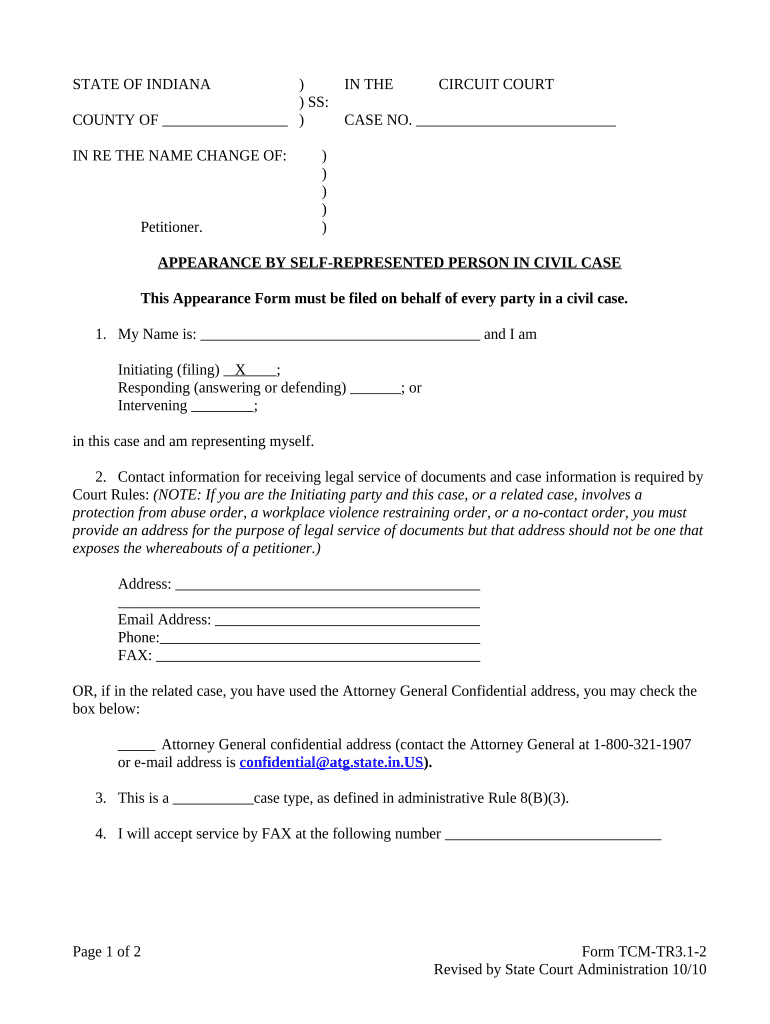
The Indiana Appearance by Self-Represented Person in Civil Case is a court filing used by individuals who represent themselves to notify the court and opposing parties that they are appearing without an attorney. The form records the party's name, contact information, the case number, and the party's role (plaintiff, defendant, petitioner, respondent). It ensures the court's docket lists accurate contact details for service of papers and clarifies who will receive notices and orders. The document does not substitute for other filings required by local rules, but it establishes the filer as a self-represented participant for case management and communication purposes.

Why filing this appearance matters

Filing an appearance updates the court record so notices, orders, and scheduling communications reach the self-represented person directly; it also clarifies who is responsible for receiving service and reduces procedural delays.

Why filing this appearance matters

Who completes the Indiana Appearance form and why

Self-represented litigants, including pro se plaintiffs and defendants, file this form to notify the court they will handle their own representation and to provide contact details for service.

  • Individuals representing themselves in civil matters (small claims, eviction, family support, contract disputes).
  • Parties who previously had counsel but now proceed pro se after counsel withdrawal or substitution.
  • Nonprofit or advocacy representatives who assist a party without formally entering an appearance as counsel.

Completing the form helps the court manage case service and scheduling and preserves the party's responsibility to monitor the docket and meet procedural deadlines.

Key elements to expect on the appearance form

A professional Indiana Appearance by Self-Represented Person in Civil Case contains structured fields and clear attestations so the court and other parties can rely on the information for service and communications.

Case Information

Caption, court name, case number, and county — ensures the appearance is associated with the correct docket.
Party Identification

Full legal name and role (plaintiff/defendant) exactly as used in the complaint or petition.

Contact Details

Street address, city, state, ZIP, daytime phone, and email for delivery of notices and orders.

Mailing vs Service Address

Separate fields for mailing address and service address to avoid misdirected process.

Signature and Date

Signed and dated by the self-represented person to attest to accuracy; electronic signature permitted where law allows.

Certificate of Service

A short statement confirming how and when copies were provided to other parties, with date and method.

How to complete and file the appearance — step-by-step

A clear sequence prevents procedural errors; follow these four essential steps when preparing your appearance.

  • 01
    Prepare Case Details: Confirm caption and exact case number from the complaint or court docket.
  • 02
    Enter Contact Information: Provide accurate street address and email for service and notices.
  • 03
    Sign and Date: Manually sign or use a lawful e-signature; date in MM/DD/YYYY format.
  • 04
    File and Serve: Submit to the clerk by the court's accepted method and serve copies on all parties per local rule.

Completing the form online: typical workflow settings

When using an electronic filing or eSignature platform, configure these settings to ensure the appearance is complete and accepted by the court.

Field Configuration
Name Field Required; auto-validate against docketed party name when possible
Date Field MM/DD/YYYY format; auto-populate option available
Signature Field Allow drawn/typed e-signature that meets ESIGN/UETA standards
Certificate of Service Include checkbox + date and method inputs for service tracking

Where to submit and how the courthouse processes it

Different courts accept filings by in-person delivery, mail, e-file portal, or in some counties by email; confirm the local clerk's preferred submission method before filing.

  • Clerk's Office Filing: Deliver or mail the signed form to the county clerk for docketing and placement on the case file.
  • Electronic Filing: Use the court's e-filing portal when available; follow required PDF/A or upload specifications.
  • Email Submission: Allowed only if the local rule or clerk authorizes email filings; include proof of service on opposing parties.
  • Retention by Court: The clerk will docket the appearance and update the case contact information for service.

Digital signing and eSubmission considerations

Use electronic filing or eSignature tools that comply with ESIGN and UETA and meet the court's technical requirements.

  • File Formats: PDF is universally accepted; follow any court-specific PDF/A requirements.
  • Authentication: Email verification or two-factor authentication helps establish signer attribution.
  • Audit Trail: Keep a complete timestamped audit trail that shows intent, email/IP, and signature events.

Retain signed originals and digital evidence of submission; courts may request proof of how and when the appearance was filed.

Deadlines, processing expectations, and service timing

Timely filing and prompt service are essential; missing deadlines or failing to serve parties can result in delays or default judgments.

File Promptly:

File the appearance as soon as you decide to proceed pro se; early filing avoids service gaps.

Service Timing:

Serve opposing parties per Indiana Trial Rule 5 or local rule timelines.

Clerk Processing:

Clerk processing times vary by county; expect 1–7 business days for docketing.

Rule Compliance:

Ensure service proof (mail receipt, e-file confirmation) is attached when required.

Update When Changed:

If your address or contact details change, promptly file an amended appearance.

Key milestones after filing an appearance

A typical milestone sequence explains what to track after your appearance is on file.

01

Docketing

Clerk adds the appearance to the case docket and updates contact fields.

02

Service Confirmation

Opposing counsel or parties acknowledge receipt per certificate of service.

03

Scheduling Orders

Court issues scheduling notices, deadlines, or hearings that list the pro se party.

04

Future Filings

Ensure subsequent pleadings use the updated contact information on file.

Common mistakes to avoid when preparing the appearance

  • Using an informal or nickname instead of your full legal name can prevent proper service or identification.
  • Omitting the case number or entering an incorrect number detaches the form from the docket.
  • Providing only a P.O. box when a physical service address is required by local rules.
  • Failing to serve opposing parties with a copy and file a certificate of service with the clerk.

Consequences and procedural risks of errors

Missed Notices: Late or incorrect contact info can cause you to miss hearings or orders.
Default Risk: Failure to timely respond after filing an appearance can expose you to default judgment.
Rejection: Clerks may reject filings that do not meet local formatting or signature requirements.
Service Disputes: Improper service can lead to motions to quash or delays.
Cost Increase: Correcting errors often requires additional filings and possible fees.
Record Challenges: Inaccurate docket information complicates appeals and post-judgment enforcement.

Practical tips for accurate and efficient completion

Follow these best practices to minimize clerical errors and preserve your procedural rights when filing an appearance.

Verify Docket
Confirm the exact case caption and number on the court docket before completing the form.
Use a Reliable Email
Provide an email address you check daily to receive notices and avoid missing deadlines.
Keep Proof of Service
Obtain receipt or return-mail evidence and file a certificate of service with the clerk to document delivery.
Update Promptly
If your contact details change, file an amended appearance immediately to maintain service integrity.

Real-world examples of appearance use

These concise examples show common scenarios where a pro se appearance is filed and why it matters.

Small Claims Filing

A tenant files a defense in small claims court using the appearance form to receive hearing notices

  • Served the landlord by mail and filed a certificate of service
  • The clerk docketed the appearance and the tenant received the hearing date by email, avoiding a default judgment.

Counsel Withdrawal

After counsel withdrew from a contract dispute, the client filed a pro se appearance to remain active in the case

  • Updated contact details were provided to opposing counsel
  • This ensured all scheduling orders and settlement communications were delivered directly to the client.

eSignature vendor pricing and feature comparison relevant to court filings

When choosing an eSignature provider for filings and service tracking, consider price, trial availability, bulk send, audit trail, HIPAA compliance, and envelope caps.

signNow DocuSign Adobe Sign PandaDoc HelloSign
Starting Price $8/user/mo $15/user/mo $14/user/mo $19/user/mo $15/user/mo
Free Trial 7-day free trial No No Yes, limited Yes, limited
Bulk Send Yes Yes Yes Yes No
Audit Trail Yes Yes Yes Yes Yes
HIPAA Compliant Yes Yes Yes No No
Envelope Cap No envelope cap 100 envelopes/user/year Varies by plan Varies by plan Varies by plan

Frequently asked questions about the Indiana Appearance by Self-Represented Person in Civil Case

Answers to common questions about completing, filing, and maintaining your appearance in Indiana civil proceedings.


Need help? Contact support

be ready to get more
Join over 28 million airSlate SignNow users