Establishing secure connection…Loading editor…Preparing document…

Agreement of Understanding with Confidential Informant

This template is fully customizable. Edit the text, fill out the fields, and send it for signature. Give it a try!
Agreement of Understanding with Confidential Informant

What the Agreement of Understanding with Confidential Informant Is

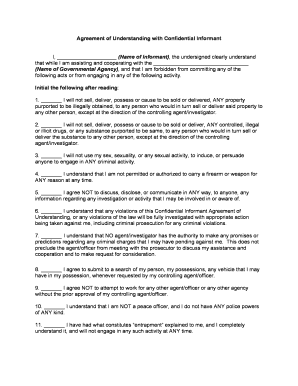
An Agreement of Understanding with Confidential Informant is a formal written record that sets out the terms under which an individual provides information to law enforcement or prosecuting authorities while preserving confidentiality and defining protections. The document identifies the parties, describes the scope and limits of information sharing, clarifies any consideration or promises made, and documents procedures for handling identity, records, and testimony. It establishes expectations about confidentiality, disclosure to third parties, use in investigations or prosecutions, and obligations to notify courts when disclosure is required. Proper execution and retention protect legal admissibility and participant safety.

Why this Agreement Matters for Legal and Operational Clarity

A clear Agreement of Understanding protects the informant, documents reciprocal obligations, and creates a record for prosecutors and defense counsel. It reduces disputes about promises, supports admissibility of evidence, and demonstrates chain-of-custody and intent when later used in court or investigation.

Why this Agreement Matters for Legal and Operational Clarity

Who commonly completes or relies on this agreement

Typical users prepare and sign these agreements as part of investigative or prosecutorial workflows; precision and recordkeeping are essential.

  • Law enforcement units and investigators who document source terms and safety measures for case files.
  • Prosecutors and defense counsel who must confirm promises and show how information was obtained.
  • Agency compliance officers and records managers who enforce retention, confidentiality, and disclosure policies.

Use consistent, agency-approved language and follow applicable statutory protections to avoid later disputes or witness-safety issues.

Core elements to include in a professional agreement

A complete Agreement of Understanding should be concise but comprehensive: identify parties, describe the information and conditions, define confidentiality limits, state any consideration, list obligations, and specify dispute resolution and governing law.

Parties

Identify the informant (legal name and alias if used) and the agency or prosecutor, including contact information and responsible case agent.
Scope

Describe precisely what information or cooperation is expected, temporal limits, and any tasks or statements the informant will provide.

Confidentiality

State whether the informant’s identity will be kept confidential, the limits to confidentiality, and circumstances that may require disclosure.

Consideration

Document any payments, benefits, or diversion offers clearly, including timing, amount, conditions, and tax or reporting consequences.

Legal Protections

Include warnings about perjury, instructions on compliance with subpoenas, and how the agreement interacts with court orders or discovery.

Retention & Access

Specify where the executed agreement is stored, who has access, and any record-retention schedule tied to agency policy or legal requirements.

Key data and security fields to document

Identity: Full legal name
Alias: Known informant names
Agency: Case agent name
Case Number: Associated investigation ID
Confidentiality Level: Operational classification
Signature: Signed and dated

Consequences and legal risks of errors or omissions

Disclosure Risk: Unauthorized identity disclosure
Agreement Voidance: Improper promises may be unenforceable
Criminal Liability: Perjury or obstruction risk
Evidentiary Exclusion: Suppressed or excluded statements
Civil Claims: Privacy or negligence suits
Operational Harm: Threats to informant safety

Common mistakes to avoid when preparing the agreement

  • Using vague confidentiality language that leaves disclosure decisions undefined and invites dispute in court or discovery.
  • Failing to document consideration precisely, which can create expectations that are later contested by the informant or opposing counsel.
  • Omitting signatory authority or agency approval, which can void commitments and expose officers to administrative discipline.
  • Poor recordkeeping—storing only paper copies without secure access controls or audit trails increases risk of unauthorized disclosure.

Step-by-step: how to complete this Agreement

Follow a consistent sequence to ensure legal clarity, safety, and admissibility of the agreement and related records.

  • 01
    Prepare: Gather informant identity and case details before drafting.
  • 02
    Draft: Use agency-approved language and specify limits of confidentiality.
  • 03
    Review: Have a supervisor or prosecutor review terms and promises.
  • 04
    Sign: Obtain signatures, date the document, and secure a signed copy in records.

How execution and recordkeeping typically proceed

Execution flows from drafting to signing, verification, and secure storage with an audit trail. Each stage should record who acted and when.

  • Drafting: Create the agreement with clear, specific terms.
  • Verification: Confirm identity and authority of all signers.
  • Signing: Collect wet or electronic signatures; note date/time.
  • Storage: Store signed file with restricted access and audit log.

Recommended e-sign and workflow settings for online completion

When using an eSignature platform, configure authentication, retention, and access controls to protect confidentiality and evidentiary value.

Field Configuration
Authentication Email + SMS code verification recommended
Signature Type Allow drawn or typed signature with audit trail
Document Access Restrict to case team; enable role-based permissions
Audit Trail Enable capture of IP, timestamp, and events

Technical and file requirements for secure handling

Ensure the platform you use supports the file formats, integrations, and authentication needed for secure, auditable execution.

  • File Formats: PDF and DOCX are standard
  • Integrations: Connectors to case management systems
  • Authentication: Multi-factor options available

Confirm platform compliance with ESIGN/UETA and any agency-specific privacy obligations before relying on electronic execution.

Timing, retention, and processing expectations

Establish and document expected timeframes for review, approval, execution, and any follow-up actions to prevent delays in investigations or prosecutions.

Execution Timing:

Sign before use of information in operations

Court Disclosure:

Provide notice promptly if disclosure becomes likely

RON Recording:

Retain audio-video for 5–10 years where used

HIPAA Retention:

Follow 45 CFR §164.530(j) for health records

Agency Review:

Periodic audit per internal schedule

Key milestones from draft to secure archive

Track these stages to maintain evidentiary integrity and protect informant safety throughout the case lifecycle.

01

Initiation

Case agent prepares draft and records expectations.

02

Supervisory Review

Supervisor or prosecutor reviews legal and safety terms.

03

Execution

Informant and authorized agency sign and date the agreement.

04

Archival

Store signed agreement with restricted access and audit trail.

How this agreement compares with similar documents

Compare typical attributes of a Confidential Informant Agreement against closely related documents to clarify purpose and use.

Criteria Confidential Informant Agreement Standard NDA
Confidentiality Scope informant identity protection business confidentiality
Legal Standing used in investigations civil or commercial disputes
Court Disclosure may require special handling typical discovery rules
Typical Signers informant + agency official parties to commercial agreement

Representative eSignature vendor comparison for this document

Comparing core pricing and compliance attributes can help agencies choose a platform that supports secure signing and required recordkeeping.

signNow DocuSign Adobe Sign PandaDoc HelloSign
Starting Price $8/user/mo $15/user/mo $14/user/mo $19/user/mo $15/user/mo
Free Trial 7-day free trial Varies by plan Varies by plan Varies by plan Varies by plan
Bulk Send Yes (Business Premium) Yes Yes Yes No
Audit Trail Yes Yes Yes Yes Yes
HIPAA Compliant Yes (BAA required) Yes Yes No No
Envelope Cap No cap 100 envelopes/user/year Varies by plan Varies by plan Varies by plan

Frequently asked questions about execution, validity, and security

Answers address common concerns about electronic signatures, anonymity, notarization, redaction, and alteration that arise when handling confidential informant agreements.


Need help? Contact support

be ready to get more
Join over 28 million airSlate SignNow users