Establishing secure connection…Loading editor…Preparing document…

Inspection Notification

This template is fully customizable. Edit the text, fill out the fields, and send it for signature. Give it a try!
Inspection Notification

What an Inspection Notification Is and when it’s used

An Inspection Notification is a formal written notice informing a property owner, occupant, tenant, or contractor that an inspection of premises, equipment, or records will occur on a specified date and time. It explains scope, legal basis, access instructions, and any documentation the inspector will review. Notifications commonly describe anticipated duration, safety requirements, and contact details for scheduling changes. Depending on jurisdiction and the subject matter, an inspection notice may be served by mail, personal delivery, electronic transmission, or posted on the property; some jurisdictions impose minimum notice periods or procedural requirements.

Why a clear Inspection Notification matters

A clear Inspection Notification establishes expectations, documents legal compliance, reduces disputes about access and timing, and helps ensure safety during on-site procedures. Properly prepared notices protect both inspectors and recipients by creating a transparent record of the inspection scope and logistics.

Why a clear Inspection Notification matters

Who prepares and receives Inspection Notifications

Typical users who prepare or receive Inspection Notifications include property managers, code enforcement officers, building owners, landlords, tenants, contractors, and facility managers responsible for compliance and safety.

  • Property managers and landlords coordinating access and scheduling for routine or complaint-driven inspections.
  • Code enforcement and municipal inspectors documenting compliance with building, health, or safety codes.
  • Contractors and subcontractors preparing for site reviews, punch lists, or warranty inspections.

Essential elements to include in every Inspection Notification

Key components make an Inspection Notification legally robust, operationally clear, and defensible in court or administrative proceedings.

Notice Header

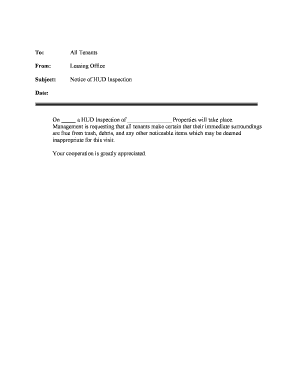
Include the issuer's name, recipient name, unique notice identifier, property or file number, and date. Use a clear subject line that references the property or case to avoid cross-department confusion.
Legal Authority

Cite the statute, ordinance, lease clause, permit, or contract provision authorizing the inspection and provide the contact information for the enforcement agency or issuing party.

Scope and Purpose

Describe exactly what will be inspected—areas, systems, records—and state whether the inspection is for safety, code compliance, warranty, or other regulatory reasons to limit scope disputes.

Date and Time Window

Provide the scheduled date plus a realistic start/end time or time window; include alternate dates and rescheduling instructions to reduce failed attempts.

Access and Safety

Specify access procedures, required PPE, occupant actions (e.g., vacate or secure animals), and instructions for locked or occupied units to protect safety and evidence integrity.

Documentation and Evidence

List documents, permits, maintenance logs, photographs, or keys required for review; state whether copies will be retained, how they will be used, and how to request redacted or certified copies.

Step-by-step: preparing and issuing the notice

Follow these sequential steps to prepare and issue an Inspection Notification accurately and compliantly today.

  • 01
    Step 1: Identify the legal authority and state the inspection purpose.
  • 02
    Step 2: Select date, time window, and expected duration.
  • 03
    Step 3: List required documents, access needs, and safety protocols.
  • 04
    Step 4: Choose delivery methods and retain verifiable proof of service.

Configuring an online Inspection Notification workflow

Typical online configuration options for drafting, routing, and authenticating an Inspection Notification securely and at scale.

Field Configuration
Template Standard template with conditional and pre-filled fields for repeated use.
Routing Sequential or parallel routing with role-based signer order and reminders.
Authentication Select email OTP, SMS code, knowledge-based auth, or SSO as required.
Attachments Allow photo uploads, permits, and checklists; lock attachments after submission.

Where to send or file the Inspection Notification

Where and how to file or send the Inspection Notification varies by recipient and legal context; choose methods that create verifiable service records.

  • Email: Send as PDF with read receipt and attach evidence of delivery.
  • Certified Mail: Use USPS return receipt to document mailing and delivery date.
  • Personal Delivery: Hand-deliver with signed acknowledgment of receipt when permitted.
  • Electronic Service: Use an e-signature platform that produces audit trails and proof.

Technical and security considerations for electronic delivery

Select delivery and signing platforms that meet technical, security, and recordkeeping needs for the Inspection Notification.

  • File Formats: PDF, DOCX, HTML supported.
  • Integrations: Salesforce, NetSuite, Google Workspace, Procore.
  • Authentication: Email OTP, SMS code, KBA, SSO options.

Security features to look for in e-delivery and signing

Encryption: TLS 1.2/1.3 in transit; AES-256 at rest.
Audit Trail: Tamper-evident logs with timestamps.
Access Controls: Role-based access and SSO options.
HIPAA: BAA available for PHI workflows.
Certifications: SOC 2 Type II and ISO 27001.
Accessibility: WCAG 2.0 Level AA compliance.

Common preparation mistakes to avoid

  • Sending incomplete notices that omit scope, date, or access instructions leads to confusion, failed service attempts, scheduling delays, and potential disputes about the inspector's authority.
  • Using informal delivery without proof of service — verbal notice or untracked email — increases the risk that a recipient denies receipt or contests timing.
  • Failing to check local statutes or lease terms for required notice periods or specific service procedures can render the notice procedurally invalid.
  • Not documenting attempted re-scheduling, returned mail, or photos of posted notices undermines evidentiary strength if compliance is contested.

Potential legal and operational consequences of improper notice

Local Fines: Civil penalties under municipal codes.
Access Refusal: Inspector may seek warrant or enforcement.
Delay Costs: Remediation and extended repair expenses.
Contractual Breach: Breach claims or indemnity exposure.
Evidence Issues: Missing records can impair defense.
Public Disclosure: Enforcement notices may become public record.

Representative eSignature pricing and capability comparison for Inspection Notifications

Compare vendor starting prices and core capabilities when selecting an eSignature provider for Inspection Notification workflows; signNow is shown first per comparison convention.

signNow DocuSign Adobe Sign PandaDoc HelloSign
Starting Price $8/user/mo $15/user/mo $14/user/mo $19/user/mo $15/user/mo
Free Trial 7-day free trial Varies by plan Varies by plan Varies by plan Varies by plan
Bulk Send Yes (Business Premium) Varies by plan Varies by plan Varies by plan Varies by plan
Audit Trail Yes Yes Yes Yes Yes
Envelope Cap No envelope cap 100 envelopes/user/year Varies by plan Varies by plan Varies by plan

Real-world examples of Inspection Notification use

These examples illustrate practical outcomes from digitizing inspection notice workflows in property management and enterprise operations.

Martin Properties

Tim Martin, Founder at Martin Properties, used online notices to schedule property inspections without in-person meetings.

  • Streamlined tenant coordination, records, and automated reminders.
  • Electronic notices with proof of delivery reduced scheduling conflicts, created a searchable record per property, and supported faster follow-up when repairs were required across multiple assets.

Tech Data

Tech Data implemented digital notification workflows to manage vendor and facility inspections across a large enterprise footprint.

  • Centralized records, audit trails, and role-based routing.
  • The approach improved visibility for compliance teams, reduced duplicate site visits, and provided consistent evidence for internal audits and external regulators.

Frequently asked questions about Inspection Notifications

Answers to frequent questions about preparing, delivering, and validating Inspection Notifications in electronic and physical formats in the U.S. context.


Need help? Contact support

be ready to get more
Join over 28 million airSlate SignNow users