Establishing secure connection…Loading editor…Preparing document…

Internal Application Form

This template is fully customizable. Edit the text, fill out the fields, and send it for signature. Give it a try!
Internal Application Form

What the Internal Application Form Is and When Organizations Use It

An Internal Application Form is an organization-managed document used to collect structured information from employees or affiliates who seek internal opportunities, transfers, promotions, project assignments, or access to restricted resources. The form typically captures identity details, current role, business justification, approvals, and relevant certifications or clearances. It can be used in HR, facilities, finance, and project intake workflows and is frequently integrated into digital systems for routing and recordkeeping. Electronic execution and storage must meet federal e-signature rules (ESIGN) and applicable state law (UETA or state ESRA) where required.

Why a Standardized Internal Application Form Matters

A consistent Internal Application Form reduces processing time, improves auditability, and ensures decision-makers receive comparable information across candidates and requests while supporting compliance with workplace policies and applicable electronic-signature laws.

Why a Standardized Internal Application Form Matters

Primary Users and Stakeholders

Organizations use the Internal Application Form across HR, operations, and project teams to centralize candidate information and authorizations.

  • HR teams vet qualifications, verify eligibility, and track internal mobility metrics.
  • Hiring managers evaluate fit, provide approvals, and request interviews or follow-up documentation.
  • Security or compliance officers confirm clearances and ensure sensitive roles meet policy requirements.

Who Can Sign and Approve Internal Applications

Hiring Manager

The hiring manager or supervisor typically has authority to approve role changes or assignments and must attest that the candidate meets job requirements and budget constraints; their signature documents managerial consent and triggers downstream actions.

HR Representative

An HR representative confirms eligibility, verifies employment records, and signs to complete the personnel file; HR sign-off ensures proper classification, payroll updates, and compliance with internal policies.

Essential Sections to Include on an Internal Application Form

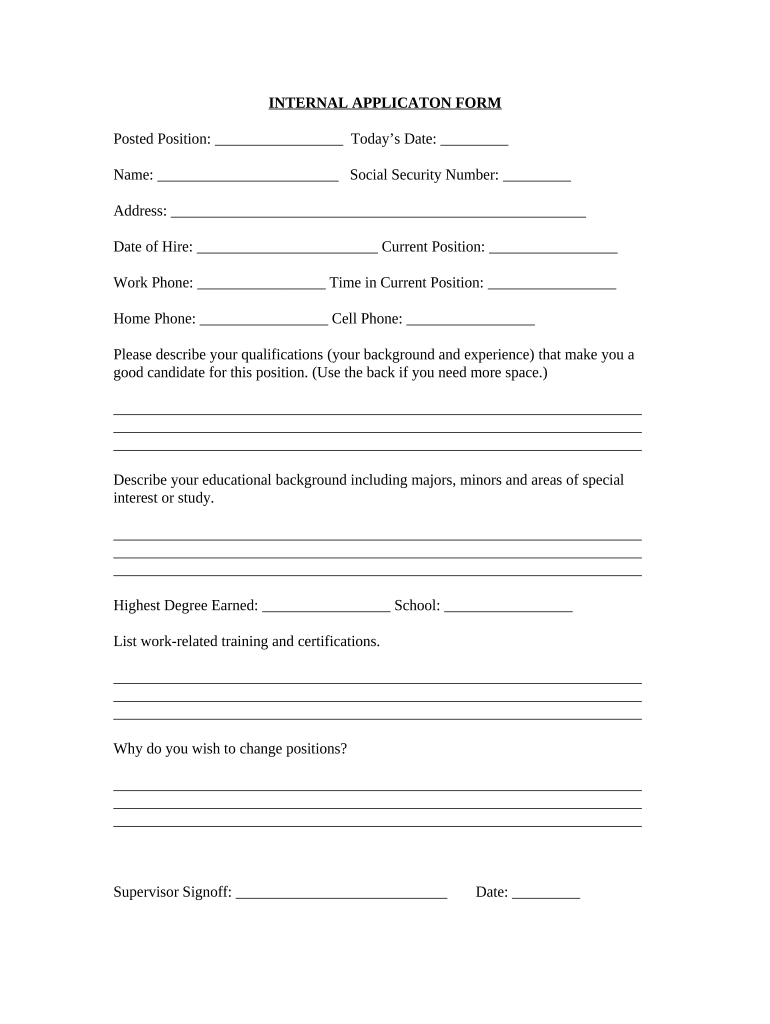
A professional Internal Application Form balances completeness with clarity: include distinct sections for identification, role details, justification, approvals, attachments, and audit metadata to support decisions and recordkeeping.

Applicant Details

Full legal name, employee ID, current department, position title, contact information, and employment status for accurate identity verification and personnel tracking.
Position Requested

Title or project name, location, FTE percentage, and expected start date so reviewers can evaluate operational impact and scheduling needs.

Business Justification

Concise rationale describing skills match, business need, or project benefit to permit consistent assessment across multiple requests.

Attachments

Resume, certifications, manager feedback, or performance summaries attached as PDFs or DOCX to document qualifications and expedite review.

Approval Routing

Designated approval order, required signers, and escalation contacts to automate routing and minimize manual follow-up.

Audit Metadata

Fields for submitter, timestamps, IP address, and e-signature audit trail to ensure traceability and meet compliance requirements.

Step-by-Step: Completing an Internal Application Form

Follow this sequence to complete and submit the form so that routing and approvals occur without interruptions.

  • 01
    Start the Form: Open the correct internal form template and confirm your identity.
  • 02
    Complete Fields: Fill mandatory sections, attach required documents, and double-check employment identifiers.
  • 03
    Select Approvers: Choose the correct approval chain based on role and department rules.
  • 04
    Sign and Submit: Apply electronic signature where permitted, then submit to begin automated routing.

How to Revise or Update a Submitted Internal Application

When information changes after submission, follow an auditable amendment process to preserve the original record while making corrections.

01

Identify Change:

Document exactly what needs updating and why to create an amendment trail.
02

Prepare Amendment:

Use the form’s revision feature or attach a clearly labeled correction page.
03

Notify Approvers:

Send the amendment to original reviewers with a brief explanation and reference to the initial submission.
04

Re-sign if Required:

Obtain signatures from affected parties to confirm acceptance of changes.
05

Archive Originals:

Retain the original submission alongside the revised record for auditability.
06

Update Systems:

Ensure HRIS or project management records reflect the approved revision.

Digital Workflow Overview for eSubmission and Routing

A clear digital workflow moves the form from submission through approvals to final retention while capturing an audit trail.

  • Upload: Attach the completed form and any supporting files.
  • Assign: Select approvers or choose a predefined routing template.
  • Authenticate: Signers confirm identity via email, SMS code, or stronger checks where required.
  • Record: System stores a signed copy and audit log for retrieval.

Configuring an Online Approval Workflow for Internal Applications

Typical workflow settings let administrators automate routing, notifications, and access controls for faster processing.

Field Configuration
Routing Rule Department-based approver selection
Authentication Email plus optional SMS code
Attachments Allow PDF/DOCX uploads only
Retention Flag Set automatic archival after approval

Technical and Integration Considerations for Electronic Submission

Ensure the chosen platform supports required file types, signer authentication, and audit logging before deploying an online Internal Application Form.

  • File Formats: PDF, DOCX, XLSX supported
  • Integrations: CRMs and HRIS like Salesforce, NetSuite, Google Workspace
  • Authentication: Email, SMS, SSO available

Security and Data Elements to Capture and Protect

Personal Identifiers: Name, employee ID
Contact Information: Work email, phone
Job Data: Current role, department
Justification: Business rationale
Approvals: Manager and HR signoffs
Audit Trail: Timestamps and IP

Key Risks When the Form Is Incomplete or Incorrect

Incorrect Identity: Can lead to misfiled records and compliance gaps; may affect benefits or payroll
Missing Approvals: Unauthorized assignments or access that violate internal policy and increase liability
HIPAA Exposure: Improper PHI handling can trigger HIPAA penalties and breach obligations (45 CFR §164.502)
Tax/Payroll Errors: Incorrect classification may trigger audits or corrective payroll filings
Audit Failure: Insufficient audit trail undermines defense during disputes or regulatory review
Retention Violations: Premature disposal may impede legal defenses and violate retention rules

Common Preparation Mistakes to Avoid

  • Submitting incomplete fields such as employee ID or exact role title delays routing and approval.
  • Using nonstandard file formats or poorly scanned attachments causes rejection by automated intake systems.
  • Failing to specify effective dates creates payroll and benefits misalignment and corrective work.
  • Routing to incorrect approvers or omitting required signers results in unauthorized approvals or rework.

Practical Tips for Accurate, Efficient Internal Application Processing

Applying consistent controls and clear instructions reduces cycle time and improves compliance across high-volume internal workflows.

Standardize Templates
Use a single approved Internal Application Form template across the organization to ensure uniform data capture and reduce review time.
Validate Key Fields
Implement field validation for employee ID, dates (MM/DD/YYYY), and required attachments to prevent common rejections.
Automate Routing
Configure routing based on department and role to remove manual handoffs and provide clear approver accountability.
Maintain Audit Trails
Preserve signed copies, timestamps, and signer authentication details to meet internal audits and legal discovery requirements.

Typical eSignature Pricing and Capabilities for Internal Application Forms

Compare common vendor starting prices and high-level features relevant to internal form signing; signNow is listed first per standard vendor ordering.

signNow DocuSign Adobe Sign PandaDoc HelloSign
Starting Price $8/user/mo $15/user/mo $14/user/mo $19/user/mo $15/user/mo
Free Trial 7-day free trial Varies Varies Varies Varies
Bulk Send Available Available Available Available Limited
Audit Trail Yes Yes Yes Yes Yes
HIPAA Compliant Yes (BAA) Yes (BAA) Yes (BAA) No information No information

Frequently Asked Questions and Troubleshooting for Internal Application Forms

Answers to typical questions about signing, submission errors, authentication, and recordkeeping for Internal Application Forms.


Need help? Contact support

be ready to get more
Join over 28 million airSlate SignNow users