Establishing secure connection…Loading editor…Preparing document…

Missouri Lien

This template is fully customizable. Edit the text, fill out the fields, and send it for signature. Give it a try!
Missouri Lien

What a Missouri Lien Is and when it applies

A Missouri Lien is a state-law claim recorded against real property to secure payment for services, labor, or materials provided for improvements to that property. It creates a public notice of the claimant’s monetary interest and may permit foreclosure to recover unpaid amounts if statutory requirements are met. Lien rules, required forms, and enforcement procedures are determined by Missouri law and by local recording offices; accuracy in the recorded statement and timely service are essential to preserve the claimant’s rights.

Why a Missouri Lien matters for claimants

Filing a properly prepared Missouri Lien preserves payment rights, establishes priority against other creditors, and creates the legal basis to enforce collection through foreclosure if necessary; valid filing protects cash flow and limits disputes.

Why a Missouri Lien matters for claimants

Who commonly files or responds to Missouri Liens

Several parties interact with Missouri Liens depending on the project and contract relationships.

  • General contractors and subcontractors who supplied labor or construction services and need to secure unpaid amounts.
  • Material suppliers and equipment lessors who provided tangible goods to the improvement but remain unpaid.
  • Property owners, lenders, and title agents who must review recorded liens during title searches and closings.

Each user should confirm statutory filing windows and service rules before preparing a claim to avoid forfeiting lien rights.

Who may sign and certify a Missouri Lien

Claimant

An authorized representative of the claimant (company officer, business owner, or designated agent) must sign. The signer should be able to attest to the accuracy of the claim and be listed in corporate authorization records if requested.

Contractor

When a contracting firm files, an officer or project manager with documented signing authority signs and dates the lien statement; individuals without delegated authority risk invalidating the filing if challenged.

Step-by-step: preparing and filing a Missouri Lien

Follow a consistent sequence to prepare, serve, record, and, if needed, enforce a lien to maintain legal priority.

  • 01
    Document assembly: Collect contracts, invoices, delivery receipts, and proof of work.
  • 02
    Draft claim: Complete the lien form with exact names, legal property description, and amount claimed.
  • 03
    Service: Serve required parties per statute and preserve proof of service.
  • 04
    Record: File the lien with the county recorder where the property is located.

How the Missouri Lien process typically flows

The basic flow is evidence, notice, filing, and enforcement; each stage has strict procedural expectations.

  • Evidence: Compile contracts, invoices, and change orders.
  • Notice: Provide any required pre-lien notices to owner or lender.
  • Record: Submit the completed claim to the county recorder.
  • Enforce: File suit to foreclose if payment is not obtained.

Typical online workflow for preparing and submitting a lien

Digital workflows streamline completion, authentication, and submission; configure each step for legal compliance and auditability.

Field Configuration
Document Upload Attach contracts, invoices, and proof-of-work PDFs.
Signer Setup Add authorized signer name, role, and authentication method.
Notary / RON Include notary or RON step if jurisdiction requires acknowledgement.
Record Submission Export final PDF for county recorder or submit per e-recording rules.

Technical considerations for e-filing and e-signatures

Ensure the platform you use supports required authentication, PDF/A exports, and an auditable trail before e-submitting a lien.

  • Authentication: Email, SMS, KBA, or stronger signer verification methods.
  • File formats: PDF/A or standard PDF accepted by recorders.
  • Integrations: Connectors for cloud storage and case management systems.

Verify county recorder e-recording policies and ensure exported signed PDFs include an embedded audit trail and tamper-evident sealing.

Essential parts of a professional Missouri Lien statement

A complete lien claim is concise and legally precise; include identifying details, the claim amount, and the legal basis for the lien.

Claimant Details

Full legal name, business entity type, and contact information to identify who holds the claim and receive notices.
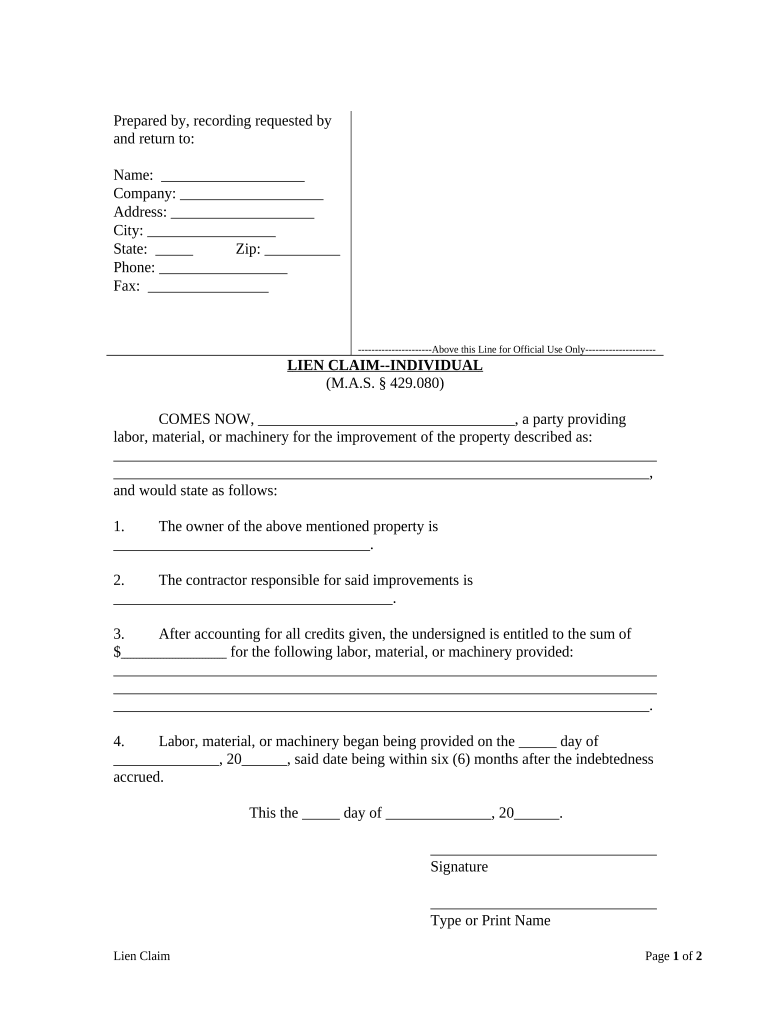
Owner Identification

Name and address of the property owner as shown in county records to link the claim to the correct parcel.

Property Description

Legal description or assessor parcel number (APN) taken from the deed to ensure precise recordation.

Amount Owed

Clear, itemized dollar amount showing principal, retainage, interest, and any unpaid change orders.

Basis for Claim

Brief statement of labor or materials provided and contract or invoice references supporting the lien.

Verification

Signature, date, and any required notarization or sworn statement as required by state or local rules.

Required data elements at a glance

Claimant name: Full legal name
Claimant address: Physical mailing address
Owner name: Owner as recorded
Property ID: Legal description or APN
Amount: Exact dollar figure
Signature: Signer name and date

Common risks and consequences of filing errors

Lost lien rights: Missed deadlines can forfeit the claim
Invalid record: Incorrect property description may be rejected
Priority issues: Late filing can reduce lien priority
Attorney costs: Enforcement may require counsel expense
Perjury risk: False statements can have legal penalties
Title delays: Recorded liens can block closings

Frequent drafting and filing mistakes to avoid

  • Using informal property descriptions instead of the deed’s legal description causes recorder rejection or ambiguity.
  • Listing the wrong owner name (e.g., trade name vs. deed name) can defeat service and title linking.
  • Failing to serve required parties or to keep proof of service undermines enforcement and may be jurisdictionally fatal.
  • Skipping notarization or required sworn statements when the county requires them leads to invalidation.

eSignature vendor comparison for completing and signing a Missouri Lien

Compare common vendor attributes relevant to preparing, signing, and delivering a lien; signNow is listed first per platform details.

signNow DocuSign Adobe Sign PandaDoc HelloSign
Starting Price $8/user/mo $15/user/mo $14/user/mo $19/user/mo $15/user/mo
Free Trial 7-day free trial No No Yes, limited Yes, limited
Bulk Send Yes Yes Yes Yes No
Audit Trail Yes Yes Yes Yes Yes
Envelope Cap No envelope cap 100 envelopes/user/year Varies Varies Varies

Example scenarios showing common lien use

Real examples show why precise documentation and timely action matter when asserting lien rights.

Tim Martin, Founder — Martin Properties

Tim’s contracting firm filed a lien after retainage went unpaid

  • Lien asserted within project deadlines
  • The recorded claim preserved negotiation leverage and supported a subsequent settlement without lengthy foreclosure.

Kodi-Marie Evans, Director — Xerox

Xerox’s operations team used documented invoices and delivery receipts to support a materials lien

  • The claim matched deed records
  • Accurate filing minimized title delay and clarified the payment dispute for all parties.

Practical tips for accurate, efficient Missouri Lien filings

Apply consistent procedures to reduce errors, maintain audit-ready records, and preserve lien rights across projects.

Use deed-based descriptions
Copy the legal property description or APN directly from the deed or county parcel data to avoid ambiguity and recording issues.
Document chain of supply
Keep invoices, delivery receipts, and signed change orders grouped with the lien statement to support any enforcement action.
Confirm signatory authority
Obtain written delegation or corporate resolution showing the signer’s authority to bind the claimant before executing the lien.
Preserve proof of service
Retain certified mail receipts or sworn service affidavits to demonstrate compliance with statutory notice and service requirements.

Frequently asked questions about Missouri Liens

Answers to common operational and legal questions to help avoid mistakes when preparing, serving, and recording a lien.


Need help? Contact support

be ready to get more
Join over 28 million airSlate SignNow users