Establishing secure connection…Loading editor…Preparing document…

Iowa Small Estate Affidavit

This template is fully customizable. Edit the text, fill out the fields, and send it for signature. Give it a try!
Iowa Small Estate Affidavit

What the Iowa Small Estate Affidavit Is and when it applies

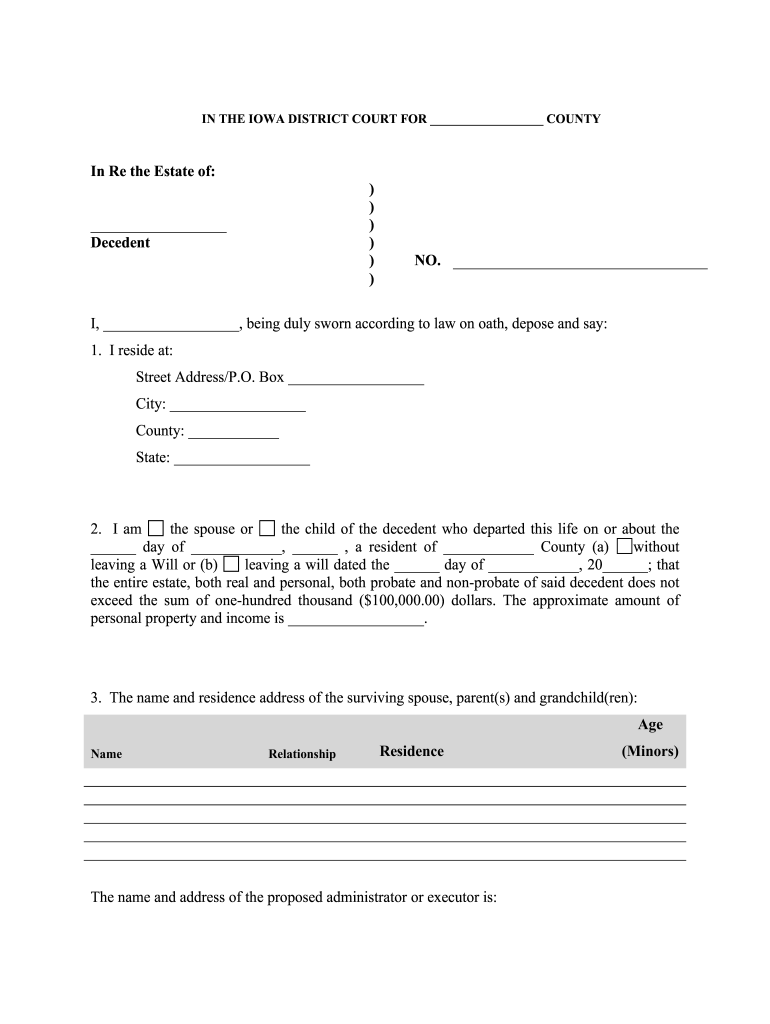
The Iowa Small Estate Affidavit is a sworn written statement used to collect or transfer certain personal property of a decedent without full probate when statutory thresholds are met. It provides a streamlined, affidavit-based alternative for heirs or personal representatives to claim assets such as bank accounts, vehicles, or personal belongings when the estate value and circumstances fit Iowa law. The affidavit identifies the decedent, lists assets and values, states the affiant's relationship and entitlement, and is executed under oath before a notary or other authorized official.

Why using the Iowa Small Estate Affidavit can simplify estate transfer

The affidavit reduces time, paperwork, and court costs by allowing certain small estates to transfer assets without formal probate. It clarifies entitlement for institutions, creates a signed record of the claimant’s assertions, and is accepted by many banks and title agencies when properly completed and authenticated.

Why using the Iowa Small Estate Affidavit can simplify estate transfer

Who typically completes an Iowa Small Estate Affidavit

Use the affidavit only when Iowa thresholds and eligibility rules are met; consult county clerk or counsel if in doubt.

  • Surviving spouse or domestic partner who is first in line to succeed to decedent property
  • Named beneficiary or heir presenting entitlement for bank or title transfer
  • Personal representative granted limited authority or acting informally to close accounts

Step-by-step: completing and presenting the affidavit

Follow these steps in order to prepare a usable affidavit and improve acceptance by institutions.

  • 01
    Review eligibility: Confirm estate value and asset types meet Iowa small estate criteria before proceeding.
  • 02
    Gather documents: Collect death certificate, account statements, title, and ID to support asset claims.
  • 03
    Complete affidavit: Fill all fields accurately, total values, and include your relationship to the decedent.
  • 04
    Notarize and submit: Sign before a notary, retain copies, then present to banks or title agencies with supporting documents.

How to organize your digital workflow for the affidavit

Set up a clear digital checklist to collect evidence, complete the form, authenticate, and share with payers.

Task Recommended setting
Document Collection Scan death certificate and account statements
Form Completion Use a fillable PDF or e-sign tool for clarity
Authentication Notarize or use RON where accepted
Submission Provide certified copies to banks and title offices

Typical submission path for a completed affidavit

This simple flow outlines where the affidavit goes after notarization and what each recipient typically requires.

  • Affiant prepares affidavit: Complete form and attach supporting documents
  • Notary or RON authentication: Affiant signs under oath and obtains notarial acknowledgment
  • Present to institution: Submit affidavit and supporting proofs to bank or title agency
  • Institution reviews and releases: Institution verifies and transfers or releases assets

Digital and integration considerations

Ensure any eSigned copy includes an audit trail showing signer identity, timestamp, and notarization to aid institutional acceptance.

  • File formats: PDF or PDF/A preferred for long-term preservation
  • Integrations: Systems often accept uploads via Google Drive, Box, or direct email
  • Authentication options: Use SMS code or identity verification when available

Security and legal compliance for eSigned affidavits

Encryption: TLS 1.2/1.3; AES-256 at rest
HIPAA: BAA required for PHI workflows
ESIGN / UETA: Meets ESIGN and UETA standards
Audit trail: Capture IP, timestamp, and signer events
21 CFR Part 11: Available for regulated use cases
Certifications: SOC 2 Type II and ISO 27001

Common preparation mistakes to avoid

  • Listing incomplete asset descriptions or missing account numbers can cause banks to refuse the affidavit and request formal probate.
  • Using an incorrect date format or omitting the decedent’s date of death can create ambiguity about eligibility and delay processing.
  • Failing to include proof of death, ID for the affiant, or supporting account statements often results in requests for additional documentation.
  • Submitting unsigned or unnotarized copies, or failing to follow the institution’s acceptance rules, commonly triggers rejection or longer review times.

Risks and legal consequences of incorrect affidavits

Affidavit Rejection: Institution declines transfer
Creditor Claims: Outstanding debts may arise
Civil Liability: False statements risk civil claims
Criminal Risk: Perjury exposure if knowingly false
Delays: Extended estate administration time
Costs: Additional attorney or court fees

Timing considerations and processing expectations

There is no universal federal filing deadline for small estate affidavits, but prompt action reduces creditor windows and administrative delays.

Prepare Promptly:

Begin within weeks after death to locate assets and gather documents

Institution Review:

Banks may take days to weeks to validate and release funds

Creditor Period:

Creditor claims can affect timing; consult local rules for notice periods

Notary Scheduling:

Plan for notary or RON appointment availability

Record Retention:

Keep records of submission and acceptance for future disputes

Comparison of common eSignature vendors for affidavit workflows

Vendor pricing and core features vary; signNow is listed first for comparison. Confirm plan details and enterprise options directly with providers.

signNow DocuSign Adobe Sign PandaDoc HelloSign
Starting Price $8/user/mo $15/user/mo $14/user/mo $19/user/mo $15/user/mo
Free Trial 7-day free trial No No Yes, limited Yes, limited
Bulk Send Yes Yes Yes Yes No
Audit Trail Yes Yes Yes Yes Yes
HIPAA Compliant Yes Yes Yes No No

Frequently asked questions about the Iowa Small Estate Affidavit

Answers to common practical and legal questions to help you avoid delays and ensure institutional acceptance.


Need help? Contact support

be ready to get more
Join over 28 million airSlate SignNow users