Establishing secure connection…Loading editor…Preparing document…

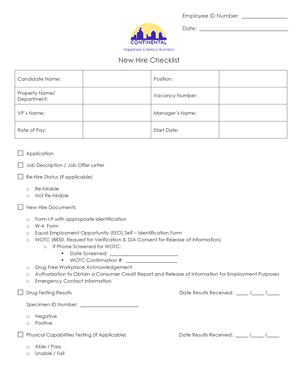
New Hire Checklist

This template is fully customizable. Edit the text, fill out the fields, and send it for signature. Give it a try!
New Hire Checklist

What the New Hire Checklist Is and Why It Matters

A New Hire Checklist is a structured list used by employers to collect required employee information, complete onboarding paperwork, and verify eligibility to work in the United States. Typical items include tax withholding forms (W-4), identity and employment authorization verification (Form I-9), direct deposit setup, emergency contacts, benefits enrollment, and acknowledgements of company policies. The checklist helps HR coordinate tasks across payroll, IT, benefits, and hiring managers so new employees have required accounts, access, and documentation in place before or shortly after the start date.

Why a Consistent New Hire Checklist Improves Compliance and Efficiency

A standardized checklist reduces onboarding errors, ensures federal requirements are met, and centralizes records for payroll and legal retention. It lowers rework, speeds payroll activation, and provides an auditable trail for regulatory reviews.

Why a Consistent New Hire Checklist Improves Compliance and Efficiency

Who Typically Prepares and Uses the New Hire Checklist

Human resources teams, hiring managers, payroll administrators, and IT provisioning staff use the checklist to coordinate new-employee setup and required documentation.

  • Human resources teams — create the checklist, collect forms, and store onboarding records for compliance.
  • Hiring managers — confirm role-specific requirements and ensure equipment or access is provisioned.
  • Payroll / benefits administrators — receive tax forms and bank details to initialize payroll and benefits.

Core Elements to Include on a Professional New Hire Checklist

Design the checklist to follow logical onboarding phases: identity and tax, payroll setup, policy acknowledgements, benefits enrollment, IT and security access, and final signoffs.

Personal Information

Collect full legal name, preferred name, home address, phone, and email. Use the government-issued name for tax and I-9 purposes to avoid mismatches during verification or background checks.
Employment Details

Record job title, department, manager, start date (MM/DD/YYYY), work location, exempt/nonexempt status, and employment type (FT/PT/temporary). These drive payroll classification and benefit eligibility.

Tax & Withholding

Include completion of Form W-4 and any state withholding forms. Accurate entries determine federal and state tax withholding and affect payroll calculations from the first pay period.

I-9 Verification

Document which List A or List B/C identity documents were presented. Employer completes Section 2 within three business days of hire to comply with 8 CFR §274a.2.

Payroll Setup

Collect direct deposit details, payroll tax IDs, and vendor or contractor payment preferences. Securely store bank routing and account numbers with access controls.

Acknowledgements

Have the employee sign acknowledgements for handbook receipt, confidentiality, safety policies, and any state-specific notices; capture signature date and method.

Step-by-Step: Completing the New Hire Checklist

Follow these steps in order to onboard a new employee efficiently and meet legal obligations.

  • 01
    Prepare Documents: Compile W-4, I-9, direct deposit, and policy acknowledgements.
  • 02
    Collect Forms: Have employee complete W-4 and Section 1 of I-9 on or before first day.
  • 03
    Verify Identity: Inspect I-9 documents and complete Section 2 within three business days.
  • 04
    Finalize Setup: Provision payroll, benefits, IT access, and store signed records securely.

Where to Send and File Completed New Hire Checklists

Use a single routing flow so each stakeholder receives required items and the completed checklist is archived in one location.

  • HRIS Upload: Save signed checklist to the employee record in HRIS or HR folder.
  • Payroll Queue: Forward tax and bank details to payroll before first pay run.
  • Benefits Admin: Send enrollment data to benefits administrator within enrollment window.
  • Personnel File: Store originals or certified copies per retention policy.

Typical Digital Workflow Settings for New Hire Checklists

Configure workflow fields and routing to automate collection, authentication, and storage of new-hire records.

Field Configuration
Authentication Email link or SMS code; use stronger methods for sensitive data.
Template Reuse Create reusable checklist template for consistent onboarding.
Conditional Fields Show benefits fields only for eligible employees.
Notifications Auto-notify HR, payroll, and hiring manager on completion.

Digital Signing and File Format Considerations

Ensure the eSignature provider supports audit trails, compliant storage, and the file types your HR systems require to maintain complete records.

  • Supported Formats: PDF and DOCX are standard
  • Integrations: Connect to HRIS, payroll, cloud storage
  • Security Controls: Two-factor and audit logs

Key Timelines and Deadlines to Observe During Onboarding

Adhere to federal timing rules and internal payroll deadlines to avoid penalties and payroll disruption.

I-9 Section 1:

Employee completes by first day of employment.

I-9 Section 2:

Employer completes within three business days (8 CFR §274a.2).

W-4 Submission:

Employee provides before first payroll run to set withholding.

Benefits Enrollment:

Meet plan-specific enrollment window, often within 30 days of hire.

Direct Deposit Setup:

Complete before first pay run to avoid manual checks.

Security and Compliance Checklist Items

Encryption: TLS 1.2/1.3 in transit; AES-256 at rest
Access Controls: Role-based access and least privilege
Audit Trail: Timestamps, IP, and signer attribution
HIPAA BAA: Execute BAA when PHI is present
21 CFR Part 11: Compliant for regulated records
Data Residency: Document storage location and backups

Common Onboarding Errors to Avoid

  • Entering informal or nickname instead of legal name causes mismatches on tax and I-9 documents and delays processing.
  • Failing to complete I-9 verification within the required period exposes the employer to civil penalties and enforcement risk.
  • Storing tax and bank details in unsecured email or spreadsheets increases breach risk and violates many data-protection policies.
  • Overlooking state-specific withholding or new-hire reporting obligations can lead to incorrect payroll deductions and compliance notices.

Penalties and Risks from Incomplete or Incorrect Checklists

Missing SSN: Backup withholding 24%
I-9 Violations: $281–$2,789 per violation
Late W-2/1099: Penalties under IRC §6721
Intentional Disregard: $660+ per form
Data Breach: Civil penalties and remediation costs
Incorrect Classification: Wage claims and tax assessments

eSignature Pricing and Feature Snapshot for New Hire Checklists

Compare entry pricing and common feature availability for popular eSignature vendors; signNow is listed first per vendor comparison convention.

signNow DocuSign Adobe Sign PandaDoc HelloSign
Starting Price $8/user/mo $15/user/mo $14/user/mo $19/user/mo $15/user/mo
Free Trial 7-day free trial Varies Varies Varies Varies
Bulk Send Yes Yes Yes Yes No
Audit Trail Yes Yes Yes Yes Yes
HIPAA Compliant Yes Yes Yes No No

Real-World Onboarding Scenarios and Outcomes

Organizations of different sizes streamline onboarding with checklist templates, eSignatures, and integrations to HR and payroll systems.

Martin Properties

Small real estate firm standardized onboarding to reduce errors in tenant-facing hires.

  • Tim Martin, Founder, used online signing for complete compliance.
  • He reports faster processing across devices and fewer missing documents, enabling timely payroll activation and improved recordkeeping for property managers.

Xerox (NetSuite Integration)

Enterprise deployment connected checklist templates to ERP for automatic provisioning.

  • Kodi-Marie Evans, Director of NetSuite Operations at Xerox, integrated signing into NetSuite workflows.
  • The integration reduced manual data entry, ensured consistent tax and payroll setup, and centralized signed records for audits.

Frequently Asked Questions About the New Hire Checklist

Answers to common questions about signatures, I-9 timing, form storage, and handling missing information during onboarding.


Need help? Contact support

be ready to get more
Join over 28 million airSlate SignNow users