Establishing secure connection…Loading editor…Preparing document…

Texas Renunciation and Disclaimer of Joint Tenant Interest

This template is fully customizable. Edit the text, fill out the fields, and send it for signature. Give it a try!
Texas Renunciation and Disclaimer of Joint Tenant Interest

What the Texas Renunciation and Disclaimer of Joint Tenant Interest Is

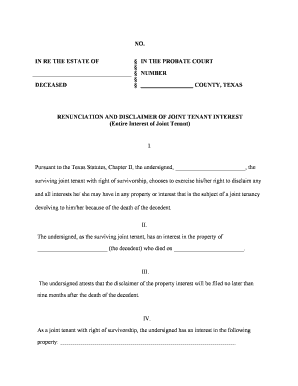
A Texas Renunciation and Disclaimer of Joint Tenant Interest is a written declaration by a person who holds property as a joint tenant stating that they give up (renounce) and disclaim any present or future ownership interest. The instrument clarifies title, can prevent the disclaimant from receiving a survivorship interest, and may be recorded in the county clerk’s office to update public records. Whether the form must be notarized, witnessed, or recorded depends on state and county practice; consult local recording rules and applicable state law before finalizing the document.

Why this Renunciation or Disclaimer Matters

Using a clear renunciation/disclaimer resolves competing ownership claims, reduces probate complexity, and clarifies who has title after a co-owner’s death. It can preserve estate planning goals or honor a prior agreement while creating a public record that third parties and title companies can rely on.

Why this Renunciation or Disclaimer Matters

Who commonly executes or receives this document

Typical parties involved and why each uses the form.

  • Surviving or co-owners seeking to decline a survivorship interest to honor estate planning or creditor considerations.
  • Estate attorneys and probate professionals using the document to resolve title issues and avoid litigation or administration costs.
  • Title companies and real estate closers who require a recorded disclaimer to clear title exceptions or complete transactions.

Each party should confirm the required execution formalities with local counsel or the county clerk to ensure the disclaimer is effective and recordable.

Core elements a professional renunciation/disclaimer should include

A complete document is concise but precise, identifying parties, describing the property, stating the renunciation language, setting an effective date, and providing signature and notarization areas suitable for recording.

Parties

Full legal names of the disclaimant and any affected co-owners, including suffixes and business entity identifiers where applicable, to avoid ambiguity in title records.
Property Description

A legally sufficient description of the real property (metes and bounds or recorded deed reference) that matches county recording details and prevents misidentification.

Renunciation Text

Clear, affirmative language stating the disclaimant irrevocably renounces and disclaims any present or future interest, including whether the disclaimer applies to survivorship rights.

Effective Date

A specific effective date in MM/DD/YYYY format when the renunciation takes effect for title and tax considerations.

Signature Block

Signature line for the disclaimant, date signed, and printed name; include notary acknowledgment or witness block if the county requires it for recording.

Recording Info

Space for county clerk recording stamps and instrument numbers, plus a mailing address for return of the recorded copy to the appropriate party.

Step-by-step completion and recording process

Follow this sequence to prepare, execute, and record a renunciation/disclaimer efficiently.

  • 01
    Prepare form: Populate names, legal description, and clear renunciation language.
  • 02
    Review with counsel: Confirm tax and estate implications before signing.
  • 03
    Execute before notary: Sign in presence of required notary or witnesses.
  • 04
    Record in county: Submit to county clerk for recording and obtain instrument number.

How to adapt this form to an online signing workflow

Configure fields and authentication for remote signing while preserving record integrity for recording or title review.

Field Configuration
Name Field Required; prefill from signer profile to avoid typos
Legal Description Field Multi-line text; required to match deed
Renunciation Text Block Read-only clause the signer must initial
Notary / RON Field Attach notarization evidence or RON session ID

Where to send and file the executed document

After execution and notarization, route copies to parties and record the original with the county clerk where the property is located.

  • County Clerk: Record original instrument to create public notice.
  • Title Company: Provide a recorded copy to clear title exceptions.
  • Executor or Trustee: Send an executed copy to administrators if relevant to estate matters.
  • Disclaimant: Retain a certified recorded copy for personal records.

Electronic signing and notarization considerations

Confirm that the chosen e-sign or RON provider meets jurisdictional and recording needs before using electronic methods.

  • Authentication: Use multi-factor or verified ID for stronger signer attribution.
  • Audit Trail: Preserve timestamps, IP addresses, and consent records.
  • Notarization: Ensure RON acceptance by the county or perform in-person notarization if required.

Keep both a certified recorded original and an electronic audit trail; verify county acceptance of electronically notarized or electronically signed instruments in advance.

Timing and typical processing expectations

Timeframes vary by county, but allow for internal review, notarization, mailing, and county recording times when planning transactions.

Internal review time:

Allow 1–3 business days for attorney or title review.

Notarization scheduling:

Book notary or RON session 1–5 business days in advance.

Mailing to county:

Allow 1–7 days depending on mail or courier.

County recording:

Recording may be immediate or take 3–10 business days for return.

Title update:

Title companies typically update records within 5–15 business days after recording.

Common mistakes to avoid

  • Failing to use the exact legal property description from the recorded deed leads to recording rejection or title ambiguity and can delay transactions.
  • Signing without required notarization or witnesses for the county can render the instrument unrecordable and ineffective to clear title.
  • Using informal or ambiguous renunciation language may leave intent unclear and invite litigation from heirs or creditors.
  • Sending only an electronic copy without preserving the audit trail or recording evidence can complicate later authentication needs.

Potential legal and practical risks

Invalidation: Document may be treated as void
Title defects: Undisclosed interests may remain
Tax consequences: Gift or estate tax issues possible
Probate delay: Estate administration complications
Recording rejection: County clerk may refuse filing
Beneficiary dispute: Litigation risk among heirs

Representative eSignature vendor comparison for signing and notarizing documents

Comparison of common eSignature vendors and core pricing or capability indicators relevant to executing and managing renunciations or disclaimers.

signNow DocuSign Adobe Sign PandaDoc HelloSign
Starting Price $8/user/mo $15/user/mo $14/user/mo $19/user/mo $15/user/mo
Free Trial 7-day free trial, no credit card required Varies by vendor Varies by vendor Varies by vendor Varies by vendor
Bulk Send Yes Yes Yes Yes No
Audit Trail Yes Yes Yes Yes Yes
HIPAA Compliant Yes Yes Yes No No

Frequently asked questions about renunciation and disclaimer forms

Answers to common questions about who can sign, notarization, recording, revocation, and the effect on title in straightforward language.


Need help? Contact support

be ready to get more
Join over 28 million airSlate SignNow users