Establishing secure connection…Loading editor…Preparing document…

California Renunciation and Disclaimer of Joint Tenant Interest

This template is fully customizable. Edit the text, fill out the fields, and send it for signature. Give it a try!
California Renunciation and Disclaimer of Joint Tenant Interest

What the California Renunciation and Disclaimer of Joint Tenant Interest Is

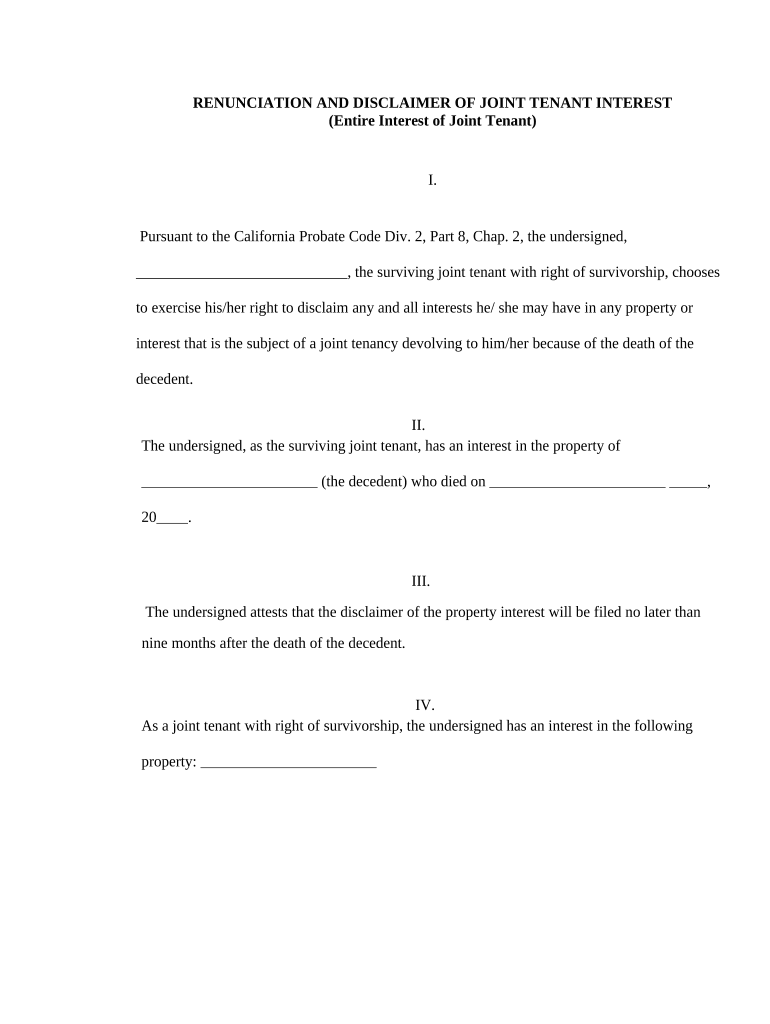
The California Renunciation and Disclaimer of Joint Tenant Interest is a written instrument by which a joint tenant formally renounces or disclaims any present or future interest in property held with another as joint tenants. It clarifies that the signing party gives up rights of survivorship or any claim to title, and is typically executed, notarized, and recorded with the county recorder to affect third-party rights. The document is used to change ownership expectations without initiating probate or a conveyance, but it must meet statutory and recording requirements to be effective.

Why This Document Matters for Property and Title Clarity

A clear renunciation/disclaimer removes ambiguity about survivorship, prevents unintended title transfer, and creates a public record for title companies and future purchasers, reducing disputes and simplifying estate administration.

Why This Document Matters for Property and Title Clarity

Which Parties Commonly Prepare or Sign This Form

Typical users include joint tenants, title companies, trustees, and real estate attorneys who need to document a voluntary relinquishment of ownership interest.

  • Joint tenant or co-owner who disclaims an interest
  • Title companies ensuring marketable record title
  • Real estate attorneys preparing or reviewing the instrument

Who Signs and Their Roles

Grantor / Renouncing Party

The individual who renounces or disclaims their joint tenant interest. They must sign and often must have identity verified; their intent to give up rights should be explicit in the instrument.

Notary / Witness

A notary public typically acknowledges the signer to validate execution for recording. Some counties or subsequent title reviewers may also request witness attestations or additional identity proofing.

Essential Recorded Document Data to Include

Document Title: Renunciation and Disclaimer
Grantor Name: Full legal name
Property Description: Complete legal description
County Recorder: Recording county name
Notarization Status: Notary acknowledgement
Effective Date: MM/DD/YYYY format

Legal Risks and Consequences to Watch For

Invalid Recording: May not affect title
Unintended Tax Results: Gift or income tax implications
Title Defects: Clouds on marketable title
Probate Complications: Survivorship disputes in estate
Creditor Claims: Potential creditor access
Enforcement Risk: Challenge for lack of capacity

Common Preparation Mistakes to Avoid

  • Leaving the legal description incomplete, which can prevent the county recorder from accepting the instrument or create ambiguity in title records.
  • Failing to notarize the signature before recording, causing rejection by the recorder or later challenge to validity in title searches.
  • Not delivering the recorded document to the title company or lender, leaving downstream parties unaware of the renunciation and increasing closing friction.
  • Using vague language like 'I give up interest' without specifying the nature of the relinquishment or the rights being disclaimed.

Step-by-Step: How to Complete the Renunciation and Disclaimer

Follow these steps in order to prepare, execute, and record a California Renunciation and Disclaimer of Joint Tenant Interest effectively.

  • 01
    Draft: Use precise grantor language and full legal description.
  • 02
    Review: Have a title company or attorney confirm form suffices.
  • 03
    Notarize: Sign before a notary; verify ID and capacity.
  • 04
    Record: File with the county recorder where property lies.

Where the Document Goes After Signing

Routing the executed instrument ensures effect against third parties and updates public title records.

  • Notary Acknowledgement: Notary verifies identity and notarizes signature.
  • County Recording: Recorder files instrument against property title.
  • Title Company: Title insurer updates chain-of-title records.
  • Document Distribution: Return recorded copy to all interested parties.

How to Configure a Digital Workflow for This Instrument

Configure an online signing workflow that mirrors the physical execution and recording steps for traceability and compliance.

Field Configuration
Signing Order Grantor first, then notarization placeholder
Authentication Email + SMS or multi-factor for identity
Notary Process Use RON where permitted or in-person
Record-ready PDF Flatten fields and preserve audit trail

Technical Considerations for eSigning and eRecording

When completing digitally, choose a platform that captures an audit trail, supports notarization workflows, and exports recorder-acceptable PDFs.

  • Audit Trail: IP, timestamps, and signer events
  • Integration: Salesforce, NetSuite, Microsoft 365
  • Export Format: PDF/A or flattened PDF for recorders

eSignature Vendor Pricing and Capability Snapshot

Compare typical starting prices and core capabilities for common eSignature vendors used with real estate instruments. Confirm plan details with each vendor before purchase.

signNow DocuSign Adobe Sign PandaDoc HelloSign
Starting Price $8/user/mo $15/user/mo $14/user/mo $19/user/mo $15/user/mo
Free Trial 7-day free trial Varies by plan Varies by plan Yes, limited Yes, limited
Bulk Send Yes Yes Yes Yes No
Audit Trail Yes Yes Yes Yes Yes
HIPAA Compliant Yes Yes Yes No No

Frequently Asked Questions About Renunciation and Disclaimer Forms

Answers to common questions about execution, recording, and the legal effects of a renunciation or disclaimer of joint tenant interest in California.


Need help? Contact support

be ready to get more
Join over 28 million airSlate SignNow users