Establishing secure connection…Loading editor…Preparing document…

Letter Regarding Outstanding Legal Fees

This template is fully customizable. Edit the text, fill out the fields, and send it for signature. Give it a try!
Letter Regarding Outstanding Legal Fees

What this Letter Is and When to Use It

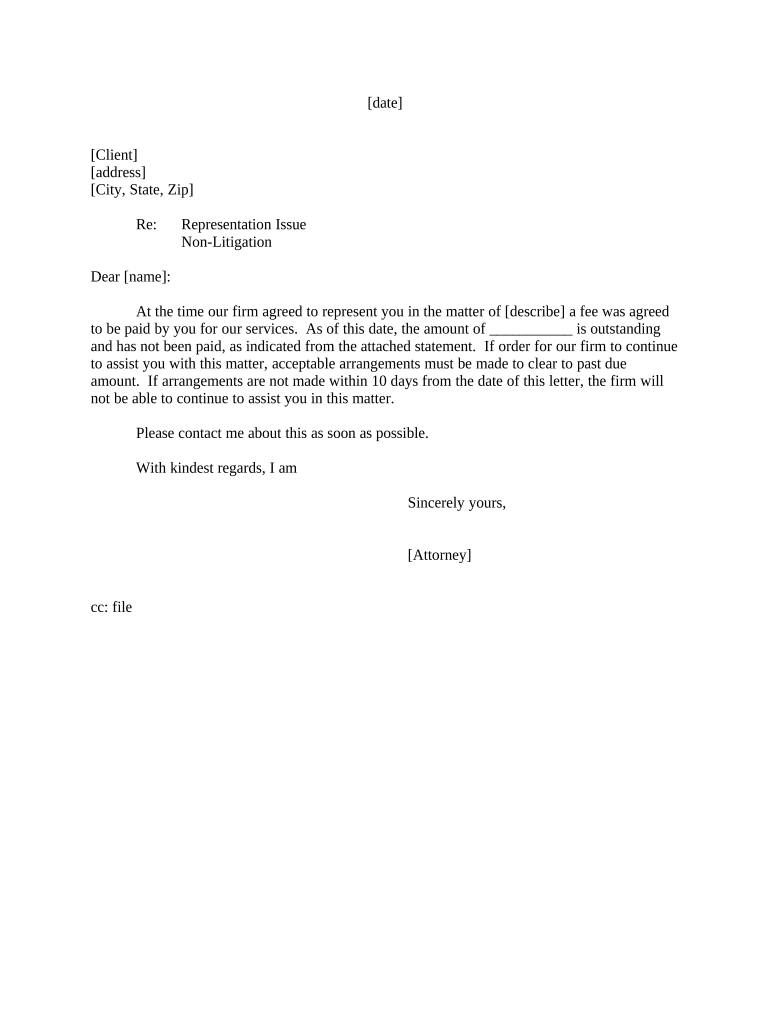
A Letter Regarding Outstanding Legal Fees is a formal written notice from a law firm or attorney to a client that identifies unpaid legal services, the amount owed, and the expected payment terms. It typically summarizes the underlying matter or invoice, provides an itemized balance or reference to an attached invoice, and explains next steps if payment is not received such as interest, suspension of services, or referral to collections. The letter documents the demand for payment and creates a record useful for internal accounting, client communications, and potential collection or litigation actions.

Why a Clear Written Demand Matters

A concise, professional letter clarifies amounts owed, reduces misunderstandings, and preserves evidence of demand that may affect collection options and the statute of limitations. It also documents attempts to resolve the matter before escalating to collections or litigation.

Why a Clear Written Demand Matters

Who Typically Sends and Receives This Letter

Recipients are clients, responsible third parties, or guarantors named in engagement agreements; tailor tone and content to the recipient and engagement terms.

  • Small law firms and solo attorneys seeking timely payment while preserving client relationships.
  • Collections or accounts receivable teams at mid-size law firms following billing policy.
  • In-house counsel notifying vendors or insured parties of outstanding fees tied to a matter.

Who Signs and Sends These Letters

Billing Manager

Typically drafts and sends standardized demand letters under attorney supervision, maintains billing records, and tracks follow-up actions. The billing manager ensures the letter aligns with the engagement agreement and documents delivery for the firm file.

Engagement Attorney

Signs or approves the demand when substantive matters or fee disputes exist. The attorney confirms that the amount claimed is accurate, that ethical obligations are met, and that any threat to suspend services conforms with state bar rules.

Step-by-Step: Preparing and Sending the Letter

Follow a consistent sequence to prepare a defensible demand and preserve records for future actions.

  • 01
    Verify Balance: Confirm invoice details and outstanding amounts before drafting.
  • 02
    Draft Letter: State facts, itemize charges, and cite the engagement agreement.
  • 03
    Approve and Sign: Obtain attorney approval and sign physically or electronically.
  • 04
    Deliver and Record: Send via certified mail or secure eDelivery and log delivery evidence.

Typical Delivery and Follow-Up Flow

A clear routing procedure reduces disputes and ensures timely escalation when payments are not received.

  • Prepare Demand: Assemble invoice, retainer ledger, and supporting time entries.
  • Send Notice: Deliver by certified mail, email with read receipt, or eSignature-enabled portal.
  • Await Response: Allow the client a reasonable cure period per engagement terms.
  • Escalate: If unpaid, consider interest, lien rights, or collection referral.

Essential Elements to Include in the Letter

Include specific elements so recipients clearly understand the claim and the consequences of nonpayment.

Statement of Debt

Concise description of the unpaid services with dates and reference to the invoice or billing statement so the recipient can verify charges quickly.
Itemization

List fees, expenses, and any applicable interest or administrative charges so totals are transparent and calculable from provided entries.

Reference to Engagement

Cite the engagement agreement or fee arrangement and any dispute resolution provisions that may govern collection or fee challenges.

Payment Instructions

Specify acceptable payment methods, remittance address, account details if applicable, and who to contact with questions.

Deadline

State a clear deadline by which payment must be received and indicate steps the firm will take if payment is not made.

Consequences

Describe potential actions such as account suspension, interest accrual, lien filing, or referral to collections while avoiding coercive or unethical language.

Best Practices for Professional Tone and Accuracy

Use neutral language, document every contact, and follow ethical rules when communicating about fees.

Keep Communications Neutral
Avoid inflammatory or threatening language. State facts plainly to protect professional conduct obligations and reduce risk of counterclaims.
Attach Supporting Documents
Include the invoice, retainer agreement, and a brief ledger to make verification straightforward and reduce avoidable disputes.
Confirm Delivery
Use traceable delivery methods such as certified mail or secure e-delivery and retain receipts and timestamps for the firm file.
Follow Ethical Rules
Ensure fee collection tactics comply with state bar rules and avoid improper threats or misrepresentations about legal actions.

Common Preparation Pitfalls to Avoid

  • Using vague amounts or ambiguous dates that make it harder for the recipient to reconcile with their records.
  • Failing to reference the engagement agreement which can lead to disputes about fee entitlement or agreed billing rates.
  • Neglecting to document delivery which weakens later collection or lien filings that require proof of demand.
  • Threatening litigation prematurely or using aggressive language that may violate professional conduct rules and escalate conflict.

Risks If the Letter Is Incorrect or Mishandled

Statute of Limitations: Loss of claim
Ethics Violation: Bar discipline risk
Collection Limits: Damaged remedy options
Client Relations: Reputational harm
Incorrect Amount: Payment dispute
Improper Threats: Legal exposure

Timing Considerations and Response Deadlines

Set a clear, reasonable deadline for payment and allow sufficient time for client review and bank processing.

Standard Cure Period:

14 days typical

Shorter Deadlines:

Use only if permitted

Interest Start Date:

Specify exact date

Collection Referral:

After stated deadline

Statute of Limitations:

Check state law

Key Milestones from Draft to Collection

Track milestones so decisions about escalation and documentation are timely and defensible.

01

Draft Completed

Letter prepared and reviewed by billing or counsel.

02

Delivery Logged

Proof of delivery recorded in billing file.

03

Response Window

Client review and payment period runs.

04

Escalation Decision

Refer to collections or pursue legal remedies if unpaid.

Electronic Delivery and Technical Considerations

Maintain copies of delivery receipts, audit logs, and signed acknowledgements in the client matter file for potential enforcement.

  • Secure Email: Use encrypted email or firm portal.
  • Certified Mail: Provides physical proof of mailing.
  • eSignature: Capture timestamp and audit trail.

Recommended Digital Workflow Settings

Standardize fields and authentication to minimize disputes and preserve admissible records.

Field Configuration
Authentication Level Email + access code
Audit Trail Enable IP, timestamp, and action log
Attachment Policy Attach invoice and ledger
Retention Setting Keep signed copy indefinitely

Real-World Examples of Use

Examples show practical adaptations and outcomes when firms use a structured demand letter.

Small Firm Billing

A solo firm sent a clear itemized demand with invoice references

  • Client paid within 10 days
  • The firm recorded proof of delivery and avoided collections while preserving client relationship.

In-House Counsel Notice

Corporate counsel issued a formal demand for outside counsel fees

  • Matter reconciled with internal ledger
  • The company withheld payment until disputed time entries were clarified, then completed payment.

Comparing eSignature Pricing and Key Capabilities

Contrast common plan criteria for selecting an eSignature provider; signNow appears first as the platform example for cost context.

signNow DocuSign Adobe Sign PandaDoc HelloSign
Starting Price $8/user/mo $15/user/mo $14/user/mo $19/user/mo $15/user/mo
Free Trial 7-day free trial Varies by plan Varies by plan Varies by plan Varies by plan
Bulk Send Yes Yes Yes Yes No
Audit Trail Yes Yes Yes Yes Yes
HIPAA Compliant Yes Yes Yes No No
Envelope Cap No cap 100 envelopes/user/year Varies Varies Varies

Frequently Asked Questions

Answers to common practical and legal questions about issuing and enforcing an outstanding-fees letter.


Need help? Contact support

be ready to get more
Join over 28 million airSlate SignNow users