Establishing secure connection…Loading editor…Preparing document…

Letter Requesting Filing of Agreed Order

This template is fully customizable. Edit the text, fill out the fields, and send it for signature. Give it a try!
Letter Requesting Filing of Agreed Order

What the Letter Requesting Filing of Agreed Order Is

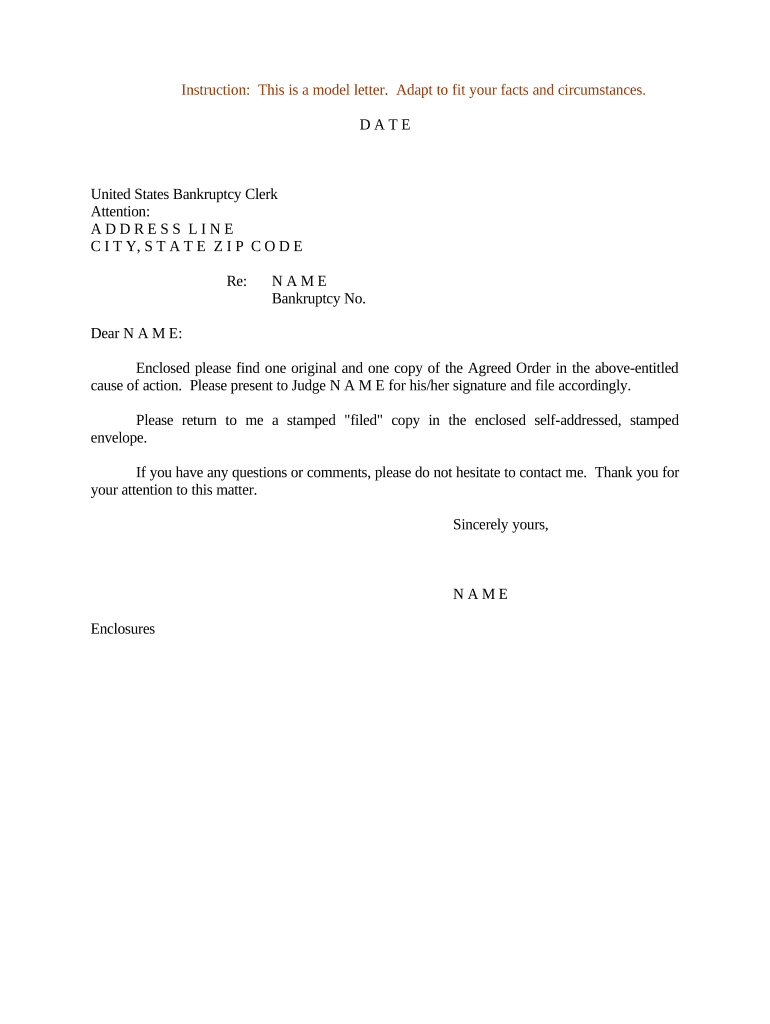
A Letter Requesting Filing of Agreed Order is a concise, formal cover letter submitted to a court clerk or judicial assistant asking the clerk to file an agreed order that parties have negotiated and signed. The letter identifies the case, confirms that the parties have stipulated to the order, explains the requested entry or docket action, and directs the clerk to file or enter the attached agreed order in the court record.

Why You Prepare This Letter

The letter clarifies filing intent, helps the clerk apply the correct docket code, and creates a clear administrative trail showing the parties requested the agreed order be entered.

Why You Prepare This Letter

Who Typically Prepares and Sends This Letter

The letter reduces clerical confusion and speeds formal entry when it follows local court filing rules and includes the signed agreed order.

  • Plaintiff or defense counsel preparing court filings and docket entries after settlement.
  • In-house counsel submitting post-negotiation stipulations to the supervising court.
  • Pro se litigants following court procedures to request entry of agreed terms.

Step-by-step: Preparing the Letter

Follow these practical steps to prepare a complete, court-ready letter requesting filing of an agreed order.

  • 01
    Confirm Agreement: Verify all parties have signed the agreed order before requesting filing.
  • 02
    Prepare Caption: Use the exact case caption and number from the court docket.
  • 03
    Attach Order: Attach the fully executed agreed order as a separate PDF.
  • 04
    File and Serve: File via CM/ECF or clerk's office and serve opposing parties per local rules.

Where and How to Submit Your Letter

Submission methods depend on the court and local rules; common paths include electronic case filing systems, clerk's intake counters, or email when permitted.

  • Electronic Filing: Upload letter and attached agreed order via the court's CM/ECF or e-filing portal.
  • Clerk's Office Drop-off: Deliver a printed letter and original signatures at the filing counter where allowed.
  • Court Email: Use court-authorized inboxes only when the local practice permits email filing.
  • Mail or Overnight: Send a physical packet with a cover letter and original signed agreed order if required by the court.

Digital Filing Workflow Checklist

Configure your e-filing workflow so attachments, metadata, and service certificates match court requirements.

Field Configuration
Document Format PDF/A or court-accepted PDF
Filename Convention Include case number and short title
Metadata Populate case number, filing type, and counsel info
Service Notice Attach certificate of service per local rules

Essential Elements to Include in the Letter

A professional filing letter should be brief, precise, and include all items a clerk needs to process the agreed order without follow-up.

Case Identification

Full court caption, docket number, and judge assignment so the clerk places the order in the correct file.
Statement of Request

A clear sentence asking the clerk to file or enter the attached agreed order and to docket the action accordingly.

Attachment Description

List the attached agreed order and any exhibits or proposed forms to be filed with the clerk.

Signature and Authority

Signature of the filing party or counsel and a note identifying signatory authority to present the document for filing.

Service Confirmation

A certificate of service describing how opposing parties were served and when, per local rules.

Contact Details

Phone, email, and postal address for clerk questions or to return conformed copies.

Digital Submission: Platform and Integration Considerations

Confirm local court rules for accepted electronic formats and maintain an audit trail showing who submitted the filing and when.

  • File Formats: PDF/A or court-accepted PDF only
  • Authentication: Use account-based or two-factor login for secure filing
  • Integrations: Platforms often integrate with systems like Salesforce, NetSuite, and Microsoft 365

Typical Timelines and Filing Deadlines

Timeframes vary by court; follow any judge-specific deadlines and local rules when requesting filing of an agreed order.

Immediate Filing:

File as soon as the agreed order is fully executed to avoid disputes over effective dates.

Local Rule Windows:

Some courts require filing within 7–30 days after agreement; check local rules or standing orders.

Clerk Processing Time:

Clerks typically docket filings within 1–5 business days after proper submission.

Opposition or Objection:

If a third party objects, the court may schedule a hearing within 14–45 days.

Appeal Timing:

Entry of an agreed order often triggers appeal deadlines that vary by jurisdiction.

Key Milestones from Agreement to Docketing

Track these sequential milestones to ensure the agreed order is accepted and entered correctly on the docket.

01

Agreement Finalized

Parties execute the agreed order and confirm final language before submission.

02

Letter and Attachments Prepared

Draft the cover letter, attach the signed agreed order, and assemble service proof.

03

Submit to Court

File via CM/ECF, clerk intake, or permitted email with required cover letter.

04

Clerk Dockets Order

Clerk reviews, dockets the agreed order, and returns conformed copy or docket entry.

Common Pitfalls to Avoid

  • Submitting an unsigned or partially signed agreed order that the clerk cannot file and will return.
  • Using an incorrect case caption or number, causing the document to be misfiled or delayed.
  • Failing to include a certificate of service, which can violate local rules and lead to rejection.
  • Uploading non-conforming PDF formats or embedding non-searchable attachments that clerks cannot process.

Security and Compliance Items to Preserve

Encryption: TLS 1.2/1.3 in transit; AES-256 at rest
Audit Trail: Timestamp, IP, signer attribution
HIPAA: BAA required for PHI-containing filings
ESIGN / UETA: Legal framework for e-signature validity
21 CFR Part 11: Applies to regulated FDA records
SOC 2 / ISO: Third-party certifications for controls

Consequences of Incorrect or Late Filing

Return or Rejection: Clerk may reject improper submissions
Delay of Relief: Entry delays can prolong disputed obligations
Service Violations: Improper service may invalidate filing
Sanctions: Court may impose procedural sanctions
Appeal Risks: Incorrect entry can affect appellate timelines
Tax/Regulatory: Missed statutory deadlines invite penalties

Typical eSignature Pricing and Feature Comparison

Compare common vendor pricing and key features relevant to filing signed court documents; signNow is listed first per platform comparison guidance.

signNow DocuSign Adobe Sign PandaDoc HelloSign
Starting Price $8/user/mo $15/user/mo $14/user/mo $19/user/mo $15/user/mo
Free Trial 7-day free trial, no credit card required Varies by plan Varies by plan Varies by plan Varies by plan
Bulk Send Yes Yes Yes Yes No
Audit Trail Yes Yes Yes Yes Yes
HIPAA Compliant Yes Yes Yes No No
Envelope Cap No cap 100 envelopes/user/year Varies by plan Varies by plan Varies by plan

Real-world Context: How Teams Use Filing Letters

Below are short examples of organizations using electronic workflows and cover letters to manage court or administrative agreed orders.

Optica Ventures

A small real estate operator streamlined post-settlement filing with concise cover letters and attached agreed orders for clerk action.

  • The interface was simple for clients and counsel.
  • Brian Fitzgibbons, COO, noted that ease of use for both internal teams and external parties reduced follow-up and improved filing accuracy.

Martin Properties

A property manager used signed electronic documents and cover letters to get agreed orders entered without in-person attendance.

  • Documents were processed end-to-end online.
  • Tim Martin, Founder, described processing and executing documents online while maintaining compliance and returning conformed copies efficiently.

Typical Signatories and Their Roles

Court Clerk

Clerks receive the letter and attachments, verify case details, apply appropriate docket codes, and officially file or enter the agreed order on the court record; accurate caption and attachments minimize clerical follow-up.

Managing Attorney

Counsel prepares the cover letter, ensures the agreed order is fully executed, confirms service on all parties, and files the package in compliance with local rules, preserving evidence of transmission and receipt.

Frequently Asked Questions About Filing an Agreed Order

Answers to common questions about preparing, signing, submitting, and preserving the Letter Requesting Filing of Agreed Order.


Need help? Contact support

be ready to get more
Join over 28 million airSlate SignNow users