Establishing secure connection…Loading editor…Preparing document…

Letter Requesting Library Access for Student

This template is fully customizable. Edit the text, fill out the fields, and send it for signature. Give it a try!
Letter Requesting Library Access for Student

What this Letter Is and When to Use It

A Letter Requesting Library Access for Student is a formal written request used by a student, parent, guardian, or authorized representative to obtain campus or public library privileges, research account credentials, or temporary access to restricted collections. The letter typically identifies the student, states the reason for access (academic research, course work, or disability accommodation), lists accompanying documentation, and requests specific privileges and effective dates. Institutions use this document to verify identity, apply eligibility rules, and create or modify patron records in their circulation systems and access-control platforms.

Why a Clear, Compliant Request Matters

A concise, properly completed letter speeds verification, reduces follow-up, and documents consent for recordkeeping. It also supports privacy and access decisions governed by federal e-signature law (ESIGN, 15 U.S.C. ch. 96) and state rules (UETA where adopted).

Why a Clear, Compliant Request Matters

Who Typically Prepares or Receives This Letter

University students, parents or guardians, disability services staff, library circulation teams, and registrars commonly prepare or process these requests.

  • Students seeking temporary research access for off-campus or visiting scholar status, often needing ID and enrollment proof.
  • Parents or guardians requesting access on behalf of minor students or dependents with supporting custody or guardianship documentation.
  • Library or registrar staff who verify identity, eligibility, and authorize account creation or role-based access.

Use institutional templates and retain a copy of the request in student records to support audits and appeals.

Primary Roles That Sign or Approve

Registrar — Records Officer

A registrar or records officer verifies enrollment status, confirms student identity, and authorizes access when institutional policy requires official documentation. Their approval establishes eligibility and creates a record of institutional consent retained under student records rules.

Library Manager — Circulation Lead

A library manager or circulation lead evaluates access requests, confirms required documents (ID, enrollment proof, faculty sponsor), and configures account privileges. They are responsible for enforcing borrowing limits and security policies.

Essential Information to Include

Student Full Name: Exact legal name
Student ID: University/college ID number
Institution: School or department
Purpose: Research or course reason
Access Duration: Start and end dates
Contact Email: Institutional email address

Step-by-Step: Preparing and Submitting the Letter

Follow these sequential steps to prepare a clear request and minimize processing time.

  • 01
    Draft letter: Write request with student details and purpose.
  • 02
    Attach documents: Add ID, enrollment proof, sponsor emails.
  • 03
    Sign and date: Student or authorized signer must sign.
  • 04
    Submit to library: Send via institution channel or library email.

How the Submission and Approval Flow Works

A typical processing flow moves from submission to verification, approval, and access provisioning; steps and responsible parties are shown below.

  • Upload or Send: Sender uploads letter and attachments to library intake.
  • Verify Identity: Library or registrar confirms ID and enrollment.
  • Authorize Access: Manager approves requested privileges and duration.
  • Activate Account: IT or circulation team provisions credentials.

Configuring an Online Submission Workflow

If you accept requests online, these workflow settings reduce friction and ensure records remain auditable.

Field Configuration
Identity Verification Require institutional email plus photo ID upload
Required Attachments Enrollment proof and photo ID are mandatory
Signer Authentication Email link or SMS code for signer attribution
Record Retention Store signed request with audit trail for retention

Technical Requirements for eSubmission and Signing

Confirm platform compatibility and authentication before accepting e-submissions and electronic signatures.

  • File Formats: Accept PDF and DOCX for uploads
  • Authentication: Support email, SMS, or institutional SSO
  • Integrations: Connect with campus systems like Google Workspace

Ensure chosen tools capture an audit trail (IP, timestamp) and can export signed records for retention and audits.

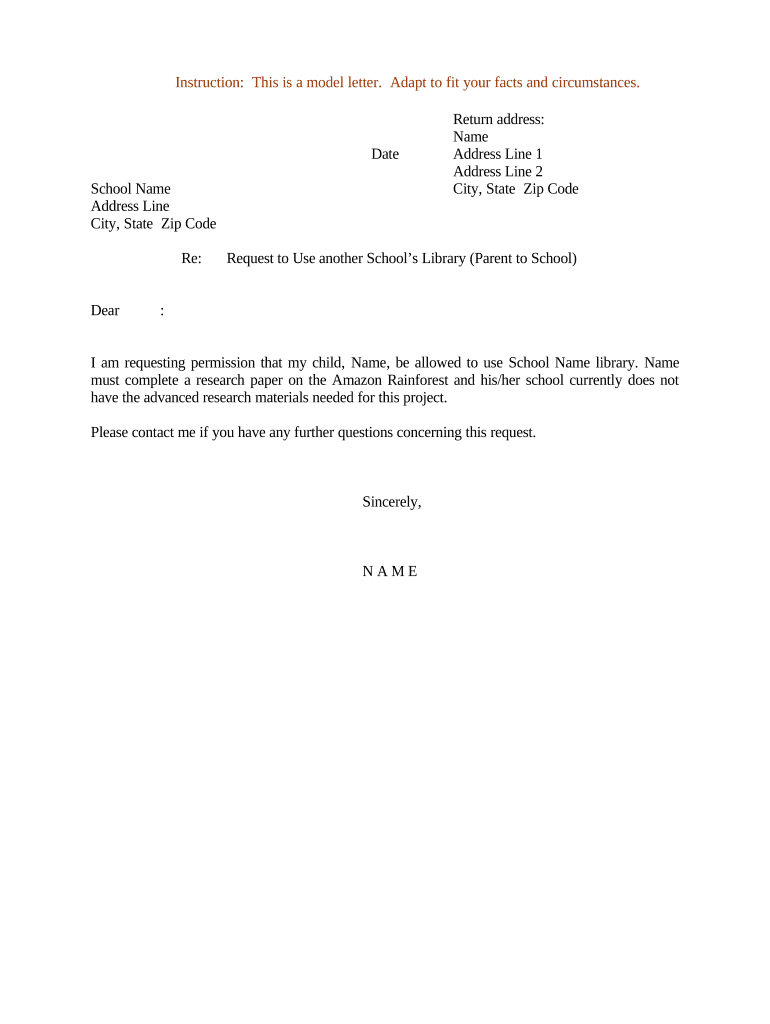
Anatomy of a Professional Library Access Letter

A concise professional letter includes clear identification, purpose, supporting documents, precise dates, and an explicit request for specific privileges or resources.

Header

Include sender name, institutional address, date, recipient name, and library contact to establish provenance and proper routing.
Recipient Information

Address the letter to the library director, circulation manager, or designated access officer and include departmental contact details for replies.

Student Identification

State full legal name, student ID, program, and institutional email so staff can verify enrollment and match records accurately.

Purpose Statement

Explain the research, course needs, or accommodation with concise justification that clarifies the scope and duration of access requested.

Supporting Documents

List and attach proof of enrollment, photo ID, faculty sponsorship, or disability documentation as required by institutional policy.

Signature Block

The student or authorized signer must sign and date; include printed name and relationship if signed by parent or guardian.

Typical Use Cases from Academic Settings

These short examples show how access requests are used and documented in common academic scenarios.

Campus Visiting Researcher

A visiting graduate student requests temporary access to special collections for thesis work (two-month term).

  • Faculty sponsor provides letter of invitation.
  • Library issues a time-limited account and reading-room privileges after verifying the sponsor letter and government ID; archival handling rules apply.

Undergraduate Course Reserve

A student requests off-hours access to course reserve materials for a group project.

  • Course instructor emails supporting confirmation.
  • Circulation approves restricted access and notates pickup/return rules; student signs to acknowledge borrowing conditions.

Processing Times and Recommended Submission Windows

Submit requests allowing time for verification, especially during semester start or library backlog periods; timelines vary by institution.

Standard Processing:

3–7 business days typical

Rush Requests:

1–2 business days with justification

Semester Start Peak:

Submit 2 weeks before term begins

Account Expiration:

Matches requested end date or semester end

Appeal Window:

Request reconsideration within 10 business days

Key Milestones from Request to Access

Track these milestones to understand where delays can occur and who is responsible at each stage.

01

Submission Received

Library intake records the incoming letter and attachments.

02

Identity Verification

Staff confirm ID, student status, and supporting documents.

03

Approval Decision

Manager grants, modifies, or denies requested privileges.

04

Access Provisioned

IT or circulation enables account and notifies requester.

Common Preparation Errors That Cause Delays

  • Missing or low-quality ID images that prevent staff from confirming identity and matching records to the student.
  • Unclear or vague purpose statements that require follow-up to determine appropriate privilege level or materials access.
  • Failing to attach required institutional enrollment verification, which often triggers denial or extended processing.
  • Using personal instead of institutional email, creating difficulty confirming affiliation and routing the request.

Risks and Consequences of an Incorrect or Incomplete Letter

FERPA Violation: Improper disclosure risk
Access Denial: Request rejected
Processing Delay: Extended verification time
Identity Mismatch: Access audit flagged
Data Exposure: Document confidentiality risk
Policy Noncompliance: Internal discipline possible

eSignature Vendor Pricing and Feature Snapshot

Comparing basic pricing and key capabilities can help institutions choose an eSignature provider; signNow is listed first per comparison conventions.

signNow DocuSign Adobe Sign PandaDoc HelloSign
Starting Price $8/user/mo $15/user/mo $14/user/mo $19/user/mo $15/user/mo
Free Trial 7-day free trial Varies by plan Varies by plan Varies by plan Varies by plan
Bulk Send Yes Yes Yes Yes No
Audit Trail Yes Yes Yes Yes Yes
HIPAA Compliant Yes Yes Yes No No

Frequently Asked Questions and Troubleshooting

Answers to common operational and compliance questions about preparing, submitting, and signing a Letter Requesting Library Access for Student.


Need help? Contact support

be ready to get more
Join over 28 million airSlate SignNow users