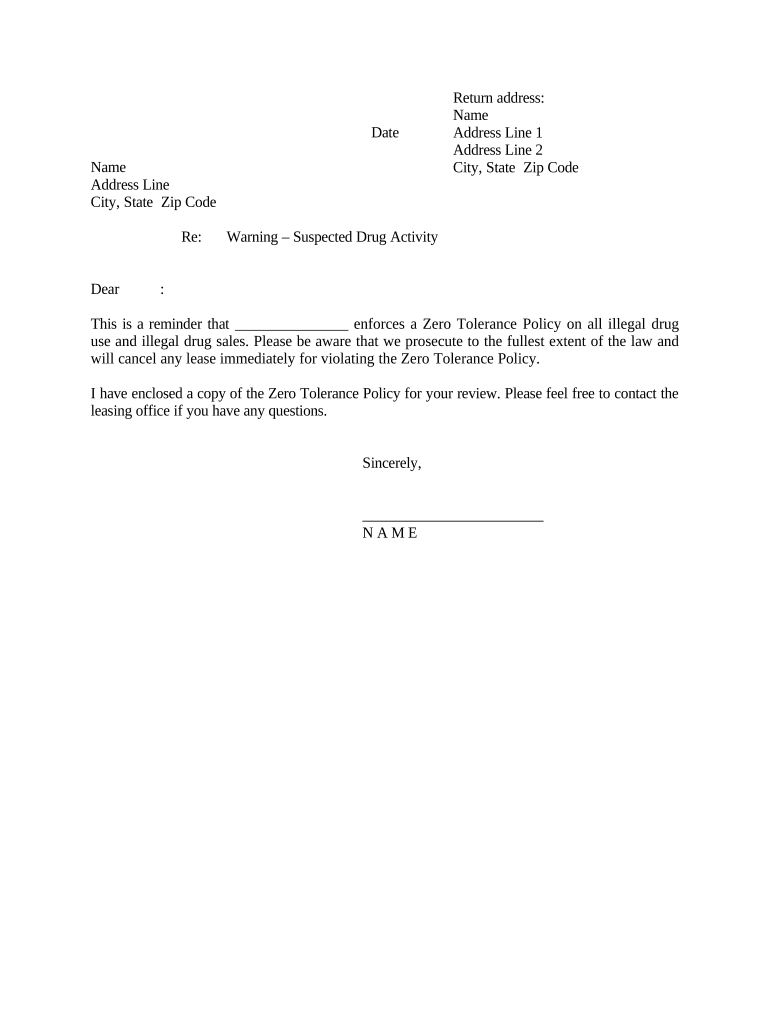
Warning Regarding Suspected Drug Activity
What the Warning Regarding Suspected Drug Activity Is and When It’s Used
Why issuing a clear warning matters
A clear, well-documented warning creates an auditable record that supports rapid response, protects third-party safety, and preserves legal options. It helps establish notice for lease enforcement, administrative remedies, or law-enforcement referrals while reducing ambiguity about required corrective actions.
Who typically prepares and receives this warning
Use the notice consistently as part of an incident response workflow to preserve evidence, meet contract requirements, and reduce liability exposure.
- Property managers and landlords who must enforce lease terms and nuisance rules and maintain tenant safety.
- Employers and human resources teams when suspected drug activity appears on workplace property or affects employee safety.
- HOAs, building security, and local community safety officers documenting incidents for coordinated response with law enforcement.
Typical signers and their roles
Property Manager
A property manager drafts and issues the warning when on-site staff or residents report suspected drug activity. They collect observable facts, attach evidence (photos, timestamps), and follow the lease's notice and cure or eviction procedures while coordinating with counsel and local law enforcement as needed.
Employer HR
An HR manager uses the form when conduct occurs on employer premises or directly impacts workplace safety. HR documents incidents, reviews workplace policy, determines interim safety measures, and coordinates any disciplinary or investigatory steps consistent with company policy and applicable employment law.
Quick step-by-step: complete and issue a warning
-
01Identify incident: Record who, what, where, and when with precise facts.
-
02Collect evidence: Attach photos, video, or witness statements with timestamps.
-
03Draft notice: State observed conduct, lease or policy citations, and corrective steps.
-
04Deliver and archive: Send via a documented method and retain the signed copy.
Process flow for issuing and tracking the notice
-
Document: Create the warning and attach evidence.
-
Notify: Deliver to the named recipient using recordable methods.
-
Respond: Allow the recipient to remedy or explain within policy timelines.
-
Escalate: Begin enforcement or refer to authorities if unresolved.
Recommended digital workflow settings
| Field | Configuration |
|---|---|
| Delivery Method | Certified mail plus e-delivery with read receipt |
| Signer Authentication | Email link with SMS code or ID verification |
| Evidence Handling | Attach files and store originals in secure archive |
| Record Retention | Keep signed copy and attachments per retention policy |
Technical considerations for e-signature and storage
Ensure the platform captures signer attribution and timestamps, and preserves an immutable audit trail for chain-of-custody and enforcement.
- File Formats: PDF, DOCX supported
- Integrations: Salesforce, Google Workspace, NetSuite
- Security: TLS in transit, AES-256 at rest
Typical timelines and expected response windows
Immediate Reporting:
Document incident as soon as observed, ideally same day.
Acknowledgement Window:
Confirm delivery within 24–48 hours if using e-delivery.
Cure Period:
Allow the stated time for corrective action per lease or policy.
Follow-up:
Re-inspect and document outcomes after the cure period ends.
Retention:
Retain the signed notice per your records policy.
Key milestones from incident to resolution
Incident Recorded
Create the initial incident entry with timestamped evidence.
Warning Issued
Deliver the written notice by documented method.
Response Period
Allow the period for the recipient to respond or remedy.
Enforcement Action
Initiate eviction, discipline, or law-enforcement referral if unresolved.
Common pitfalls that undermine the notice
- Vague descriptions: insufficient factual detail or no timestamps make the notice weak for enforcement or police action.
- Missing evidence: failing to attach photos, video, or witness statements reduces credibility and delays follow-up.
- Wrong recipient: sending to the wrong address, tenant, or party can invalidate notice and extend legal timelines.
- Improper service method: using an unrecorded delivery channel may fail to prove receipt in later proceedings.
Risks and potential consequences of unresolved incidents
Real-world examples of documented warnings in practice
Martin Properties
Property staff documented a late-night incident with time-stamped video and photos
- Evidence corroborated the report and tenant received a formal warning the next day
- The documented record supported a lease termination hearing and reduced litigation risk by showing consistent process.
Optica Ventures
On-site security reported repeated activity near a storage area, with witness statements attached
- Management issued a formal notice and required remedial steps
- The combined documentation enabled a swift coordinated response with local police and preserved internal audit records.
Practical tips to make warnings accurate and defensible
How this warning differs from related documents
| Document Type | Warning Notice | Incident Report |
|---|---|---|
| Primary Purpose | notice and demand | full incident record |
| Typical Audience | tenant or employee | internal investigators |
| Legal Use | triggers enforcement | supports investigation |
| Formality | moderately formal | highly formal |
Representative e-signature vendor comparison for issuing and storing warnings
| signNow | DocuSign | Adobe Sign | PandaDoc | HelloSign | |
|---|---|---|---|---|---|
| Starting Price | $8/user/mo | $15/user/mo | $14/user/mo | $19/user/mo | $15/user/mo |
| Free Trial | 7-day free trial | Trial available | Trial available | Trial available | Trial available |
| Bulk Send | Yes | Yes | Yes | Yes | No |
| Audit Trail | Yes | Yes | Yes | Yes | Yes |
| HIPAA Compliant | Yes | Yes | Yes | No | No |
Frequently asked questions about issuing and handling this warning
-
Is this notice an accusation?
No. The warning documents observed or reported conduct and requests corrective action; it does not itself adjudicate guilt. Keep language factual and objective to avoid defamatory statements and to preserve admissibility in later proceedings.
-
Can the warning be signed electronically?
Yes. Electronic signatures are generally valid under the federal ESIGN Act (15 U.S.C. §7001) and state UETA laws; ensure consumer-facing disclosures where required and use authentication appropriate to the risk.
-
Do I need a notary or witnesses?
Most administrative warnings do not require notarization or witnesses. If you anticipate court use or need notarized acknowledgements, consult local rules and counsel before notarizing.
-
What if the recipient disputes the facts?
Retain all supporting evidence, witness statements, and delivery proofs. Counsel can advise on discovery and the appropriate next steps; a robust record improves your position in disputes.
-
How long should I keep copies?
Retain the signed notice and attachments per your retention policy; follow federal and industry minimums such as 3 years for business records and 6 years for HIPAA-related records where applicable.
-
How should I attach sensitive evidence?
Store sensitive files in encrypted storage, restrict access, and document chain-of-custody. For healthcare-related evidence, handle under a BAA and follow HIPAA safeguards to avoid privacy violations.