Establishing secure connection…Loading editor…Preparing document…

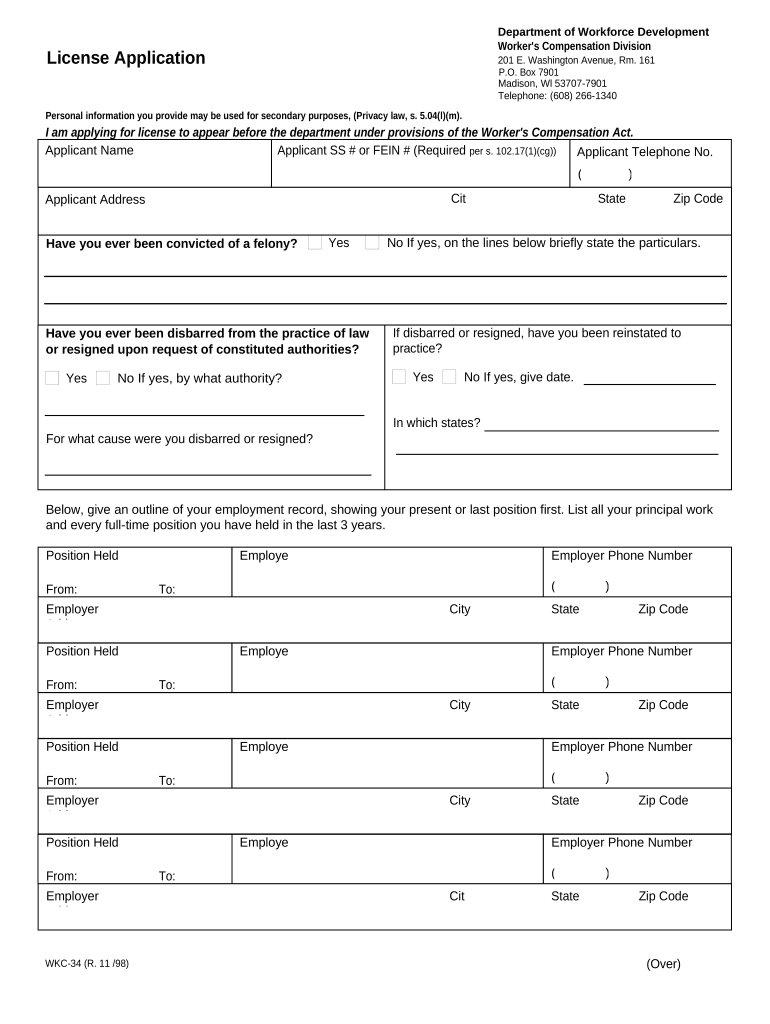
Wisconsin Workers' Compensation License Application

This template is fully customizable. Edit the text, fill out the fields, and send it for signature. Give it a try!
Wisconsin Workers' Compensation License Application

What the Wisconsin Workers' Compensation License Application Is

The Wisconsin Workers' Compensation License Application is the formal administrative form used to register an employer, insurance entity, or licensed service provider with the state agencies that oversee workers' compensation obligations and licensing. It collects core business identification, payroll and classification details, insurance carrier or self-insurance information, and attestations about coverage and claims history. Completed applications establish an official record used for premium calculation, regulatory compliance, audits, and claims processing. Requirements and processing channels vary depending on whether the filer is an employer, insurer, agent, or third-party administrator.

Why the Application Matters for Compliance and Risk Management

Filing the correct Wisconsin Workers' Compensation License Application ensures legal compliance, establishes coverage obligations, and helps avoid fines, stop-work orders, or civil exposure; accurate filing also supports correct premium assessments and timely claims handling.

Why the Application Matters for Compliance and Risk Management

Who Completes This Application and Why It Fits Their Role

The application is used by different parties depending on the purpose: employers registering for coverage, insurance carriers and agents applying for licensing, and third-party administrators or self-insured employers reporting coverage details.

  • Small and medium employers who must register as an employer and provide payroll and classification data for premium calculations.
  • Insurance agents and carriers applying for licenses or registering workers' compensation policies for employers in Wisconsin.
  • Third-party administrators, self-insured employers, and professional employer organizations (PEOs) reporting coverage and claims administration arrangements.

Choosing the correct filer category and providing complete supporting documentation accelerates processing and reduces the risk of follow-up requests or application rejection.

Primary Signers and Responsible Parties

Authorized Officer

An executive or owner with legal authority to bind the business should sign attestations. This signer confirms payroll estimates, classification accuracy, and authorization to obtain coverage.

Licensed Agent

A licensed insurance agent or broker may complete sections related to carrier, policy information, and agent details; the agent's license number and contact information should be provided.

Key Data Elements Required on the Application

Employer Name: Legal entity name
Federal EIN: Employer identification number
NAICS / SIC: Business classification code
Payroll Estimate: Annual payroll amount
Insurance Carrier: Carrier name and policy number
Contact Information: Business address and authorized signer

Consequences of Incorrect or Late Filing

Administrative Fines: Civil penalties and fines
Stop-Work Orders: Possible work stoppage orders
Criminal Exposure: Potential misdemeanor or criminal charges
Claim Denials: Risk to injured worker claims
Increased Premiums: Higher audits and recalculated premiums
Liability: Direct civil liability to employees

Common Preparation Pitfalls to Avoid

  • Using an incorrect legal entity name (DBA vs. legal name) that does not match IRS records, causing delays and possible re-submission.
  • Estimating payroll inaccurately or omitting subcontractor payments, which can trigger audits and retroactive premium adjustments.
  • Failing to include the insurer or policy number when coverage is already in place, which can be treated as a non-covered period.
  • Missing the authorized signer's signature or providing initials only, often resulting in a return-to-sender for completion.

Step-by-Step: Completing the Application

Follow this sequence to prepare and complete the Wisconsin Workers' Compensation License Application accurately.

  • 01
    Gather Documents: Collect EIN, articles of organization, and payroll records.
  • 02
    Choose Filer Type: Select employer, insurer, agent, or self-insured option.
  • 03
    Enter Payroll Details: Provide estimated annual payroll by classification.
  • 04
    Sign and Submit: Authorized signer signs and submits via designated channel.

How the Application Moves Through State Processing

This overview explains typical routing steps after submission so you understand review, verification, and finalization.

  • Intake: Agency receives application and assigns tracking number.
  • Verification: Staff reviews identity, EIN, and supporting documents.
  • Audit Flagging: Incomplete or inconsistent data may trigger an audit.
  • Acceptance: Application finalized; coverage or license recorded.

Essential Sections of a Professional Application

A complete Wisconsin Workers' Compensation License Application is organized into discrete sections; ensure each is fully and accurately completed to reduce processing time.

Applicant Details

Provide the legal business name, trade name if applicable, mailing and physical addresses, and primary contact information to ensure correct identification and correspondence.
Business Classification

Specify the NAICS or SIC code and describe operations so the correct workers' compensation class codes and rates can be applied by the state and insurer.

Payroll and Employees

Estimate annual payroll by class code and report the number of employees, seasonal workers, and independent contractors where required for premium calculations.

Insurance Information

Supply current carrier name, policy number, effective and expiration dates, or indicate self-insured status and attach proof of authorization if applicable.

Claims History

Disclose prior workers' compensation claims, open claims, and any significant loss history that may affect underwriting or regulatory review processes.

Attestation and Signature

Include an authorized officer's signature and date, certifying the accuracy of submitted information and acknowledging legal responsibilities under state law.

Practical Tips for Faster, More Accurate Filing

Adopt these practices to minimize processing delays and reduce post-filing corrections.

Match IRS Records
Use the exact legal name and EIN as shown on IRS documentation to prevent identity mismatches and processing rejections.
Provide Detailed Payroll Breakouts
Break payroll down by classification and by payroll period; conservative estimates reduce the chance of an adverse audit adjustment.
Attach Supporting Documents
Include certificates of insurance, policy declarations, and organizational formation documents to speed verification and reduce follow-up requests.
Use Clear Contact Details
List an email and phone number for the authorized representative to enable quick clarification if the agency needs additional information.

Key Timing and Reporting Deadlines

Track these time-sensitive items to remain compliant with state registration and reporting obligations related to workers' compensation.

Initial Registration Timing:

Register when hiring first employee or within the period specified by state registration rules.

Policy Effective Dates:

Provide carrier policy effective and end dates to confirm continuous coverage.

Annual Payroll Updates:

Update payroll estimates annually or when payroll materially changes to reflect accurate premiums.

Audit and Document Requests:

Respond to audit inquiries promptly; delayed responses can result in estimated assessments.

Premium Payment Deadlines:

Meet insurer or state premium deposit and installment deadlines to avoid lapses.

eSignature Pricing and Feature Comparison for Filing Workflows

Comparison of common eSignature providers for document signing workflows; signNow is listed first per table policy. Use this as a baseline and verify plan specifics with each vendor.

signNow DocuSign Adobe Sign PandaDoc HelloSign
Starting Price $8/user/mo $15/user/mo $14/user/mo $19/user/mo $15/user/mo
Free Trial 7-day free trial, no credit card No No Yes, limited Yes, limited
Bulk Send Yes Yes Yes Yes No
Audit Trail Yes Yes Yes Yes Yes
HIPAA Compliant Yes Yes Yes No No

Frequently Asked Questions About the Application

Answers to common questions about completing, signing, submitting, and correcting the Wisconsin Workers' Compensation License Application.


Need help? Contact support

be ready to get more
Join over 28 million airSlate SignNow users