Establishing secure connection…Loading editor…Preparing document…

South Carolina Life Estate Deed

This template is fully customizable. Edit the text, fill out the fields, and send it for signature. Give it a try!
South Carolina Life Estate Deed

What a South Carolina Life Estate Deed Is and What It Does

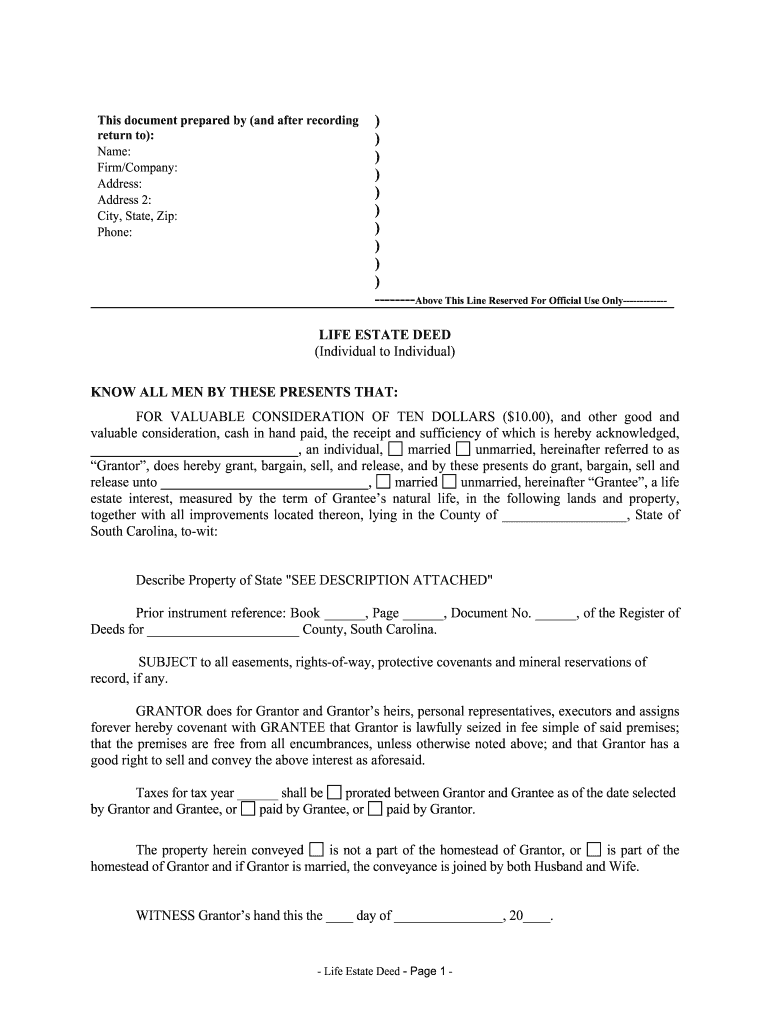
A South Carolina Life Estate Deed conveys ownership rights differently than a full fee simple transfer: the grantor (or another designated life tenant) retains the right to use and occupy the property for the duration of their life, after which the property passes to the named remainder person(s). The deed must include a precise legal description, clear life-estate and remainder language, the grantor's signature, notarization and the required witnesses for South Carolina recording to protect the remainderman's interest.

Why a Life Estate Deed Can Be Useful in South Carolina

A Life Estate Deed allows the grantor to keep use of the property while arranging for an automatic, probate-free transfer to remainder beneficiaries at death, limiting probate exposure and memorializing intent in a recorded instrument under South Carolina law.

Why a Life Estate Deed Can Be Useful in South Carolina

Who Typically Uses a South Carolina Life Estate Deed

Common users include property owners planning transfers, estate attorneys preparing nonprobate transfers, and family members coordinating future ownership.

  • Individual property owners arranging succession while retaining lifetime use and control.
  • Estate planning attorneys preparing clear remainder language and recording instructions.
  • Title companies or closing agents verifying legal description and recording requirements.

Each party benefits from clarity at execution: grantors preserve occupation rights, remaindermen gain secured future interest, and professionals reduce later probate disputes.

Typical Roles Involved in Preparing the Deed

Grantor — Property Owner

The owner creating the life estate who retains lifetime use. The grantor must properly identify themselves, sign in the presence of the required witnesses and notary, and confirm the deed's legal description to ensure enforceability.

Attorney — Real Estate Attorney

A licensed attorney drafts or reviews the deed language, confirms title and liens, advises on tax and Medicaid implications, and prepares recording instructions to minimize future disputes and recording rejections.

Essential Parts of a South Carolina Life Estate Deed

A complete life estate deed contains specific clauses and supporting data that define rights, timing, and future ownership; omissions can create ambiguity or recording rejection.

Grantor Identity

Full legal name(s) and marital status if applicable; accurate identity details prevent later title defects and ensure recording reflects the true owner of record.
Life Estate Clause

Explicit language granting a life estate to the life tenant, stating that the named person has the right to possess and use the property for life while reserving remainder interests.

Remainder Interest

Clear naming of remaindermen with precise ownership shares or alternate beneficiaries to avoid intestacy or contested interpretation after the life tenant's death.

Legal Description

Full metes-and-bounds or recorded plat citation and tax parcel number; an imprecise description is a common ground for recording office rejection or future boundary disputes.

Consideration and Date

State the consideration or declaration of nominal consideration and an effective date; the date anchors the deed for title history and tax reporting.

Notary & Witness Blocks

South Carolina requires proper notary acknowledgement and the required number of witnesses; include explicit signature, witness lines, and notarial language for recording.

Quick Step-by-Step: Execute and Record a Life Estate Deed in South Carolina

Follow these sequential steps to prepare, sign, notarize, witness and record the deed correctly.

  • 01
    Gather Documents: Obtain current deed, title report, tax parcel number.
  • 02
    Draft Deed: Include life estate and remainder language, legal description.
  • 03
    Sign with Witnesses: Grantor signs before required witnesses and notary.
  • 04
    Record in County: Submit to the county Register of Deeds for recording.

Recording and Delivery: How the Deed Moves Through the Process

This sequence shows the typical lifecycle from preparation through county recording and delivery of copies to interested parties.

  • Prepare Document: Finalize deed language and attach supporting title documents.
  • Notarize and Witness: Complete signatures with witnesses and notary present.
  • Record Document: File the deed with the county Register of Deeds.
  • Distribute Copies: Send recorded copy to remaindermen, mortgagee, and title insurer.

How to Configure an Online Workflow for the Deed

Set up a secure e-signing workflow that supports notarization and delivers a complete audit trail for county recording and title history.

Field Configuration
Upload Document Use a PDF with stable formatting and the full legal description.
Signature Placement Add grantor, witness, and notary signature fields in correct order.
Authentication Require email and SMS code, or stronger ID verification where available.
Audit Trail Enable timestamps, IP capture, and certificate of completion.

Digital Signing and eSubmission Requirements

Electronic workflows must preserve intent, attribution, and a verifiable audit trail to meet ESIGN and UETA standards when used.

  • File Formats: PDF or DOCX preserved as PDF for recording
  • Integrations: Connectors with title systems, cloud storage, and case management
  • Notarization Options: In-person notarization required in some jurisdictions; RON may be restricted

When using electronic platforms, maintain signed PDF copies, a detailed audit trail, and check county acceptance policies before submitting recorded instruments.

Timing Considerations and Recording Expectations

While there is no statutory 'deadline' to record a deed, timely recording protects priority and provides public notice; follow these timing guidelines.

When to Record:

Record promptly after execution to protect remainderman priority

After Execution:

File with county Register of Deeds within days to weeks

Tax Reporting:

Consider property tax reassessment or transfer tax timing

Mortgage Considerations:

Notify lenders if mortgage exists; subordination may be needed

Effective Date:

Deed effective on execution unless it states otherwise

Key Milestones from Draft to Recorded Deed

A concise milestone flow helps coordinate signers, notary, witnesses and the county recorder for an efficient closing.

01

Draft Completed

Deed language and legal description finalized.

02

Execution Meeting

Grantor signs in presence of witnesses and notary.

03

Submission to Recorder

Deliver executed deed to county Register of Deeds.

04

Return & Distribution

Receive recorded copy and distribute to beneficiaries.

Required Data Elements at a Glance

Grantor Name: Full legal name
Life Tenant: Full legal name
Remaindermen: Names and shares
Legal Description: Metes/plat citation
Notary Block: Acknowledgement text
Witness Lines: Printed names and signatures

Consequences of Errors or Omitted Steps

Unrecorded Risk: Loss of priority
Name Mismatch: Title defects
Missing Witness: Recording rejection
Incorrect Description: Boundary dispute
Undisclosed Liens: Mortgage liability
Intent Ambiguity: Probate litigation

Common Preparation Mistakes to Avoid

  • Using a street address instead of a full legal description often leads to recording rejection or future disputes over the precise parcel.
  • Failing to include the correct number of witnesses and a notary acknowledgement for South Carolina will typically cause the register of deeds to refuse recording.
  • Ambiguous remainder language or failure to name alternate remaindermen can trigger probate or litigation when the life tenant dies.
  • Not checking for existing mortgages or liens can leave the remainderman exposed to creditor claims or lender defenses.

Real-World Examples and Customer Perspectives

Practitioners and companies use online execution and secure signing to manage property transfers that require notarization and witness coordination.

Tim Martin — Founder, Martin Properties

A small property firm streamlined remote closings for elderly clients using secure online tools.

  • Efficiency gains reduced turnaround time.
  • "I can process and execute all of these documents online with 100% compliance and built-in security. Whether on mobile or working offline, I can get forms back to their necessary parties efficiently."

Brian Fitzgibbons — COO, Optica Ventures LLC

An operations team standardized deed templates and audit trails to reduce errors.

  • Templates improved consistency across counties.
  • "The interface is simple and easy-to-use for our team; more importantly, it is just as easy for our customers."

Practical Tips for Accurate and Efficient Deed Completion

Adopt these practices to reduce rework, recording delays and legal risk when preparing a life estate deed.

Use Exact Legal Descriptions
Copy the legal description from the existing recorded deed or title report to prevent recording rejection or future boundary disputes; do not rely on street addresses alone.
Verify Identities
Confirm signer identities against government ID and ensure witness availability; mismatches between recorded names and identification are a common cause of title issues.
Coordinate with Lenders
Notify mortgage holders and resolve lien issues before recording to prevent lender challenges or inadvertent lien enforcement affecting remaindermen.
Obtain Certified Copies
Keep a certified recorded copy for estate records; distribute noncertified copies to remaindermen and retain digital backups with audit trails.

eSignature Vendor Comparison for Executing and Managing Deeds

Feature and pricing comparison focused on eSignature capabilities relevant to deed execution and notarization; signNow is displayed first per vendor comparison guidance.

signNow DocuSign Adobe Sign PandaDoc HelloSign
Starting Price $8/user/mo $15/user/mo $14/user/mo $19/user/mo $15/user/mo
Bulk Send Yes Yes Yes Yes No
Audit Trail Yes Yes Yes Yes Yes
HIPAA Compliant Yes Yes Yes No No
Envelope Cap No cap 100 envelopes/user/year Varies by plan Varies by plan Varies by plan

Frequently Asked Questions and Common Issues

Answers to common execution, recording, notarization, and correction questions for South Carolina Life Estate Deeds.


Need help? Contact support

be ready to get more
Join over 28 million airSlate SignNow users