Establishing secure connection…Loading editor…Preparing document…

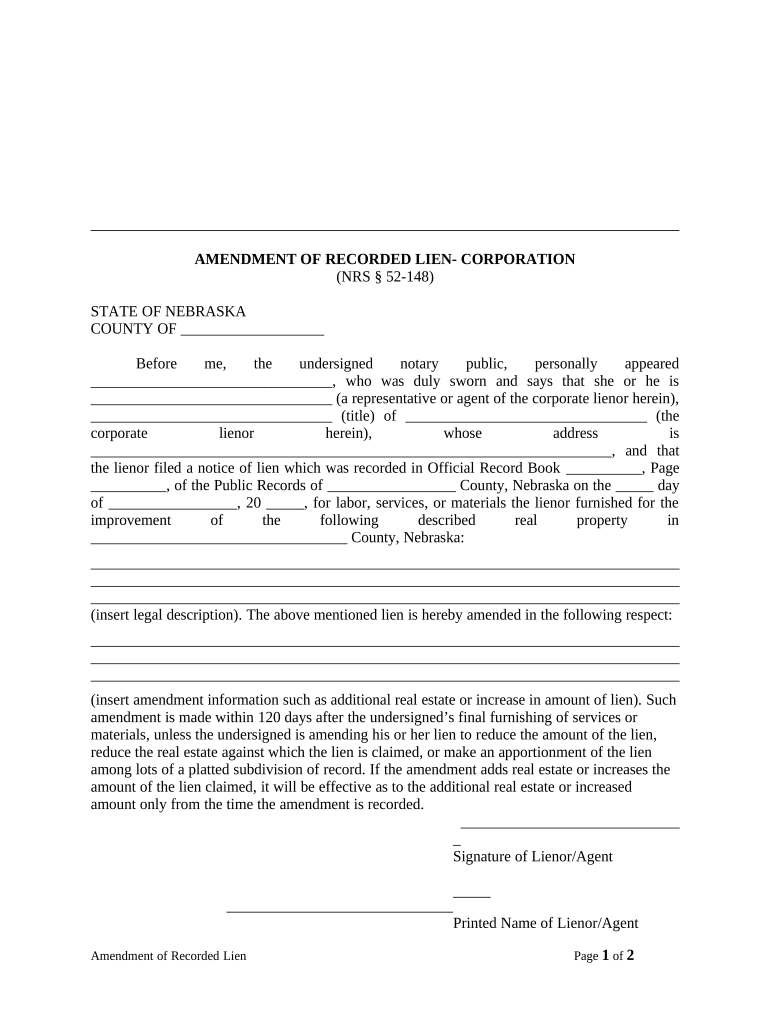
Nebraska Amendment of Recorded Lien

This template is fully customizable. Edit the text, fill out the fields, and send it for signature. Give it a try!
Nebraska Amendment of Recorded Lien

What the Nebraska Amendment of Recorded Lien Is

A Nebraska Amendment of Recorded Lien updates information on an existing lien recorded in county land records to reflect changes such as corrected legal descriptions, revised lien amounts, extended maturity dates, or modified parties. The amendment itself is a separate recorded instrument that references the original lien document and county recording details so that title records remain accurate. Proper execution, notarization where required, and timely recording preserve lien priority and ensure public notice to subsequent purchasers or encumbrancers.

Why Amend a Recorded Lien

Amendments correct or update a recorded lien to protect priority, clear title defects, or reflect negotiated changes between the secured party and debtor. Accurate recorded records reduce disputes and ensure third parties can rely on county records.

Why Amend a Recorded Lien

Who typically prepares or files this amendment

Lienholders, title companies, and legal counsel commonly prepare amendments to ensure recorded instruments match current agreements and facts.

  • Lienholder representatives who control the secured interest and must preserve priority in public records.
  • Title company or closing agents correcting title or updating chain-of-title records.
  • Borrowers or grantors working with counsel to reflect modifications or satisfy recording requirements.

Parties should confirm local recording requirements and signatory authority before submitting an amendment to county records.

Primary signers and document owners

Authorized Lienholder

An authorized officer or agent of the secured party who holds power to amend lien terms. Include company name, title, and evidence of authority to avoid rejection or later challenges.

Title Company Agent

A closing or title agent who prepares and records the amendment on behalf of a client. Agents typically verify legal descriptions and recording references, and coordinate notarization and recording logistics.

Key security and compliance features to consider

Encryption: TLS 1.2/1.3 in transit; AES-256 at rest.
Audit Trail: Timestamped logs capturing signer IP and actions.
HIPAA Ready: BAA available where health data is involved.
ESIGN & UETA: Accepts electronic signatures under federal and state law.
Access Controls: Role-based permissions and SSO options.
Retention: Secure storage with tamper-evident versioning.

Consequences of incorrect or late amendments

Recording Rejection: County recorder may refuse improperly executed instruments.
Priority Loss: Failure to record timely can affect lien priority.
Legal Challenges: Court disputes if signatures or authority are challenged.
Financial Exposure: Additional fees and interest may accrue on unpaid balances.
Tax Reporting: Incorrect lien info can complicate tax or title reporting.
Fraud Allegations: Mismatched names or forged signatures risk civil penalties.

Common preparation mistakes to avoid

  • Using an incorrect legal description or parcel number leads to mis-indexing and may prevent the amendment from being associated with the original lien.
  • Submitting the amendment with mismatched party names or without evidence of assignment can create title disputes and require corrective filings.
  • Failing to notarize or witness the amendment where county rules require it will result in recording rejection and processing delays.
  • Not confirming county recording practices (margins, cover sheets, fees) causes avoidable rejections and additional county charges.

Step-by-step: Completing the amendment

Follow these sequential steps to prepare, execute, and record a Nebraska Amendment of Recorded Lien correctly and efficiently.

  • 01
    Identify original lien: Record book/page or instrument number to reference exact document.
  • 02
    Draft amendment: Specify changes, include original recording citation, and new effective terms.
  • 03
    Execute and notarize: Have authorized signer sign before a notary or comply with permitted RON procedures.
  • 04
    Record with county: Submit to the county register of deeds with required fee and cover sheet.

Digital workflow settings for online completion

Configure signing, authentication, and recording export options to streamline e-execution and county submission.

Field Configuration
Authentication Email plus SMS code or KBA for higher assurance
Templates Save amendment as reusable template with locked fields
Notarization Support in-person or RON where state law permits
Recording Export Export signed PDF with certificate of completion

Where the amendment goes after signing

Routing the completed amendment properly ensures public notice and correct title indexing.

  • County Recorder: Primary filing venue for land records and lien amendments.
  • Title Company: Keeps a recorded copy and updates title commitments.
  • Lienholder Records: Retain certified copy for enforcement and audit trails.
  • Borrower/Grantor: Provide an executed copy for borrower records.

Essential elements of a professional amendment

A complete amendment contains clear references, precise language, and proper execution to be accepted for recording and enforceable against third parties.

Citation

Full citation to the original recorded instrument (book/page or instrument number) so the county connects the amendment to the initial lien.
Precise Changes

Line-by-line description of what is being amended — e.g., corrected amount, extended maturity date, or substituted party names.

Legal Description

Complete recorded legal description of the property, identical to the original lien to avoid indexing errors.

Authority Statement

A clause confirming the signer's authority (officer title, power of attorney, or assignment documentation) to make the amendment.

Execution Block

Signature lines with printed names, titles, and notary acknowledgement or RON block where allowed by law.

Recording Instructions

Cover sheet instructions for county clerk, including return address and required fees to expedite processing.

Key milestones after preparing the amendment

Track these milestones to confirm the amendment becomes part of the public record and maintains intended priority.

01

Prepare Document

Draft and verify all references and legal descriptions before seeking signatures.

02

Notarize or Authenticate

Complete required notarization or use RON where permitted by statute and county policy.

03

Record with County

Submit the instrument and fee to the county register of deeds for indexing.

04

Confirm Recording

Obtain recorded copy and confirm book/page or instrument number for retention.

Timing and processing expectations

Recording timelines and deadlines vary; submit promptly to avoid priority disputes or acceptance issues.

Recording Promptness:

Record as soon as practical to preserve lien priority against later recordations.

County Processing:

Processing times vary by county and may require additional cover sheets or fees.

Effective Date:

The amendment's effective date governs changed terms and should be stated clearly.

Follow-up:

Obtain and archive certified recorded copy immediately after indexing.

Corrections:

File corrective amendment promptly if the recorder flags errors.

How an amendment differs from related instruments

Compare the common document types used to change or release recorded lien rights to choose the correct instrument.

Criteria Amendment Release Satisfaction
Purpose modify recorded terms remove lien claim document payment in full
Recording Effect updates public record terminates index entry shows discharge of debt
Signatory original or assigned lienholder lienholder signs lienholder or trustee signs
Typical Use correct or change details clear title for sale evidence of payment

eSignature vendor comparison for executing amendments

Compare starting prices and core eSignature capabilities relevant to signing and delivering a recorded lien amendment. signNow appears first in the vendor list.

signNow DocuSign Adobe Sign PandaDoc HelloSign
Starting Price $8/user/mo $15/user/mo $14/user/mo $19/user/mo $15/user/mo
Free Trial 7-day trial Varies Varies Varies Varies
Bulk Send Yes Yes Yes Yes No
Audit Trail Yes Yes Yes Yes Yes
HIPAA Compliant Yes Yes Yes No No

Technical delivery and integration checklist

Confirm file formats, signer authentication, and integrations before starting an online amendment workflow.

  • File Formats: PDF, DOCX supported
  • Integrations: NetSuite, Salesforce, Google Workspace
  • Authentication: Email, SMS code, or KBA

Align export settings to generate a certified PDF and a clear audit trail suitable for county submission or title company records.

Real-world examples of digital signing for property documents

These examples show how organizations use online signing to manage recorded instruments and related workflows.

Optica Ventures (Brian Fitzgibbons)

A small investment firm streamlined closing paperwork with online signing to reduce turnaround time.

  • The interface was simple to use and worked for clients.
  • Brian notes streamlined execution improved client experience and reduced in-person signing without sacrificing compliance or record integrity.

Martin Properties (Tim Martin)

A regional property manager used eSignatures for lien amendments and closing addenda.

  • Mobile signing enabled field staff to finish documents on site.
  • Tim reports being able to process and execute documents online with compliance and security while meeting tight closing timelines.

Frequently asked questions about amendment preparation and recording

Answers to common procedural and legal questions when preparing a Nebraska Amendment of Recorded Lien.


Need help? Contact support

be ready to get more
Join over 28 million airSlate SignNow users