Establishing secure connection…Loading editor…Preparing document…

Louisiana Name Form

This template is fully customizable. Edit the text, fill out the fields, and send it for signature. Give it a try!
Louisiana Name Form

What the Louisiana Name Form Is and When It’s Used

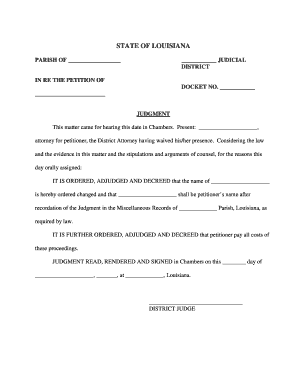
The Louisiana Name Form is a standardized document used to record, change, or confirm a legal name in Louisiana records and related administrative systems. Typical uses include updating state IDs, notifying employers and financial institutions, and registering a new name with agencies that require a signed record. The form captures identifying details, previous names or aliases, the effective date of the name change, and a signature block; some filers must combine it with supporting ID or a court order depending on the receiving agency.

Why a Correct Louisiana Name Form Matters

An accurate Louisiana Name Form prevents administrative delays, reduces mismatches across government and private records, and supports downstream identity verification tasks. Proper completion helps avoid enrollment problems, payroll errors, and tax reporting issues associated with mismatched names.

Why a Correct Louisiana Name Form Matters

Who Typically Completes the Louisiana Name Form

Individuals and organizations complete this form when a legal name change, correction, or verification is required by state agencies, employers, or service providers.

  • Individuals updating driver’s licenses, state IDs, or Social Security records after marriage, divorce, court order, or personal choice.
  • Employers or HR teams reconciling payroll, benefits, and tax records when an employee’s legal name changes.
  • Financial institutions and title companies updating account ownership or property records to match legal identity.

Preparing the Louisiana Name Form carefully and attaching required documents reduces the risk of rejections and shortens processing time for subsequent administrative steps.

Step-by-Step: Filling Out the Louisiana Name Form

Complete the form in sequence: verify identity, fill fields, sign, notarize if required, and submit to the correct office.

  • 01
    Prepare ID: Gather government-issued photo ID and any court orders.
  • 02
    Complete Form: Enter each field accurately and use MM/DD/YYYY for dates.
  • 03
    Notarization: Obtain notary or witnesses if the receiving agency requires them.
  • 04
    Submit: Send to the agency or office specified by the instructions.

Typical Workflow for Online Completion and Submission

A digital workflow reduces manual steps: upload, tag fields, authenticate signer, sign, then route to recipients with an audit trail.

  • Upload Document: Start with a clear PDF or Word version of the form.
  • Place Fields: Add signature, date, and identity fields for each signer.
  • Authenticate Signer: Use email, SMS, or higher authentication as required.
  • Route & Store: Route signed copy to agencies and retain an audit record.

Configuring a Digital Signing Workflow for the Form

Set up a digital workflow that mirrors the paper process and enforces required steps such as notarization or extra authentication.

Field Configuration
Upload Use PDF or DOCX; scan at 300 DPI for clarity
Field Placement Add signature, initials, date, and ID upload fields
Authentication Email link or SMS code; use KBA for high-assurance
Routing Specify signer order and final recipient copy

Platform and File Requirements for eSubmission

Ensure the platform supports required file types, signer authentication, and audit logs before e-submitting the Louisiana Name Form.

  • File Formats: PDF, DOCX and scanned images are acceptable.
  • Integrations: Works with common systems like Salesforce and Google Workspace.
  • Audit Trail: Capture IP, timestamp, and signer actions.

Confirm the receiving agency accepts electronic submissions and whether notarization or original documents are required before relying on e-submission.

Security and Compliance Checklist for Electronic Name Forms

Encryption: TLS 1.2/1.3 in transit; AES-256 at rest
Audit Trail: Detailed signing logs, timestamps, IP addresses
HIPAA Controls: BAA required for PHI-containing workflows
Authentication: Email, SMS, KBA, or advanced signer checks
Regulatory: Complies with ESIGN and UETA frameworks
Certifications: SOC 2 Type II and ISO 27001 available

Key Risks and Consequences of Incorrect Forms

Incorrect Name Entry: Processing delays and record mismatches
Mismatched ID: Agency may reject or require re-submission
Unsigned Form: Considered invalid for official use
Missing Notarization: May render the form unacceptable
Late Updates: Causes payroll/tax reporting complications
Fraudulent Information: Potential civil or criminal penalties

Common Errors to Avoid When Preparing the Form

  • Entering nicknames or incomplete legal names instead of the full government-issued name, which causes identity mismatches and rejections.
  • Submitting unsigned or undated forms or forgetting required witness or notary signatures, triggering invalidation and re-filing.
  • Failing to attach required supporting documents such as a certified court order or valid photo ID, resulting in delays or denial.
  • Using low-quality scans or incorrect file formats for online submissions, which prevents automated processing or verification.

How Organizations Use Electronic Name Forms in Practice

Real organizations use electronic workflows to collect identity changes and keep records synchronized across systems.

Optica Ventures (COO)

Optica used digital forms to streamline customer interactions and signature collection.

  • The interface is simple and easy-to-use for our team.
  • This lowered turnaround time for identity updates and improved customer experience while preserving an audit trail for compliance.

Martin Properties (Founder)

A property manager digitized owner and tenant name-change records to avoid in-person meetings.

  • I can process and execute all of these documents online with 100% compliance.
  • Paperless workflows reduced administrative overhead and ensured consistent records across leasing, payroll, and title systems.

Essential Elements to Include on a Professional Louisiana Name Form

A complete Louisiana Name Form should collect identity data, previous names, legal basis, signatures, and clear submission instructions to support downstream verification.

Identity Details

Full legal name, date of birth, and government ID type and number included for verification
Previous Names

All prior legal names or aliases to link historical records accurately

Legal Basis

A clear statement of reason (marriage, court order) and attached proof where required

Effective Date

A designated date in MM/DD/YYYY format that triggers record updates

Signature Section

Signature, printed name, date, and notarization/witness fields if required

Submission Instructions

Agency-specific guidance for where and how to file or upload supporting documents

Practical Tips for Accurate and Efficient Completion

Follow these best practices to reduce rejection risk and speed processing when filing a Louisiana Name Form.

Verify Legal Names
Compare entries against government-issued ID and any court orders. Consistency across documents avoids identity resolution delays and tax or benefits mismatches.
Use Clear Dates
Enter all dates as MM/DD/YYYY and double-check effective dates to prevent conflicts with payroll or benefit systems relying on the change.
Attach Required Proof
Include certified court orders, marriage certificates, or photo ID as the receiving office requests to prevent returns or additional document requests.
Keep Records
Retain signed originals and encrypted electronic copies for the recommended retention period to support future audits or identity disputes.

Typical Timelines and Processing Expectations

Processing timelines vary by agency: allow time for verification, possible notarization, and downstream system updates after submission.

Local Processing:

Agency review commonly takes 1–6 weeks based on volume and verification requirements

ID Updates:

State ID or driver’s license changes may require an in-person visit and can take several weeks

Payroll Changes:

Employer payroll systems require notification before payroll cutoff to reflect the new name on tax documents

Tax Records:

Update Social Security and tax records promptly to avoid mismatched filings

Court Orders:

If a court order is required, obtain certified copies before submitting to other agencies

Key Milestones from Filing to Record Update

A sequential view of milestones clarifies responsibilities and expected outcomes during the name-change process.

01

Prepare Documents

Gather ID, court orders, and the completed form before submission

02

Notarize or Witness

Obtain notarization and witness signatures where the agency requires them

03

Submit to Agency

File according to agency instructions, online or by mail

04

Confirm Updates

Verify that state, employer, and financial records reflect the new name

Comparing eSignature Options for Louisiana Name Form Workflows

Basic pricing and capabilities across common eSignature providers. Place signNow first and compare starting price, trial availability, bulk send, audit trail, HIPAA support, and envelope limits.

signNow DocuSign Adobe Sign PandaDoc HelloSign
Starting Price $8/user/mo $15/user/mo $14/user/mo $19/user/mo $15/user/mo
Free Trial Yes, 7-day trial Varies by vendor Varies by vendor Varies by vendor Varies by vendor
Bulk Send Yes Yes Yes Yes No
Audit Trail Yes Yes Yes Yes Yes
HIPAA Compliant Yes Yes Yes No No
Envelope Cap No cap 100 envelopes/user/year Varies by plan Varies by plan Varies by plan

Frequently Asked Questions About the Louisiana Name Form

Answers to common questions about completing, notarizing, and submitting the Louisiana Name Form.


Need help? Contact support

be ready to get more
Join over 28 million airSlate SignNow users