Establishing secure connection…Loading editor…Preparing document…

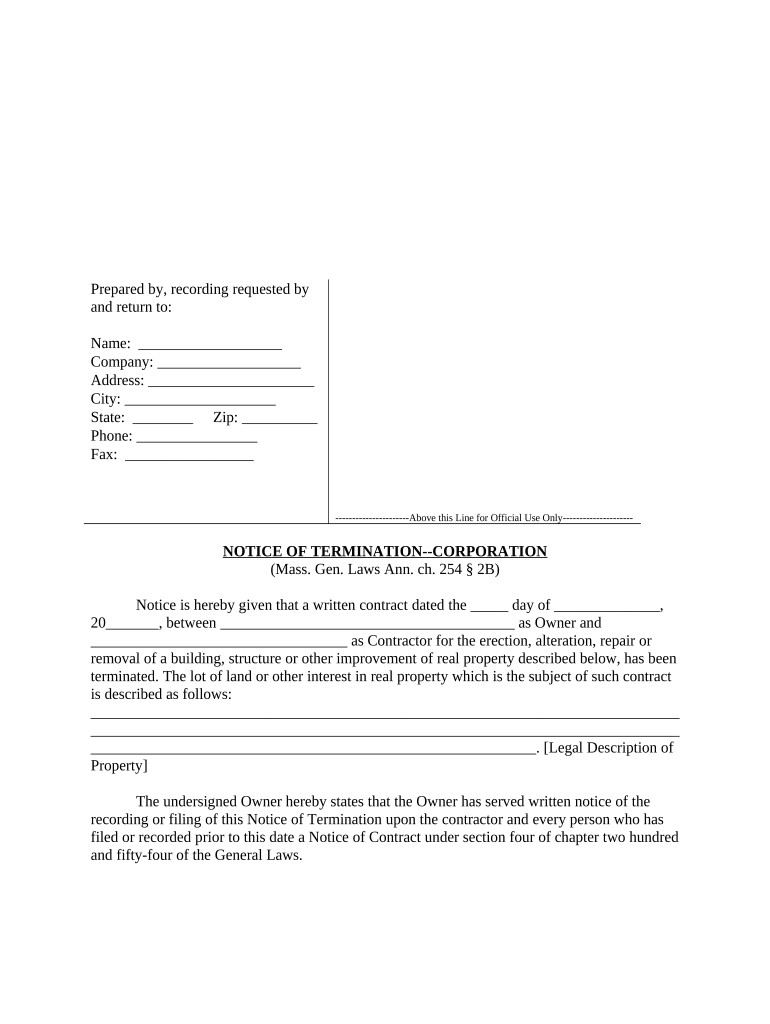
Massachusetts Notice of Termination

This template is fully customizable. Edit the text, fill out the fields, and send it for signature. Give it a try!
Massachusetts Notice of Termination

What the Massachusetts Notice of Termination Is and When it Applies

The Massachusetts Notice of Termination is a formal written document used to end a contractual relationship, commonly a lease, service contract, or employment agreement, under Massachusetts law. It states the parties, the effective termination date, the reason or statutory basis for ending the agreement, and any cure or notice period required by the contract or state rule. This guide explains required content, serving options, timing considerations, supporting documents, retention expectations, and how electronic signing interacts with federal and state e‑signature law such as the ESIGN Act and UETA.

Why a Clear, Compliant Notice Matters

A properly completed Notice of Termination creates an objective record, helps satisfy contractual or statutory notice requirements, and reduces disputes over timing or delivery. Accurate notices improve enforceability and ease subsequent steps such as cure periods, replacements, or enforcement actions under Massachusetts law and relevant contract terms.

Why a Clear, Compliant Notice Matters

Typical parties that prepare and receive this notice

Who commonly prepares or receives a Massachusetts Notice of Termination — and why it matters for each role.

  • Landlords and property managers serving tenants with month-to-month or fixed-term lease terminations to meet statutory or lease-based notice periods.
  • Employers and HR professionals ending at-will or contract-based employment, documenting effective termination dates and final-pay obligations.
  • Contracting businesses and vendors notifying counterparties of contract termination for convenience or breach, often to trigger cure rights.

Essential elements to include in a professional notice

A complete notice is concise but specific: it identifies parties, cites the contractual or statutory basis, sets an effective date, explains cure rights, shows delivery method, and provides signature blocks for proper attribution.

Parties

Full legal names of the notifying party and recipient, including any business entity type and the signer’s title, to ensure clear attribution and enforceability.
Effective Date

Exact termination date in MM/DD/YYYY format; this date determines when obligations end and when any cure period begins or expires.

Termination Reason

Concise statement of the contract clause or statutory ground for termination (for example, breach, convenience, nonpayment), including relevant lease or contract section.

Cure or Notice Period

If a cure period applies, state the duration and mechanics for cure (what must be done and by what date) to preserve the right to enforce termination.

Delivery Method

State how the notice was delivered (personal service, certified mail, email under agreement, or e‑signature/e‑delivery) and include proof of service details.

Signature Block

Printed name, title, original or electronic signature, and date; include witness or notary information where required by the specific transaction or jurisdictional rules.

Core information to capture on the form

Notifier name: Full legal name
Recipient name: Full legal name
Effective date: MM/DD/YYYY
Reason: Breach or convenience
Delivery proof: Mail tracking or e‑receipt
Signature: Signer name and date

Quick step-by-step: complete and serve the notice

Follow these steps in order to complete, sign, and preserve evidence of a Massachusetts Notice of Termination.

  • 01
    Draft: Populate all required fields accurately.
  • 02
    Review: Check contract clauses and statutory notice requirements.
  • 03
    Serve: Deliver using agreed or statutory method with proof.
  • 04
    Record: Save signed copy and service evidence.

Configuring an online completion and signing workflow

Set up document fields, signer roles, and authentication according to the level of formality required by the transaction.

Field mapping Place name, date, reason, and signature fields.
Signer roles Designate notifier and recipient signer types.
Authentication Select email, SMS code, or stronger ID verification.
Reminders Configure automatic reminders and expiration settings.
Storage Set secure storage location and retention policy.

Where to send or file the completed notice

The destination depends on the contract and the reason for termination; preserve proof of delivery and follow any specified route in the agreement.

  • Recipient delivery: Hand deliver, certified mail, or approved electronic method.
  • Contract counterparty: Send to the counterparty address specified in the contract.
  • Court filing: If enforcement needed, file with the appropriate Massachusetts court or housing authority.
  • Internal records: Keep an employer or business copy in personnel or contract files.

Common delivery and signing methods for the notice

Choose a delivery method that satisfies the contract and provides reliable proof of service.

  • Email delivery: PDF with read receipt
  • Certified mail: USPS return receipt
  • Electronic signature: Signed PDF with audit trail

Typical timelines to verify before serving notice

Confirm contract terms and any statutory notice periods before setting the effective date; timing affects remedies and enforcement options.

Month-to-month tenancy:

Commonly 30 days but check lease and state rules

Fixed-term lease:

Terminate only as allowed by contract or mutual agreement

Nonpayment of rent:

Statutory grace and cure periods may apply

Employment contracts:

Observe contract notice or final-pay obligations

Contract breach:

Allow any contractual cure period before enforcement

Common mistakes to avoid when preparing the notice

  • Using an imprecise effective date or wrong date format leads to disputes over timing and enforcement.
  • Failing to cite the correct contract section or statute leaves the recipient unclear about grounds for termination.
  • Serving the notice without proof (no tracking, no signed receipt) makes later enforcement more difficult.
  • Omitting the signer’s title or authority can cause the recipient to challenge the notice’s validity.

Potential consequences of incorrect or incomplete notices

Notice invalid: Enforcement delayed
Liability exposure: Damages or statutory penalties
Eviction delays: Loss of priority for relief
Contract disputes: Increased litigation risk
Regulatory fines: If statutory procedures ignored
Reputational harm: Business or employment consequences

Key milestones from drafting to enforcement

Track these milestones to preserve rights and to ensure a consistent record of timing and service for possible enforcement or litigation.

01

Draft Completed

All fields populated and internal approval secured.

02

Notice Served

Proof of delivery recorded via tracking or signed receipt.

03

Cure Period Expires

Determine whether recipient cured the breach or default.

04

Enforcement Action

File in court or commence contract remedies if unresolved.

eSignature vendor comparison for handling the notice (signNow listed first)

Basic vendor pricing and feature indicators for eSignature platforms used to complete and send a Notice of Termination. Confirm vendor plans and features with each provider before purchase.

signNow DocuSign Adobe Sign PandaDoc HelloSign
Starting Price $8/user/mo $15/user/mo $14/user/mo $19/user/mo $15/user/mo
Free Trial 7-day trial Yes Yes Yes Yes
Bulk Send Yes (Premium) Yes Yes Yes No
Audit Trail Yes Yes Yes Yes Yes
HIPAA Compliant Yes Yes Yes No No

Frequently asked questions about Notices of Termination in Massachusetts

Concise answers to common questions about validity, electronic signatures, service methods, and recordkeeping for Massachusetts notices.


Need help? Contact support

be ready to get more
Join over 28 million airSlate SignNow users