Establishing secure connection…Loading editor…Preparing document…

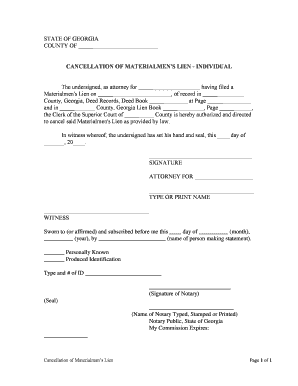
Materialman Lien Form

This template is fully customizable. Edit the text, fill out the fields, and send it for signature. Give it a try!
Materialman Lien Form

What the Materialman Lien Form Is and When It Applies

A Materialman Lien Form (commonly called a mechanic's lien or construction lien notice in some states) is a legal document filed or recorded by a supplier, subcontractor, or material provider to secure payment for labor, materials, or services furnished to improve real property. The form identifies the claimant, scope of work or materials supplied, the property description, the owner or general contractor, the contract or invoice amount, and the date services began or were completed. Proper preparation preserves lien rights but must follow state-specific timing and filing rules to remain effective.

Why the Materialman Lien Form Matters

A correctly drafted Materialman Lien Form creates a statutory security interest that prioritizes unpaid suppliers or contractors over other unsecured creditors, improving chances of collection and leverage in negotiations.

Why the Materialman Lien Form Matters

Who Typically Prepares or Receives This Form

Parties should consult state statute or counsel to confirm notice, preliminary notice, and filing timing before preparing or recording a lien.

  • Subcontractors and suppliers seeking legal remedy when payment is overdue on a construction project.
  • General contractors tracking project balances and verifying downstream claims before final payment.
  • Property owners and lenders reviewing recorded liens to assess title risk and payment exposure.

Step-by-Step: Preparing and Filing a Materialman Lien Form

Follow a consistent sequence to preserve lien rights and reduce procedural risk.

  • 01
    Gather Documents: Collect contracts, invoices, delivery tickets, and notices of completion if applicable.
  • 02
    Confirm Parties: Verify legal names for claimant, owner, and contractor against public records.
  • 03
    Complete Form: Fill required fields precisely, including property legal description and claim amount.
  • 04
    File / Record: Submit to county recorder or designated filing office within statutory deadline.

How Filing and Enforcement Typically Work

A recorded lien notifies third parties and can lead to foreclosure or negotiation if unpaid; the process and remedies vary by state.

  • Notice: Public recording alerts owners and lenders to the claim.
  • Priority: Priority depends on dates of work and recording; earlier-recorded interests may have superior rights.
  • Enforcement: If unpaid, claimant can pursue lien foreclosure through court action.
  • Release: A lien release or satisfaction is recorded after payment or settlement.

Typical Digital Workflow Settings for Online Completion

When completing the form online, configure fields and signer steps to match legal and procedural requirements.

Field Configuration
Claimant Information Required text field; validate against ID or business registry
Property Description Free-text with attachment option for deed or APN
Supporting Attachments Allow PDF uploads for invoices, delivery receipts
Signature Order Signer authentication first, then notary or recording agent

Key Elements to Include on a Professional Materialman Lien Form

A complete form improves acceptance by recorders and preserves legal remedies; include these essential elements and supporting details.

Claimant Details

Full legal name, address, and contact information for the party asserting the lien; required for service and enforcement actions.
Property Identifier

Legal description and assessor parcel number (APN) or street address, so the county recorder can index and relate the lien to the correct real property.

Description of Work

Clear description of labor, materials, or services provided, including dates and project location to substantiate the claim.

Amount Owed

Specific dollar amount claimed, including any retainage, interest, or allowable costs as supported by invoices and contracts.

Contract Reference

Reference contract or purchase order numbers and dates to tie the claim to an existing agreement when applicable.

Signature and Notary

Authorized signature, date, and notarization or acknowledgement if required by state statute for recording.

Security, Compliance, and File Protections to Consider

Data in Transit: TLS 1.2/1.3
Data at Rest: AES-256 encryption
Audit Trail: Signed event log
HIPAA Support: BAA available
21 CFR Part 11: Compliant options
SOC 2 / ISO: SOC 2 Type II and ISO 27001

Consequences of Incorrect or Late Filings

Missed Deadline: Loss of lien rights
Incorrect Property: Recording rejection or court challenge
Name Mismatch: Enforceability dispute
Insufficient Detail: Statutory defect
False Statement: Potential penalties
Failure to Release: Title clouding and liability

Common Preparation Mistakes to Avoid

  • Using an informal or ambiguous property description rather than the legal description or APN, which can cause the recorder to reject or the court to narrow the lien.
  • Failing to verify the statutory notice or preliminary notice requirements in the state before filing, resulting in procedural disqualification of the claim.
  • Listing the wrong entity name for claimant or owner, producing service problems and potential grounds for lien invalidation.
  • Not attaching or retaining supporting invoices, delivery tickets, and contract references, which weakens enforcement and increases litigation risk.

Typical Deadlines and Timing Considerations

Timing governs lien priority and enforceability; confirm state statute for exact filing windows and any required preliminary notices.

Preliminary Notice:

Required in many states within 20–90 days of first furnishing

Filing Deadline:

Statutory windows vary; often 60–180 days after last work

Enforcement Action:

Many states require foreclosure suit within 1–2 years after recording

Notice of Completion:

Owner filing can shorten claimant deadlines in some states

Release Timing:

Record release upon payment; creditors often require recorded satisfaction

Key Milestones from Performance to Enforcement

A typical sequence helps claimants track critical dates and maintain priority in the event of nonpayment.

01

Start of Work

Document first delivery or service date immediately.

02

Preliminary Notice

Serve if required to preserve future filing rights.

03

Record Lien

File with county recorder within statutory window after last work.

04

Foreclosure Suit

Initiate judicial enforcement if payment is not made.

Comparing eSignature Options for Preparing and Executing Lien Forms

eSignature platforms differ on pricing, bulk send, audit capabilities, and compliance features. signNow appears first for direct comparison.

signNow DocuSign Adobe Sign PandaDoc HelloSign
Starting Price $8/user/mo $15/user/mo $14/user/mo $19/user/mo $15/user/mo
Free Trial 7-day free trial Varies Varies Varies Varies
Bulk Send Yes (Business Premium) Varies Varies Varies Varies
Audit Trail Yes Yes Yes Yes Yes
HIPAA Compliant Yes Yes Yes Varies Varies

Frequently Asked Questions About Materialman Lien Forms

Answers to common practical and legal questions to help prepare, file, and enforce lien claims.


Need help? Contact support

be ready to get more
Join over 28 million airSlate SignNow users