Establishing secure connection… Loading editor… Preparing document…
Navigation

Fill and Sign the May Be Formed and Governed Only as a Nonprofit Corporation under the Boc and Not as a for Profit
Fill and Sign the May Be Formed and Governed Only as a Nonprofit Corporation under the Boc and Not as a for Profit

How it works

Open the document and fill out all its fields.
Apply your legally-binding eSignature.
Save and invite other recipients to sign it.

Rate template

4.7
39 votes
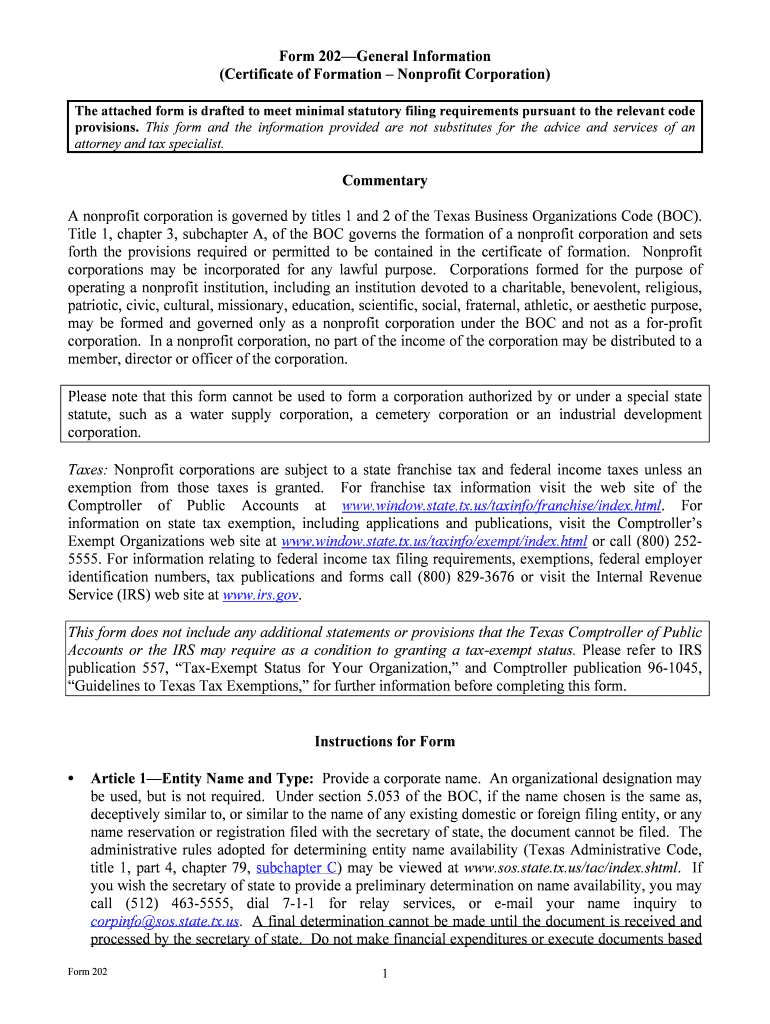
                                Form 202—General Information (Certificate of Formation – Nonprofit Corporation) The attached form is drafted to meet minimal statutory filing require ments pursuant to the relevant code provisions. This form and the information provided are not substitutes for the advice and services of an attorney and tax specialist. Commentary A nonprofit corporation is governed by  titles 1 and 2 of the Texas Business Organizations Code (BOC).  Title 1, chapter 3, subchapter A, of the BOC govern s the formation of a nonprofit corporation and sets  forth the provisions required or permitted to be c ontained in the certificate of formation.  Nonprofit  corporations may be incorporated for any lawful  purpose.  Corporations formed for the purpose of  operating a nonprofit institution, including an institution  devoted to a charitable, benevolent, religious,  patriotic, civic, cultural, missionary,  education, scientific, social, fraternal, athletic, or aesthetic purpose,  may be formed and governed only as a nonprofit co rporation under the BOC and not as a for-profit  corporation.  In a nonprofit corporati on, no part of the income of the corporation may be distributed to a  member, director or officer of the corporation.   Please note that this form cannot be used to form  a corporation authorized by or under a special state  statute, such as a water supply corporation, a cem etery corporation or an industrial development  corporation.  Taxes:  Nonprofit corporations are subject  to a state franchise tax and federal income taxes unless an  exemption from those taxes is granted.  For franch ise tax information visit the web site of the  Comptroller of Public Accounts at  www.window.state.tx.us/taxinf o/franchise/index.html . For  information on state tax exemption, including applic ations and publications, visit the Comptroller’s  Exempt Organizations web site at  www.window.state.tx.us/ta xinfo/exempt/index.html  or call (800) 252- 5555. For information relating to federal income tax  filing requirements, exemptions, federal employer  identification numbers, tax publications and forms  call (800) 829-3676 or visit the Internal Revenue  Service (IRS) web site at  www.irs.gov .  This form does not include any additional statements or provisions that the Texas Comptroller of Public Accounts or the IRS may require as a condition to granting a tax-exempt status. Please refer to IRS  publication 557, “Tax-Exempt Status for Your Or ganization,” and Comptroller publication 96-1045,  “Guidelines to Texas Tax Exemptions,” for furt her information before completing this form.  Instructions for Form  Article 1—Entity Name and Type: Provide a corporate name.  An organizational designation may  be used, but is not required.  Under section 5.053 of  the BOC, if the name chosen is the same as,  deceptively similar to, or similar to the name of a ny existing domestic or foreign filing entity, or any  name reservation or registration f iled with the secretary of state, the document cannot be filed.  The  administrative rules adopted for determining entity  name availability (Texas Administrative Code,  title 1, part  4, chapter 79,  subchapter C ) may be viewed at  www.sos.state.tx.us/tac/index.shtml .  If  you wish the secretary of state to provide a prel iminary determination on name availability, you may  call (512) 463-5555, dial 7-1-1 for relay serv ices, or e-mail your name inquiry to  corpinfo@sos.state.tx.us .  A final determination cannot be made until the document is received and  processed by the secretary of state.  Do not make  financial expenditures or execute documents based  Form 202  1                                  on a preliminary clearance.  Also note that the precl earance of a name or the issuance of a certificate  of formation under a name does not authorize the us e of a name in violation of another person’s  rights to the name.   Article 2—Registered Agent and Registered Office: The registered agent can be either (option A)  a domestic entity or a foreign enti ty that is registered to do business in Texas or (option B) an  individual resident of th e state.  The corporation cannot act as  its own registered agent; do not enter  the corporate name as the name of the registered agent.  Consent :  Effective January 1, 2010, a person designated as  the registered agent of an entity must  have consented, either in a written  or electronic form, to serve as the registered agent of the entity.  Although consent is required, a copy of the person’ s written or electronic consent need not be  submitted with the certif icate of formation.  The liabilities and penalties imposed by sections 4.007 and 4.008 of the BOC apply with respect to a false statement in a filing instrument that names a person as the registered agent of an entity without that person’s consent. (BOC § 5.207)  Office Address Requirements:   The registered office address must be located at a street address  where service of process may be personally served  on the entity’s registered agent during normal  business hours.  Although the regist ered office is not required to be the entity’s principal place of  business, the registered office ma y not be solely a mailbox service or telephone answering service  (BOC § 5.201).   Article 3—Management: Except as provided by section 22.202  of the BOC, the affairs of a  nonprofit corporation are governed  by a board of directors.  Board of Directors :  The board of directors may be desi gnated by any name appropriate to the  customs, usages, or tenets of the corporation.  If  managed by a board of directors, three directors are  required .  A director must be a natura l person; there are no residency re quirements for directors.  Set  forth the name of the individual in the format speci fied.  Do not use prefixes (e.g., Mr., Mrs., Ms.).  Use the suffix box only for titles of lineage (e.g., Jr., Sr ., III) and not for other suffixes or titles (e.g.,  M.D., Ph.D.).  Please note that a document on file w ith the secretary of state is a public record that is subject to public  access and disclosure.  When providing address informa tion for directors, use a business or post office  box address rather than a residence addre ss if privacy concerns are an issue.   Managed by Members : A nonprofit corporation is considered to  have vested the management of the  corporation in the board of  directors unless otherwise provided in the certificate of formation.   This  certificate of formation also may be used to create  a nonprofit corporation that is managed solely by  its members. If management of the corporation  is to be vested in the nonprofit corporation’s  members, a statement to that effect  must be included in the certificate.  If the nonprofit corporation is  to be governed  solely by its members, check the appropriate statement and proceed to Article 4 of  this form.   The fact that the individuals named on the board of directors are also members of the nonprofit entity does not mean that the corporation is governed by its members .  Article 4—Members: If the corporation will not have member s, the certificate of formation must  include a statement to that effect.  If management  of the affairs of the corporation is vested in its  members, you also must check st atement A in Article 4 of this form.  Checking statement B in  Article 4 is inconsistent with a corporation that  is managed by its members and will result in a  rejection of the instrument.  Form 202  2                   Article 5—Purpose: State the purpose of the corporation  in the space provided.  A nonprofit  corporation may be formed for a ny lawful purpose or purposes not  expressly prohibited under title 1,  chapter 2, or title 2, chap ter 22, of the BOC, which may be stated  as “any or all lawful purposes” in  the space provided.  While the BOC allows formation  with a general purpose, please note that other  laws, including the Texas Tax Code  and the Internal Revenue Code, may require that the certificate  of formation include a more specific purpose statem ent as a basis for granting a license or a tax- exempt or tax-deductible status.  An additional te xt area is provided to include any additional  language or additional provisions that may  be needed.  In addition, the “Supplemental  Provisions/Information” section may be  used if the additional text area provided in this section is not  sufficient.      Supplemental Provisions/Information: Additional space has been provided for additional text to  an article within this form or to provide for add itional articles to contain optional provisions.  This  space also may be used to provide for additional st atements or provisions needed by the Texas Tax  Code or Internal Revenue Code as a basis for  granting a tax-exempt or tax-deductible status.  Manner of Distribution: Section 22.304 of the BOC provides th at after all liabilities and  obligations of the corporation in  the process of winding up are paid , satisfied, and discharged in  accordance with chapter 11 of the BOC, the prope rty of the corporation shall be applied and  distributed as follows:   Property held by the corporation on a condition re quiring return, transfer, or conveyance because  of the winding up or termination shall be returned, transferred, or conveyed in accordance with  that requirement; and   The remaining property shall be distributed onl y for tax-exempt purposes to one or more  organizations that are exempt under Section 501(c )(3), or described by Section 170(c)(1) or (2)  of the Internal Revenue Code as provided in a  plan of distribution adopted by the corporation  under the BOC unless the certificate of  formation provides otherwise.   If the corporation is not applyi ng and distributing its property in accordance w ith section 22.304, the certificate of formation must include a statement describing th e manner of distribution in the Supplemental Provisions/Information section of this form.  If the space provided is not sufficient, an  addendum may be included and attached to this form.   Duration:   Pursuant to section 3.003  of the BOC, a Texas nonprofit co rporation exists perpetually  unless provided otherwise in the cer tificate of formation.  If formation of a corporation with a stated  period of duration is desired, use the “Supplemental  Provisions/Information” section of this form to  provide for a limited duration.   Organizer:   Only one organizer is required for the formation of a nonprofit corporation.  An  organizer may be any person having the capacity to co ntract for the person or for another; that is, a  natural person 18 years of age or ol der, or a corporation or other legal entity.  There are no residency  requirements for an organizer.   Effectiveness of Filing: A certificate of formation becomes effe ctive when filed by the secretary of  state (option A).  However, pursu ant to sections 4.052 and 4.053 of the BOC the  effectiveness of the  instrument may be delayed to a date not more than  ninety (90) days from the date the instrument is  signed (option B).  The effectiven ess of the instrument also may be delayed on the occurrence of a  future event or fact, other than th e passage of time (option C).  If option C is selected, you must state  Form 202  3  the manner in which the event or fact will cause the instrument to take effect and the date of the 90th  day after the date the instrument is signed.  In orde r for the certificate to take effect under option C,  the entity must, within ninety (90) days of the filing  of the certificate, file with the secretary of state  a statement regarding the event or fact  pursuant to section 4.055 of the BOC.  On the filing of a document with a delayed effective date or condition, the computer records of the  secretary of state will be changed  to show the filing of the document,  the date of the filing, and the  future date on which the document will be eff ective or evidence that the effectiveness was  conditioned on the occurrence of a future event or f act.  In addition, at the time of such filing, the  status of the entity will be shown as “in existence” on the records of the secretary of state.    Execution:  The organizer must sign the certificate of form ation, but it does not need to be notarized.  However, before signing, please read the statemen ts on this form carefully.  The designation or  appointment of a person as registered agent by an  organizer is an affirmation that the person named  in the certificate of formation has c onsented to serve in that capacity.  (BOC § 5.2011, effective  January 1, 2010)  A person commits an offense under sec tion 4.008 of the BOC if the person signs or directs the filing of a filing instrument the person knows is materially false with the intent that the instrument be delivered to the secretary of state for filing. The offense is a Class A misdemeanor unless the person’s intent is to harm or de fraud another, in which case the offense is a state jail felony.  Payment and Delivery Instructions:  The filing fee for a certificate of formation for a nonprofit  corporation is  $25.  Fees may be paid by personal checks , LegalEase debit cards, or American  Express, Discover, MasterCard, and Visa credit  cards.  Checks or money orders must be payable  through a U.S. bank or financial instit ution and made payable to the secretary of state.  Fees paid by  credit card are subject to a stat utorily authorized convenience fee  of 2.7 percent of the total fees.  Submit the completed form in dupli cate along with the filing fee.  The form may be mailed to P.O.  Box 13697, Austin, Texas, 78711-3697; faxed to (512)  463-5709; or delivered to the James Earl  Rudder Office Building, 1019 Brazos, Austin, Texas 78701.  If a document is transmitted by fax,  credit card information must accompany the tran smission (Form 807).  On filing the document, the  secretary of state will return the appropriate evidence of filing to the submitter together with a file- stamped copy of the document, if a duplicate copy was provided as instructed.   Registered Agent/Office: A corporation is required to maintain a registered agent and a registered  office address in Texas.  If the registered agent or  registered office address changes, it is important to  file a statement with the secretary of state to effect a change to the certifi cate of formation.  Failure  to maintain a registered agent and registered office may result in the involuntary termination of the corporation.   Periodic Reports: Under section 22.357 of the BOC, the secr etary of state may require a nonprofit  corporation to file a report not mo re often than once every four years.  The secretary of state will  send notice to the corporation at its  registered office as to the time the report is due.  Failure to file  the report when requested to do so by the secretar y will result in the involuntary termination of the  corporation.   Information for Public Inspection: Records, books and annual reports of the corporation’s  financial activity are required to be maintained at  the registered office or principal office for three  years after the close of a fiscal year.  The corpor ation shall make those documents available to the  Form 202  4  public for inspection and copying during regular business hours and may charge a reasonable fee for  preparing a copy of those records.   Failure to maintain those records, prepare  an annual report or  make the record or report availa ble to the public is a Class B misd emeanor.  These provisions do not  apply to those corporations exempted under secti on 22.355 of the BOC.  Also note that a nonprofit  corporation supported in whole or in part by public funds or that spends public funds is considered a  governmental body under chapter 552 of the Government Code (Public Information Act) and thus subject to the provisions of that  Act regarding access to public information.  In addition, a property  owner’s association may also be subject to th e Public Information Act pursuant to section 552.0035  of the Government Code.  Revised 05/11  Form 202  5  Form 202 6 This space reserved for office use.  Form 202 (Revised 05/11) Submit in duplicate to:  Secretary of State  P.O. Box 13697 Austin, TX 78711-3697 512 463-5555 FAX: 512/463-5709  Filing Fee: $25 Certificate of Formation Nonprofit Corporation Article 1 – Entity Name and Type The filing entity being formed is a nonprofit co rporation.  The name of the entity is:  Article 2 – Registered Agen t and Registered Office (See instructions. Select and complete either  A or B and complete C.)  A.  The initial register ed agent is an organization  (cannot be entity named above) by the name of:  OR B.  The initial registered agent  is an individual resident of the st ate whose name is set forth below:  First Name M.I. Last Name Suffix C.  The business address of the registered agent and the registered office address is:  Street Address City State TX  Zip Code Article 3 – Management The management of the affairs of the corporation is  vested in the board of directors.  The number of  directors constituting the initial board of directors and the names and addresses of the persons who are  to serve as directors until the first annual meeting of  members or until their successors are elected and  qualified are as follows:  A minimum of three directors is required. Director 1  First Name M.I. Last Name Suffix Street or Mailing Address C ity State Zip Code Country                                                                                                                                                                                     Form 202  7  Director 2  First Name M.I. Last Name Suffix Street or Mailing Address C ity State Zip Code Country Director 3  First Name M.I. Last Name Suffix Street or Mailing Address C ity State Zip Code Country OR   The management of the affairs of the corporati on is to be vested in the nonprofit corporation’s  members.  Article 4 – Membership (See instructions. Do not select statement B if the corporation is to be managed by its members.)  A.  The nonprofit corporation shall have members.  B.  The nonprofit corporation will have no members.  Article 5 – Purpose (See instructions.  This form does not contain language needed to obtain a tax-exempt status  on the state or federal level.)  The nonprofit corporation is  organized for the following purpose or purposes:  The following text area may be used to in clude any additional language or provisions that may be needed to obtain tax-exempt status.                                                                                              Form 202  8  Supplemental Provisions/Information (See instructions.)  Text Area: [The attached addendum, if any, is incorporated herein by reference.]  Organizer The name and address of the organizer:  Name Street or Ma iling Address City State Zip Code Effectiveness of Filing (Select either A, B, or C.)  A.   This document becomes effective when the do cument is filed by the secretary of state.  B.   This document becomes effective at a later date,  which is not more than ninety (90) days from  the date of signing.  The delayed  effective date is:  C.   This document takes effect upon the occurrence  of a future event or fact, other than the   passage of time.  The 90 th  day after the date of signing is:  The following event or fact will cause the documen t to take effect in the manner described below: Execution The undersigned affirms that the person designate d as registered agent has consented to the  appointment.  The undersigned signs this document subject to the penalties imposed by law for the  submission of a materially false or  fraudulent instrument and certifies under penalty of perjury that the  undersigned is authorized to execute the filing instrument.  Date:  Signature of organizer  Printed or typed name of organizer 

Practical advice on preparing your ‘May Be Formed And Governed Only As A Nonprofit Corporation Under The Boc And Not As A For Profit’ online

Are you fed up with the inconvenience of managing documentation? Your search ends here with airSlate SignNow, the premier eSignature solution for both individuals and organizations. Bid farewell to the monotonous routine of printing and scanning documents. With airSlate SignNow, you can effortlessly complete and sign documents online. Take advantage of the extensive features available on this user-friendly and affordable platform and transform your method of document handling. Whether you require to endorse forms or collect signatures, airSlate SignNow takes care of it all swiftly, with just a few clicks.

Adhere to this step-by-step guide:

  1. Sign in to your account or initiate a free trial with our service.
  2. Click +Create to upload a document from your device, cloud, or our form library.
  3. Open your ‘May Be Formed And Governed Only As A Nonprofit Corporation Under The Boc And Not As A For Profit’ in the editor.
  4. Hit Me (Fill Out Now) to finalize the document on your end.
  5. Add and designate fillable fields for others (if necessary).
  6. Proceed with the Send Invite settings to solicit eSignatures from others.
  7. Save, print your copy, or convert it into a reusable template.

Don’t worry if you need to collaborate with your teammates on your May Be Formed And Governed Only As A Nonprofit Corporation Under The Boc And Not As A For Profit or send it for notarization—our platform provides all you need to complete such tasks. Create an account with airSlate SignNow today and enhance your document management to a new standard!

Here is a list of the most common customer questions. If you can’t find an answer to your question, please don’t hesitate to reach out to us.

Need help? Contact Support

The best way to complete and sign your may be formed and governed only as a nonprofit corporation under the boc and not as a for profit


Save time on document management with airSlate SignNow and get your may be formed and governed only as a nonprofit corporation under the boc and not as a for profit eSigned quickly from anywhere with our fully compliant eSignature tool.

How to Sign a PDF Online How to Sign a PDF Online

How to complete and sign documents online

Previously, dealing with paperwork required lots of time and effort. But with airSlate SignNow, document management is quick and simple. Our robust and user-friendly eSignature solution lets you effortlessly complete and electronically sign your may be formed and governed only as a nonprofit corporation under the boc and not as a for profit online from any internet-connected device.

Follow the step-by-step guidelines to eSign your may be formed and governed only as a nonprofit corporation under the boc and not as a for profit template online:

  • 1.Register for a free trial with airSlate SignNow or log in to your account with password credentials or SSO authentication.
  • 2.Click Upload or Create and add a file for eSigning from your device, the cloud, or our form library.
  • 3.Click on the document name to open it in the editor and use the left-side toolbar to complete all the empty fields properly.
  • 4.Put the My Signature field where you need to approve your form. Provide your name, draw, or upload a photo of your handwritten signature.
  • 5.Click Save and Close to finish modifying your completed form.

As soon as your may be formed and governed only as a nonprofit corporation under the boc and not as a for profit template is ready, download it to your device, save it to the cloud, or invite other individuals to electronically sign it. With airSlate SignNow, the eSigning process only requires a couple of clicks. Use our robust eSignature tool wherever you are to handle your paperwork effectively!


How to Sign a PDF Using Google Chrome How to Sign a PDF Using Google Chrome

How to complete and sign documents in Google Chrome

Completing and signing paperwork is simple with the airSlate SignNow extension for Google Chrome. Installing it to your browser is a quick and efficient way to manage your forms online. Sign your may be formed and governed only as a nonprofit corporation under the boc and not as a for profit template with a legally-binding eSignature in just a few clicks without switching between applications and tabs.

Follow the step-by-step guide to eSign your may be formed and governed only as a nonprofit corporation under the boc and not as a for profit form in Google Chrome:

  • 1.Navigate to the Chrome Web Store, find the airSlate SignNow extension for Chrome, and add it to your browser.
  • 2.Right-click on the link to a form you need to eSign and select Open in airSlate SignNow.
  • 3.Log in to your account with your credentials or Google/Facebook sign-in option. If you don’t have one, you can start a free trial.
  • 4.Utilize the Edit & Sign menu on the left to fill out your sample, then drag and drop the My Signature field.
  • 5.Upload a picture of your handwritten signature, draw it, or simply type in your full name to eSign.
  • 6.Make sure all data is correct and click Save and Close to finish modifying your form.

Now, you can save your may be formed and governed only as a nonprofit corporation under the boc and not as a for profit template to your device or cloud storage, send the copy to other individuals, or invite them to eSign your document via an email request or a protected Signing Link. The airSlate SignNow extension for Google Chrome improves your document processes with minimum time and effort. Start using airSlate SignNow today!


How to Sign a PDF in Gmail How to Sign a PDF in Gmail How to Sign a PDF in Gmail

How to complete and sign forms in Gmail

Every time you get an email with the may be formed and governed only as a nonprofit corporation under the boc and not as a for profit for approval, there’s no need to print and scan a document or download and re-upload it to a different program. There’s a much better solution if you use Gmail. Try the airSlate SignNow add-on to quickly eSign any paperwork right from your inbox.

Follow the step-by-step guide to eSign your may be formed and governed only as a nonprofit corporation under the boc and not as a for profit in Gmail:

  • 1.Visit the Google Workplace Marketplace and find a airSlate SignNow add-on for Gmail.
  • 2.Install the program with a corresponding button and grant the tool access to your Google account.
  • 3.Open an email with an attached file that needs approval and utilize the S sign on the right sidebar to launch the add-on.
  • 4.Log in to your airSlate SignNow account. Choose Send to Sign to forward the document to other parties for approval or click Upload to open it in the editor.
  • 5.Put the My Signature option where you need to eSign: type, draw, or import your signature.

This eSigning process saves efforts and only requires a couple of clicks. Take advantage of the airSlate SignNow add-on for Gmail to update your may be formed and governed only as a nonprofit corporation under the boc and not as a for profit with fillable fields, sign forms legally, and invite other parties to eSign them al without leaving your mailbox. Boost your signature workflows now!


How to Sign a PDF on a Mobile Device How to Sign a PDF on a Mobile Device How to Sign a PDF on a Mobile Device

How to fill out and sign paperwork in a mobile browser

Need to rapidly complete and sign your may be formed and governed only as a nonprofit corporation under the boc and not as a for profit on a mobile phone while doing your work on the go? airSlate SignNow can help without the need to install additional software programs. Open our airSlate SignNow tool from any browser on your mobile device and add legally-binding eSignatures on the go, 24/7.

Follow the step-by-step guide to eSign your may be formed and governed only as a nonprofit corporation under the boc and not as a for profit in a browser:

  • 1.Open any browser on your device and follow the link www.signnow.com
  • 2.Register for an account with a free trial or log in with your password credentials or SSO option.
  • 3.Click Upload or Create and add a file that needs to be completed from a cloud, your device, or our form collection with ready-made templates.
  • 4.Open the form and fill out the empty fields with tools from Edit & Sign menu on the left.
  • 5.Place the My Signature area to the sample, then type in your name, draw, or add your signature.

In a few easy clicks, your may be formed and governed only as a nonprofit corporation under the boc and not as a for profit is completed from wherever you are. As soon as you're done with editing, you can save the file on your device, generate a reusable template for it, email it to other people, or ask them to electronically sign it. Make your documents on the go quick and efficient with airSlate SignNow!


How to Sign a PDF on iPhone How to Sign a PDF on iPhone

How to fill out and sign forms on iOS

In today’s corporate environment, tasks must be done rapidly even when you’re away from your computer. With the airSlate SignNow app, you can organize your paperwork and approve your may be formed and governed only as a nonprofit corporation under the boc and not as a for profit with a legally-binding eSignature right on your iPhone or iPad. Install it on your device to conclude agreements and manage forms from anyplace 24/7.

Follow the step-by-step guidelines to eSign your may be formed and governed only as a nonprofit corporation under the boc and not as a for profit on iOS devices:

  • 1.Open the App Store, find the airSlate SignNow app by airSlate, and set it up on your device.
  • 2.Launch the application, tap Create to import a template, and choose Myself.
  • 3.Select Signature at the bottom toolbar and simply draw your signature with a finger or stylus to eSign the form.
  • 4.Tap Done -> Save after signing the sample.
  • 5.Tap Save or use the Make Template option to re-use this paperwork later on.

This process is so easy your may be formed and governed only as a nonprofit corporation under the boc and not as a for profit is completed and signed within a few taps. The airSlate SignNow app works in the cloud so all the forms on your mobile device remain in your account and are available any time you need them. Use airSlate SignNow for iOS to boost your document management and eSignature workflows!


How to Sign a PDF on Android How to Sign a PDF on Android

How to fill out and sign documents on Android

With airSlate SignNow, it’s easy to sign your may be formed and governed only as a nonprofit corporation under the boc and not as a for profit on the go. Set up its mobile app for Android OS on your device and start improving eSignature workflows right on your smartphone or tablet.

Follow the step-by-step guidelines to eSign your may be formed and governed only as a nonprofit corporation under the boc and not as a for profit on Android:

  • 1.Navigate to Google Play, find the airSlate SignNow app from airSlate, and install it on your device.
  • 2.Sign in to your account or create it with a free trial, then add a file with a ➕ button on the bottom of you screen.
  • 3.Tap on the imported document and choose Open in Editor from the dropdown menu.
  • 4.Tap on Tools tab -> Signature, then draw or type your name to electronically sign the template. Complete empty fields with other tools on the bottom if necessary.
  • 5.Use the ✔ key, then tap on the Save option to finish editing.

With an intuitive interface and full compliance with main eSignature requirements, the airSlate SignNow application is the best tool for signing your may be formed and governed only as a nonprofit corporation under the boc and not as a for profit. It even works without internet and updates all record adjustments once your internet connection is restored and the tool is synced. Fill out and eSign documents, send them for eSigning, and make re-usable templates anytime and from anyplace with airSlate SignNow.

Sign up and try May be formed and governed only as a nonprofit corporation under the boc and not as a for profit
  • Close deals faster
  • Improve productivity
  • Delight customers
  • Increase revenue
  • Save time & money
  • Reduce payment cycles

