Establishing secure connection…Loading editor…Preparing document…

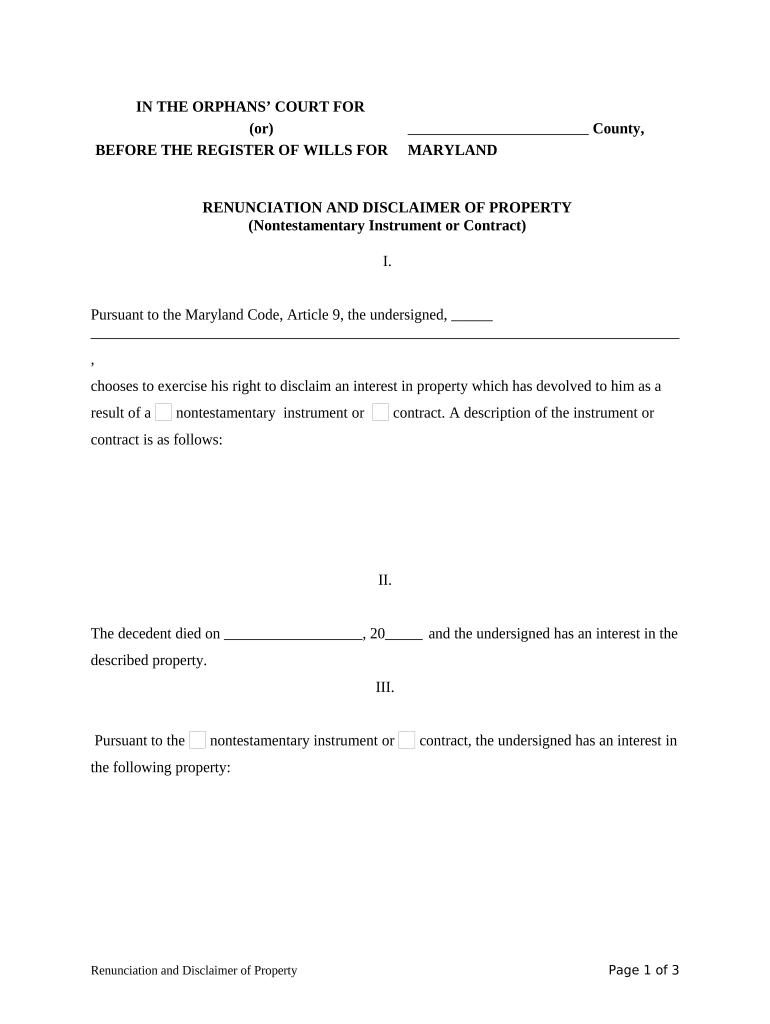
Maryland Renunciation and Disclaimer of Property

This template is fully customizable. Edit the text, fill out the fields, and send it for signature. Give it a try!
Maryland Renunciation and Disclaimer of Property

What the Maryland Renunciation and Disclaimer of Property Is

The Maryland Renunciation and Disclaimer of Property is a signed document in which an individual formally declines an interest in real or personal property that otherwise would pass to them by intestacy, will, trust, or operation of law. It clarifies that the renouncing party will not accept the property, and it identifies the specific asset, the decedent, and the effective date. Proper execution and filing can affect how the asset is distributed to other beneficiaries and can have tax and title consequences that should be considered with legal or tax advice.

Why this document matters for estate and title outcomes

A formal renunciation/disclaimer prevents an unintended transfer, preserves the estate plan or intestate distribution scheme, and can preserve tax benefits when done correctly; it creates a clear record for probate and title examiners.

Why this document matters for estate and title outcomes

Who typically completes a Maryland renunciation or disclaimer

Each party’s role differs: beneficiaries make the election, fiduciaries ensure proper form and timing, and attorneys record legal and tax implications.

  • Individual heirs or beneficiaries who do not want the property or its liabilities.
  • Personal representatives or executors who document a beneficiary's election to refuse an interest.
  • Estate attorneys or title professionals preparing paperwork for probate or recording.

Representative signer profiles

Renouncing Heir

A named beneficiary who declines an interest. They sign to confirm voluntary renunciation and should provide identification; a signed, notarized document protects the estate record and helps land records update ownership.

Personal Representative

The executor or administrator who receives the renunciation for the estate file. They review form compliance, attach it to probate documents, and may file copies with the Register of Wills and county land records when relevant.

Essential data fields to include

Decedent Name: Full legal name
Property Description: Legal description
Renouncing Party: Full legal name
Effective Date: MM/DD/YYYY
Signature: Signed and dated
Notary Block: Acknowledgement details

Step-by-step: complete and execute the renunciation

Follow these steps to prepare, sign, and preserve a legally effective Maryland renunciation or disclaimer.

  • 01
    Gather documents: Collect deed, will, death certificate
  • 02
    Complete form: Enter decedent, property, and party details
  • 03
    Notarize: Sign before a notary or authorized officer
  • 04
    File and retain: Submit or record and keep copies

How to set up a digital completion workflow

Configure an online workflow so each action—signing, notarization, and filing—is assigned and trackable.

Field Configuration
Signer Order Beneficiary then witness/notary
Authentication Email plus SMS code or ID verification
Notary Step In-person or RON where allowed
Archive Save PDF with audit trail

Typical filing flow from execution to recording

The route from signed renunciation to official record typically follows a short, repeatable path.

  • Preparation: Complete and review the document
  • Authentication: Sign and notarize as required
  • Submission: File with probate or county recorder
  • Retention: Keep copies with estate file

Technical and format considerations for e-completion

When using e-signature tools, retain a tamper-evident PDF and audit record; where Maryland or the county requires in-person notarization, ensure the workflow includes that step.

  • Supported formats: PDF and Word DOCX
  • Integration options: CRM, cloud storage, and case management
  • Authentication methods: Email, SMS code, or ID verification

Timing considerations and practical deadlines

There is no single universal filing date; act promptly to avoid complications with probate, distribution, and title transfer.

Before distribution:

Execute renunciation before estate assets are distributed to preserve intended allocations

At notarization:

Sign and notarize at the time of execution to meet recording requirements

When recording title:

Record any deed changes promptly to prevent clouds on title

Retain records:

Keep the executed document for at least the federal retention period

Consult counsel:

Confirm any time limits affecting tax or probate with an attorney

Key milestones from signing to estate finalization

Track these sequential milestones to ensure the renunciation is effective and reflected in estate administration.

01

Document Preparation

Complete and double-check names and legal descriptions

02

Execution and Notary

Sign before required witness or notary

03

Submit to Estate

Deliver to personal representative for probate file

04

Record if Needed

File with county recorder to update title records

Core sections a professional renunciation should include

A complete form anticipates title examiners, probate clerks, and tax reviewers by combining clear identification, an unambiguous renunciation statement, and proper authentication.

Parties

Names and contact details for the decedent, renouncing party, and relevant fiduciaries
Property

Full legal description or specific personal property items being renounced

Renunciation Language

A plain, unconditional statement declining the specified interest

Effective Date

Clear date of election formatted MM/DD/YYYY

Notarization

Notary acknowledgment or RON section where allowed and accepted

Filing Instructions

Notes on where copies should be submitted or recorded

Common legal and practical risks of improper renunciation

Tax Consequences: Possible loss of preferred tax treatment
Clouded Title: Incomplete recording can create ownership disputes
Invalid Renunciation: Improper form or late signing may void the disclaimer
Beneficiary Disputes: Unclear language can spark litigation
Missed Deadlines: Failure to act can alter estate distribution
Legal Costs: Counsel and correction expenses may increase

Frequent mistakes to avoid when preparing the form

  • Using vague property descriptions instead of the deed’s legal description leads to ambiguity and title examiner rejections.
  • Signing without a required notary or witness can render the renunciation invalid for probate or recording.
  • Accepting benefits from the estate before renouncing may be interpreted as acceptance, undermining the disclaimer.
  • Failing to deliver the executed renunciation to the personal representative or recorder leaves the record incomplete.

Real-world scenarios where a renunciation clarifies distribution

Practical examples show how a clear renunciation affects estate administration and title transfers.

Family Real Estate Example

A beneficiary renounces a vacation property

  • Renunciation executed and notarized
  • The property passes to alternate beneficiaries without additional probate dispute, and the recorder updates the chain of title.

Account Beneficiary Example

A named beneficiary declines a bank account inheritance

  • Signed disclaimer delivered to custodian
  • The bank transfers assets to contingent beneficiaries after verification, reducing administrative delay.

Practical tips for accurate, defensible renunciations

Follow these practices to reduce ambiguity and downstream disputes when preparing a renunciation or disclaimer.

Use exact legal descriptions
Transcribe the deed or account designation precisely. A posthumous renunciation tied to an incorrect description can be challenged and delay distribution.
Avoid conditional language
State an unconditional refusal of the specified interest. Conditional or ambiguous phrasing invites interpretation disputes in probate.
Notarize where required
Execute the form before a notary or authorized officer if the jurisdiction requires it; attach the official acknowledgment to the estate file.
Document delivery
Provide signed copies to the personal representative and file where appropriate with the Register of Wills or county recorder to preserve the public record.

How renunciation differs from related document types

Compare renunciation with similar instruments to choose the correct form for your situation.

Criteria Renunciation Disclaimer
Purpose refuse interest decline transfer
Effect on Title prevents vesting prevents acceptance
Timing before distribution before or upon receipt
Recording often recorded sometimes recorded

eSignature vendor pricing and feature snapshot for document workflows

Overview of starting prices and key capabilities relevant to executing and storing renunciations and disclaimers. Verify vendor plans directly for full details.

signNow DocuSign Adobe Sign PandaDoc HelloSign
Starting Price $8/user/mo $15/user/mo $14/user/mo $19/user/mo $15/user/mo
Free Trial 7-day free trial, no credit card Varies Varies Varies Varies
Bulk Send Yes Yes Yes Yes No
Audit Trail Yes Yes Yes Yes Yes
HIPAA Compliant Yes Yes Yes No No

Frequently asked questions about Maryland renunciations and disclaimers

Answers to common questions about execution, validity, filings, and electronic signing in Maryland and related jurisdictions.


Need help? Contact support

be ready to get more
Join over 28 million airSlate SignNow users