Establishing secure connection…Loading editor…Preparing document…

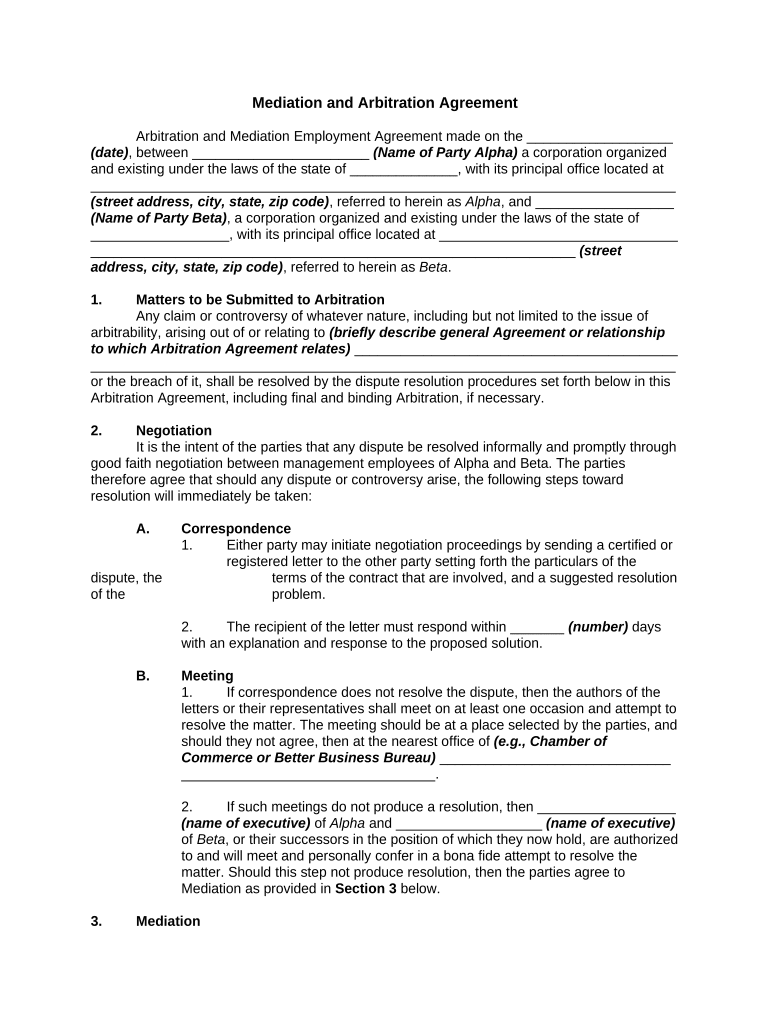
Mediation and Arbitration Agreement

This template is fully customizable. Edit the text, fill out the fields, and send it for signature. Give it a try!
Mediation and Arbitration Agreement

What a Mediation and Arbitration Agreement Is

Mediation and Arbitration Agreement is a written contract where parties agree to submit disputes to mediation and, if unresolved, binding arbitration instead of court litigation. It sets procedures for selecting mediators and arbitrators, timing, governing law, discovery limits, confidentiality, remedies, and enforceability. In the United States, electronic execution is generally valid under the ESIGN Act (15 U.S.C. §7001) and UETA where adopted; some exceptions may apply for particular court orders or statutory rights. Clear terms reduce litigation costs and provide a predictable dispute-resolution path.

Why Including an ADR Clause Matters in Contracts

Provides a streamlined dispute-resolution framework that can shorten timelines, limit discovery costs, and preserve confidentiality. By specifying procedures and remedies, the agreement reduces uncertainty and supports enforceability in arbitration tribunals and courts under ESIGN and UETA frameworks.

Why Including an ADR Clause Matters in Contracts

Who Commonly Signs a Mediation and Arbitration Agreement

Typical signatories include employers, service providers, landlords, vendors, and parties to commercial contracts seeking alternative dispute resolution.

  • Law firms and corporate counsel using ADR to manage litigation risk and client expectations.
  • Employers and HR managers requiring arbitration clauses in employment contracts or settlement agreements.
  • Small businesses and vendors who prefer faster, private resolution over costly court proceedings.

Step-by-Step: Completing the Agreement Before Signing

Follow these steps to complete the Mediation and Arbitration Agreement and ensure clear, enforceable terms before signing or submitting.

  • 01
    Prepare Details: Gather party names, addresses, and dispute descriptions.
  • 02
    Choose Process: Decide mediation timeline, arbitration rules, and seat.
  • 03
    Set Fees: Allocate costs for mediator, arbitrator, and filing.
  • 04
    Sign and Store: Execute with compliant e-signature and retain audit trail.

Core Sections Every Professional Agreement Should Include

Core sections of a Mediation and Arbitration Agreement define scope, ADR sequence, selection of neutrals, rules, costs, evidence, confidentiality, and enforcement mechanisms.

Scope

Describe which disputes are covered and which are excluded. Identify contract claims, tort claims, and post-termination disputes. Specify whether class actions, statutory claims, or injunctive relief are waived or preserved.
ADR Sequence

State whether mediation is a prerequisite to arbitration, define the mediation period and notice requirements, and describe precisely when arbitration commences if mediation does not resolve the dispute.

Selection of Neutral

Specify appointment method for mediator and arbitrator, list acceptable provider organizations, and include disqualification criteria, qualifications, and procedures for replacement if an appointed neutral is unavailable.

Discovery and Evidence

Limit scope and methods of discovery, set document production schedules, and identify admissibility standards for evidence in arbitration to effectively control costs and preserve proportionality.

Confidentiality

Define confidentiality obligations for mediation and arbitration, permitted disclosures, obligations to comply with subpoenas, and remedies for breach including injunctive relief, monetary damages, and fee-shifting.

Enforcement

State that arbitration awards are binding and enforceable under the Federal Arbitration Act; include procedures for entry of judgment, costs allocation, and any waiver of appeals to the extent permitted by law.

Security and Compliance Considerations for Digital Execution

Encryption: TLS 1.2/1.3 in transit; AES-256 at rest.
Certifications: SOC 2 Type II; ISO 27001; PCI DSS.
Regulatory Compliance: ESIGN, UETA, HIPAA (BAA required).
Accessibility: WCAG 2.0 Level AA support.
Audit Trails: Detailed tamper-evident audit logs retained.
21 CFR: 21 CFR Part 11 compliance available.

Primary Risks and Penalties to Watch For

Invalid Waivers: Overbroad waivers may be void.
Consumer Protections: State laws may limit arbitration.
Notarization Errors: Missing notary can affect authenticity.
HIPAA Exposure: Improper PHI disclosure triggers penalties.
Award Vacatur: Procedural errors risk vacatur.
Cost Allocation: Unexpected arbitration fees can increase costs.

Common Preparation Mistakes to Avoid

  • Drafting vague dispute clauses that fail to specify covered claims, exclusions, or monetary thresholds leads to pre-arbitration litigation over applicability and increases costs.
  • Using an unverified electronic method without audit trail or consent can make the signature challengeable under ESIGN's intent and attribution tests.
  • Failing to provide ESIGN consumer disclosures where required invalidates consent for electronic records in consumer-facing agreements.
  • Omitting procedures for entering judgment or allocating award costs leads to post-award disputes and collection delays.

How the Digital Execution Workflow Typically Works

Typical workflow for executing and processing a Mediation and Arbitration Agreement using digital tools and e-signatures.

  • Prepare Document: Draft terms, attach exhibits, and identify parties.
  • Place Fields: Add signature, initial, and date fields.
  • Authenticate: Use email, SMS, or advanced methods.
  • Archive: Store signed copy and audit trail securely.

Recommended Electronic Workflow Settings for Enforceability

Configure an electronic workflow balancing authentication strength, consent capture, and retention for enforceability under ESIGN and UETA.

Field Configuration
Authentication Email link; optional SMS code; KBA for high risk
Consent Capture Explicit ESIGN disclosure and consent checkbox
Document Retention Retain PDF and audit trail for minimum retention period
Notifications Automated emails for each signer and completion

Platform Capabilities to Verify Before eSigning

Use an eSignature platform that supports required authentication, audit trails, and exportable signed PDFs securely.

  • Formats: PDF, DOCX, and HTML supported.
  • Integrations: Salesforce, NetSuite, Google Workspace, Box.
  • Security: AES-256 encryption, TLS transport, audit trails.

Vendor Pricing and Feature Comparison for eSignature

Baseline vendor pricing and feature availability for common eSignature plans; signNow appears first for direct comparison.

signNow DocuSign Adobe Sign PandaDoc HelloSign
Starting Price $8 per user per month on annual billing; Business plan $15 per user per month on annual billing; market-standard tier $14 per user per month on annual billing; common enterprise entry $19 per user per month on annual billing; pricing for teams $15 per user per month on annual billing; small business tier
Free Trial Seven-day free trial available; no credit card required Free trial availability varies by plan and region Free trial availability varies; check vendor terms and conditions Offers limited free trial; features depend on plan selected Offers trial; length and features depend on selected plan
Bulk Send Bulk send available on Business Premium and higher plans Bulk send available on higher-tier plans and enterprise agreements Bulk sending supported on enterprise and select business plans Bulk send capability included on specific paid plans and tiers Bulk send availability varies by plan; feature may be limited
Audit Trail Comprehensive tamper-evident audit trail with timestamps, IP, and actions Provides detailed audit history including signer events and metadata Audit trail and certificate of completion for signed documents Includes audit logs with signer activity and timestamps Maintains basic audit logs with signer timestamps and IPs
HIPAA Compliant HIPAA-compliant options available; Business and Site License support BAA Offers HIPAA compliance via appropriate plans and BAA arrangements HIPAA support available with appropriate configuration and agreement HIPAA compliance varies; contact vendor for enterprise options and BAA HIPAA availability varies; enterprise agreements may include BAA
Envelope Cap No envelope cap; unlimited users and usage on paid plans Limits 100 envelopes per user per year on some plans Envelope limits depend on plan; enterprise options available Document/send limits vary by subscription and tier Limits depend on plan; check vendor terms for quotas

Common Deadlines and Timing Clauses to Include

Key deadlines and timeframes that commonly appear in Mediation and Arbitration Agreements govern notice, mediation duration, arbitration commencement, award entry, and appeal periods.

Notice Period for Disputes:

Typically 30–60 days to notify other party of claim.

Mediation Window:

Mediation often scheduled within 30–90 days after notice.

Arbitration Commencement:

Arbitration begins within a set period after mediation fails.

Award Issuance Timeline:

Arbitrators typically issue awards within 30–90 days post-hearing.

Record Retention Deadline:

Signed agreement and audit trail retained per retention policy.

Practical Drafting Tips to Improve Enforceability

Practical tips to create clear, enforceable Mediation and Arbitration Agreements and reduce later disputes before signing.

Use clear, plain language throughout
Avoid legalese and define key terms. Spell out procedures for mediator selection, arbitration rules, timelines, discovery limits, and cost allocation. Clear definitions reduce interpretation disputes and help arbitrators and courts enforce the parties’ intentions.
Specify governing law and enforcement jurisdiction
Choose the governing state law and seat of arbitration. This determines procedural rules, availability of provisional remedies, and which courts can confirm or vacate an award. Align choice with applicable state statutes and public policy concerns.
Include required ESIGN consumer disclosures for consumers
For consumer-facing agreements, provide ESIGN consumer disclosures, verify access to electronic records, and allow a clear method to withdraw consent. Failure to obtain proper consumer consent can invalidate electronic acceptance under 15 U.S.C. §7001.
Preserve audit trails and retention records
Retain signed PDFs, audit trails, authentication logs, and any identity-proofing records. These artifacts satisfy ESIGN retention tests and are crucial for enforcing agreements, defending against challenges, and complying with regulatory recordkeeping obligations.

How Organizations Use ADR Clauses and Digital Execution

Real-world examples show how parties streamline dispute resolution and preserve confidentiality while reducing costs in practice.

Optica Ventures

Optica Ventures adopted an ADR clause and digital signing to accelerate contract execution across investors and partners, reducing turnaround time and administrative burden.

  • Interface simplicity aided external signers.
  • The firm retained secure signed records, reduced processing time, and found mediation triggers clearer; staff reported fewer follow-up clarifications and faster dispute resolution readiness, improving operational consistency.

Tech Data

Tech Data integrated ADR clauses and digital execution across vendor agreements to standardize dispute pathways and accelerate contract lifecycle for sales and procurement.

  • Integration reduced transactional delays and manual processing.
  • By pairing clear ADR language with digital signing and organized records, the company minimized litigation exposure, improved response times for claims, and simplified internal workflows for counsel and contracts teams.

Who Typically Signs and Manages These Agreements

General Counsel

Corporate general counsel drafts ADR clauses to manage litigation risk, align with corporate policy, and ensure enforceability. They coordinate with outside counsel on state-law variations, supervise consumer disclosures when applicable, and approve cost-allocation and confidentiality provisions.

HR Director

HR directors include ADR language in employment agreements and severance packages to shorten dispute timelines and reduce expense. They focus on fairness, statutory compliance, and employee notice rights while coordinating mediation steps and vendor selection for arbitrators.

Frequently Asked Questions About Mediation and Arbitration Agreements

Common questions about enforceability, electronic signing, and procedural choices for Mediation and Arbitration Agreements are answered below.


Need help? Contact support

be ready to get more
Join over 28 million airSlate SignNow users