Establishing secure connection…Loading editor…Preparing document…

Members Resolution

This template is fully customizable. Edit the text, fill out the fields, and send it for signature. Give it a try!
Members Resolution

What a Members Resolution Is and when it’s used

A Members Resolution is a formal written statement adopted by the members of an LLC or by the shareholders of certain member-managed entities to record approval of a specific action or corporate decision. Typical subjects include authorizing contracts, approving loans, admitting or removing members, approving mergers or asset sales, and delegating signatory authority. The resolution becomes an official company record when signed by authorized members and dated. Properly drafted resolutions establish authority, create an audit trail for corporate governance, and help satisfy bank, investor, and regulatory requirements when proof of member approval is required.

Why adopting a clear Members Resolution matters

A clear resolution documents collective member consent, reduces dispute risk, and supplies third parties with evidence of authority for transactions. It preserves corporate formalities that support liability protections and internal governance.

Why adopting a clear Members Resolution matters

Who prepares and relies on a Members Resolution

Maintain signed resolutions in the company minute book and deliver certified copies to external parties when requested to verify authority or satisfy compliance checks.

  • Managing Members and Officers who must document authority or delegate signing power for contracts and banking.
  • Company Counsel or Corporate Paralegals who draft and maintain governance records and minutes.
  • Banks, lenders, and third-party counterparties that require proof of member authorization for accounts, credit, or contracts.

Typical signers and their roles

Managing Member

A managing member or designated manager signs to attest that the resolution reflects authorized member action. This signer often executes on behalf of the company and confirms compliance with the operating agreement.

Corporate Secretary

When present, the corporate or company secretary certifies records and may attach a formal certificate of resolution to external documents, providing an official company attestation.

Core elements to include in a professional Members Resolution

A complete resolution contains structured language so third parties and internal reviewers can quickly confirm what was approved, when, and by whom.

Title

A clear title referencing the entity name and the phrase 'Members Resolution' to distinguish it from minutes or general corporate records.
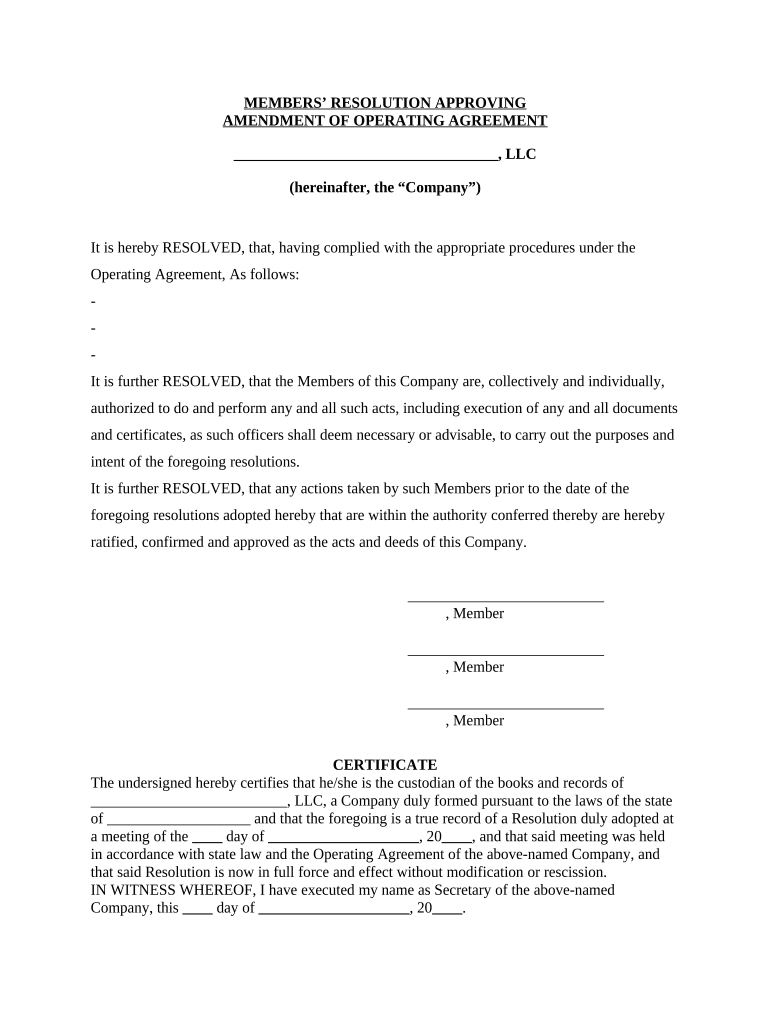
Recitals

A brief factual background stating why the resolution is needed, citing relevant provisions of the operating agreement or bylaws if applicable.

Resolved Clause

One or more 'Resolved' paragraphs setting out the specific authorization, limitations, dollar amounts, or delegated powers being approved.

Effective Date

An explicit effective date for the resolution that governs when the authority takes effect and controls related timelines.

Signatures

Signature blocks for authorized members or managers, including printed name, title (if any), and date of signature.

Certification

Optional company certification language and signature by a secretary or manager verifying the resolution was adopted according to governing documents.

Step-by-step: completing a Members Resolution

Follow these sequential steps to prepare, approve, and record a Members Resolution so it meets governance and third-party requirements.

  • 01
    Draft the language: Prepare a concise title, recitals, resolved clauses, and an effective date that match the intended action.
  • 02
    Review governing documents: Confirm approval thresholds, notice requirements, and quorum rules in the operating agreement or bylaws before adoption.
  • 03
    Obtain member approval: Hold a meeting or obtain written consent per the operating agreement; document votes or written consents in the record.
  • 04
    Sign and certify: Authorized members sign and date the resolution; a secretary or manager may attach a certification if requested by third parties.

Where to file, send, or submit the Members Resolution

Resolutions are retained internally but may be shared with banks, title companies, auditors, or counsel to evidence authority. Know where each copy must go.

  • Company Minute Book: File the original signed resolution in the company minute book or corporate records folder for retention and future reference.
  • Bank or Lender: Provide a certified copy when opening accounts, granting signing authority, or supporting loan documents as requested by the institution.
  • Title/Closing Agent: Deliver a certified copy for real property closings to show authority to convey or encumber assets.
  • External Counsel: Share with legal counsel for review and to attach to related transaction files or due diligence materials.

Configuring an online workflow for a Members Resolution

Set up a digital template and routing rules so the resolution is completed, signed, and stored consistently across transactions.

Template Field Prepopulate Entity Name, Resolution Title, Effective Date, and Resolved Clauses
Signer Order Set sequential or parallel signing depending on whether a manager or multiple members must sign
Authentication Use email plus SMS or access code for added signer attribution
Certification Step Include a final signature block for the certifying secretary or manager
Archive Action Automatically save signed PDF and audit trail to company cloud storage

Technical considerations for eSigning and eSubmission

Choose integrations with cloud storage and corporate systems to automate archiving and simplify retrieval for audits or third-party requests.

  • Document formats: PDF and DOCX support ensures the signed resolution is widely accepted
  • Authentication options: Email access codes, SMS codes, or knowledge-based checks improve signer attribution
  • Audit trail: Timestamps, IP addresses, and action logs provide evidentiary value

Timing and deadlines to watch when adopting a resolution

Certain transactions require member approval before a date-specific event (closing, loan draw, contract execution). Plan adoption to align with those trigger dates.

Effective date selection:

Enter effective date as MM/DD/YYYY to coordinate with transaction schedules

Bank requirements:

Some banks require a certified resolution no more than 90 days old; confirm institutional policy

Contract closings:

Obtain member approval before signing purchase agreements or security documents

Regulatory filings:

Align adoption with any required governmental filings or notices to avoid retroactivity issues

Record retention:

Archive signed resolution immediately after execution to preserve audit trail

Key milestones in the resolution process

A simple milestone sequence helps track drafting, approval, execution, and distribution so no step is missed.

01

Drafting Complete

Language finalized, including resolved clauses and effective date

02

Member Approval

Meeting held or written consents collected to meet quorum and voting rules

03

Signatures Collected

Authorized members and certifier sign and date the resolution

04

Distribution and Filing

Certified copies delivered to banks, counsel, and recorded in company records

Risks and consequences of an incorrect or missing resolution

Contract invalidation: Third parties may refuse to recognize the transaction without documented member authorization
Bank refusal: Banks can decline to open accounts or process transactions without a proper certified resolution
Internal disputes: Ambiguous authority increases risk of member disputes and litigation
Regulatory exposure: Incorrect records can weaken liability protections and compliance defenses
Delay costs: Missing or mismatched documentation can delay closings and incur financial penalties
Notary noncompliance: Improper notarization or lack of required witness signatures may invalidate certifications

Common mistakes to avoid when preparing a resolution

  • Using vague action language that fails to specify amounts, dates, or transaction identifiers.
  • Failing to confirm quorum or voting thresholds in the operating agreement before adopting the resolution.
  • Mismatching entity or signer names between the resolution and formation documents.
  • Neglecting to record the signed resolution in the company minute book and distribute certified copies as needed.

Practical examples showing typical Members Resolutions

Two concise examples illustrate how resolution language varies by purpose and recipient.

Bank Account Authorization

A multi-member LLC authorizes the managing member to open accounts

  • Authorization names the bank and account types
  • The certified resolution includes entity name, member vote record, signature block, and a dated certification for bank acceptance.

Asset Sale Approval

Members approve sale of business assets to third party

  • Resolved clause specifies assets, sale price, and authorized signatory
  • Signed, dated, and certified copy provided to escrow and included with closing documents to evidence corporate approval.

Supporting documents commonly attached to a resolution

Attaching related documents strengthens the resolution’s evidentiary value and eases third-party due diligence.

Operating Agreement

Attach the governing provision authorizing the action or a citation to the relevant section to show compliance with internal voting rules.

Meeting Minutes

Include minutes or written consents documenting the vote or member approvals required to adopt the resolution.

Certification Letter

A short certifying letter from the company secretary confirming the resolution’s adoption and the current member list is often requested by banks.

Power of Attorney

If authority is delegated, attach a limited power of attorney or delegation document specifying the scope and duration of authority.

Practical tips for accurate and efficient completion

Adopt these practices to reduce friction with counterparties and improve governance records.

Use a standard template
Maintain a version-controlled template that includes required fields, certification language, and common bank wording to avoid ad hoc drafting errors.
Confirm signer identity
Verify signer names and titles against formation documents and use reliable authentication methods for electronic signing.
Keep certified copies
Provide certified copies to banks and title agents and retain originals in the minute book to preserve record integrity.
Document voting
Record votes or attach written consents that demonstrate the resolution was adopted per operating agreement thresholds.

Typical eSignature plan pricing and feature comparison

Summary comparison of entry-level pricing and common features for signing platforms. signNow is listed first per vendor ordering rules.

signNow DocuSign Adobe Sign PandaDoc HelloSign
Starting Price $8/user/mo $15/user/mo $14/user/mo $19/user/mo $15/user/mo
Free Trial 7-day free trial, no credit card Varies by vendor Varies by vendor Varies by vendor Varies by vendor
Bulk Send Yes (Business Premium) Yes Yes Yes Yes
Audit Trail Yes Yes Yes Yes Yes
HIPAA Compliant Yes (BAA required) Yes Yes No No

Frequently asked questions about Members Resolutions

Answers to common procedural and legal questions to help avoid delays when preparing and using a Members Resolution.


Need help? Contact support

be ready to get more
Join over 28 million airSlate SignNow users