Establishing secure connection…Loading editor…Preparing document…

Mississippi Letters Testamentary

This template is fully customizable. Edit the text, fill out the fields, and send it for signature. Give it a try!
Mississippi Letters Testamentary

What Mississippi Letters Testamentary Are and how they function

A Mississippi Letters Testamentary is a court-issued document that formally appoints a personal representative (executor) to administer a decedent's probate estate. It is issued after the probate court accepts a will and grants authority to act on behalf of the estate, and it gives the executor authority to access bank accounts, transfer titled property, pay creditors, and distribute assets in accordance with the will and Mississippi probate law. Because Letters Testamentary originate from a court order, they are governed by state probate procedure rather than private contract rules, and they are typically produced and filed with the local probate or chancery court during the estate administration process.

Why Letters Testamentary matter for estate administration

Letters Testamentary provide the legal authority executors need to manage and settle an estate, to collect assets, settle debts, and transfer property title. They reduce friction with banks, title companies, and third parties by proving that the bearer acts under court authority rather than as a private claimant.

Why Letters Testamentary matter for estate administration

Who typically handles or relies on Letters Testamentary

Several parties interact with Letters Testamentary during probate and estate settlement.

  • Executors and personal representatives who need court authority to manage the decedent's assets and pay debts.
  • Probate attorneys preparing petitions, representing executors in court, and advising on fiduciary duties.
  • Banks, financial institutions, and title companies that require proof of authority before releasing funds or transferring title.

These documents establish formal authority; parties asked to accept them typically verify the issuing court and the case number before taking action.

Primary roles that interact with this document

Executor

An individual named in a will (or appointed by the court) responsible for collecting assets, paying creditors, and distributing property under court supervision. Executors must follow fiduciary duties and can be held liable for breaches of duty.

Probate Attorney

A licensed lawyer who files the probate petition, represents the estate in hearings, prepares Letters Testamentary documentation, and advises the executor on compliance with Mississippi probate procedure and statutory deadlines.

Key legal and security facts to know

Encryption: TLS 1.2/1.3 in transit; AES-256 at rest
HIPAA: HIPAA compliance possible; BAA required for PHI
ESIGN / UETA: ESIGN and UETA govern most e-signature legality
Audit Trail: Maintain timestamps, IP, and signer attribution
21 CFR Part 11: Applies to FDA records; may require stronger controls
SOC / ISO: SOC 2 Type II and ISO 27001 commonly used

Consequences of improper or incomplete Letters Testamentary

Probate Delays: Delays to estate administration and creditor payouts
Bond Requirements: Court may require a surety bond if improperly executed
Fiduciary Liability: Executor can be held personally liable for breaches
Tax Penalties: Late filings can trigger IRS or state penalties
Transaction Rejection: Banks or title companies may refuse transactions
Contested Proceedings: Improper process increases risk of will contests

Common preparation mistakes to avoid

  • Submitting an incomplete petition without the decedent's death certificate or will can cause immediate dismissal or request for supplemental filings from the court.
  • Using mismatched names or incorrect case numbers on submitted copies often leads to processing delays and additional court appearances.
  • Failing to include a certified copy of the will or required estate inventory prompts repeated requests and can extend probate timelines significantly.
  • Attempting to rely on an unsigned or electronically executed will where state law requires original, witnessed signatures risks invalidation under Mississippi and ESIGN exceptions.

Step-by-step overview for obtaining Letters Testamentary

Follow these primary steps to request and receive Letters Testamentary from the probate court in Mississippi.

  • 01
    Gather Records: Collect death certificate, original will, and asset list.
  • 02
    File Petition: File a probate petition with the appropriate county court.
  • 03
    Court Hearing: Attend hearing; court approves executor and issues order.
  • 04
    Receive Letters: Clerk issues Letters Testamentary with case number.

How Letters Testamentary operate in day-to-day estate work

Once issued, Letters Testamentary serve as the executor's written authority when interacting with third parties.

  • Bank Access: Present letters to financial institutions to access accounts.
  • Title Transfers: Use letters to retitle or transfer real property.
  • Claims Handling: Authorize payment or defense of creditor claims.
  • Final Accounting: Support filings required for closing the estate.

Essential components of a professional Letters Testamentary document

A complete Letters Testamentary contains court identifiers, a clear grant of powers, and the clerk's authentication so third parties can rely on it confidently.

Court Caption

Case number, court name, and county identifying the probate proceeding and enabling third-party verification.
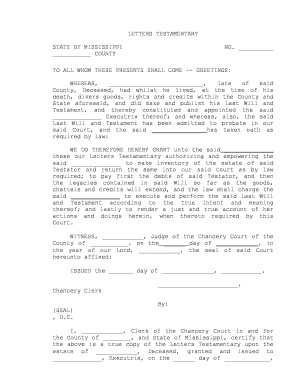
Grant of Authority

A clear statement naming the executor and listing the powers to collect assets, pay debts, and distribute estate property.

Executor Identity

Full legal name and any address of the appointed personal representative for bank and title verification purposes.

Bond and Security

If required, the court order will reference any bond amount or surety conditions attached to the appointment.

Clerk Certification

Court clerk signature, seal, and issuance date certifying that the document is an official court order.

Limits and Conditions

Any court-imposed limits on sale or distribution of assets, such as inventory requirements or supervised distributions.

Real-world examples of digitized document workflows supporting estate tasks

Below are concise examples of how organizations use digital signing and secure document handling to streamline legal and property workflows.

Martin Properties — Tim Martin

Tim Martin replaced paper-based processes for property closings after owner death to reduce turnaround times.

  • He used secure document routing and certified copies to satisfy title companies.
  • As a result, routine estate transfers that previously took weeks were completed more consistently and with documented audit trails for each transaction.

Fertility Centers — John Butler

John Butler's organization digitized consent and probate-related release forms for estate matters.

  • The team combined secure signatures and role-based access control.
  • This approach preserved compliance with recordkeeping requirements while allowing counsel and administrators to access certified court documents remotely when needed.

Practical tips for accurate and efficient completion

Follow these practical practices to minimize delays and reduce the risk of contested filings or rejections.

Use Certified Copies
Submit certified copies of the will and death certificate to the court and to banks to prevent repeated verification requests.
Confirm Court Requirements
Verify local county procedures and filing fees ahead of submission to avoid supplemental filings and hearing continuances.
Record Case Numbers
Note the court-assigned case number on every communication and submitted document for reliable tracking.
Keep an Audit Trail
Maintain signed copies, timestamps, and custody records to support distributions and defend fiduciary actions.

eSignature vendor comparison for probate and supporting documents

Below is a concise vendor comparison focused on price, core features, and HIPAA capability; signNow is listed first per guidance.

signNow DocuSign Adobe Sign PandaDoc HelloSign
Starting Price $8/user/mo $15/user/mo $14/user/mo $19/user/mo $15/user/mo
Free Trial Yes, 7-day free trial No No Yes, limited Yes, limited
Bulk Send Yes Yes Yes Yes No
Audit Trail Yes Yes Yes Yes Yes
HIPAA Compliant Yes Yes Yes No No
Envelope Cap No envelope cap 100 envelopes/user/year Varies by plan Varies by plan Varies by plan

Frequently asked questions about Mississippi Letters Testamentary

Common questions revolve around e-signature acceptability, required attachments, filing steps, and what to present to third parties.


Need help? Contact support

be ready to get more
Join over 28 million airSlate SignNow users