Establishing secure connection…Loading editor…Preparing document…

Missouri Verified Petition for Name Change of Minor

This template is fully customizable. Edit the text, fill out the fields, and send it for signature. Give it a try!
Missouri Verified Petition for Name Change of Minor

What the Missouri Verified Petition for Name Change of Minor Is

The Missouri Verified Petition for Name Change of Minor is a sworn court filing used to request a judicial order changing a child’s legal name in Missouri. Filed in the circuit court of the county where the minor resides, the petition must state the minor’s current and proposed names, the reason for the request, and the identity and addresses of parents or legal guardians. Supporting documents commonly include a certified birth certificate and proof of parental authority; some counties also require background or publication steps under local rules.

Why a Verified Petition Matters for Minors

A verified petition provides the court a sworn record to evaluate the best interest of the child, documents parental consent or notice, and creates a clear legal basis to update identity records such as birth certificates, school files, and social security records after a judicial decree issues.

Why a Verified Petition Matters for Minors

Step-by-step: Completing the Petition

Follow these concise steps to prepare, file, and pursue a name change petition for a minor in Missouri.

  • 01
    Prepare Petition: Complete verified petition form with facts and signatures.
  • 02
    Attach Evidence: Include birth certificate, ID, and custody documents.
  • 03
    File with Clerk: Submit to county circuit court and pay fees.
  • 04
    Attend Hearing: Appear at scheduled hearing for final decree.

Core Components of a Professional Petition

A well-prepared verified petition organizes facts, attaches evidence, and presents the court with a clear proposed order to make post-decree changes straightforward.

Caption

Court caption lists the county, case number (if assigned), and full names of parties so the filing is routed correctly and becomes part of the court record.
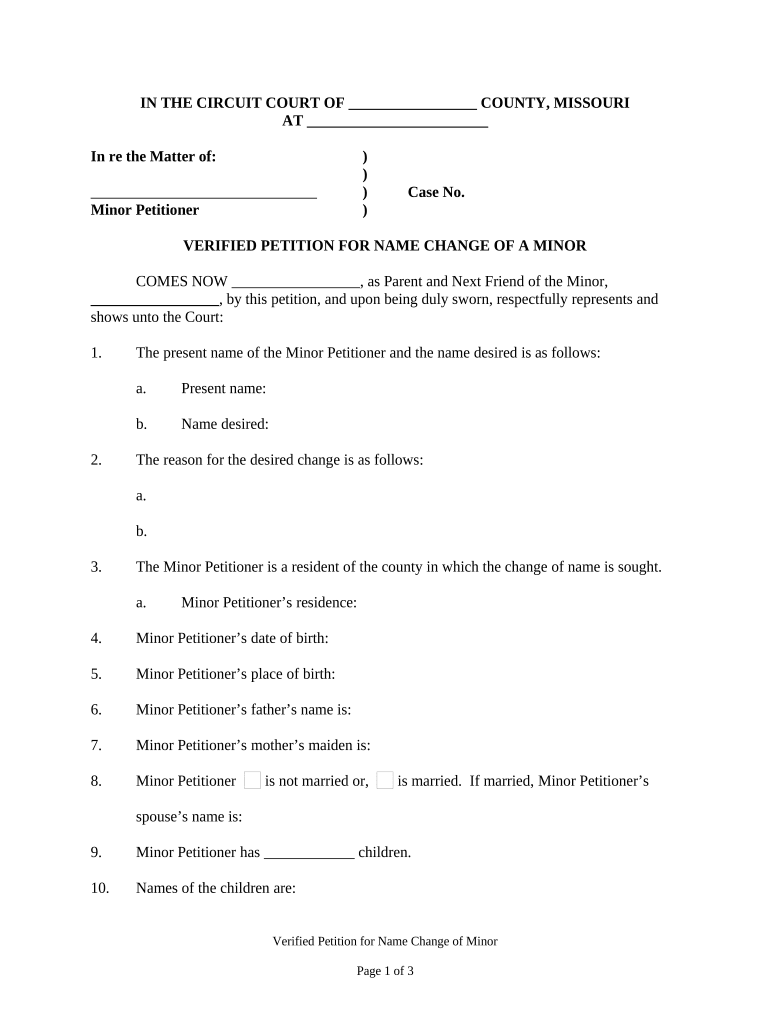
Verified Statement

A sworn narrative that explains the petition’s factual basis, the minor’s status, and the legal grounds for the requested change under applicable Missouri statutes.

Parental Consent

Express written consent from the custodial parent and notarized consent or served notice to noncustodial parent as required by the court ensures due process.

Supporting Documents

Attach certified birth certificate, custody orders, adoption paperwork, or other documentation that substantiates identity and parental authority.

Proposed Decree

Include a clear proposed order for the judge to sign that states the minor’s new legal name and instructs agencies to update records.

Filing Cover Sheet

Court-specific cover sheets, fee payment receipt, and stamped envelopes for service can speed clerk processing and scheduling of hearings.

Security and Compliance Considerations

Encryption: TLS 1.2/1.3 in transit; AES-256 at rest
HIPAA: BAA required for protected health information
ESIGN / UETA: Compliant with federal and state e-signature laws
21 CFR Part 11: Supports FDA electronic records controls
SOC 2 Type II: Third-party security attestation available
ISO 27001: Information security management certified

Short List of Risks If the Petition Is Flawed

Invalid Petition: Case dismissed
Missing Consent: Delay or denial
Incorrect Fees: Clerk returns filing
False Statement: Perjury exposure
Service Failure: Hearing postponed
Identity Mismatch: Records not updated

Common Preparation Pitfalls to Avoid

  • Using inconsistent name formats between the petition and supporting documents causes clerks to request corrections and delays court scheduling.
  • Failing to serve or notify a noncustodial parent when required leads to continuances or dismissal for lack of notice.
  • Omitting a proposed order forces the court to draft language, which can result in unintended record changes or additional follow-up filings.
  • Neglecting notarization or sworn verification where the court requires it means the petition may be rejected on procedural grounds.

Who Typically Completes This Petition

Choose the path—self-represented filing, attorney assistance, or guardian involvement—based on complexity and whether expedited processing is needed.

  • Parents or legal guardians filing for a minor’s name change without counsel, often with county clerk assistance or court self-help resources.
  • Family law attorneys preparing formal petitions, proposed orders, and service packages for contested or complex custody situations.
  • Court clerks, guardians ad litem, or child welfare agencies assisting in cases involving adoption or juvenile court matters.

Representative Users and Their Roles

Custodial Parent

A custodial parent prepares the verified petition to legally change the child’s name, gathers certified birth records and consent documents, and signs the verification under oath before filing with the county circuit court.

Family Law Attorney

An attorney drafts the petition and proposed decree, ensures statutory requirements and notice obligations are met, represents the minor’s best interest in hearings, and coordinates record updates after the judge signs the decree.

How the Filing and Decision Process Operates

The petition moves through a series of administrative and judicial steps from filing to decree and record updates.

  • Draft & Verify: Prepare petition, sign under oath.
  • File & Pay: Submit to county clerk with payment.
  • Service / Notice: Provide required notice to other parent.
  • Hearing / Order: Judge hears matter and signs decree.

Customizing an Online Petition Workflow

When assembling an online petition package, configure fields and notifications to match court requirements and proof of service steps.

Authentication Email link or SMS verification for signer identity
Attachments Require certified birth certificate and custody paperwork
Conditional Fields Show consent fields only when applicable
Notifications Auto-notify clerks and serving parties on filing
Template Reuse Save a template per county to ensure local compliance

Technical Requirements for eFiling and eSignatures

Confirm the county clerk’s e‑filing portal accepts electronically signed and uploaded PDFs and retains a court-ready audit trail.

  • Integrations: Salesforce, NetSuite, Microsoft 365, Google Workspace
  • Formats Supported: PDF, DOCX, TIFF, text-image attachments
  • Authentication Options: Email link, SMS code, or advanced ID proofing

Time-sensitive Steps and Typical Scheduling

Timelines for hearings, service, and record updates vary by county; the overview below reflects common steps to monitor after filing.

Hearing Scheduling:

County assigns hearing date; timing varies by docket and local rules.

Service Deadline:

Serve required parties within the timeframe set by the court.

Fee Payment:

Pay filing fees at submission or as directed by clerk.

Publication (if required):

Some counties require notice publication; follow local rule.

Decree Entry:

Judge signs decree; clerk enters order and issues certified copies.

Key Milestones from Filing to Final Decree

A typical timeline includes preparation, filing, notice/service, and the court’s final order and record change.

01

Prepare Petition

Draft verified petition and gather certificates.

02

File with Court

Submit petition to the appropriate county circuit court.

03

Serve Parties

Provide required notice to other parent or interested parties.

04

Final Hearing

Judge reviews facts and issues the decree.

eSignature Vendor Pricing and Feature Snapshot

Comparison of typical entry-level pricing and common feature availability for popular eSignature providers. Confirm plan details with each vendor directly.

signNow DocuSign Adobe Sign PandaDoc HelloSign
Starting Price $8/user/mo $15/user/mo $14/user/mo $19/user/mo $15/user/mo
Free Trial 7-day trial Varies by plan Varies by plan Varies by plan Varies by plan
Bulk Send Yes Yes Yes Yes No
Audit Trail Yes Yes Yes Yes Yes
HIPAA Compliant Yes Yes Yes No No
Envelope Cap No cap 100 envelopes/user/year Varies by plan Varies by plan Varies by plan

Realistic Use Examples

Two concise scenarios illustrate when and how a verified petition for a minor’s name change is used in practice.

Pro Se Parent Filing

A single custodial parent files pro se after gathering a certified birth certificate and consent affidavit

  • County clerk assigns a hearing date six to eight weeks out
  • The parent obtains a certified decree and uses it to update school, Social Security, and medical records without attorney fees.

Attorney-Assisted Petition

A family law attorney files a petition where custody is shared and the other parent contests the change

  • Attorney serves required notices and prepares evidence for the hearing
  • The attorney secures a clear decree, coordinates certified copies, and assists with agency record updates.

Practical Tips for Accurate and Efficient Filings

Follow these practices to reduce defects, accelerate court processing, and ensure records are updated correctly after the decree.

Use Certified Documents
Attach certified birth certificates and court orders rather than photocopies to avoid clerk rejections and to verify identity.
Confirm Local Rules
Review county circuit court filing requirements, publication obligations, and service rules to ensure procedural compliance.
Provide Clear Proposed Order
Include a concise proposed decree that names the new legal name and directs agencies to update official records.
Keep Certified Copies
Obtain multiple certified copies of the signed decree to expedite updates to schools, vital records, and federal agencies.

Frequently Asked Questions and Quick Answers

Answers to common questions about procedure, e-signatures, notarization, and next steps after the court signs a minor’s name change decree.


Need help? Contact support

be ready to get more
Join over 28 million airSlate SignNow users