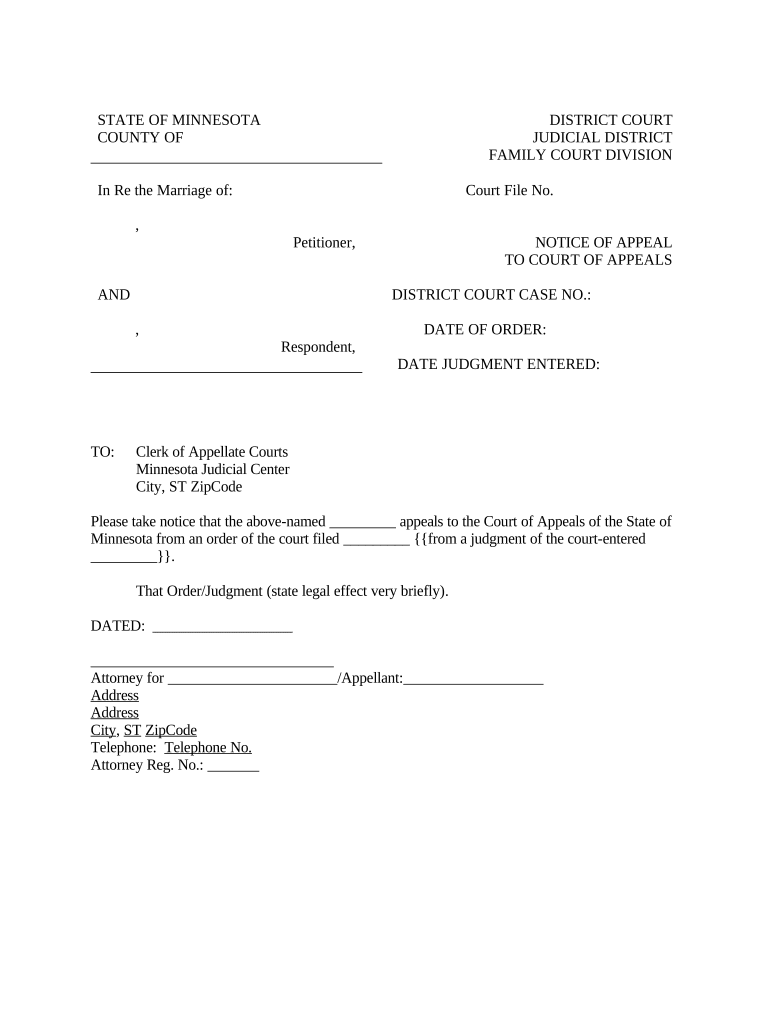
Minnesota Notice of Appeal to Court of Appeals
What the Minnesota Notice of Appeal to Court of Appeals Is
Why a Proper Notice of Appeal Matters
A clear, timely Notice of Appeal preserves your right to appellate review, starts the appellate record process, and sets deadlines for briefing and record assembly under Minnesota appellate rules. Accurate filing reduces the risk of dismissal for procedural defects and enables efficient service and scheduling for all parties.
Who Typically Files a Notice of Appeal and When
Appellants include plaintiffs, defendants, or intervenors who received a final judgment or appealable order from a trial court and wish to seek review from the Minnesota Court of Appeals.
- Individual litigants and self-represented parties seeking reversal or modification of trial court rulings.
- Civil defense or plaintiff counsel preserving error for appellate briefing and record preparation.
- Public entities or agencies appealing administrative or civil judgments that affect statutory or regulatory rights.
File promptly after entry of judgment and after consulting the Minnesota Rules of Civil Appellate Procedure to confirm applicable time limits and service requirements.
Step-by-Step: Filing a Notice of Appeal in Minnesota
-
01Confirm Finality: Verify the order is final or appealable under Minnesota rules.
-
02Prepare Notice: Complete caption, docket number, judgment date, relief sought, and signature.
-
03Serve Parties: Serve opposing parties per Minn. R. Civ. App. P. and include certificate of service.
-
04File with Clerk: File the original with the appellate clerk and pay any required fee or seek waiver.
Where the Notice Goes and How the Process Moves
-
Appellate Clerk: Files and dockets the notice; confirms filing requirements.
-
Trial Court: Prepares and certifies the record on appeal upon request.
-
Opposing Parties: Receive service; may file responsive or cross-appeal notices.
-
Scheduling: Court issues briefing and oral argument schedule.
Customizing an Online Filing and Service Workflow
| Field | Configuration |
|---|---|
| Filling Method | Use fillable PDF or web form for consistent fields. |
| Signer Authentication | Select email + SMS code or stronger verification. |
| Service Evidence | Attach certificate of service and delivery receipts. |
| Archival Format | Export signed copy as PDF/A with audit trail. |
Technical Requirements for eFiling and eService
Use a platform that supports PDF, audit trails, and verified signer authentication for court-grade submissions.
- File Formats: PDF and PDF/A accepted.
- Authentication: Email+SMS or KBA recommended.
- Integrations: Supports court eFiling portals.
Ensure the provider can produce an immutable signed PDF and a tamper-evident audit trail; signNow supports PDF, Word, integrations with common systems, and compliance frameworks suitable for legal workflows.
Key Timing Rules to Watch
Typical Filing Window:
Many states use 30 days from judgment entry; verify Minn. R. Civ. App. P.
Certificate of Service:
Include service date; it affects opponents' response deadlines.
Record Requests:
Order the trial-court record early to meet briefing deadlines.
Briefing Schedule:
Appellant's brief deadlines follow docketing and record availability.
Extensions:
Extensions are limited; request them promptly with justification.
Milestones in a Minnesota Appeal
File Notice
Submit notice to appellate clerk to start the appeal.
Serve Parties
Serve all parties and file the certificate of service.
Record Assembly
Request and obtain the certified record from trial court.
Briefing and Argument
Follow court schedule for briefs and possible oral argument.
Common Mistakes When Preparing a Notice of Appeal
- Missing or incorrect trial-court docket number leading to misdocketed appeals and clerk confusion.
- Failing to calculate the deadline from the correct judgment entry or service date, causing untimely filing.
- Omitting a proper certificate of service or using incorrect service method for opposing counsel or parties.
- Using inconsistent party names or an incorrect caption that does not match the trial-court record.
Consequences of Procedural Errors
Electronic Signing Pricing Overview for Appeal Filings
| signNow | DocuSign | Adobe Sign | PandaDoc | HelloSign | |
|---|---|---|---|---|---|
| Starting Price | $8/user/mo | $15/user/mo | $14/user/mo | $19/user/mo | $15/user/mo |
| Free Trial | 7-day free trial | Varies by vendor | Varies by vendor | Varies by vendor | Varies by vendor |
| Bulk Send | Yes | Yes | Yes | Yes | No |
| Audit Trail | Yes | Yes | Yes | Yes | Yes |
| HIPAA Compliant | Yes | Yes | Yes | No | No |
Frequently Asked Questions and Troubleshooting
-
What if I miss the appeal deadline?
Missing the deadline typically results in dismissal of the appeal unless you can show excusable neglect or a statutory basis for extension; consult Minn. R. Civ. App. P. and consider emergency relief only in narrow circumstances.
-
Can I eSign the Notice of Appeal?
Yes, electronic signatures are generally enforceable under the ESIGN Act (15 U.S.C. §7001) and UETA where adopted; ensure the court accepts electronic filings and that service rules are met.
-
Is notarization required for the Notice?
Notarization is not typically required for a Notice of Appeal itself; check local rules and whether any attached affidavits require notarization or RON authentication.
-
How do I certify the trial-court record?
Request the record from the trial-court clerk promptly after docketing; follow the appellate clerk's instructions for certification and transmission to avoid briefing delays.
-
Can I serve the notice electronically?
Electronic service may be permitted under court rules or by agreement; file a certificate of service showing method, recipient, and date consistent with Minn. R. Civ. App. P.
-
When should I hire appellate counsel?
Engage appellate counsel early if issues involve complex legal questions, record assembly, or tight deadlines; counsel can preserve issues and manage procedural requirements efficiently.