Establishing secure connection…Loading editor…Preparing document…

Minnesota Satisfaction of Attorney's Lien

This template is fully customizable. Edit the text, fill out the fields, and send it for signature. Give it a try!
Minnesota Satisfaction of Attorney's Lien

What the Minnesota Satisfaction of Attorney's Lien Is

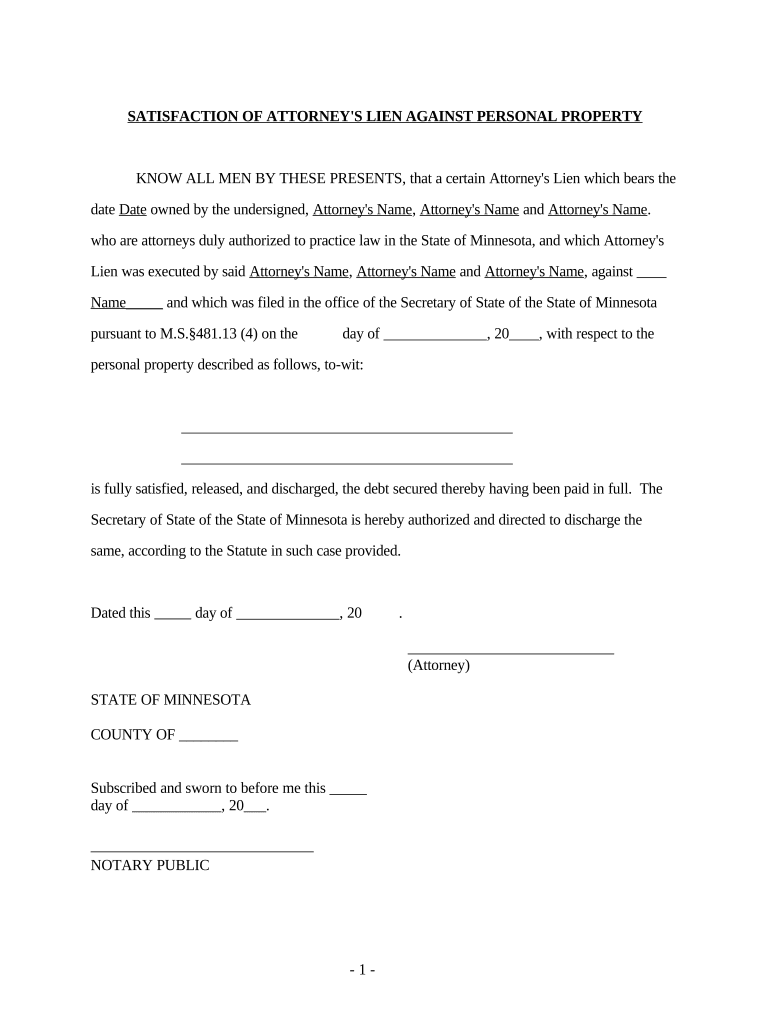
A Minnesota Satisfaction of Attorney's Lien is a written instrument that formally confirms an attorney's lien on a client's recovery, judgment, or settlement has been satisfied, released, or paid. It typically references the case or matter, the lien amount or release language, attorney and client names, and the date of satisfaction. Once executed and recorded where the original lien was filed, the satisfaction clears the public record and removes the lien encumbrance that could otherwise cloud title or remain a lien against funds. Accurate completion prevents later disputes over entitlement and collection.

Why a Proper Satisfaction Matters

A correctly executed satisfaction document confirms that the attorney's claim on proceeds is resolved and prevents future collection attempts or title issues.

Why a Proper Satisfaction Matters

Who Uses This Form and When

Use the satisfaction as soon as the lien's monetary or conditional terms are fulfilled to avoid administrative or legal complications.

  • Attorneys closing client matters and releasing claims upon payment or settlement.
  • Clients who need proof the attorney's lien no longer encumbers recovery funds.
  • Title companies and lenders checking public records before disbursing proceeds.

Primary Signatories and Stakeholders

Attorney

The attorney or law firm that held the lien must sign or otherwise execute the satisfaction. The attorney's signature and printed name should match the lien instrument to ensure clear identification and valid release.

Client / Claimant

The client or claimant is often listed for identification and may sign where the satisfaction requires client acknowledgment, particularly if the satisfaction modifies the original lien's terms or conditional releases.

Core Components of a Professional Satisfaction Document

A complete Satisfaction of Attorney's Lien includes specific references and certifications so recorders, payors, and third parties can verify the release without further inquiry.

Case Reference

Identify the court, case number, or claim file so the satisfaction clearly ties to the original lien instrument and matter.
Attorney Identification

Include the law firm's full legal name, mailing address, bar number when available, and signature to validate authority to release the lien.

Client Identification

List the client's full legal name and contact details to confirm the person or entity whose recovery was encumbered.

Payment or Release Statement

State the exact amount paid or declare a full satisfaction or conditional release with precise language describing how the lien is extinguished.

Execution Date

Record the date the satisfaction is signed; this controls when the lien stops affecting title or distribution of funds.

Recording / Notary Block

Include notary acknowledgement and a recording block for county recorder use; specify where the original lien was recorded for efficient indexing.

Essential Fields to Include

Attorney Name: Full firm or attorney name
Client Name: Full legal name of claimant
Case Number: Court or claim file number
Amount: Dollar amount or 'satisfied in full'
Execution Date: MM/DD/YYYY format
Notary / Recorder: Notary block and recording reference

Step-by-Step: Completing and Recording the Satisfaction

Follow these steps in order to prepare, execute, and record a valid satisfaction that clears the lien from public records.

  • 01
    Prepare Form: Populate attorney, client, case, and payment details accurately.
  • 02
    Execute: Attorney signs and, if required, client or witness signs the document.
  • 03
    Notarize: Obtain notary acknowledgement where the county requires it.
  • 04
    Record: File with the county recorder office where the original lien was recorded.

How to Set Up an Online Satisfaction Workflow

Configure a digital workflow to collect signatures, notarizations, and recording-ready PDFs to reduce processing time and errors.

Field Configuration
Signer Roles Attorney | Notary | Client where required
Authentication Email link or SMS code for signer verification
Notarization Mode Remote online notary (where allowed) or in-person
Final PDF Format Flattened, printable PDF with audit trail

Where to File and How the Record Is Updated

Understanding the destination and chain of custody helps ensure the satisfaction is recorded and indexed correctly for clearing the lien.

  • County Recorder: Record satisfaction where the original lien appears in public records.
  • Client File: Place a recording receipt in the client's matter file for future reference.
  • Title Company: Provide recorded satisfaction to title or closing agent when required.
  • Payor / Disburser: Supply recorded instrument to the payer to authorize final distribution.

Digital Signing and eSubmission Considerations

Verify county recorder acceptance of electronically notarized or e-signed documents before relying solely on eSubmission workflows.

  • Authentication: Email, SMS, or advanced authentication
  • Notary Support: Remote or in-person notarization options
  • Output: Flattened PDF with audit trail

Timing and Processing Expectations

Prompt execution and recording minimize the risk of title holds and enable timely disbursement of settlement funds.

Execute Promptly:

Sign and notarize upon payment or settlement completion.

Record Soon:

Record at county recorder immediately after execution.

Allow Processing:

County recording processing varies from same day to several business days.

Provide Copies:

Give recorded copy to client, payer, and title agent.

Retain Originals:

Keep executed original in the attorney's file per retention rules.

Key Milestones When Satisfying an Attorney's Lien

Track these sequential milestones to ensure the lien release is enforceable and properly recorded for distribution and title clearance.

01

Payment or Settlement

Funds received or settlement terms fulfilled before release.

02

Draft Satisfaction

Prepare satisfaction referencing original lien instrument and case.

03

Execution and Notarization

Signatures and notary acknowledgement completed.

04

Recording and Distribution

File with county recorder; distribute recorded copy to stakeholders.

Risks and Consequences of Errors

Title Clouding: Continued encumbrance
Payment Delay: Funds withheld
Malpractice Risk: Client claims possible
Recording Rejection: Improper format
Administrative Costs: Re-filing fees
Regulatory Exposure: State bar inquiries

Common Preparation Mistakes to Avoid

  • Using an incorrect case number or instrument reference that prevents the recorder from matching the satisfaction to the original lien.
  • Mismatched attorney or client names between the lien and the satisfaction document causing indexing errors.
  • Omitting the notary acknowledgement where the recorder requires it, which results in rejection or non-acceptance.
  • Failing to deliver the recorded satisfaction to the payer or title company, delaying final disbursement of funds.

Practical Examples — How Satisfactions Are Used

Two common scenarios illustrate how and when satisfactions resolve liens and enable final disbursements.

Settlement Closure

A firm receives settlement funds and drafts a satisfaction referencing the settlement instrument.

  • The attorney signs and notarizes the satisfaction.
  • The recorded satisfaction is provided to the payer and title company, enabling immediate distribution and removing the lien from public record.

Post-Judgment Payoff

After a judgment payoff, counsel prepares a satisfaction specifying payoff amount and date.

  • The client acknowledges receipt where required.
  • Recording the satisfaction updates the public record and prevents later challenges to the distribution of judgment proceeds.

Comparing eSignature Vendors for Completing and Recording Satisfactions

Select an eSignature provider that supports notarization workflows, audit trails, and produces recording-ready PDFs; comparison below lists common vendor attributes.

signNow DocuSign Adobe Sign PandaDoc HelloSign
Starting Price $8/user/mo $15/user/mo $14/user/mo $19/user/mo $15/user/mo
Free Trial 7-day free trial, no card Trial available — vendor terms Trial available — vendor terms Trial available — vendor terms Trial available — vendor terms
Bulk Send Yes Yes Yes Yes No
Audit Trail Yes Yes Yes Yes Yes
HIPAA Compliant Yes Yes Yes No No
Envelope Cap No envelope cap 100 envelopes/user/year Varies by plan Varies by plan Varies by plan

FAQs and Troubleshooting for Minnesota Satisfaction Filings

Answers to frequent questions help resolve common issues during preparation, execution, and recording of satisfactions.


Need help? Contact support

be ready to get more
Join over 28 million airSlate SignNow users