Establishing secure connection… Loading editor… Preparing document…
Navigation

Fill and Sign the Model Agreements Form

Fill and Sign the Model Agreements Form

How it works

Open the document and fill out all its fields.
Apply your legally-binding eSignature.
Save and invite other recipients to sign it.

Rate template

4.6
34 votes
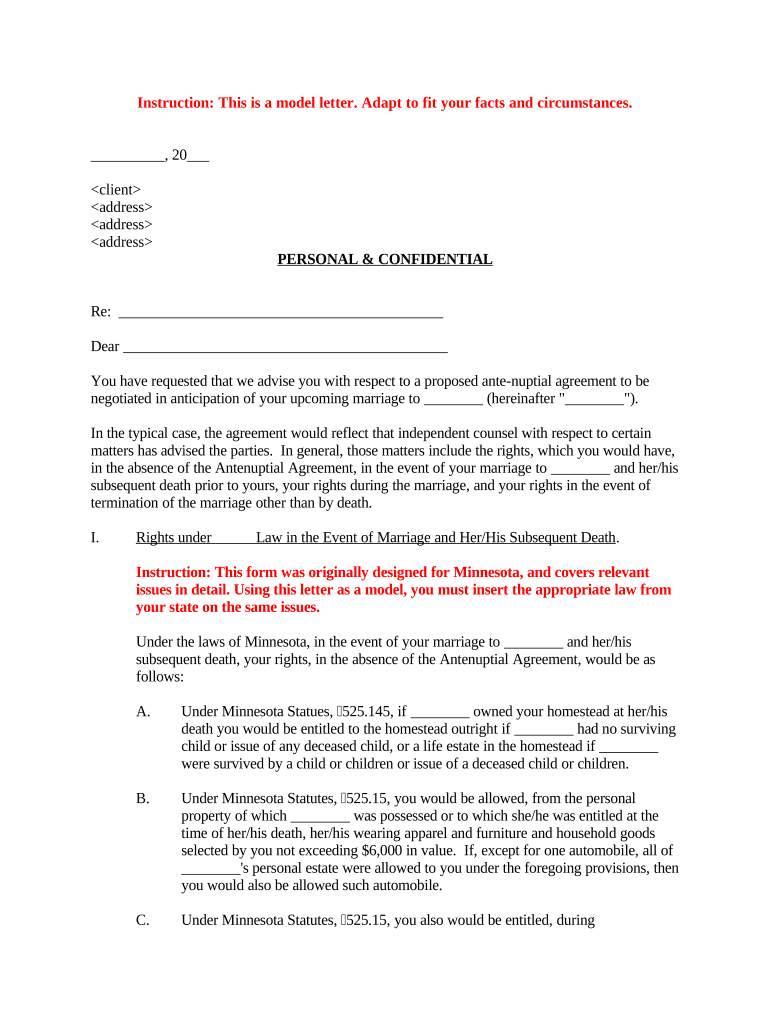
Instruction: This is a model letter. Adapt to fit your facts and circumstances. __________ , 20 ___ PERSONAL & CONFIDENTIAL Re: ___________ ___________ ___________ ___________ Dear ___________ ___________ ___________ ___________ You have requested that we advise you with respect to a proposed ante-nuptial agreement to be negotiated in anticipation of your upcoming marriage to ________ (hereinafter " ________ "). In the typical case, the agreement would reflect that independent counsel with respect to certain matters has advised the parties. In general, those matters include the rights, which you would have, in the absence of the Antenuptial Agreement, in the event of your marriage to ________ and her/his subsequent death prior to yours, your rights during the marriage, and your rights in the event of termination of the marriage other than by death. I. Rights under       Law in the Event of Marriage and Her/His Subsequent Death . Instruction: This form was originally designed for Minnesota, and covers relevant issues in detail. Using this letter as a model, you must insert the appropriate law from your state on the same issues. Under the laws of Minnesota, in the event of your marriage to ________ and her/his subsequent death, your rights, in the absence of the Antenuptial Agreement, would be as follows: A. Under Minnesota Statues, 525.145, if ________ owned your homestead at her/his death you would be entitled to the homestead outright if ________ had no surviving child or issue of any deceased child, or a life estate in the homestead if ________ were survived by a child or children or issue of a deceased child or children. B. Under Minnesota Statutes, 525.15, you would be allowed, from the personal property of which ________ was possessed or to which she/he was entitled at the time of her/his death, her/his wearing apparel and furniture and household goods selected by you not exceeding $6,000 in value. If, except for one automobile, all of ________ 's personal estate were allowed to you under the foregoing provisions, then you would also be allowed such automobile. C. Under Minnesota Statutes, 525.15, you also would be entitled, during administration, to a reasonable maintenance allowance. D. Under Minnesota Statutes, 524.2-101, if ________ dies intestate (without a will), ________ 's estate, real and personal (subject to your interest in the homestead under 524.145, the allowances provided in 525.15, and the payment of the expenses of administration, funeral expenses, expenses of last illness, taxes and debts), would be distributed as follows: (1) if there are no surviving issue of ________ , her/his entire estate would pass to you; (2) if there are surviving issue of ________ all of whom are also issue of yours, you will receive the first $70,000 of ________ 's intestate estate plus one-half (1/2) of the balance; (3) if there are surviving issue of ________ who are not issue of yours, you will be entitled to one-half (1/2) of the intestate estate. E. If ________ dies testate (with a will), under Minnesota Statutes, 524.2-201 through 524.2-207, you are granted the right of election to take an elective share of one-third (1/3) of ________ 's "augmented estate." The augmented estate is the estate: (1) reduced by funeral and administration expenses, the homestead, family allowances and exemptions, liens, mortgages and enforceable claims, and (2) increased by gifts made by ________ where she/he retained (a) the right to enjoy the property or income from the property, (b) a power to revoke or consume the property, (c) right of survivorship, and (d) any transfers within one year of death to the extent transfers exceed $30,000 to any one donee, and (3) also increased by the value of property owned by you and/or any property transferred by you, to the extent the owned or transferred property is derived from ________ . If ________ is not domiciled in this state, your right to take an elective share is governed by the law of ________ 's domicile. II. Rights During the Marriage under Minnesota Law . Under the laws of Minnesota, in the event of your marriage to ________ , your rights during the marriage, in the absence of the Antenuptial Agreement, would be governed primarily under the provisions of Chapter 519 of the Minnesota Statutes. By the specific provisions - 2 - of Minnesota Statutes, 519.11, Subd. 7, the provisions in that chapter are not to be construed as affecting antenuptial contracts or settlements. In the absence of any such antenuptial contract or settlement, the pertinent provisions of that chapter would be as follows: A. Under Minnesota Statutes, 519.02, all property, real, personal and mixed, and all closes in action, owned by any woman at the time of her marriage, continues to be her separate property after marriage. Any married woman continues to be entitled to receive, acquire and enjoy property of every description, and the rents, issues and profits thereof, and all avails of her contracts and industry, free from the control of her husband, and from any liability on account of her debts, as fully as if she were unmarried. B. Under Minnesota States, 519.05, it is specifically provided that a spouse shall not be liable for any debts of his or her spouse, except for necessities furnished to a spouse after marriage, where he or she/he would be liable at common law. That section further provides that where the husband and wife are living together, they are jointly and severally liable for all necessary household articles and supplies furnished to and used by the family. C. Under Minnesota Statutes, 519.07, provision is made for initiation of judicial proceedings, in the event that either spouse is deserted by the other for the space of one year, to debar the deserting spouse's interest in or to the deserted spouse's property. Upon completion of the necessary judicial proceeding, the deserted spouse would have full control over and full authority to convey her/his or her/his property. D. Under Minnesota Statutes 519.09, all inchoate estates or statutory interests in lieu of dower and courtesy in all lands in Minnesota conveyed prior to January 1, 1960, by the husband or wife of the one entitled to such inchoate dower or courtesy, or statutory interest, by a conveyance in writing, are abolished. III. Rights in the Event of Termination of Marriage Other Than by Death. Under the laws of Minnesota, in the event of your marriage to ________ and the subsequent termination of the marriage other than by death, your rights would be governed by the provisions of Chapter 518 of the Minnesota Statutes. A. Under Minnesota Statutes, 518.14, in any proceeding brought for dissolution of marriage or legal separation, the court, from time to time, after considering the financial resources of both parties, may require one party to pay a reasonable amount necessary to enable the other spouse to carry on, or to contest the proceeding, and to pay attorney's fees. The court may adjudge costs and disbursements against either party. B. Under Minnesota Statues, 518.17, the court upon adjudging dissolution of the marriage or separation, may make such further order as it deems just and proper concerning the care, custody and maintenance of minor children of the parties giving consideration to the factors set out in 518.17. The court may order either or both parents to pay a reasonable or necessary amount for support. C. Minnesota Statutes, 518.54, Subd. 5, defines "marital property" to include property, real or personal, including vested pension benefits or rights, acquired by the parties, or - 3 - either of them, or at any time during which the parties were living together as husband and wife under a purported marriage relationship which is later annulled. All property acquired by either spouse subsequent to the marriage and before a decree of legal separation is presumed to be marital property regardless of whether title is held individually or by the spouses in a form of co- ownership, such as joint tenancy, tenancy in common, tenancy by the entirety, or community property. The presumption of marital property is overcome by a showing that the property is of a type listed in clauses (a) to (e) below. By statute, "non-marital property" includes property, real or personal, acquired by either spouse before, during or after the existence of their marriage, which (a) is acquired as a gift, bequest, devise or inheritance made by a third party to one but not to the other spouse; (b) is acquired before the marriage; (c) is acquired in exchange for or is the increase in value of property which is described in clauses (a), (b), (d), and (e); (d) is acquired by a spouse after a decree of legal separation; or (e) is excluded by a valid antenuptial contract (emphasis supplied). D. Under Minnesota Statutes, 518.55, the court is authorized to determine, as one of the issues of the case, whether or not either spouse is entitled to an award of maintenance notwithstanding that no award is then made, or it may reserve jurisdiction of the issue of maintenance for determination at a later date. E. Under Minnesota Statutes, 518.57, upon decree of dissolution, legal separation or annulment, the court may make such further order as it deems just and property concerning the maintenance of minor or dependent children. F. Under Minnesota Statutes, 518.58, upon dissolution of the marriage, the court is required to make a just and equitable disposition of the marital property of the parties without regard to marital misconduct, after making findings regarding the disposition of the property. The court is to base its findings on all relevant factors including the length of the marriage, any prior marriage of a party, the age, health, station, occupation, amount and sources of income, vocational skills, employability, estate liabilities, needs and opportunities for future acquisition of capital assets, the amount of support, maintenance and income of each party, whether the property award is in lieu of or in addition to maintenance or support. The court shall also consider the contribution of each in the acquisition, preservation, depreciation or appreciation in the amount or value of the marital property, as well as the contribution of a spouse as a homemaker. It is presumed that each spouse made a substantial contribution to the acquisition of income and property while they were living together as husband and wife. The court may also award to either spouse the household goods and furniture of the parties, whether or not acquired during the marriage. If the court finds that either spouse's resources or property, including his or her - 4 - portion of the marital property as defined in Minnesota Statutes, 518.54, Subd. 5, are so inadequate as to work an unfair hardship, considering all relevant circumstances, the court may, in addition to the marital property, apportion up to one-half (1/2) of the property otherwise excluded under Minnesota Statutes, 518.54, Subd. 5, clauses (a) to (d), to prevent the unfair hardship. If the court apportions property other than the marital property, it is required to make findings in support of the apportionment. The length of the marriage, any prior marriage of a party, the age health, station, occupation, amount and sources of income, vocational skills, employability, estate, liabilities, needs and opportunity for future acquisition of capital assets and income of each party. It is important to note that property described under Minnesota Statues, 518.54, Subd. 5, clause (3) --property excluded by an antenuptial agreement--apparently may not be awarded by the court in the case of unfair hardship. If the court finds that it is necessary to preserve the marital assets of the parties, the court may order the sale of the homestead of the parties or the sale of other marital assets, as the circumstances may require, during the pendency of the proceeding, and may further provide for the disposition of the funds received from the sale. IV. Minnesota Law Affecting Antenuptial Contracts . Section 519.11 of the Minnesota Statutes deals specifically with antenuptial contracts. Section 519.11, Subd.1, provides that a man and woman of legal age may enter into an antenuptial contract or settlement prior to solemnization of marriage which shall be valid and enforceable if (a) there is a full and fair disclosure of the earnings and property of each party; and (b) the parties have had an opportunity to consult with legal counsel of their own choice. Further, it provides that an antenuptial contract or settlement made in conformity with this section may determine what rights each party has in the non-marital property, defined in Minnesota Statutes, 518.54, Subd. 5, clauses (a) through (d), upon dissolution of marriage, legal separation or after its dissolution of marriage, legal separation or after its termination by death and may bar each other of all rights in the respective estates not so secured by them by their agreement. Section 519.11, Subd. 2, provides that antenuptial contracts or settlements must be in writing, executed in the presence of two witnesses and acknowledged by the parties, executing the same under the laws of this state. It also provides that the agreement must be entered into and executed prior to the day of solemnization of marriage. Section 519.11, Subd. 3, provides that an antenuptial contract or settlement which by its terms conveys or determines what rights each has in the other's real property and sets forth the legal description of the real estate granted or affected by the agreement may be filed or recorded in every county where any real estate so described is situated, in the office of the county recorder for the county or in any public office authorized to receive a deed, assignment or other instrument affecting the real estate, for filing or recording. Section 519.11, Subd. 4, provides that any antenuptial contract or settlement not recorded in the office of the county recorder or other public office authorized to receive the document, where - 5 - the real property is located, shall be void as against any subsequent purchaser in good faith and for a valuable consideration of the same real property, or any part thereof, whose conveyance is first duly recorded and as against any attachment levied thereon or any judgment lawfully obtained at the suit of any party against the person in whose name the title to the property appears of record prior to recording the conveyance. Section 519.11, Subd. 5, provides that an antenuptial contract or settlement duly acknowledged and attested shall be prima facie proof o the matters acknowledged therein and as to those matters, the burden of proof shall be upon the person contesting the same. Subdivision 7, as has been previously indicated in this letter, provides that nothing in Minnesota Statutes, 519.01 and 519.101, shall be construed to affect antenuptial contracts or settlements. There has been a controversy under current Minnesota law as to the effectiveness of provisions of an antenuptial agreement which determine what rights each party has in marital property, defined in Minnesota Statutes, 518.54, Subd. 5. The statutory provisions relating to antenuptial agreements expressly provide that Minnesota Statues 519.11 shall not be construed to make invalid or unenforceable any antenuptial agreement or settlement made and executed in conformity with this section because the agreement or settlement covers or includes marital property, if the agreement or settlement would be valid and enforceable without regard to the section. Moreover, Minnesota Statues 518.54, Subd. 5, clause (3), states that property excluded by a valid antenuptial contract (presumably including property which otherwise would be treated as marital property) shall be treated as non-marital property. On October 4, 1988, the Minnesota Court of Appeals held in a controversial decision that Minnesota Statutes 519.11 prevented prospective spouses from contracting with respect to their marital property, and that the provisions of an antenuptial agreement executed on or after August 1, 1979, dealing with the disposition of marital property in the event of a dissolution of the marriage are unenforceable. McKee-Johnson v. Johnson , 429 N.W. 2d 689 (Minn. Ct. App., October 4, 1988). This decision was in our view, at odds with previous Minnesota common law, and not particularly well reasoned. The Minnesota Supreme Court has recently overturned the Court of Appeals decision. McKee-Johnson v. Johnson , 444 N.W. 2d 259 (Minn. Sup. Ct., August 18, 1989). In its decision, however, the Supreme Court introduced a procedural fairness, which is to be administered to an antenuptial agreement at the time of enforcement. Thus, to be effective, such an agreement needs to be fair at the time it is impossible to determine at the time of execution whether an agreement will be able to meet the substantive fairness test when it is enforced. Thus, there will always be some risk that an antenuptial agreement may not pass the substantive fairness test introduced by the Minnesota Supreme Court. - 6 - After you have reviewed the provisions of this letter, I will be available to discuss any questions you may have concerning the above. Yours truly, _________________ Attorney at Law - 7 -

Useful suggestions for finalizing your ‘Model Agreements’ online

Are you weary of the complications involved in handling documentation? Look no further than airSlate SignNow, the premier electronic signature solution for both individuals and enterprises. Bid farewell to the monotonous routine of printing and scanning documents. With airSlate SignNow, you can effortlessly complete and sign paperwork online. Take advantage of the extensive features integrated into this intuitive and cost-effective platform and transform your document management strategy. Whether you need to approve forms or collect eSignatures, airSlate SignNow manages everything seamlessly, with just a few clicks.

Follow this step-by-step guide:

  1. Access your account or register for a complimentary trial with our service.
  2. Select +Create to upload a document from your computer, cloud storage, or our template repository.
  3. Open your ‘Model Agreements’ in the editor.
  4. Click Me (Fill Out Now) to get the document ready on your end.
  5. Include and designate fillable fields for other participants (if necessary).
  6. Proceed with the Send Invite settings to solicit eSignatures from others.
  7. Download, print your version, or convert it into a reusable template.

Do not worry if you need to collaborate with others on your Model Agreements or send it for notarization—our platform provides you with everything necessary to accomplish such tasks. Sign up with airSlate SignNow today and enhance your document management to extraordinary levels!

Here is a list of the most common customer questions. If you can’t find an answer to your question, please don’t hesitate to reach out to us.

Need help? Contact Support

The best way to complete and sign your model agreements form

Save time on document management with airSlate SignNow and get your model agreements form eSigned quickly from anywhere with our fully compliant eSignature tool.

How to Sign a PDF Online How to Sign a PDF Online

How to complete and sign paperwork online

Previously, coping with paperwork took pretty much time and effort. But with airSlate SignNow, document management is quick and simple. Our powerful and easy-to-use eSignature solution allows you to effortlessly complete and eSign your model agreements form online from any internet-connected device.

Follow the step-by-step guidelines to eSign your model agreements form template online:

  • 1.Sign up for a free trial with airSlate SignNow or log in to your account with password credentials or SSO authentication.
  • 2.Click Upload or Create and add a file for eSigning from your device, the cloud, or our form collection.
  • 3.Click on the document name to open it in the editor and utilize the left-side menu to fill out all the empty areas appropriately.
  • 4.Put the My Signature field where you need to eSign your form. Provide your name, draw, or import an image of your handwritten signature.
  • 5.Click Save and Close to finish editing your completed document.

Once your model agreements form template is ready, download it to your device, save it to the cloud, or invite other individuals to eSign it. With airSlate SignNow, the eSigning process only requires a few clicks. Use our robust eSignature solution wherever you are to deal with your paperwork productively!

How to Sign a PDF Using Google Chrome How to Sign a PDF Using Google Chrome

How to complete and sign forms in Google Chrome

Completing and signing documents is easy with the airSlate SignNow extension for Google Chrome. Adding it to your browser is a quick and beneficial way to deal with your forms online. Sign your model agreements form sample with a legally-binding electronic signature in just a couple of clicks without switching between tools and tabs.

Follow the step-by-step guidelines to eSign your model agreements form in Google Chrome:

  • 1.Go to the Chrome Web Store, find the airSlate SignNow extension for Chrome, and install it to your browser.
  • 2.Right-click on the link to a form you need to eSign and select Open in airSlate SignNow.
  • 3.Log in to your account with your password or Google/Facebook sign-in buttons. If you don’t have one, you can start a free trial.
  • 4.Use the Edit & Sign toolbar on the left to complete your template, then drag and drop the My Signature field.
  • 5.Upload a picture of your handwritten signature, draw it, or simply type in your full name to eSign.
  • 6.Verify all the details are correct and click Save and Close to finish modifying your paperwork.

Now, you can save your model agreements form template to your device or cloud storage, email the copy to other people, or invite them to eSign your form with an email request or a secure Signing Link. The airSlate SignNow extension for Google Chrome improves your document workflows with minimum time and effort. Start using airSlate SignNow today!

How to Sign a PDF in Gmail How to Sign a PDF in Gmail How to Sign a PDF in Gmail

How to complete and sign forms in Gmail

Every time you get an email containing the model agreements form for signing, there’s no need to print and scan a file or save and re-upload it to another tool. There’s a much better solution if you use Gmail. Try the airSlate SignNow add-on to quickly eSign any paperwork right from your inbox.

Follow the step-by-step guidelines to eSign your model agreements form in Gmail:

  • 1.Visit the Google Workplace Marketplace and locate a airSlate SignNow add-on for Gmail.
  • 2.Install the tool with a corresponding button and grant the tool access to your Google account.
  • 3.Open an email with an attachment that needs approval and utilize the S symbol on the right panel to launch the add-on.
  • 4.Log in to your airSlate SignNow account. Choose Send to Sign to forward the document to other parties for approval or click Upload to open it in the editor.
  • 5.Put the My Signature field where you need to eSign: type, draw, or upload your signature.

This eSigning process saves efforts and only requires a couple of clicks. Take advantage of the airSlate SignNow add-on for Gmail to update your model agreements form with fillable fields, sign paperwork legally, and invite other individuals to eSign them al without leaving your mailbox. Boost your signature workflows now!

How to Sign a PDF on a Mobile Device How to Sign a PDF on a Mobile Device How to Sign a PDF on a Mobile Device

How to complete and sign forms in a mobile browser

Need to quickly fill out and sign your model agreements form on a mobile phone while working on the go? airSlate SignNow can help without needing to set up extra software apps. Open our airSlate SignNow solution from any browser on your mobile device and add legally-binding electronic signatures on the go, 24/7.

Follow the step-by-step guidelines to eSign your model agreements form in a browser:

  • 1.Open any browser on your device and go to the www.signnow.com
  • 2.Create an account with a free trial or log in with your password credentials or SSO option.
  • 3.Click Upload or Create and add a file that needs to be completed from a cloud, your device, or our form catalogue with ready-to go templates.
  • 4.Open the form and complete the blank fields with tools from Edit & Sign menu on the left.
  • 5.Add the My Signature area to the sample, then enter your name, draw, or upload your signature.

In a few easy clicks, your model agreements form is completed from wherever you are. Once you're finished editing, you can save the document on your device, generate a reusable template for it, email it to other individuals, or ask them to electronically sign it. Make your paperwork on the go speedy and effective with airSlate SignNow!

How to Sign a PDF on iPhone How to Sign a PDF on iPhone

How to fill out and sign documents on iOS

In today’s business world, tasks must be completed rapidly even when you’re away from your computer. With the airSlate SignNow application, you can organize your paperwork and approve your model agreements form with a legally-binding eSignature right on your iPhone or iPad. Set it up on your device to conclude contracts and manage forms from anyplace 24/7.

Follow the step-by-step guidelines to eSign your model agreements form on iOS devices:

  • 1.Go to the App Store, search for the airSlate SignNow app by airSlate, and set it up on your device.
  • 2.Launch the application, tap Create to add a form, and select Myself.
  • 3.Opt for Signature at the bottom toolbar and simply draw your signature with a finger or stylus to eSign the sample.
  • 4.Tap Done -> Save right after signing the sample.
  • 5.Tap Save or use the Make Template option to re-use this paperwork later on.

This method is so easy your model agreements form is completed and signed within a couple of taps. The airSlate SignNow application works in the cloud so all the forms on your mobile device remain in your account and are available whenever you need them. Use airSlate SignNow for iOS to enhance your document management and eSignature workflows!

How to Sign a PDF on Android How to Sign a PDF on Android

How to fill out and sign forms on Android

With airSlate SignNow, it’s simple to sign your model agreements form on the go. Install its mobile application for Android OS on your device and start boosting eSignature workflows right on your smartphone or tablet.

Follow the step-by-step guidelines to eSign your model agreements form on Android:

  • 1.Navigate to Google Play, find the airSlate SignNow application from airSlate, and install it on your device.
  • 2.Sign in to your account or register it with a free trial, then add a file with a ➕ button on the bottom of you screen.
  • 3.Tap on the uploaded document and choose Open in Editor from the dropdown menu.
  • 4.Tap on Tools tab -> Signature, then draw or type your name to electronically sign the template. Complete blank fields with other tools on the bottom if required.
  • 5.Utilize the ✔ key, then tap on the Save option to finish editing.

With an intuitive interface and full compliance with major eSignature laws and regulations, the airSlate SignNow app is the best tool for signing your model agreements form. It even works offline and updates all form adjustments once your internet connection is restored and the tool is synced. Fill out and eSign documents, send them for eSigning, and generate re-usable templates anytime and from anyplace with airSlate SignNow.

Sign up and try Model agreements form
  • Close deals faster
  • Improve productivity
  • Delight customers
  • Increase revenue
  • Save time & money
  • Reduce payment cycles