Establishing secure connection…Loading editor…Preparing document…

Motion for Change of Venue

This template is fully customizable. Edit the text, fill out the fields, and send it for signature. Give it a try!
Motion for Change of Venue

What a Motion for Change of Venue Is and when it applies

A Motion for Change of Venue is a formal court filing asking a judge to transfer a pending case from one court or district to another. Typical grounds include improper venue, convenience of parties and witnesses, prejudice or pretrial publicity that impairs a fair trial, or mandatory statutory transfer under federal rules such as 28 U.S.C. §1404(a) and §1406(a). State courts follow local venue statutes and rules; outcomes depend on factual support, procedural timing, and the judge’s discretion.

Why filing a Motion for Change of Venue matters

Filing a Motion for Change of Venue can protect the right to an impartial forum, reduce travel and discovery costs, and place the case where governing law or convenience favors a party. When supported by admissible facts and legal authority, it can preserve litigation strategy and avoid prejudice.

Why filing a Motion for Change of Venue matters

Who typically prepares and submits this motion

This motion is most often prepared by counsel for plaintiffs or defendants, but self-represented litigants may file it as well.

  • Private litigants and their attorneys seeking a fair forum and convenience
  • Defendants asking transfer for improper or inconvenient venue issues
  • Self-represented litigants filing pro se motions under local rules

Core parts every professional Motion for Change of Venue should include

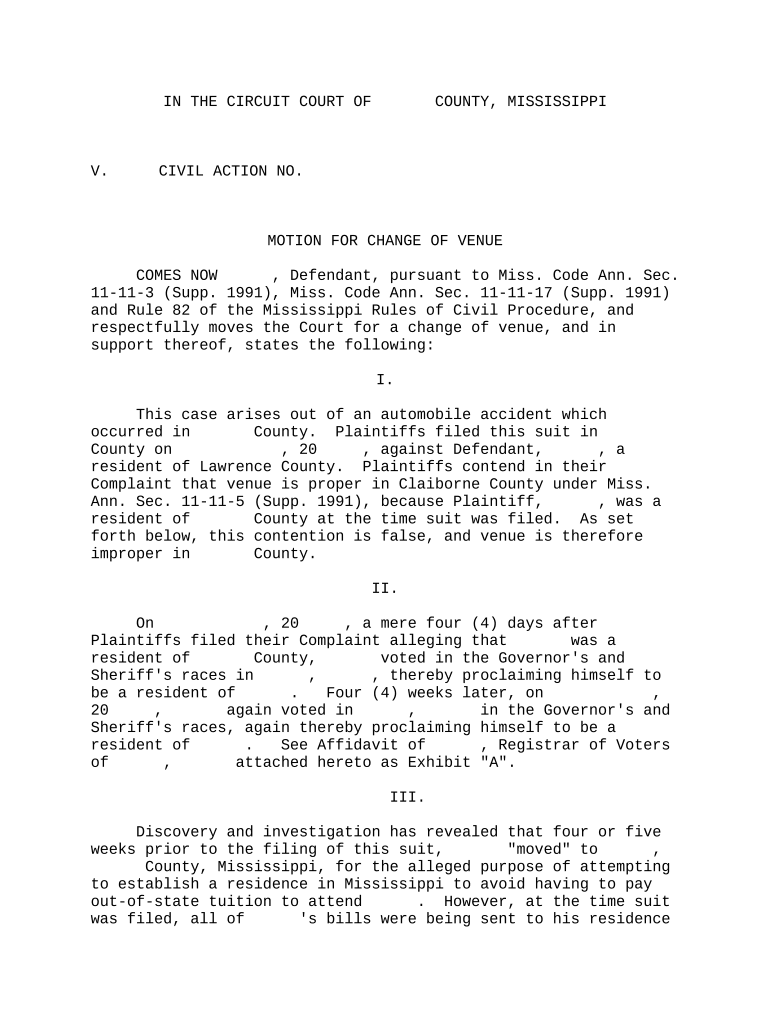
A complete motion organizes jurisdictional statements, factual support, legal standards, sworn statements, a proposed order, and proof of service. Clear structure and citation to governing statutes or rules improve judicial review and reduce procedural objections.

Caption

Court name, parties, case number, and title identifying this filing as a Motion for Change of Venue.
Statement of Facts

Chronological, relevant facts that explain why venue is improper or why transfer promotes convenience and justice.

Legal Argument

Citation to statutes or case law (e.g., 28 U.S.C. §1404(a) or controlling state venue statutes) and application to facts.

Affidavit or Declaration

Sworn statement(s) from parties or witnesses supporting convenience factors and venue facts.

Proposed Order

Draft order for the judge to sign transferring the case or setting conditions for transfer.

Certificate of Service

Proof that all opposing parties and the clerk received the motion according to court rules.

Step-by-step: prepare and file your Motion for Change of Venue

Follow procedural sequence to prepare a motion that the clerk can accept and the court can rule on efficiently.

  • 01
    Draft Motion: Prepare caption, facts, legal argument, and proposed order.
  • 02
    Attach Evidence: Add sworn declarations and exhibits supporting venue and convenience assertions.
  • 03
    File With Clerk: E-file or file in person according to local court electronic filing rules.
  • 04
    Serve Parties: Serve opposing counsel or parties per the court’s service rules and include certificate of service.

Where the motion goes and what happens next

After filing and service, the clerk assigns the motion for judicial review; the court may set briefing and hearing dates before ruling.

  • File With Clerk: Clerk receives the document; e-filing portal assigns docket entry and confirmation.
  • Judicial Review: Judge reviews motion papers and any local rule requirements before scheduling.
  • Opposing Response: Court permits a written response and sometimes limited reply briefing.
  • Hearing and Ruling: Judge may hold oral argument or rule on papers; decision results in transfer, denial, or alternative remedy.

Configuring an online workflow for a motion

Set up consistent naming, attachments, signature method, and service steps when creating an electronic filing workflow.

Field Configuration
File Name Use case number + short title for automated docketing
Signature Method Select signer email link or advanced authentication
Attachment Order Attach exhibits in labeled order for clerk review
Service Step Automate email serve and create certificate of service

Technical considerations for electronic filing and signatures

Ensure uploaded filings meet size, format, and naming rules and confirm whether the court accepts electronic signatures for pleadings or requires original wet signatures.

  • Accepted Formats: PDF and PDF/A are widely required by courts.
  • E-Filing Portals: Most state and federal courts use designated e-filing systems.
  • Authentication: Email, SMS, or court-required login methods govern signer ID.

How this motion differs from forum non conveniens relief

Compare purpose, legal basis, timing, and typical remedy to distinguish similar procedural tools for changing where a case will be heard.

Criteria Motion for Change of Venue Forum Non Conveniens
When Used convenience or improper venue dismissal for inconvenient forum
Legal Basis 28 u.s.c. §1404(a) / state rules common law doctrine / state law
Remedy transfer to another court dismissal or stay
Standard convenience and justice strong public/private interest balancing

Typical timing and deadlines to monitor

Timing for filing and response is governed by court rules and local practice; early filing and clear service often improve the chance of timely resolution.

Filing Window:

File as soon as venue issues are known; some courts prefer early motions.

Response Deadline:

Local rules control response time; many rules set specific days for opposing briefs.

Briefing Schedule:

Court will set deadlines for opposition and reply briefs where required.

Hearing Timing:

Hearings are scheduled per judge’s calendar; timing varies by docket.

Effect on Trial Date:

Transfer may delay trial scheduling pending resolution or after remand.

Key milestones from filing to decision

Track these sequential stages to follow the case lifecycle and anticipate next steps after filing the motion.

01

Prepare Motion

Assemble facts, legal support, exhibits, and proposed order before filing.

02

File and Serve

Submit to the clerk and serve all parties per court procedures.

03

Opposition Submitted

Opposing party files response and any counter-evidence.

04

Hearing and Ruling

Judge hears argument or considers papers and issues a transfer or denial ruling.

Typical eSignature vendor comparison for preparing and sharing court documents

Basic pricing and feature distinctions among common eSignature vendors to help choose a solution for document assembly and secure signature collection.

signNow DocuSign Adobe Sign PandaDoc HelloSign
Starting Price $8/user/mo $15/user/mo $14/user/mo $19/user/mo $15/user/mo
Free Trial 7-day trial Varies Varies Varies Varies
Bulk Send Yes Yes Yes Yes No
Audit Trail Yes Yes Yes Yes Yes
Envelope Cap No envelope cap 100 envelopes/user/year Varies Varies Varies

Essential data fields and quick formatting rules

Case Caption: Exact court and party identifiers
Case Number: Official docket number format
Movant Identity: Full legal name and counsel information
Relief Requested: Clear description of the transfer requested
Exhibits List: Numbered, labeled attachments
Signature/Date: Printed name, signature, and MM/DD/YYYY date

Key risks and consequences of improper filings

Waiver of Objections: Failure to timely object may forfeit venue claims
Sanctions: Filing frivolous motions can lead to sanctions
Delay: Incorrect filings can postpone trial dates
Denial: Insufficient facts often result in denial
Cost Increase: Extra briefing and travel raise litigation costs
Contempt Risk: Improper service or misstatements risk contempt

Common mistakes to avoid when preparing this motion

  • Filing in the wrong court or wrong division because the caption or case number is incorrect causes clerical rejection or delay.
  • Submitting unsupported assertions without sworn declarations or admissible exhibits weakens the motion and invites dismissal.
  • Failing to serve all parties or to include a certificate of service leads the court to question notice compliance.
  • Relying on general convenience claims without specifically identifying witnesses, documents, and travel burdens usually fails to persuade a judge.

Real-world examples of why parties request a venue change

These brief case sketches show practical grounds and evidentiary support commonly used in venue motions.

Local Prejudice Example

A defendant moved after extensive pretrial publicity in the original county that risked juror impartiality.

  • The motion included news clippings and juror pool affidavits.
  • The court considered media evidence and convenience factors and ultimately transferred the case to a neighboring county to protect the defendant’s right to impartial adjudication.

Convenience of Witnesses

A plaintiff sought transfer where most witnesses and evidence were located to reduce travel costs.

  • Affidavits listed specific out-of-state witnesses and estimated expenses.
  • The court granted transfer under the convenience analysis, citing reduced witness travel and more efficient access to documentary evidence.

Frequently asked questions about Motions for Change of Venue

Answers to common procedural and substantive questions when preparing or responding to a venue motion.


Need help? Contact support

be ready to get more
Join over 28 million airSlate SignNow users