Establishing secure connection…Loading editor…Preparing document…

Iowa Judgment

This template is fully customizable. Edit the text, fill out the fields, and send it for signature. Give it a try!
Iowa Judgment

What an Iowa Judgment Is and what it does

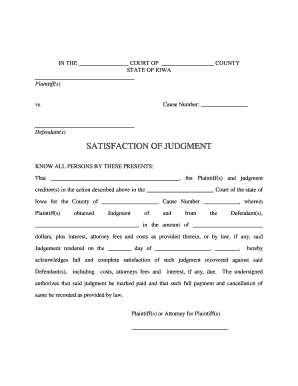
The Iowa Judgment is a court-issued determination establishing a monetary award or legal obligation entered by an Iowa court following a civil proceeding. It records the court’s decision, creates an enforceable obligation against the judgment debtor, and often creates a lien on real property once properly recorded. Typical uses include creditor collection, enforcement of damages, and formalizing settlement terms. An Iowa Judgment includes case identifiers, parties, judgment amount, interest, and docketing information required for enforcement and public record. It is entered on the court docket and may trigger statutory interest and post-judgment remedies.

Why a properly drafted Iowa Judgment matters

An Iowa Judgment formalizes an enforceable debt or obligation, enabling remedies such as wage garnishment, bank levy, and property liens. It provides legal finality, a public record for creditors, and a basis for post-judgment interest and enforcement actions under Iowa law.

Why a properly drafted Iowa Judgment matters

Common users and roles that rely on an Iowa Judgment

Parties and attorneys commonly prepare or record judgments; court clerks, collection agencies, and title examiners also rely on the recorded document.

  • Judgment creditor — obtains enforcement remedies and records liens to collect the judgment amount.
  • Judgment debtor — named party whose assets and earnings may be subject to collection measures.
  • Attorneys and title companies — review docketed judgments during closings and title searches.

Step-by-step: from drafting to enforcement

Follow these steps to prepare, record, and enforce an Iowa Judgment, from drafting through recording and post-judgment remedies.

  • 01
    Draft Entry: Prepare the judgment document including case number, parties, amount, and interest terms.
  • 02
    Court Filing: Submit judgment entry to the clerk for entry on the court docket.
  • 03
    Record Lien: If required, record an abstract or transcript with the county recorder.
  • 04
    Enforce Remedies: Use garnishment, levy, or sale procedures under Iowa statutes to collect.

Electronic signing and submission workflow overview

This workflow outlines common steps for e-signing and submitting an Iowa Judgment electronically, including authentication and record retention.

  • Upload Document: Add the finalized judgment PDF or Word file to the e-signature platform.
  • Place Fields: Add signature, date, and notarization fields where required.
  • Authenticate Signers: Use email, SMS, or higher-assurance methods for signer identity.
  • Record Audit: Capture timestamp, IP, and audit trail on completion.

Typical e-signature workflow settings for an Iowa Judgment

Common workflow settings to configure before preparing and sending an Iowa Judgment with an e-signature platform.

Field Configuration
Primary Signer Authentication Settings and Options Email with SMS code; knowledge-based authentication optional for risk.
Document Fields and Notary Field Placement Place signature, date, and notary blocks; mark required fields.
Routing Order, Notifications, and Reminders Set signer order, add CCs, and schedule reminders.
Storage and Retention Settings for Recordkeeping Enable export to PDF/A, select retention period, and enable audit logs.

Platform features to support enforceable electronic judgments

Digital signing of an Iowa Judgment requires secure platform features, signer authentication, and reliable audit trails to support enforceability.

  • File Formats: PDF and DOCX formats supported, preserve layout.
  • Integrations: Connects to CRMs, cloud storage
  • Security: TLS 1.2/1.3 in transit for signer sessions

Essential elements to include in a professional Iowa Judgment

Core elements of a professional Iowa Judgment ensure clarity of rights, enforceability, and accurate public indexing to support collection and title matters.

Caption

Include full case caption with court name, county, case number, and complete party names; accurate captioning links the judgment to the court file and prevents recording errors or mis-indexing.
Judgment Amount

State principal damages clearly, itemize costs and statutory interest; show how interest is calculated and the date it begins to run to avoid enforcement disputes.

Entry Date

Record the official entry date as it appears on the court docket; that date often determines interest accrual and timing for appeals or post-judgment motions.

Service Info

Document how notice or service was effected, attach proof-of-service and filing references, and include return dates or respondent acknowledgments to aid enforcement or title searches.

Recording Directions

Specify whether an abstract, transcript, or certified copy should be filed with the county recorder; include recording party name, address, and any fee instructions to facilitate lien perfection.

Notary Block

If a notarized signature is required, include a complete notary block consistent with Iowa rules; retain notarial certificates and audio-video records when remote notarization is used.

Saving and attaching the right outputs and supporting documents

Available outputs and supporting documents streamline recording and future enforcement; choose formats and attachments that preserve evidentiary integrity and metadata.

Export Formats

Provide signed judgments in PDF/A and PDF formats with embedded audit certificates; ensure the file preserves timestamps, signer identity metadata, and any attached exhibits or proof-of-service.

Certified Copies

Obtain a certified court copy when required for recording; certified copies often streamline county recorder acceptance, reduce challenges in title searches, and serve as primary evidence of entry.

Exhibits

Attach supporting exhibits such as settlement agreements, itemized bills, and affidavits of service; label each exhibit clearly and reference exhibit identifiers within the judgment text.

Audit Certificate

Include a certificate of completion that records signer authentication method, timestamps, IP addresses, and a complete audit trail to support admissibility and attribution in enforcement proceedings.

Common pitfalls to avoid

  • Using informal or abbreviated party names can prevent matching to court records and delay or defeat recording with the county recorder.
  • Failing to calculate post-judgment interest correctly, or omitting the interest start date, leads to disputes and collection delays.
  • Neglecting to attach proof-of-service or proof-of-filing often requires supplemental submissions and can materially impair enforcement or delay lien recording.
  • Recording the judgment in the wrong county or failing to follow local recorder rules can nullify lien priorities.

Consequences of errors in a judgment filing

Enforcement Delay: Delayed remedies and extra filings
Inaccurate Amounts: Reduced recovery and reopening risk
Lien Failure: No enforceable property lien
Fee Exposure: Additional court or attorney fees
Title Issues: Clouded title on property
Possible Sanctions: Court sanctions or contempt exposure

Security and compliance considerations for electronic judgments

Encryption in Transit: TLS 1.2/1.3 in transit for signer sessions
Encryption at Rest: AES-256 encryption for stored files
Certifications: ISO 27001, SOC 2 Type II certified
HIPAA Support: BAA available for HIPAA compliance
eSignature Law: Complies with ESIGN and UETA
Audit Trail: Detailed timestamp, IP, and action log

Practical best practices for accuracy and defensibility

Follow these best practices to reduce disputes, speed recording, and preserve evidence when preparing or transmitting an Iowa Judgment.

Verify each party’s identity and signing authority
Confirm legal names, counsel authorization, and entity signatory authority; attach corporate resolutions or power-of-attorney documentation where necessary to prevent later challenges to enforcement or title clearance during recording and filings.
Use certified copies for recording and lien perfection
Where county recorders require certified copies or abstracts, obtain them from the clerk; certified copies often expedite county acceptance, reduce rejection risk, and serve as primary evidence when enforcing or defending against claims.
Preserve the platform audit trail and metadata
Ensure the signing platform captures timestamps, IP addresses, authentication methods, and certificate of completion; export and attach the audit certificate to the recorded file to support attribution and admissibility in post-judgment enforcement.
Check local recorder requirements before filing
Confirm document formatting, margins, required attachments, fee amounts, and submission methods with the county recorder; local variations cause rejections that delay lien perfection and increase administrative costs and require resubmission.

Real-world examples of Iowa Judgment use

Real-world examples show how Iowa Judgments are used in collections, real estate, and settlement enforcement.

Credit Collection

A creditor obtained a money judgment after an unpaid account; the court entered a detailed judgment with itemized costs and interest.

  • Creditor recorded an abstract to create a lien.
  • With the recorded abstract and an attached certificate of completion, the creditor pursued garnishment and bank levy procedures; clear docket references and correct recording county avoided title disputes during sale of debtor property.

Real Estate Closing

During a property closing, a previously docketed Iowa Judgment against the seller surfaced on a title search, requiring resolution before transfer.

  • Title company required payoff or release.
  • The seller obtained a certified court copy and negotiated a settlement to satisfy the judgment; recording the release cleared the title and allowed the transaction to proceed without lender objections.

Frequently asked questions about Iowa Judgments

Common questions about preparing, signing, and recording an Iowa Judgment, including e-signature validity, notarization, and retention guidance.


Need help? Contact support

be ready to get more
Join over 28 million airSlate SignNow users