Establishing secure connection…Loading editor…Preparing document…

Oregon Petitioner’s Ex Parte Motion for Order of Default

This template is fully customizable. Edit the text, fill out the fields, and send it for signature. Give it a try!
Oregon Petitioner’s Ex Parte Motion for Order of Default

What the Oregon Petitioner’s Ex Parte Motion for Order of Default Is

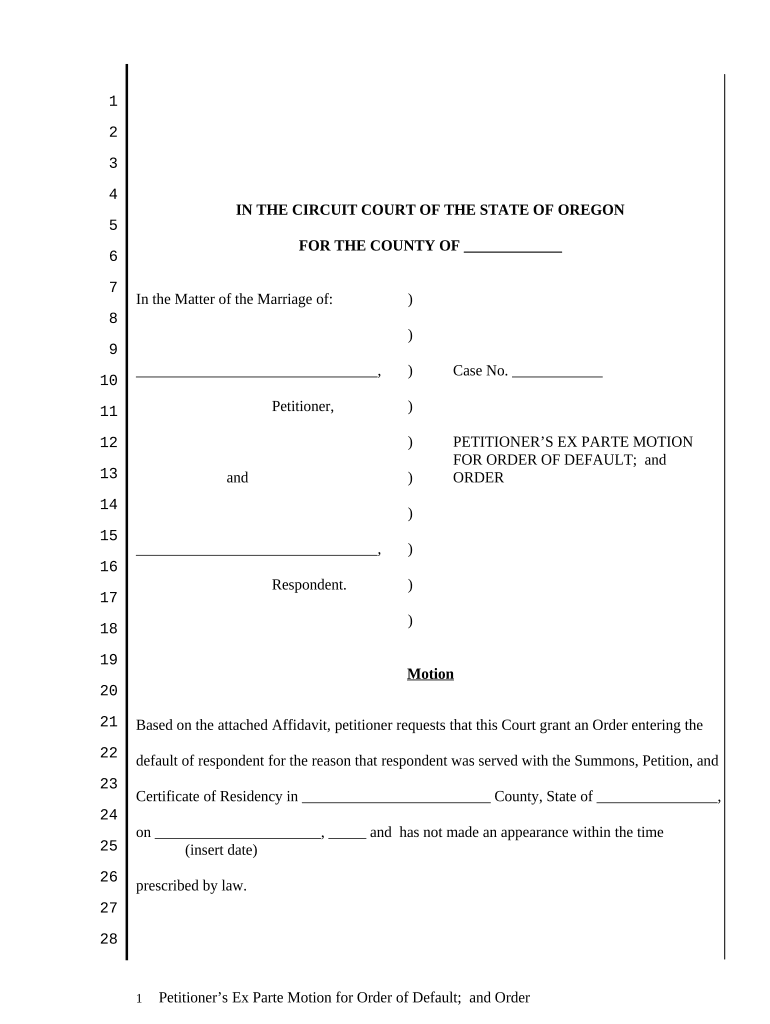
The Oregon Petitioner’s Ex Parte Motion for Order of Default is a court pleading filed by a petitioner when a respondent fails to respond or appear within the time required by law. The motion asks the court to enter a default judgment or default order without a contested hearing, typically relying on proof of service and supporting declarations. It is used in civil and family proceedings to seek relief where procedural deadlines were missed. Outcomes may include entry of default, default judgment, and orders on requested relief consistent with Oregon court rules and local practice.

Why a Clear Ex Parte Motion Matters

A properly prepared ex parte motion streamlines the court’s review, documents the absence of a response, and preserves the petitioner’s right to relief without a contested hearing. It reduces procedural delays and makes it easier for the clerk or judge to enter default where statutory requirements have been met.

Why a Clear Ex Parte Motion Matters

Who Typically Prepares and Files This Motion

Accurate completion supports faster court action and reduces the chance of the motion being denied for procedural defects.

  • Pro se petitioner — files directly when not represented by counsel and provides proof of service.
  • Petitioner’s attorney — drafts supporting declarations, prepares proposed order, and e-files with the court.
  • Court clerk or legal assistant — assembles filing packet and confirms local e-filing requirements.

Essential Parts to Include in a Professional Motion

A complete ex parte motion combines case identification, factual assertions, procedural history, supporting affidavits, and a proposed order. Each element should be clear, dated, and tied to proof of service or affidavit evidence to meet local court rules.

Caption

Court name, county, case number, party names, and title identifying this document as a Petitioner’s Ex Parte Motion for Order of Default.
Statement of Facts

Concise chronology showing complaint served, date of service, statutory response deadline, and absence of any timely answer or appearance by respondent.

Declaration

Signed affidavit from petitioner or process server attesting to service details, date, method, and lack of response or appearance.

Legal Basis

Cite the controlling local rule or statute authorizing default and explain why those criteria are satisfied in this case.

Proposed Order

A clean, judge-ready order granting default or default judgment with specific relief requested and signature block for the judge.

Certificate of Service

A statement showing who received the motion, how it was served, and the date of service; required for filing and judicial consideration.

Required Core Identifiers

Petitioner: Full legal name
Respondent: Full legal name
Case Number: Court-assigned case number
Service Date: Date of service
Signatures: Petitioner or attorney signature
Contact: Address and phone

Step-by-Step: Complete and File the Motion

Follow these steps in order to prepare a coherent ex parte motion and present it properly to the court for entry of default.

  • 01
    Prepare Document: Draft motion, declaration, and proposed order.
  • 02
    Proof of Service: Obtain and date the proof of service or affidavit.
  • 03
    E-file or Deliver: Submit through the court’s e-file system or file in person.
  • 04
    Follow Up: Confirm clerk acceptance and monitor docket for entry of default.

Where to File and How the Court Processes the Motion

Select the correct filing channel and include required attachments so the clerk and judge can act promptly on the ex parte request.

  • E-Filing: Use the county or statewide e-file portal when available.
  • In-Person Filing: Deliver to the clerk’s office with copies and proof of service.
  • Mail Filing: Send with tracking and include a self-addressed stamped envelope.
  • Clerk Review: Clerk checks completeness; judge reviews proposed order for entry.

Digital Filing and eSubmission Settings to Verify

When e-filing, confirm platform settings and signer authentication to match court requirements and preserve evidentiary integrity.

Field Configuration
E-filing Portal Select county-specific portal
File Format PDF/A preferred
Authentication Email or multi-factor as required
Retention Keep copies per record retention rules

Technical Considerations for Electronic Submission

Retain the original signed documents and the e-filing confirmation to support any later challenges to service or default entry.

  • File Types: PDF, PDF/A, and searchable PDFs
  • Authentication: Email verification or stronger methods
  • Integrations: E-filing portals and court document viewers

Timing and Typical Deadlines to Watch

Deadlines and response periods vary by case type and local rule; verify county requirements before filing an ex parte motion for default.

Response Period:

Varies by complaint type and service method

Service to Motion:

File motion after response deadline has passed

Clerk Processing:

Processing times differ by court

Hearing Dates:

Judge may set hearing at discretion

Notice to Opposing Party:

Provide any required post-filing notice per local rule

Common Preparation Errors to Avoid

  • Incomplete proof of service or missing server affidavit causes clerk rejection and delays entry of default.
  • Using mismatched party names or incorrect case number will misfile the motion and frustrate docket processing.
  • Failing to attach a proposed order forces the clerk to request clarification and slows judicial action.
  • Submitting unsigned declarations or unsworn statements risks the court declining to grant default without further evidence.

Consequences of an Incorrect or Incomplete Motion

Delay: Court may deny or strike motion
Dismissal Risk: Case could be dismissed for procedural defects
Loss of Relief: Petitioner may forfeit requested remedies
Sanctions: Possible monetary or procedural sanctions
Re-filing Costs: Additional filing fees and time
Service Challenges: Default may be set aside if service defective

Comparison: eSignature Pricing and Core Features

This vendor comparison shows starting price and a few common feature differences. Place signNow first per platform conventions; verify plan details with each vendor before purchase.

signNow DocuSign Adobe Sign PandaDoc HelloSign
Starting Price $8/user/mo $15/user/mo $14/user/mo $19/user/mo $15/user/mo
Free Trial 7-day trial Varies Varies Varies Varies
Bulk Send Yes Yes Yes Yes No
Audit Trail Yes Yes Yes Yes Yes
HIPAA Compliant Yes Varies Varies Varies Varies
Envelope Cap No cap 100 envelopes/user/year Varies Varies Varies

Representative Customer Examples and Usage Notes

Real-world examples show how organizations use e-sign and digital workflows when managing legal filings and customer-facing documents.

Martin Properties — Tim Martin, Founder

Martin Properties moved lease, closing, and legal form signing online to close deals faster.

  • The firm used mobile and offline signing on-site for convenience.
  • The result improved turnaround and ensured documents were filed and retained with full traceability across mobile and desktop workflows.

Fertility Centers of Illinois — John Butler, Founder

The clinic centralized patient forms and consent documents to unify signature capture.

  • Integration with back-end systems preserved records.
  • This enabled consistent security controls, audit trails, and compliance with privacy requirements while simplifying patient interactions.

Practical Tips for Accurate, Efficient Completion

Adopt these practices to reduce errors and improve the chance the court accepts your ex parte motion without additional requests.

Match Docket Data
Use exact party names and the official case number to avoid misfiling and processing delays.
Attach Proofs
Always include proof of service and any server affidavits to demonstrate the respondent was properly served.
Use Proposed Order
Provide a clear, judge-ready proposed order that specifies relief and the judge’s signature block.
Retain Originals
Keep signed originals and e-filing receipts to support any future motion to set aside or enforcement actions.

Typical Signatories and Their Roles

Petitioner — Self-Represented

A petitioner acting without counsel signs the motion and declaration under penalty of perjury. They must ensure proof of service is accurate and that all factual statements are true to the best of their knowledge.

Attorney — Counsel of Record

An attorney prepares the motion, signs declarations as needed, and submits electronically. Counsel certifies compliance with local rules and often handles follow-up with the clerk's office.

Frequently Asked Questions About Ex Parte Default Motions

Answers to common procedural and technical questions when preparing an Oregon Petitioner’s Ex Parte Motion for Order of Default.


Need help? Contact support

be ready to get more
Join over 28 million airSlate SignNow users