Establishing secure connection…Loading editor…Preparing document…

Motion to Invoke the Rule Prior to Voir Dire

This template is fully customizable. Edit the text, fill out the fields, and send it for signature. Give it a try!
Motion to Invoke the Rule Prior to Voir Dire

What the Motion to Invoke the Rule Prior to Voir Dire Is

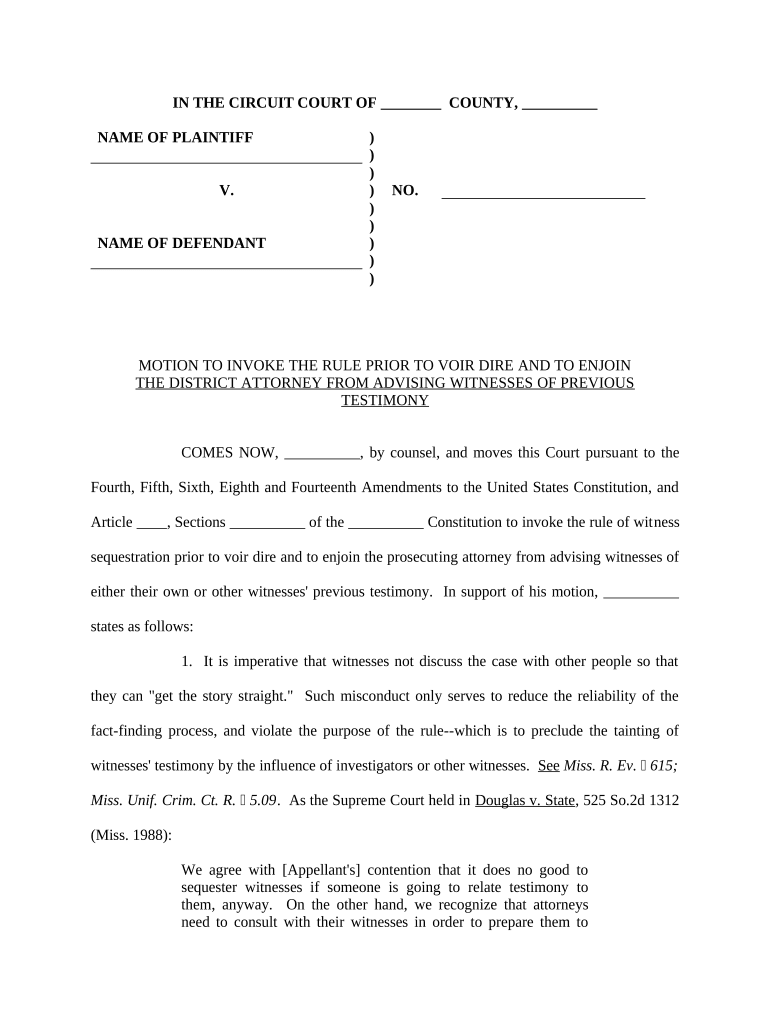
A Motion to Invoke the Rule Prior to Voir Dire asks the court to exclude non‑testifying witnesses from the courtroom until they have given testimony. Typically filed before jury selection or witness examination, the motion seeks to prevent witness contamination, coaching, or premature exposure to other testimony. Courts grant the motion under their inherent authority or local rules to preserve the integrity of witness recollection and the fairness of trial proceedings; practice and timing depend on jurisdiction and the judge’s preferences.

Why Parties File This Motion

Invoking the rule protects witness memory, reduces the risk of coaching or collusion, and helps maintain a fair factfinder process while clarifying the scope of witnesses permitted in the courtroom.

Why Parties File This Motion

Who Typically Prepares and Files This Motion

Local rules determine how the motion is filed, noticed, and argued; counsel should consult court rules early.

  • Criminal defense counsel — Moves to exclude other witnesses from hearing testimony that could influence their statements.
  • Prosecutors — Uses the motion to prevent witness coordination and preserve trial evidence.
  • Civil litigators — Employs the rule in cases with sensitive witness testimony or confidentiality concerns.

Step-by-Step: Preparing and Filing the Motion

Follow these basic procedural steps to prepare a defensible, court-ready motion invoking the rule prior to voir dire.

  • 01
    Draft motion: State facts, legal basis, and specific relief sought concisely.
  • 02
    Attach affidavits: Include declarations from counsel or witnesses supporting the need for exclusion.
  • 03
    File with clerk: E-file or deliver under local filing rules with proper caption and service.
  • 04
    Serve parties: Provide opposing counsel and the court with proof of service per local rules.

Core Components to Include in a Professional Motion

A complete motion includes factual background, the legal standard, supporting evidence, and a clear proposed order that the judge can sign.

Caption

Full court caption and case number placed at the top to match prior filings; required for proper docketing and clerk processing.
Statement of Facts

Concise factual recitation explaining why witness exclusion is necessary, avoiding argumentative language but emphasizing risk of contamination.

Legal Standard

Cite governing authority for excluding witnesses in that jurisdiction and briefly explain how facts meet the standard.

Supporting Evidence

Attach declarations or affidavits from counsel or witnesses describing the risk of contamination or prejudice.

Relief Sought

A precise request such as 'order all non-testifying witnesses excluded until they testify' and any limited exceptions.

Proposed Order

Submit a clean, signable order for the judge to adopt, formatted per local rule and including necessary findings.

Required Case and Filing Details

Court Name: Full court title
Case Caption: Plaintiff v. Defendant
Docket Number: Official case number
Judge: Presiding judge name
Hearing Date: Scheduled trial/hearing
Relief Sought: Specific exclusion

How the Motion Moves Through the Court Process

This workflow describes typical routing from filing through hearing and order entry; procedures vary by court and local rule.

  • File motion: Clerk receives e-file or paper and assigns a docket entry.
  • Serve opposing counsel: Provide proof of service and any supporting exhibits or affidavits.
  • Judge reviews: Judge may set a hearing date or decide on papers alone.
  • Order issued: Judge signs order memorializing witness exclusion and any exceptions.

Configuring an Electronic Filing and eSignature Workflow

When completing and submitting the motion electronically, configure document metadata, signing, and service options to match court rules.

Field Configuration
Document Type Motion — select prefilled motion template
e-Filing Method Choose court-approved e-file provider
Signature Method Use authenticated attorney eSignature per local court standards
Service Options Enable e-service and generate certificate of service

Digital Signing and Submission Considerations

Keep an auditable record of signing and service events to support admissibility and to meet court or opposing counsel inquiries about the filing process.

  • File Format: PDF/A preferred
  • Authentication: Attorney credential or firm account
  • Audit Trail: Retain timestamp and IP details

Timing, Service, and Local Deadline Considerations

Deadlines depend on local rules and the judge’s schedule; allow adequate time for service, response, and any pretrial conferences.

Advance Notice:

Many courts require service several days before hearing; check local rule for exact timing.

Opposition Deadline:

Opposing party typically has a set number of days to respond; local rules vary.

In-Court Requests:

Motions may be heard during pretrial conferences or immediately before voir dire.

Emergency Relief:

Seek expedited consideration only when immediate witness contamination is at risk.

Calendar Control:

Judge may set conditions or limit coverage to particular witnesses or topics.

Common Mistakes to Avoid

  • Failing to attach supporting affidavits describing the specific risk of contamination or prejudice.
  • Using argumentative or speculative language rather than factual, narrowly tailored allegations.
  • Not serving opposing counsel or the court in the manner required by local rules.
  • Submitting a proposed order that omits necessary findings or is not formatted per court requirements.

Risks and Consequences of an Improper Motion

Motion Denied: No relief granted
Sanctions: Possible fee or conduct sanctions
Appeal Issues: Preservation problems on appeal
Witness Confusion: Overbroad orders may harm witness rights
Delay: Unnecessary continuances
Record Problems: Incomplete service record

Supporting Documents Commonly Filed with the Motion

Attaching clear supporting materials helps the court assess the necessity and scope of the requested witness exclusion.

Affidavit or Declaration

Provide a sworn statement from counsel or a witness explaining why non-testifying witnesses should be excluded and describing the specific risks of contamination.

Witness List

Supply a list of witnesses and a short summary of their expected testimony to assist the court in crafting a narrowly tailored order.

Proposed Order

Prepare a concise, signable order that states who is excluded, any exceptions, and the period of exclusion for judicial convenience.

Certificate of Service

Include proof of service showing how and when opposing counsel and relevant parties received the motion and exhibits.

Illustrative Use Cases

These scenarios illustrate when counsel might seek to invoke the rule and how courts commonly limit its scope.

Criminal Case Example

A defendant’s counsel files to exclude lay witnesses from hearing prior testimony to prevent coaching

  • The court grants a narrowly tailored order limited to non‑testifying lay witnesses
  • The order preserved witness recollection and avoided repeated, potentially tainted testimony at trial.

Civil Hearing Example

Plaintiff seeks exclusion to protect confidential witness statements in a contested damages hearing

  • The judge allows exclusion for specific witnesses pending testimony
  • The limited exclusion balanced fair trial rights with the need for an open record once testimony was complete.

Practical Tips for Accurate and Efficient Completion

Adopt these habits to reduce rejections, preserve the record, and improve the chance of a favorable ruling.

Tailor the factual basis narrowly
Describe tangible risks of contamination with specific examples rather than broad speculation; narrow requests are more likely to be granted and withstand appeal.
Format a signable proposed order
Provide a clean, short order that mirrors relief sought; judges often adopt provided orders with minimal edits, saving time.
Confirm local e-filing and service rules
Early verification of format, margins, and service deadlines avoids clerk rejection and preserves hearing availability.
Keep an auditable trail
Retain timestamps, certificates of service, and signed affidavits to support chain-of-custody and evidentiary integrity.

eSignature Vendor Comparison for Motion Preparation and Signing

Common vendor features and starting prices for electronic signature and document workflow tools used to prepare, sign, and archive legal motions.

signNow DocuSign Adobe Sign PandaDoc HelloSign
Starting Price $8/user/mo $15/user/mo $14/user/mo $19/user/mo $15/user/mo
Free Trial 7-day trial Varies by plan Varies by plan Varies by plan Varies by plan
Bulk Send Yes Yes Yes Yes Varies
Audit Trail Yes Yes Yes Yes Yes
HIPAA Compliant Yes Yes Yes No No

Frequently Asked Questions and Practical Answers

Answers to common procedural and technical questions about drafting, filing, serving, and enforcing a Motion to Invoke the Rule Prior to Voir Dire.


Need help? Contact support

be ready to get more
Join over 28 million airSlate SignNow users