Establishing secure connection…Loading editor…Preparing document…

Motion to Show Cause

This template is fully customizable. Edit the text, fill out the fields, and send it for signature. Give it a try!
Motion to Show Cause

What a Motion to Show Cause Is and when it’s used

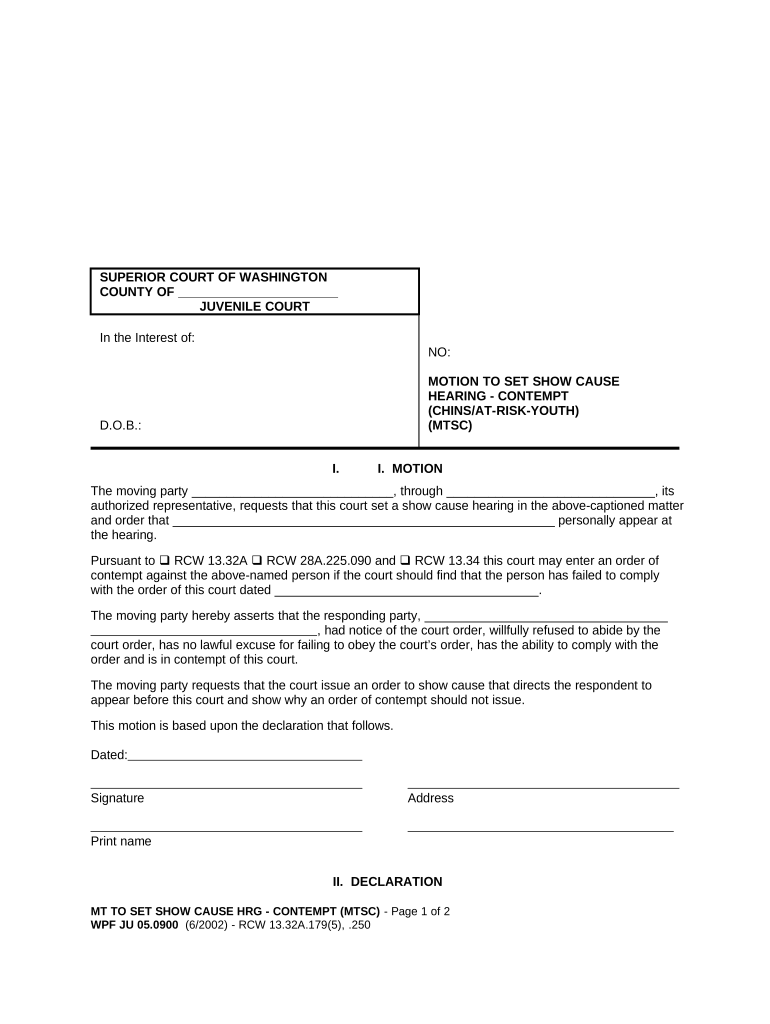
A Motion to Show Cause is a court filing that asks a judge to order a person or party to appear and explain why the court should not grant a requested remedy. Common uses include seeking sanctions, enforcing prior orders, obtaining temporary relief, or asking the court to hold another party in contempt for failing to comply with an order. The motion typically sets out the facts, the legal basis for relief, the specific order requested, and a proposed form of order for the judge to sign.

Why a Motion to Show Cause matters in litigation

A Motion to Show Cause provides a fast, targeted pathway to prompt judicial review and immediate relief where ongoing harm or noncompliance exists. It focuses the court’s attention on specific conduct and can include a request for an interim order pending a full hearing.

Why a Motion to Show Cause matters in litigation

Who prepares and responds to this motion

The motion affects parties, their counsel, and the court; timely and accurate completion reduces the risk of adverse procedural outcomes.

  • Plaintiff or petitioner counsel seeking enforcement or sanctions
  • Defendant or respondent when opposing enforcement or explaining compliance
  • Court clerks and mediators who manage scheduling and service logistics

Core elements to include in a professional Motion to Show Cause

A complete motion combines a clear statement of facts, legal argument, supporting evidence, and precise relief requested so the judge can grant or deny the request without ambiguity.

Caption

Case caption listing court, parties, case number, and title of the motion so the filing is matched with the correct docket entry.
Statement of Facts

Concise factual narrative describing events, dates, and the other party’s conduct that justifies the court’s intervention.

Legal Basis

Cite statutes, rules, or case law that authorize the requested relief so the judge sees the controlling authority.

Relief Requested

Specify the precise order you want (temporary restraining order, sanctions, contempt finding, monetary award, or other remedy).

Evidence

Attach declarations, exhibit materials, affidavits, or business records that substantiate factual claims and demonstrate urgency where applicable.

Proposed Order

Provide a clean proposed order the judge can sign to reduce drafting delay and clarify the exact terms of relief.

Step-by-step: preparing and filing a Motion to Show Cause

Follow these steps to prepare, serve, and file the motion while reducing procedural errors and delays.

  • 01
    Draft motion: Assemble facts, legal argument, and exhibits.
  • 02
    Prepare proposed order: Draft an order the judge can sign.
  • 03
    Serve opposing party: Comply with rules for service and proof of service.
  • 04
    File with court: E-file or hand-file and submit proof of service.

How to configure an electronic workflow for this motion

Set up an e-filing and e-sign workflow that attaches exhibits, tracks service, and preserves a complete audit trail.

Field Configuration
Document type Select 'Motion' and add 'Show Cause' tag
Exhibit attachments Use PDF attachments, label each exhibit
Service tracking Enable proof-of-service field and time stamps
Signature method Choose signer authentication level per court rules

Typical process for submitting and serving the motion

A clear submission path reduces the chance of filing errors and ensures timely judicial consideration.

  • Prepare: Assemble motion, exhibits, and proposed order.
  • Service: Serve opposing counsel and file proof of service.
  • File: E-file or file with the clerk per local rules.
  • Hearing: Judge sets date or issues immediate order if warranted.

Digital signing and technical requirements for e-submission

Keep an unalterable audit trail and retain originals per retention rules; confirm any notarization or signature authentication required by the clerk.

  • Accepted formats: PDF/A and standard PDF
  • Authentication: Email, SMS, or higher-level ID verification
  • Integrations: Salesforce, Microsoft 365, NetSuite integrations

Common timing requirements and service deadlines

Observe local rules and statutory deadlines for notice, opposition, and hearing scheduling to avoid procedural default.

Hearing notice period:

Varies by court; often 5–21 days before hearing

Service timing:

Serve opposing party per civil rules before hearing

Opposition deadline:

Court rules set response window, commonly 7–14 days

Exhibit lodging:

Some courts require exhibits filed before hearing

Emergency relief:

Temporary orders may be granted ex parte in urgent cases

Consequences of an improperly prepared or served motion

Dismissal risk: Motion may be denied or stricken for procedural defects
Sanctions: Court may impose monetary sanctions for frivolous filings
Contempt exposure: Moving party may face counterclaims or contempt proceedings
Default orders: Failure to serve can produce default or uncontested relief
Evidence excluded: Late or improperly authenticated exhibits may be excluded
Fee liabilities: Unnecessary filings can create fee-shifting exposure

Key data and authentication elements to include

Filer identity: Attorney name and bar number
Service information: Method, date, and recipient of service
Exhibit labeling: Exhibit A, B, numbered pages
Signature method: Type of e-signature and authentication used
Audit trail: Timestamp, IP, and action log
Retention note: Where original signed copy is stored

How a Motion to Show Cause compares to similar filings

Compare purpose, timing, and typical remedy to pick the correct procedural vehicle for your issue.

Document Typical Use Typical Timing
Motion to Show Cause enforce orders or seek contempt often expedited, hearing set quickly
Motion to Compel compel discovery or compliance follows discovery dispute timeline
Contempt Motion hold party in contempt for disobeying order may follow show-cause proceedings
Order to Show Cause court-ordered appearance with proposed interim relief used for immediate, temporary relief

eSignature vendor comparison for filing and serving motions

Compare base pricing and key features relevant to secure signing, bulk sending, HIPAA needs, and document auditability when choosing an eSignature provider.

signNow DocuSign Adobe Sign PandaDoc HelloSign
Starting Price $8/user/mo $15/user/mo $14/user/mo $19/user/mo $15/user/mo
Free Trial 7-day trial Varies Varies Varies Varies
Bulk Send Yes Yes Yes Yes No
Audit Trail Yes Yes Yes Yes Yes
HIPAA Compliant Yes Yes Yes No No

Practical tips for accurate and efficient completion

Follow these practices to reduce rejections, avoid continuances, and strengthen the motion’s evidentiary support.

Verify party names and case details
Confirm spelling, docket number, and court division against the existing file. Small caption errors commonly cause clerical rejection or delay.
Number and reference exhibits
Label and cite exhibits in the motion to allow quick judicial review; include a table of exhibits when many documents are attached.
Follow local formatting rules
Adhere to page limits, font size, and line spacing required by local rules to avoid rejection for noncompliance.
Preserve an unalterable record
Use PDF/A for filing, retain original signed versions, and maintain a secure audit trail for any electronic signatures used.

Sample scenarios illustrating typical use

These scenarios show common contexts where a Motion to Show Cause provides a procedural remedy.

Enforcement of Court Order

A creditor files a motion alleging missed payment under a court order

  • Request for contempt and accelerated payment schedule
  • The motion attaches bank records and a declaration; the court schedules an expedited hearing and issues a temporary order pending resolution.

Noncompliance with Discovery

A party fails to produce documents subject to discovery order

  • Motion seeks sanctions and compelled production
  • The filing includes a meet-and-confer declaration and timeline; the court may impose cost-shifting and set a production deadline.

Frequently asked questions about Motions to Show Cause

Answers to common procedural and practical questions help avoid delays and objections.


Need help? Contact support

be ready to get more
Join over 28 million airSlate SignNow users