Establishing secure connection…Loading editor…Preparing document…

Mississippi Temporary Restraining Order

This template is fully customizable. Edit the text, fill out the fields, and send it for signature. Give it a try!
Mississippi Temporary Restraining Order

What the Mississippi Temporary Restraining Order Is

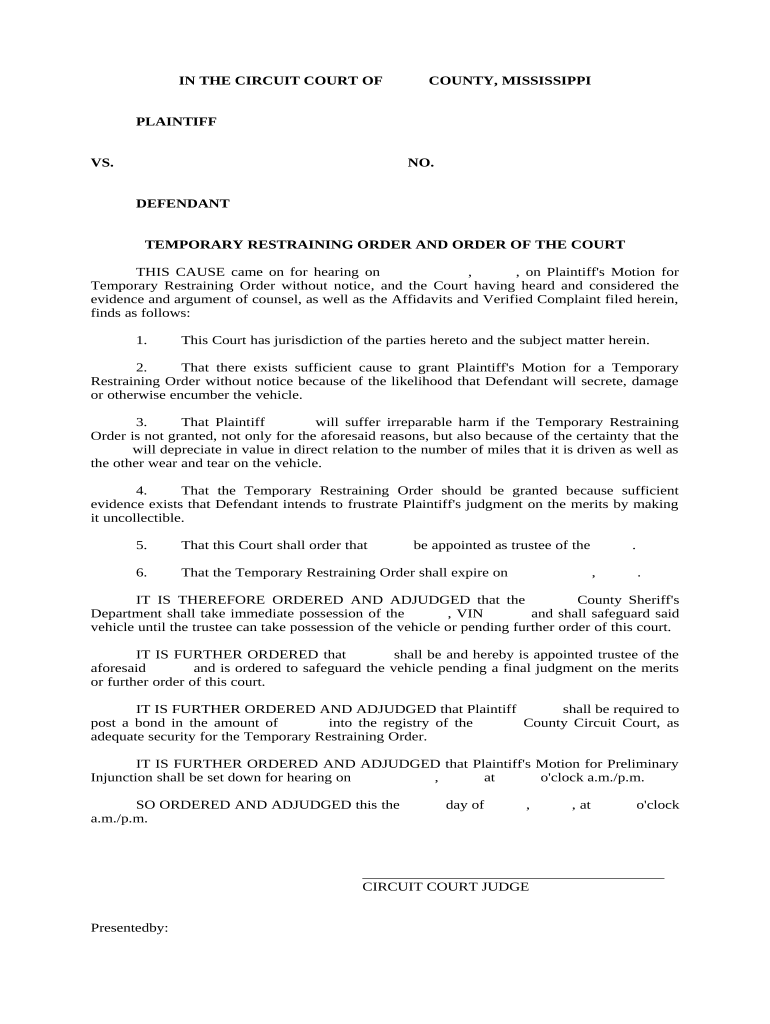
A Mississippi Temporary Restraining Order (TRO) is a short-term court order issued to preserve the parties’ status quo and prevent immediate harm before a full hearing. TROs are typically requested ex parte and may be issued immediately or on short notice pending service on the opposing party. Because TROs are court orders, local court procedures control filing, service, and hearing timelines; electronic signatures and filings may be subject to exceptions for official court filings under federal and state e-signature law (15 U.S.C. ch. 96; UETA 1999).

Why a TRO Matters and What It Does for You

A TRO can halt threatening conduct, secure property, or prevent irreparable injury while a court considers longer-term relief. It can be issued quickly with limited notice and preserves the right to a full hearing on a temporary injunction or final order.

Why a TRO Matters and What It Does for You

Core Parts of a Professional Mississippi Temporary Restraining Order

A clear TRO includes identifying information, specific prohibitions, scope and duration, factual affidavit support, service instructions, and court routing details to ensure enforceability and proper notice.

Caption

Court name, county, case number, and party names must match pleadings and court records for proper filing and enforcement.
Relief Requested

Exactly state the temporary prohibitions or mandates (for example, no contact, property exclusion, or asset freezing) with clear geographic and behavioral limits.

Affidavit

A sworn or verified factual statement explains urgency and facts justifying ex parte relief and supports the TRO’s issuance.

Duration

Specify the effective date and the initial expiration or return-hearing date so parties and the court know when the order lapses.

Service

Describe how the defendant must be served (personal, certified mail, electronic where permitted) and who is responsible for proof of service.

Enforcement Terms

Include penalties, contempt language, and instructions for contacting the clerk or law enforcement for enforcement or clarification.

Step-by-Step: Completing a Mississippi TRO

Follow these sequential steps to prepare and submit a TRO petition correctly and reduce the chance of procedural delays.

  • 01
    Prepare Petition: Draft complaint and supporting affidavit detailing immediate harm.
  • 02
    Complete TRO Form: Fill caption, relief requested, effective date, and service instructions.
  • 03
    Submit to Clerk: File with the appropriate county court clerk following local filing rules.
  • 04
    Obtain Hearing Order: Judge reviews ex parte materials and issues TRO and hearing date.

How to Set Up an Online TRO Workflow

Create a repeatable electronic workflow to collect sworn affidavits, signatures, and proof-of-service documents for court submission.

Field Configuration
Document Upload Require PDF/A for court compatibility
Signature Capture Collect signer name, date, and method (e-sign or in-person)
Authentication Use email + SMS or ID proofing where court allows
Attachments Attach proof-of-service and exhibit files

Where to File, Serve, and Send TRO Documents

Understand the primary filing and service destinations so filings are accepted and orders are enforceable.

  • County Clerk: File the TRO petition with the clerk in the county of jurisdiction.
  • Judge’s Chambers: Deliver ex parte materials per local rules for judicial review.
  • Process Server: Arrange personal service or sheriff delivery for defendant notice.
  • E‑File Portal: Use the court’s electronic filing system where available and accepted.

Digital Signing and File Requirements for TRO Documents

Courts and clerks often require specific file formats and authenticated signatures; confirm local e-filing specifications before submitting electronically.

  • File Formats: PDF/PDF-A and DOCX widely accepted; convert to PDF for filing.
  • Authentication: Platform should record timestamps, IP, and signer attribution.
  • Integrations: Integrate with cloud storage and court e-file systems where supported.

eSignature Vendor Comparison for TRO Workflows

Common vendor features and entry pricing for eSignature platforms used to collect and manage TRO filings and supporting affidavits.

signNow DocuSign Adobe Sign PandaDoc HelloSign
Starting Price $8/user/mo $15/user/mo $14/user/mo $19/user/mo $15/user/mo
Free Trial 7-day trial Varies by plan Varies by plan Varies by plan Varies by plan
Bulk Send Yes (Premium) Varies by plan Varies by plan Varies by plan Varies by plan
Audit Trail Yes Yes Yes Yes Yes
HIPAA Compliant Yes (BAA) Yes (BAA) Yes (BAA) Varies Varies

Typical TRO Deadlines and Hearing Expectations

Timing varies by county and judge; the following are common procedural timeframes to plan for when seeking emergency relief.

Ex Parte Filing:

Immediate filing; judge may rule same day.

Temporary Order Effective:

Order often effective upon issuance or service.

Return Hearing:

Full hearing typically scheduled within days to weeks.

Service Deadline:

Service must comply with local rules before hearing.

Extension or Conversion:

Court may extend or set preliminary injunction hearing.

Key Milestones in a TRO Proceeding

Track sequential milestones from petition to hearing so parties meet procedural obligations and preserve enforcement options.

01

Draft and File Petition

Prepare complaint, affidavit, and TRO form; file at clerk's office.

02

Judicial Review

Judge examines ex parte materials and determines urgency.

03

Issuance of TRO

Judge signs order setting immediate restrictions and a hearing date.

04

Proof of Service

Serve defendant and file proof of service before the hearing.

Who Typically Uses a Mississippi TRO

TROs are used by individuals and organizations seeking immediate court-ordered protection or preservation of rights.

  • Domestic violence survivors seeking no-contact and safety protections.
  • Businesses requesting asset preservation or no-transfer orders in commercial disputes.
  • Landlords or property owners seeking removal of trespassers or to prevent damage.

Parties should consult local court rules or counsel to confirm forms, filing fees, and service procedures before initiating a TRO.

Typical Signers and Their Roles

Pro Se Petitioner

A self-represented individual who prepares and files the TRO petition, signs affidavits under oath, and arranges service; must follow court-form rules and deadlines to avoid dismissal.

Civil Litigation Attorney

An attorney files on a client’s behalf, drafts legally framed relief, and handles service and hearing procedures while ensuring compliance with evidentiary and procedural requirements.

Essential Data Elements to Include

Plaintiff: Full legal name
Defendant: Full legal name
Court Info: Court name and county
Case ID: Assigned case number
Relief: Specific prohibitions
Affidavit: Sworn factual statement

Consequences of an Incorrect or Incomplete TRO

Dismissal: Court may dismiss application
Enforcement Failure: Order unenforceable without proper service
Contempt Risk: Improper wording can prevent contempt findings
Civil Liability: Wrongful orders risk counterclaims
Criminal Exposure: False affidavit may lead to charges
Delay: Procedural errors add time and cost

Common Mistakes to Avoid When Preparing a TRO

  • Using vague prohibitions that law enforcement cannot enforce, such as 'behave reasonably' instead of specific actions or locations.
  • Failing to include clear service instructions or contact information, which can result in missed hearings or vacated orders.
  • Relying on unsigned affidavits or unsworn statements; courts generally require sworn affidavits for ex parte relief.
  • Attempting to use e-signatures or email service where local court rules require in-person or notarized filings.

Illustrative TRO Scenarios

These anonymized examples show common TRO fact patterns and the practical effects of a properly drafted order.

Example 1

A homeowner sought urgent relief after a neighbor threatened property damage; the petition included photos and sworn affidavit

  • Judge issued an ex parte TRO with no-contact and property exclusion terms
  • At the return hearing the TRO remained in force pending a full injunction hearing after proper service and evidentiary presentation.

Example 2

An employer requested a TRO to prevent a departing employee from deleting proprietary data; affidavit cited immediate risk and log evidence

  • Court ordered temporary access restrictions and forensic hold
  • Subsequent hearing produced a preliminary injunction and preserved evidence for trial.

Frequently Asked Questions About Mississippi TROs

Answers to common procedural and technical questions when preparing, filing, and enforcing a Temporary Restraining Order in Mississippi.


Need help? Contact support

be ready to get more
Join over 28 million airSlate SignNow users