Establishing secure connection…Loading editor…Preparing document…

Muniment of Title Form

This template is fully customizable. Edit the text, fill out the fields, and send it for signature. Give it a try!
Muniment of Title Form

What a Muniment of Title Form Is and When It's Used

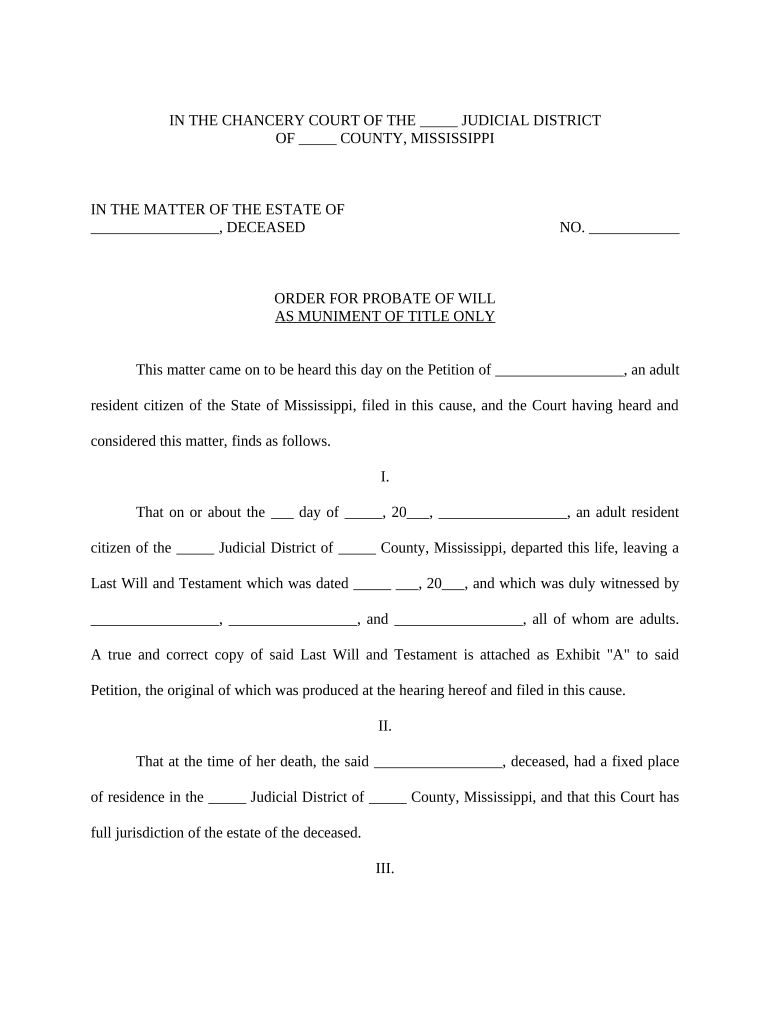
The Muniment of Title form is a probate document used to record an instrument—typically a will or court order—that establishes ownership of real property without full estate administration. When a decedent’s assets are limited and there are no unpaid debts requiring administration, a court may admit a will and issue a muniment of title to update land records and transfer title to beneficiaries. The form summarizes the instrument, identifies the decedent and heirs, and provides a certified court entry for county recording. Requirements and terminology vary by state; follow local probate rules when preparing and filing this form.

Why Use a Muniment of Title Form

A Muniment of Title streamlines property transfer after death by allowing court admission of an instrument that serves as proof of ownership without full estate administration. This reduces time, filing complexity, and recording costs when statutory conditions and creditor requirements are met.

Why Use a Muniment of Title Form

Who Prepares and Benefits from This Form

Typical users who prepare or receive Muniment of Title forms include probate attorneys, executors, and title professionals handling post-death transfers.

  • Probate attorneys handling admission of wills and court filings on behalf of estates.
  • Executors or personal representatives seeking to clear title for beneficiaries or buyers.
  • Title companies and county recorders verifying judicial instruments before recording.

Core Elements a Professional Muniment Should Include

A professional Muniment of Title form includes clear identification, legal descriptions, petitioner details, supporting attachments, certification language, and signature blocks for court and recording.

Title Header

Document title, court name, case number, and caption should appear prominently. Use the court’s official formatting and include the probate division and county to ensure clerks associate the muniment with the correct docket.
Decedent Details

Full legal name, date of death, last residence, and social identifiers where applicable. Include executor or personal representative name and contact information to facilitate court notices and record correspondence.

Property Description

Accurate metes and bounds or legal lot description copied from recorded deeds, plus assessor parcel numbers. Ambiguous descriptions may cause recorder rejection or require corrective deeds.

Instrument Attachment

Attach the will or other instrument being admitted as muniment, including certified copies and any exhibits referenced. Ensure attachments are legible and complete for court review.

Court Certification

Provide proposed form of court entry admitting the instrument as muniment of title with signature and seal lines for the judge or clerk. Include certificate language for recording.

Signature & Notary

Include signature blocks for petitioner and notary acknowledgment fields. For RON, include electronic notary certificate details per state rules.

Step-by-Step: From Petition to Recorded Order

Follow these steps to prepare and file a Muniment of Title form correctly with the probate court and county recorder.

  • 01
    Gather Documents: Collect will, death certificate, and property deed copies.
  • 02
    Prepare Petition: Draft petition admitting the will as muniment of title.
  • 03
    File with Court: File petition and exhibits with the appropriate probate division.
  • 04
    Record Instrument: Obtain certified court order and record it with county recorder.

Configuring a Digital Workflow for Muniment Filings

Configure a digital workflow to collect signatures, notarizations, and certified documents for court filing and county recording.

Field Configuration
Signer Authentication Email link, SMS code, or ID verification
Notary Integration Enable RON session or upload notary stamp image
Document Fields Add fields for names, dates, legal descriptions
Delivery Set signer order and automatic certified delivery

Technical Features to Support Filing and Recording

Use an e-signature platform that supports PDF, DOCX, RON, and certified delivery for probate filings.

  • File Formats: PDF, DOCX, and fillable forms supported
  • Integrations: Connectors for NetSuite, Salesforce, Google Workspace
  • Authentication: Email, SMS, and advanced ID verification options

How a Muniment Filing Typically Flows

This high-level flow shows how a Muniment of Title moves from petition to recorded court order and county recording.

  • Upload Documents: Attach will, death certificate, and deeds.
  • Petition Filed: File petition with probate court clerk.
  • Court Entry: Judge signs order admitting instrument as muniment.
  • Record Order: Record certified order at county recorder’s office.

Timing Considerations and Typical Deadlines

Key dates and timelines for filing a Muniment of Title with probate court and recording the certified order.

Petition Filing Deadline:

No universal deadline; file promptly after death to protect interests.

Court Hearing:

Hearing scheduled per local docket; timeline varies by county.

Recording After Order:

Record certified order immediately to update title records.

Notice to Creditors:

Follow state notice periods; creditor claims may affect eligibility.

Retention of Records:

Keep originals and certified copies per retention rules.

Common Pitfalls to Avoid

  • Using an informal property description or omitting assessor parcel numbers often causes recording clerks to reject muniment entries and request corrected legal descriptions.
  • Failing to list all heirs or provide current mailing addresses can lead to contested filings and additional court orders to resolve title disputes.
  • Submitting a muniment without confirming state-specific probate eligibility increases the chance administrators will require full estate administration instead.
  • Relying on electronic signatures without confirming recorder or county acceptance may require a re-execution with wet signatures and notarization.

Consequences of Errors or Incomplete Filings

Recording Rejection: Missing or incorrect documents.
Clouded Title: Incorrect entry can create title defects.
Creditor Claims: Unresolved debts may require administration.
Delay Costs: Additional filings and attorney fees.
Notary Issues: Invalid acknowledgements cause refusal.
Fraud Risk: Misstatements risk civil penalties.

Practical Examples of Muniment Use

Real-world examples show how muniment filings can clear title and accelerate property transfers when probate requirements are satisfied.

Private Heir Transfer

A small estate with a single parcel and no outstanding debts used the muniment process to expedite title transfer and avoid full probate administration.

  • Faster transfer and reduced court costs.
  • After the court admitted the will as a muniment of title and issued a certified order, the county recorder updated the deed and the beneficiary completed a sale without additional probate steps, saving weeks and legal fees.

Title Company Review

A title company streamlined clearance by obtaining the certified court entry and verifying deed language ahead of recording to avoid objections.

  • Certified court orders clarified ownership quickly.
  • Coordinating the court-certified instrument with title insurance requirements reduced follow-up requests, minimized chain-of-title issues, and facilitated faster closings for buyers and heirs while limiting additional recording fees.

Best Practices to Improve Acceptance and Speed

Practical tips to reduce errors and speed acceptance when preparing and recording Muniment of Title documents.

Verify identity and names against official records
Cross-check decedent names, executor names, and beneficiary spellings against the death certificate, will, and government IDs. Even small variations can cause recorder rejection or title insurance delays; include aliases or formerly used names when applicable.
Provide the deed's exact legal description
Copy metes-and-bounds text or recorded lot descriptions directly from the deed; include assessor parcel numbers. Avoid colloquial addresses alone, which often trigger clarification requests from recorders.
Confirm probate and creditor procedures
Follow state notice-to-creditor timelines and obtain court confirmation that no administration is required. Failure to observe statutory notice periods can permit creditor claims that complicate title clearance and may require reopening probate.
Prepare certified court orders for recording
Ensure the court’s certified entry contains the language needed by county recorders, and request a certified copy with the court seal. Photocopies without certification are usually unacceptable for recording.

Pricing and Feature Snapshot for Common eSignature Vendors

Vendor pricing and feature limits affect electronic filing workflows; compare starting price, trial availability, bulk send, audit trail, HIPAA, and envelope caps.

signNow DocuSign Adobe Sign PandaDoc HelloSign
Starting Price $8/user/mo $15/user/mo $14/user/mo $19/user/mo $15/user/mo
Free Trial 7-day free trial Varies by plan Varies by plan Varies by plan Varies by plan
Bulk Send Yes Yes Yes Yes Varies by plan
Audit Trail Yes Yes Yes Yes Yes
HIPAA Compliant Yes Yes Yes No No

Frequently Asked Questions About Muniment of Title Forms

Answers to common questions about preparing, signing, notarizing, and recording a Muniment of Title form in U.S. probate practice.


Need help? Contact support

be ready to get more
Join over 28 million airSlate SignNow users