Establishing secure connection…Loading editor…Preparing document…

North Dakota Warranty Deed to Child - Reserving Life Estate to Parent

This template is fully customizable. Edit the text, fill out the fields, and send it for signature. Give it a try!
North Dakota Warranty Deed to Child - Reserving Life Estate to Parent

What this North Dakota warranty deed does

A North Dakota Warranty Deed to Child reserving a life estate to the parent transfers legal title of real property to a child while the parent retains the right to possess and use the property during the parent's lifetime. This document conveys warranty protections from the grantor to the grantee, describes the reserved life estate interest, and typically requires notarization and recording with the county recorder where the property is located.

Why reserving a life estate matters

Reserving a life estate lets a parent avoid immediate loss of possession, simplify later transfer at death, and potentially reduce probate while preserving certain protections for the grantor during life.

Why reserving a life estate matters

Who commonly prepares and uses this deed

Typical parties and professionals involved include the parent (grantor), the child (grantee), real estate attorneys, closing agents, and county recording clerks.

  • Parent grantors seeking to preserve lifetime occupancy while transferring future ownership
  • Adult children expecting future title but not immediate possession
  • Real estate attorneys and title companies preparing and reviewing deed language

Use with counsel if there are liens, mortgages, Medicaid concerns, or tax implications; the deed affects title, property taxation, and beneficiary planning.

Key parties and signer roles

Parent (Grantor)

The parent transferring title remains the life tenant with possession and use rights for life. The grantor must sign and usually acknowledge the deed before a notary; errors in the grantor's name or signature can invalidate the conveyance or cause recording rejection.

Child (Grantee)

The child receives fee simple remainder subject to the reserved life estate. The grantee's acceptance may not be required for recording, but documenting intent and providing contact information helps future title clearance and tax reporting.

Core elements included in a professional deed

A complete North Dakota warranty deed reserving a life estate should contain precise conveyance language, a clear reservation clause, legal descriptions, and required execution statements for recording.

Granting Clause

States the transfer of title to the child and the type of estate conveyed, using clear warranty language to assure title transfer and future protections against third-party claims.
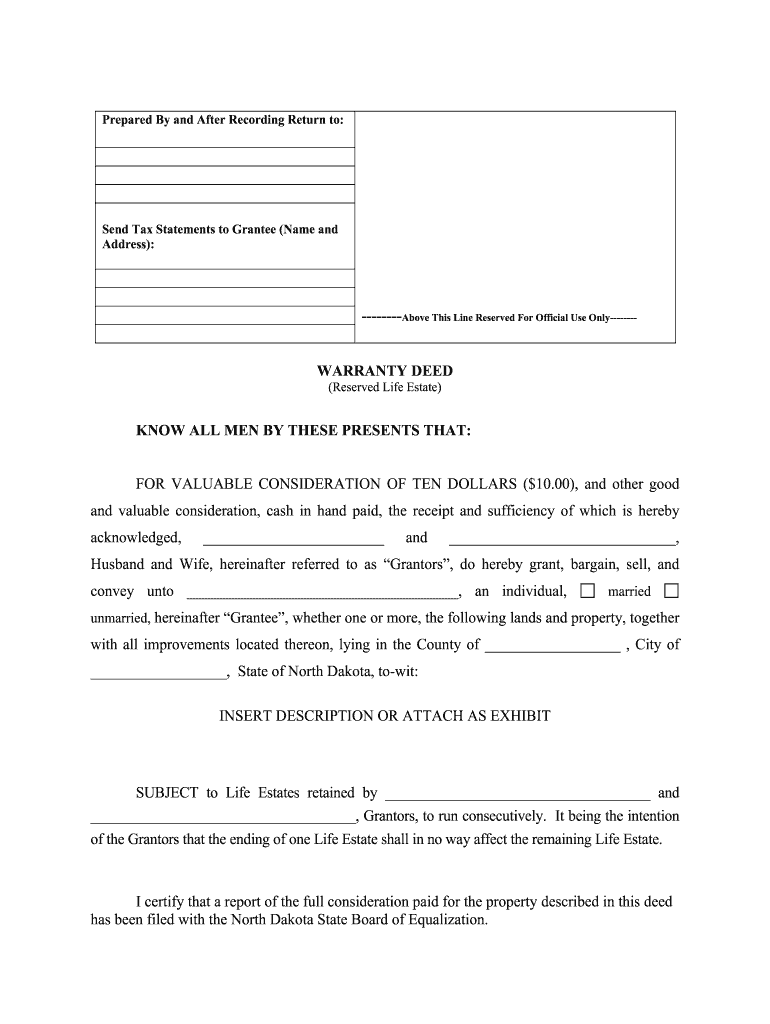
Life Estate Reservation

Explicitly reserves the parent's right to possess, occupy, and use the property for life and specifies whether the parent may lease or encumber during the life estate.

Legal Description

Provides the full legal description of the property (lot, block, subdivision or metes and bounds) to avoid ambiguity and ensure county recorder acceptance.

Consideration

Records the stated consideration or recital of love and affection; although nominal consideration is common in family transfers, accurate description affects tax and recording interpretation.

Execution and Notary

Contains the grantor signature block, notary acknowledgement required under state law, and dates of signing to meet recording requirements.

Recording Block

Leaves space for county recorder stamps and indices; timely recording protects the grantee's interest and provides public notice of the conveyance.

Step-by-step: preparing and recording the deed

Follow these sequential steps to prepare, execute, and record the deed with minimal friction.

  • 01
    Gather documents: Obtain current deed, legal description, and mortgage status.
  • 02
    Draft deed: Include exact reservation clause and correct legal description.
  • 03
    Sign before notary: Grantor signs in notary presence; notary completes acknowledgement.
  • 04
    Record in county: Submit deed and fees to county recorder where property located.

Online workflow settings for digital completion

Configure a straightforward online signing and notarization workflow to collect signatures, authentication, and final recording-ready PDF output.

Field Configuration
Signature Field Require in-person or remote notarized signature
Date Field Auto-fill MM/DD/YYYY on signer confirmation
Notary Block Lock field until notary completes acknowledgement
Final PDF Flatten form and include certificate of completion

Where to sign, notarize, and record

This deed usually must be signed before a notary, returned to the preparer or title company, and recorded at the county recorder's office in the property's jurisdiction.

  • Signing location: In presence of a commissioned notary public
  • Notarization: Notary completes acknowledgment block and seal
  • Recording: Record at county recorder where property is located
  • Delivery: Provide recorded copy to grantor and grantee

Digital signing and technical requirements

Use an eSignature platform that supports notarization workflows, produces tamper-evident PDFs, and integrates with common storage systems.

  • Integrations: Salesforce, NetSuite, Box support
  • File formats: PDF, DOCX accepted
  • Authentication: Email, SMS, or advanced options

Ensure the chosen platform supports audit trails, secure storage (AES-256), and produces an uneditable recorded-format PDF for submission to the county recorder.

Common mistakes to avoid

  • Using an informal address instead of the recorded legal description leads to recording rejection or title ambiguity.
  • Failing to reserve precise life estate language can create disputes about the grantor's rights to lease or encumber the property.
  • Not checking for mortgages or liens before transfer can trigger lender due-on-sale clauses or unexpected liability.
  • Submitting unsigned or improperly notarized documents results in recording delays and possible re-execution costs.

Key legal and financial risks

Tax consequences: Gift or capital gains tax implications
Medicaid recovery: Potential estate recovery claim
Mortgage acceleration: Lender may call loan due
Recording rejection: Defective execution or description
Title defects: Uncleared liens compromise transfer
Family disputes: Ambiguous language invites litigation

Practical tips for accurate, efficient deeds

Follow proven practices that reduce rework, protect title, and simplify recording for family transfers.

Use recorded legal description
Copy the legal description exactly from the current recorded deed or county parcel record to avoid ambiguity and recording rejection; avoid street addresses as the sole identifier.
Confirm mortgage status
Obtain a payoff statement or lender approval before transfer to avoid triggering due-on-sale clauses and to ensure grantee accepts title subject to encumbrances intentionally.
Consider title insurance
Purchase or update title insurance to protect against hidden defects; a new policy or endorsement can simplify later sale or refinancing by the grantee.
Document intent clearly
Spell out whether the grantor may lease, mortgage, or sell life-estate rights and whether the reservation terminates upon death or under specified events.

Representative scenarios families use this deed for

Two anonymized examples illustrate common uses and practical outcomes when a life estate is reserved.

Family Transfer

A parent conveys a lake house to an only child to avoid probate and simplify succession

  • Child receives remainder interest while parent retains occupancy and decision rights
  • Recorded deed provided public notice, but the family arranged for a title endorsement and payer consent to cover outstanding mortgage responsibilities and taxes.

Medicaid Planning

An elderly grantor uses a life estate to transfer future ownership while retaining lifetime use

  • The reservation preserved income and possession but requires careful timing for benefit eligibility
  • The family consulted counsel to evaluate Medicaid look-back rules and potential recovery risks before recording.

eSignature vendor comparison for completing and notarizing deeds

Compare common eSignature pricing and capabilities relevant to notarized real estate workflows; signNow is placed first for reference to its publicly stated pricing and features.

signNow DocuSign Adobe Sign PandaDoc HelloSign
Starting Price $8/user/mo $15/user/mo $14/user/mo $19/user/mo $15/user/mo
Free Trial 7-day free trial Varies by plan Varies by plan Varies by plan Varies by plan
Bulk Send Yes Yes Yes Yes No
Audit Trail Yes Yes Yes Yes Yes
HIPAA Compliant Yes Yes Yes No No
Envelope Cap No cap 100 envelopes/user/year Varies by plan Varies by plan Varies by plan

Common questions about deeds reserving a life estate

Answers to frequently asked questions address validity, notarization, tax effects, and recording practicalities for North Dakota deeds.


Need help? Contact support

be ready to get more
Join over 28 million airSlate SignNow users