Establishing secure connection…Loading editor…Preparing document…

Time Extension Letter

This template is fully customizable. Edit the text, fill out the fields, and send it for signature. Give it a try!
Time Extension Letter

What a Time Extension Letter Is and when it’s used

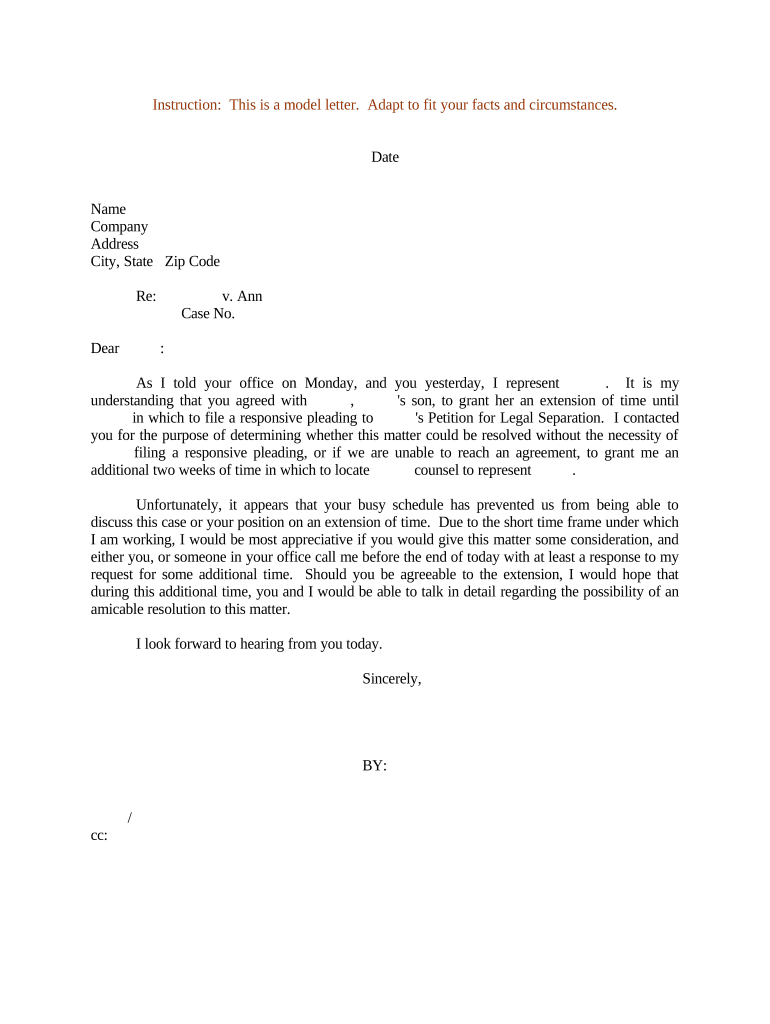
A Time Extension Letter is a formal written request asking a counterparty or authority to extend a deadline, due date, or performance period. Common uses include contract milestone delays, project schedule adjustments, rental lease extension requests, and administrative filing deadline extensions. The letter states the original deadline, the additional time requested, the reason for the extension, and any proposed new date or conditions. It may be delivered by email, certified mail, courier, or electronically signed file; the method can affect enforceability and receipt evidence in disputes.

Why a clear Time Extension Letter matters

A concise, dated Time Extension Letter creates a written record of the request and response, helps avoid misunderstandings, and can preserve contractual or legal rights if accepted.

Why a clear Time Extension Letter matters

Who typically prepares and receives Time Extension Letters

Time Extension Letters are used across business, legal, education, and government contexts when a party cannot meet a deadline and needs formal permission to extend it.

  • Project managers and contractors requesting schedule relief from clients or owners.
  • Tenants or landlords seeking to extend lease dates or rent payment deadlines.
  • Students or applicants asking institutions for extra time to submit materials.

Keep communications factual, include dates and reasons, and retain signed copies to document any agreed extension.

Step-by-step: drafting a Time Extension Letter

Follow these practical steps to create a clear, enforceable extension request.

  • 01
    Identify parties: Name requester and recipient exactly.
  • 02
    State original deadline: List original date and contract clause if applicable.
  • 03
    Request new date: Propose specific extension period or new deadline.
  • 04
    Sign and send: Sign, date, and choose a verifiable delivery method.

Essential elements to include in a professional request

A robust Time Extension Letter combines factual detail, a clear request, and evidence of authority to bind the sender.

Header information

Include date of letter, subject line, recipient name, and reference identifiers such as contract number or invoice number so the recipient can locate the matter immediately.
Statement of facts

Concise factual summary of why the extension is needed, including relevant dates, events, and steps already taken to comply with original obligations.

Specific request

Precisely state the additional time requested and any conditions or milestones tied to the extension so the recipient can evaluate and respond.

Impact mitigation

Describe remedial actions or new timelines that limit disruption; offer interim deliverables if available to demonstrate good faith and progress.

Authority and signature

Confirm the signer’s authority to request the extension (title or role) and provide a dated signature block to validate the request.

Delivery and proof

Specify how the letter was or will be sent and request written acceptance; retain proof of delivery such as certified mail receipt, email copy, or signed eSigned agreement.

Security and compliance considerations for electronic submission

Encryption: TLS 1.2/1.3 in transit; AES-256 at rest
Audit trail: Timestamp, IP address, and signer actions recorded
Regulatory compliance: ESIGN and UETA acceptance in the United States
HIPAA readiness: BAA required for protected health information
Access controls: Role-based permissions and multi-factor authentication
Retention options: Exportable PDFs and CSV audit logs available

Common pitfalls when preparing an extension request

  • Failing to reference the original agreement or invoice leads to confusion and delays in acceptance.
  • Providing a vague or unsupported reason weakens the request and reduces the chance of approval.
  • Missing signatures or unsigned attachments can make the request non‑binding and eligible for rejection.
  • Sending the request too late—after the deadline—may forfeit contractual remedies or trigger penalties.

Potential legal and financial consequences of errors

Contract breach: May expose parties to damages or termination
Loss of remedy: Waiving rights if extension not documented properly
Tax penalties: IRC §6721: $60–$330 per form for late filings
Rejection risk: Recipient can refuse and insist on original terms
Invalid signature: Wrong signer can void the request
Evidence gaps: No proof of delivery weakens dispute positions

Typical workflow for creating and sending an extension letter

This sequence outlines a common online workflow from drafting to acceptance.

  • Draft: Prepare letter including dates and reasons
  • Attach documents: Include contracts, invoices, or supporting evidence
  • Sign: Apply handwritten or electronic signature
  • Deliver: Send by certified mail, email, or eSignature platform

Configuring an electronic workflow for extension requests

Set up template fields and routing rules to streamline repeat extension requests and preserve audit records.

Field Configuration
Authentication Email link or SMS code for signer verification
Template Pre-fill party names, dates, and reference numbers
Reminders Automated follow-ups at user-defined intervals
Attachments Attach contracts, invoices, or supporting PDFs

Delivery channels and technical considerations

Choose a delivery method that provides verifiable receipt and an audit trail appropriate for the recipient and legal context.

  • Email delivery: Fast and trackable when using read receipts
  • Certified mail: Strong proof of delivery for legal disputes
  • eSignature platforms: Preserve audit trail and signed PDF

Ensure chosen platform supports required authentication and records retention for the document’s legal and regulatory context.

Timing guidance and typical submission expectations

Submit a Time Extension Letter as early as possible and include a proposed new deadline; some contexts have formal deadlines or statutory requirements.

Administrative requests:

Submit immediately upon anticipating a missed deadline

Contractual milestones:

Provide notice per contract terms, often 10–30 days prior

Tax-related extensions:

See Form 4868 for individual tax filing extension timing

Court or regulatory deadlines:

Often require formal motion rather than a letter

Emergency delays:

Inform counterparty promptly with supporting documentation

Key milestones from request to resolution

Track these stages after sending a Time Extension Letter to ensure timely follow up and recordkeeping.

01

Draft and sign

Prepare letter, gather evidence, and sign

02

Send and record

Send via chosen method and save delivery proof

03

Recipient review

Recipient evaluates request and consults stakeholders

04

Response and documentation

Record acceptance, conditional approval, or denial

How a Time Extension Letter differs from a contract amendment

Compare typical characteristics to choose the right approach for changing deadlines or obligations.

Criteria Time Extension Letter Contract Amendment
Formality lower formality higher formality
Filing required usually no sometimes yes
Typical use short-term relief permanent change
Notarization rare occasionally required

eSignature vendor pricing and capability snapshot for signing extension letters

Platform pricing and feature availability vary; choose a solution that meets authentication, audit trail, and compliance needs for your jurisdiction and industry.

signNow DocuSign Adobe Sign PandaDoc HelloSign
Starting Price $8/user/mo $15/user/mo $14/user/mo $19/user/mo $15/user/mo
Free Trial 7-day free trial Varies Varies Varies Varies
Bulk Send Yes Yes Yes Yes No
Audit Trail Yes Yes Yes Yes Yes
HIPAA Compliant Yes Yes Yes No No

Real-world examples of extension requests and outcomes

The following case snapshots show how organizations used formal letters to document and secure extra time.

Martin Properties — lease extension

Martin Properties needed to extend a move‑in date due to construction delays, and used an eSigned letter to notify tenants and record consent.

  • Tim Martin, Founder, noted the ability to execute documents online efficiently.
  • The signed letter preserved the timeline and helped avoid a lease dispute while confirming the new completion date and tenant acceptance.

Optica Ventures — vendor deadline

Optica Ventures requested a two‑week extension from a supplier after supply chain delays, documenting reasons and a revised delivery schedule.

  • The COO confirmed the interface was simple for customers and partners.
  • The written agreement avoided penalty clauses, established interim deliverables, and provided clear acceptance evidence for both parties.

Practical tips for drafting effective Time Extension Letters

Follow these practical tips to improve clarity, speed acceptance, and reduce legal risk.

Be specific
State exact dates, contract references, and the specific extension length requested rather than vague durations.
Provide evidence
Attach supporting documents such as invoices, inspection reports, or delivery notices to substantiate the reason.
Request written acceptance
Ask the recipient to sign or confirm acceptance in writing to create an enforceable record.
Preserve delivery proof
Use tracked mail or an eSignature platform that records delivery and signer identity for future disputes.

Frequently asked questions about Time Extension Letters

Answers to common questions about validity, signatures, and next steps when an extension is needed.


Need help? Contact support

be ready to get more
Join over 28 million airSlate SignNow users