Establishing secure connection…Loading editor…Preparing document…

New Jersey Name Change Order

This template is fully customizable. Edit the text, fill out the fields, and send it for signature. Give it a try!
New Jersey Name Change Order

What the New Jersey Name Change Order Is

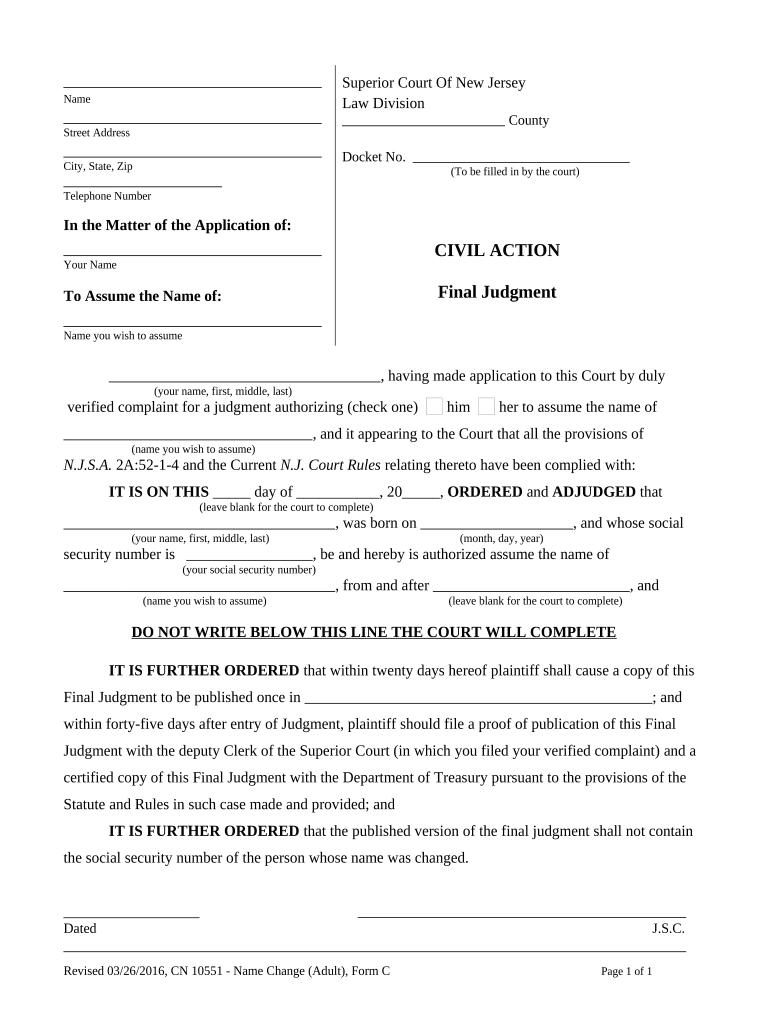
A New Jersey Name Change Order is a court-issued document that legally replaces an individual's current name with a new name after a judicial proceeding in the appropriate county Superior Court. The order follows a filed petition, any required notice or publication, and a hearing where a judge reviews the request and supporting documents. Once entered, the order provides the legal basis to update identity records such as driver licenses, Social Security, passports, bank accounts, and academic or employment records. Parties should keep certified copies for administrative updates and to show proof of the legal change.

Why a Proper Court Order Matters

A clear, correctly completed Name Change Order creates a single authoritative record for identity updates, minimizes administrative rejections, and supports legal continuity across government and private records.

Why a Proper Court Order Matters

Who Commonly Prepares or Signs This Order

Professionals and individuals involved in a name-change petition typically interact with the order at different stages.

  • Self-represented petitioners: Individuals filing for their own name change who prepare and sign required forms.
  • Family law attorneys: Lawyers who draft petitions, advise on notice/publication, and represent petitioners at hearings.
  • Court clerks and judges: Court staff process filings and judges review petitions and sign the final order.

Step-by-Step: From Petition to Final Order

A standard completion path includes preparing the petition, filing, providing required notice, attending the hearing, and obtaining the signed order.

  • 01
    Prepare Petition: Complete petition forms and gather IDs.
  • 02
    File with Court: Submit the petition and pay filing fee.
  • 03
    Provide Notice: Publish or serve notice as local rules require.
  • 04
    Attend Hearing: Appear or have counsel appear; judge signs order.

Customizing the Order for Online Completion

Configure a digital workflow to collect signatures, attach IDs, and route the order for signing and notarization where permitted.

Field Configuration
Document Format Use PDF or DOCX for court compatibility
Signature Type Allow typed or drawn signatures; require notarization where needed
Authentication Use email or SMS code for signer verification
Retention Store signed certified copies in secure archive

Where to File and How the Order Moves Through the System

Know the typical routing steps so you file in the right venue and meet county-specific procedures for notice and entry of the order.

  • County Superior Court: File petition with the clerk in the county of residence.
  • Clerk Processing: Clerk assigns case number and schedules hearing.
  • Notice or Publication: Publish or serve notice per local rules.
  • Judge Signs Order: Order is signed at hearing and recorded by clerk.

Digital Signing and Delivery Considerations

When using electronic tools for signature collection, verify that authentication, notarization, and retention meet court and agency expectations.

  • Authentication: Email, SMS, or stronger multifactor
  • Notarization: Remote notarization where state law permits
  • Integrations: Connects to case or document storage

Key Timing and Scheduling Notes

Understand local deadlines for filing, notice, publication, and any waiting periods to avoid continuances or dismissal.

File Promptly:

Submit petition before planned travel or deadlines

Publication Window:

Comply with county-specific publication timing

Service Deadlines:

Serve interested parties within court-required days

Hearing Date:

Judge schedules a hearing after filing

Order Entry:

Certified order available after judge signs

Essential Information to Include

Petitioner Name: Full current legal name
Proposed Name: Exact new legal name
Date of Birth: MM/DD/YYYY format
Address: Street, city, state, ZIP
Case Number: Court-assigned file number
Hearing Date: Scheduled appearance date

Anatomy of a Professional Name Change Order

A clear order includes identifying case caption, petitioner details, the precise name change directive, effective date, recording instructions, and signature blocks for the judge and clerk.

Caption

Court name, county, case number, and party designation that identify the matter for recordkeeping and indexing.
Petitioner Details

Full current legal name, date of birth, and address to uniquely identify the person subject to the order.

Order Language

Precise directive stating the current name is legally changed to the new name as of the effective date.

Effective Date

Date the court declares the name change effective for administrative updates and legal purposes.

Recording

Instructions for filing or certifying the order with the clerk and making copies for agencies and private entities.

Signatures

Judge’s signature, date, and clerk certification to create a certified, enforceable court order.

Supporting Documents to Attach

Common attachments shorten review time; include certified or original IDs and documents that verify identity, status, or related legal matters.

Birth Certificate

Certified copy establishes original name and birth details; helps the court confirm identity and lineage in the record.

Photo ID

State driver license or passport confirming current name, photo, and date of birth for petitioner identification.

Court Orders

If a prior name change, divorce decree, or adoption affects the request, attach certified copies to clarify legal history.

Minor Consent

For changes affecting minors, include consent forms or custody documentation as required by local rules.

Common Preparation Errors to Avoid

  • Mismatched names or abbreviations that do not match government ID often require corrective affidavits or amended petitions.
  • Omitting notarization where required leads to rejection or a request for authenticated signature verification by the clerk.
  • Failing to publish or serve notice according to local rules can result in continuance or dismissal of the petition.
  • Missing attachments such as certified birth certificates or prior orders slows judicial review and may require supplemental filings.

Consequences of an Incorrect or Incomplete Order

Case Dismissal: Court may dismiss petition
Administrative Rejection: Agencies may reject updates
Delayed Updates: Delay in changing IDs and records
Additional Costs: Must refile or correct documents
Privacy Exposure: Publication can reveal personal details
Legal Complication: Objections can require hearings

eSignature Vendor Comparison for Document Signing

A concise comparison of starting prices and core features relevant to signing court forms; signNow is listed first per vendor-comparison standards.

signNow DocuSign Adobe Sign PandaDoc HelloSign
Starting Price $8/user/mo $15/user/mo $14/user/mo $19/user/mo $15/user/mo
Free Trial 7-day free trial Varies by plan Varies by plan Varies by plan Varies by plan
Bulk Send Yes Yes Yes Yes No
Audit Trail Yes Yes Yes Yes Yes
HIPAA Compliant Yes Yes Yes No No

Real-World Examples of Digital Signing Use

These brief examples show how organizations use electronic signature platforms to collect judicial or administrative signatures efficiently.

Optica Ventures LLC

A small firm needed quick signature turnaround for client authorizations

  • The interface simplified signing across devices
  • "The interface is simple and easy-to-use for our team; more importantly, it is just as easy for our customers." — Brian Fitzgibbons, COO

Martin Properties

A real-estate operator digitized tenant and court paperwork to reduce in-person steps

  • Signatures completed remotely sped processing
  • "I can process and execute all of these documents online with 100% compliance and built-in security." — Tim Martin, Founder

Representative Professionals Involved

Family Attorney

An attorney specializing in family and probate matters prepares petitions, advises on publication and consent requirements, represents petitioners at hearings, and ensures the order language meets administrative needs for downstream updates.

Court Clerk

A county Superior Court clerk receives filings, assigns case numbers, schedules hearings, and issues certified copies of the signed order to petitioners for record updates with agencies and private entities.

Practical Tips for Accurate and Efficient Completion

Follow these practical steps to minimize friction, reduce rework, and ensure the order is accepted for downstream updates.

Verify Identity Documents
Confirm names on all IDs match the petition exactly; scan certified copies for attachments and keep originals available for court review.
Confirm Local Rules
Check county clerk requirements for publication, service, or local filing fees before preparing the petition to avoid routine continuances.
Use Certified Copies
Retain certified copies of the signed order; agencies commonly require certified rather than plain photocopies to update vital records or identification.
Record Everything
Keep a clear file with petition, proof of service, publication receipts, and certified order to streamline future identity updates.

Frequently Asked Questions About Name Change Orders

Answers to typical questions on filing, signatures, minors, and post-order updates to record keepers and agencies.


Need help? Contact support

be ready to get more
Join over 28 million airSlate SignNow users