Establishing secure connection…Loading editor…Preparing document…

Minnesota Easement

This template is fully customizable. Edit the text, fill out the fields, and send it for signature. Give it a try!
Minnesota Easement

What a Minnesota Easement Is and how it functions

A Minnesota easement is a legal property interest that grants one party limited use or access across another party’s land while the underlying title remains with the owner. Easements can be appurtenant (tied to land ownership) or in gross (personal or commercial rights), and they are typically created by written agreement, deed, or long‑term use. For practical effect, an easement intended to bind successors should be recorded with the county recorder and describe the scope, duration, and legal description clearly so it appears in title searches and affects property rights.

Why establishing a clear easement matters

A documented easement clarifies access and maintenance responsibilities, reduces boundary disputes, protects title insurance eligibility, and preserves rights for future owners while allocating liability and costs between parties.

Why establishing a clear easement matters

Who commonly prepares or signs a Minnesota easement

Each stakeholder has distinct concerns—recording, enforceability, liability allocation, and clarity of the legal description are common priorities.

  • Property owners and neighbors seeking formal access or utility corridors to avoid disputes and protect long-term use rights.
  • Utility companies, municipalities, and developers establishing access, service lines, or rights-of-way across private land.
  • Title companies, real estate attorneys, lenders, and surveyors preparing, reviewing, or clearing title for transactions.

Core elements every professional Minnesota easement includes

A professional easement instrument is concise but complete: it defines parties, scope, duration, consideration, maintenance, and recording instructions to avoid ambiguity.

Parties

Full legal names and capacities of grantor(s) and grantee(s) to ensure proper title binding and clear attribution of rights.
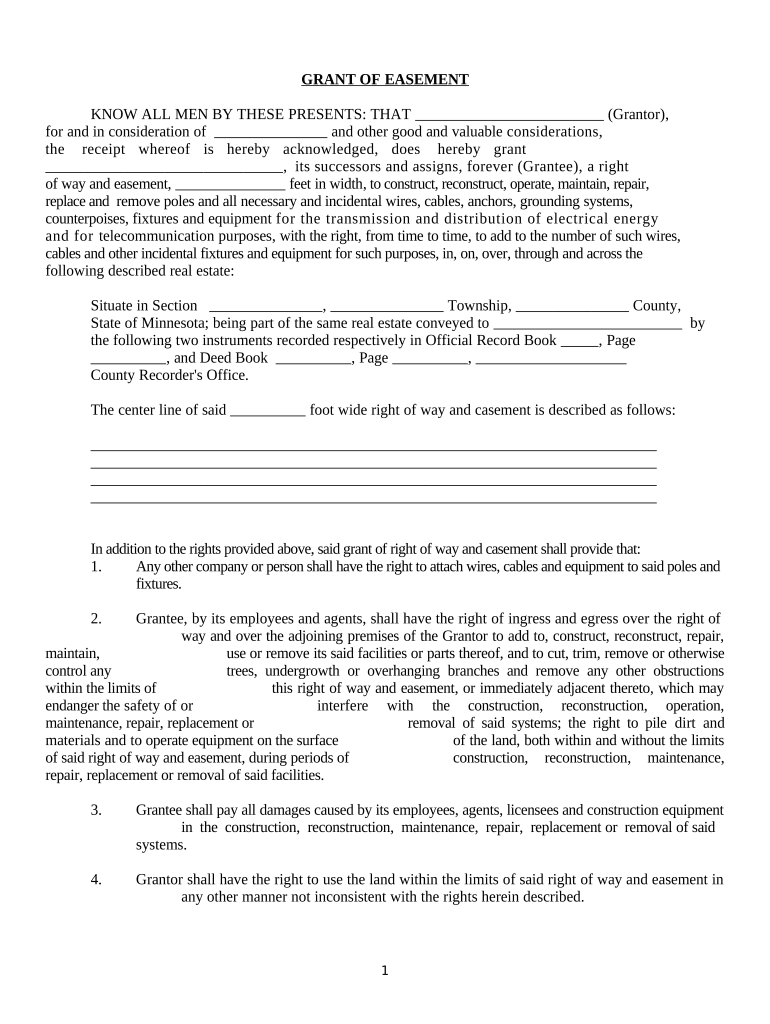
Legal Description

Precise metes-and-bounds or recorded plat citation referencing county property records and any attached survey exhibit for clarity.

Scope of Use

Specific permitted activities, dimensional limits, permitted encroachments, and any restrictions or seasonal limits on access.

Duration

Whether perpetual, for a fixed term, or conditional; include termination triggers and renewal rights when applicable.

Maintenance & Liability

Allocation of repair, upkeep, indemnity, insurance, and responsibility for third-party damages tied to easement use.

Recording Clause

Instructions to record with county recorder, grantor acknowledgement, and reference to attached exhibits or survey plats.

Required identification and recording details

Grantor Name: Exact legal name
Grantee Name: Exact legal name
Property ID: Parcel number
Legal Description: Metes-and-bounds
Consideration: Dollar or other value
Recording County: County recorder name

Stepwise process to create, sign, and record an easement

Follow a clear sequence to reduce delays and ensure enforceability.

  • 01
    Draft the instrument: Prepare with legal description and exhibits.
  • 02
    Review parties and title: Confirm owner names via title search.
  • 03
    Execute and notarize: All required signers sign before a notary.
  • 04
    Record and distribute: Record with county and provide copies to parties.

Configuring an online easement workflow

Digital workflows streamline signature collection, authentication, and distribution for recorded easements.

Field Configuration
Upload Document Use PDF/A or DOCX; include survey as an attachment.
Signer Roles Assign Grantor/Grantee and notary roles explicitly.
Authentication Enable email or SMS code; use stronger KBA if required.
Routing Order Set signers and notary sequence for proper execution.

Where to send the signed easement and who receives copies

After execution, the instrument must be delivered to the correct recording office and relevant stakeholders.

  • County Recorder: Record original or signed copy per county requirement.
  • Title Company: Provide copy for title insurance and closings.
  • Grantee / Grantor: Each party retains a recorded copy for records.
  • Municipality / Utility: Send to any municipal or utility grantee for operational files.

Technical considerations for eSigning and eRecording

Ensure the platform preserves an immutable audit trail (timestamps, IP, signer attribution) and produces a downloadable certificate for county recorders and title underwriters.

  • File Formats: PDF, DOCX supported
  • Integrations: Integrates with Title systems
  • Authentication: Email, SMS, KBA

Immediate legal and financial risks from errors or omissions

Clouded Title: Risk of title defect
Recording Rejection: County may reject document
Enforceability Dispute: Ambiguous terms cause litigation
Boundary Disputes: Survey mismatch triggers conflict
Insurance Issues: Title insurance denial risk
Higher Legal Costs: Increased attorney fees

Common pitfalls when preparing a Minnesota easement

  • Incomplete legal description or missing survey exhibit that causes ambiguity in spatial limits and leads to title examiner objections.
  • Failing to identify the correct grantor capacity (individual versus trustee or corporation), producing a defective conveyance for recording.
  • Omitting a clear maintenance and liability allocation, which creates future disputes about repairs, access, and cost sharing.
  • Delay in recording after execution, which can compromise priority against subsequently recorded interests or encumbrances.

Timing considerations and recommended deadlines

Timely execution and recording preserve priority and reduce disputes; consider these common timing benchmarks.

Execution Timeline:

Execute when all parties and exhibits are finalized.

Notarization Deadline:

Notarize contemporaneously with signatures for recordability.

Recording Window:

Record as soon as possible after execution to preserve priority.

Title Search:

Order within closing period to confirm no intervening liens.

Document Distribution:

Provide recorded copies to parties within days of recording.

Practical tips for accurate and efficient easement completion

Apply these practices to reduce rework, recording delays, and future disputes.

Use an attached survey exhibit
Attach a certified survey or sketch referenced by the legal description to remove spatial ambiguity, and cite the plat or parcel ID used by the county recorder.
Verify owner names and title
Confirm current recorded owner and vesting through a title search before drafting to avoid executing against the wrong party or creating an ineffective conveyance.
Specify precise scope and restrictions
Define permitted uses, width, vertical limits, and vehicle or equipment restrictions to reduce later interpretation disputes and litigation risk.
Confirm notary and recording requirements
Check county recorder rules for notarization, number of copies, fee structure, and RON acceptance before finalizing execution logistics.

eSignature vendor comparison for signing and managing easement workflows

Compare common vendor features and pricing models relevant to easement signing and distribution; signNow is listed first for parity in evaluation.

signNow DocuSign Adobe Sign PandaDoc HelloSign
Starting Price $8/user/mo $15/user/mo $14/user/mo $19/user/mo $15/user/mo
Free Trial 7-day trial Varies Varies Varies Varies
Bulk Send Yes Yes Yes Yes No
Audit Trail Yes Yes Yes Yes Yes
HIPAA Compliant Yes Yes Yes No No
Envelope Cap No cap 100 envelopes/user/year Varies Varies Varies

Frequently asked questions about Minnesota easements and electronic signing

Answers to common practical and legal questions when preparing, executing, and recording an easement in Minnesota.


Need help? Contact support

be ready to get more
Join over 28 million airSlate SignNow users