Establishing secure connection…Loading editor…Preparing document…

Notice of Cessation of Construction Work

This template is fully customizable. Edit the text, fill out the fields, and send it for signature. Give it a try!
Notice of Cessation of Construction Work

What a Notice of Cessation of Construction Work Is

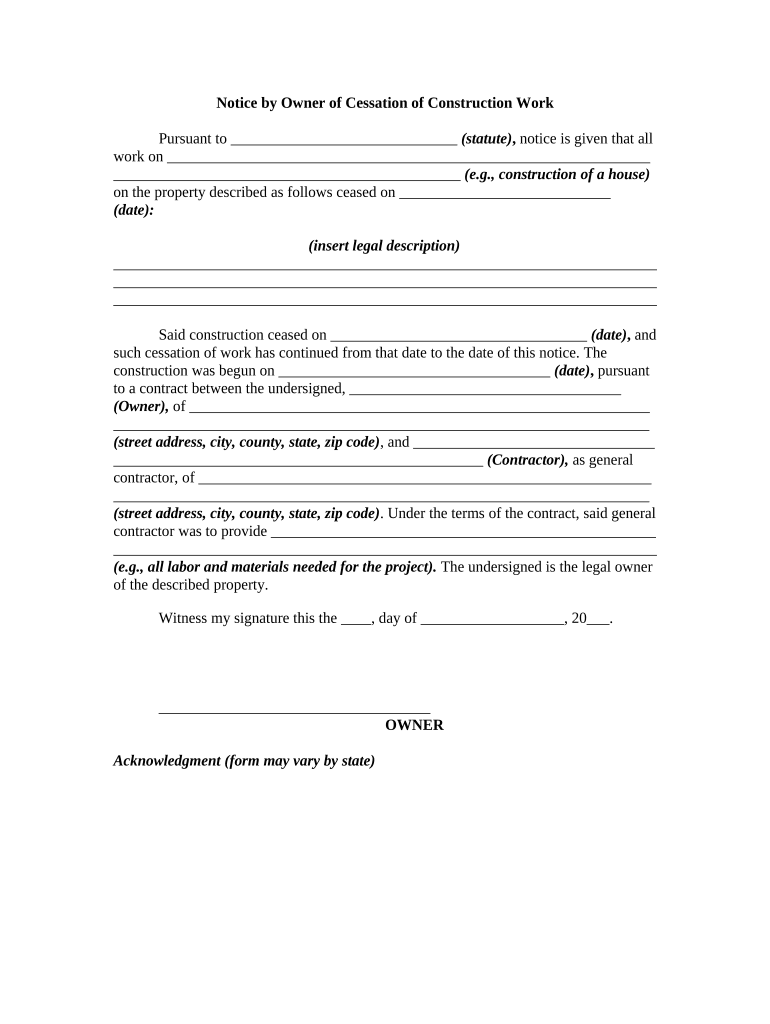
Notice of Cessation of Construction Work is a short legal document used to record that on a specific date construction activities at a project site have stopped and are not expected to resume within a defined period. It identifies the project, the notifying party, the stop date, and a brief reason. In many jurisdictions the notice fixes the cessation date for mechanic’s lien timing and contract deadlines, so accuracy matters when protecting or disputing lien and payment rights under state law.

Why an Accurate Notice of Cessation Matters

A properly drafted Notice of Cessation clarifies when work stopped, can shorten or fix lien filing windows in some states, and provides written evidence useful for owners, contractors, and suppliers to manage claims and contract closeout obligations.

Why an Accurate Notice of Cessation Matters

Who Typically Prepares and Relies on This Notice

Owners, general contractors, and subcontractors use a Notice of Cessation to document that work has stopped and to preserve or challenge lien and contract timelines.

  • Project owners: document cessation to manage closeout, warranties, and potential lien exposure on affected parcels.
  • General contractors: provide notice to subcontractors and suppliers to protect contract deadlines and payment flows.
  • Subcontractors and suppliers: use the notice to track filing windows and determine whether to file claims or preserve rights.

Essential Elements to Include in the Notice

A professional Notice of Cessation names the project, identifying parties, the precise stop date, the factual reason for stopping work, distribution records, and signature provenance so that filing offices and courts can determine the notice’s effect on lien and contractual deadlines.

Project ID

Include the project name, full street address, permit or parcel number, and internal job reference so the notice clearly matches public records and contracts.
Notifying Parties

List full legal names and capacities of the owner, general contractor, and the party submitting the notice, plus a daytime contact phone or email for verification.

Exact Stop Date

Record the last day of active construction in MM/DD/YYYY format; this date often determines lien filing windows and statutory notice periods.

Reason

State the concise factual reason for cessation (completed, abandoned, funding paused, weather) to provide context for lien and contract timing.

Distribution Log

Document delivery methods and dates for owner, contractors, subcontractors, and county recorder to create an auditable evidence trail of notice.

Signature & Notary

Provide printed name, title, signature, date, and a notary block when required by state law to maximize evidentiary weight and acceptance.

Step-by-Step: Prepare, Sign, and Issue the Notice

Follow these sequential steps to prepare, execute, and distribute a legally effective Notice of Cessation of Construction Work.

  • 01
    Identify Parties: List owner, contractor, and project address exactly as in contracts.
  • 02
    Set Stop Date: Record the last day work actually stopped in MM/DD/YYYY format.
  • 03
    Sign & Notarize: Have an authorized person sign; obtain notarization if the state requires it.
  • 04
    File & Distribute: Record where required and send copies to owner, GC, subs, and suppliers.

Where the Notice Is Sent and Filed

This section outlines typical routing and filing endpoints for a Notice of Cessation of Construction Work.

  • Owner Notification: Deliver a signed copy to the property owner and project manager.
  • General Contractor: Provide a copy to the general contractor and supervising agent.
  • County Recorder: Record the notice with the county recorder or clerk if state or local rules require recording.
  • Suppliers and Subs: Send copies to known subcontractors and suppliers who may have lien rights.

Suggested Online Workflow Settings

Configure an online workflow to collect signatures, attach exhibits, and route the Notice of Cessation automatically; retain a secure audit trail for evidentiary needs.

Field Configuration
Signers Owner; general contractor; authorized agents
Auth Method Email link; optional SMS code
Attachments Attach contracts, permits, schedules as exhibits
Retention Secure audit trail and stamped PDF output

Platform Capabilities to Look For

Choose an eSignature platform that supports secure signatures, tamper-evident PDFs, and detailed audit trails for project recordkeeping.

  • File Types: PDF and Word DOCX supported
  • Integrations: Integrates with Salesforce, Procore, Google Workspace
  • Authentication: Supports email, SMS, and KBA options

Security and Compliance Essentials

Transmission Encryption: TLS 1.2/1.3 in transit
Data at Rest: AES-256 encryption at rest
Certifications: ISO 27001; SOC 2 Type II
Regulatory Compliance: ESIGN, UETA, HIPAA (BAA)
Audit Trail: Detailed timestamps and IP
Access Controls: SSO, MFA, role-based permissions

Risks and Potential Consequences of Errors

Missed Lien Window: Lose lien rights
Incorrect Stop Date: Disputed timing
Improper Signatory: Document invalidity risk
Failure to Notify: Claims delays
Notarization Omitted: Filing rejection
Recordkeeping Failure: Evidence lost

Common Preparation Mistakes to Avoid

  • Using inconsistent project names or addresses between contracts, permits, and the notice can cause county record mismatch and potential lien filing rejection.
  • Failing to date the stop date in MM/DD/YYYY format or using ambiguous language creates disputes about when work actually ceased and shortens filing windows.
  • Not verifying whether notarization or recording is required in the project’s jurisdiction may produce a notice with reduced legal weight or recording rejection.
  • Sending the notice to some stakeholders but not all required recipients undermines the distribution record needed to support or defend against claims.

Timing Considerations and Typical Deadlines

Key timing considerations for issuing a Notice of Cessation affect lien filing deadlines and contractor notice obligations; always verify relevant state statutes before filing.

Issue Promptly After Stop:

File or send the notice as soon as work has clearly stopped.

Lien Filing Window Impact:

Cessation may shorten statutory lien filing periods in some states.

Subcontractor Response Deadlines:

Subcontractors may have limited days to file claims after notice.

Recording Timeframes:

County recorders vary; allow processing time for official filing.

Retain Proof:

Keep mail receipts or electronic delivery proofs for statutory retention.

Key Milestones From Stop to Record

Sequential milestones from identifying cessation through filing, distribution, and retention preserve priority and proof for lien purposes.

01

Determine Cessation

Confirm that work has definitively stopped and document supporting facts.

02

Prepare Notice

Draft the notice with project details and exact stop date.

03

Execute & Notarize

Obtain authorized signature and notarization if required by state law.

04

Record & Distribute

File with county recorder and send copies to stakeholders promptly.

eSignature Pricing and Feature Comparison

Compare common plans and feature availability across vendors to choose a solution compatible with your Notice of Cessation workflow and compliance needs.

signNow DocuSign Adobe Sign PandaDoc HelloSign
Starting Price $8/user/mo $15/user/mo $14/user/mo $19/user/mo $15/user/mo
Free Trial 7-day free trial Trial varies Trial varies Trial varies Trial varies
Bulk Send Yes Yes Yes Yes No
Audit Trail Yes Yes Yes Yes Yes
HIPAA Compliant Yes Yes Yes No No

Practical Tips to Reduce Risk and Save Time

Adopt consistent procedures and documentation standards to lower dispute risk and speed project closeout.

Confirm project identifiers and address consistency
Cross-check project name, permit numbers, parcel ID, and street address with contracts and public records before filing; consistency prevents recorder mismatches and reduces the chance of notice exclusion from lien determinations.
Use clear, factual language for cessation reason
State only factual reasons such as 'work completed' or 'work abandoned' and avoid conditional language that could create disputes over intent and timing for lien eligibility.
Document delivery and proof of service
Send via certified mail or secure eDelivery and retain receipts, tracking numbers, or electronic receipts; documented service supports or rebuts claims in contested proceedings.
Store signed originals and digital copies securely
Maintain notarized originals when required and tamper-evident electronic copies with audit trails and metadata organized by project for easy retrieval during audits.

Real-World Examples of Electronic Notice Use

Examples illustrate how digital execution and recordkeeping improve notice handling for contractors and owners across projects.

Martin Properties

Tim Martin, Founder at Martin Properties, used eSignature workflows to handle construction closeout and notices remotely across multiple sites.

  • Faster processing and consistent electronic records.
  • By replacing paper-based steps he executed cessation notices and attached exhibits from mobile devices, maintained audit trails, and secured signed PDFs that supported lien handling and reduced administrative delays during project closeout.

BIS

Dan Rotelli, CEO of BIS, implemented structured electronic notices to improve legal controls and evidence collection.

  • Improved internal control and auditability.
  • The approach produced SOC 2-level records and role-based signing order, enabling the legal team to produce signed cessation notices with full metadata and defend filing dates when disputes arose.

Frequently Asked Questions and Troubleshooting

Answers to common questions about validity, filing, signing, and recordkeeping for a Notice of Cessation of Construction Work.


Need help? Contact support

be ready to get more
Join over 28 million airSlate SignNow users