Establishing secure connection…Loading editor…Preparing document…

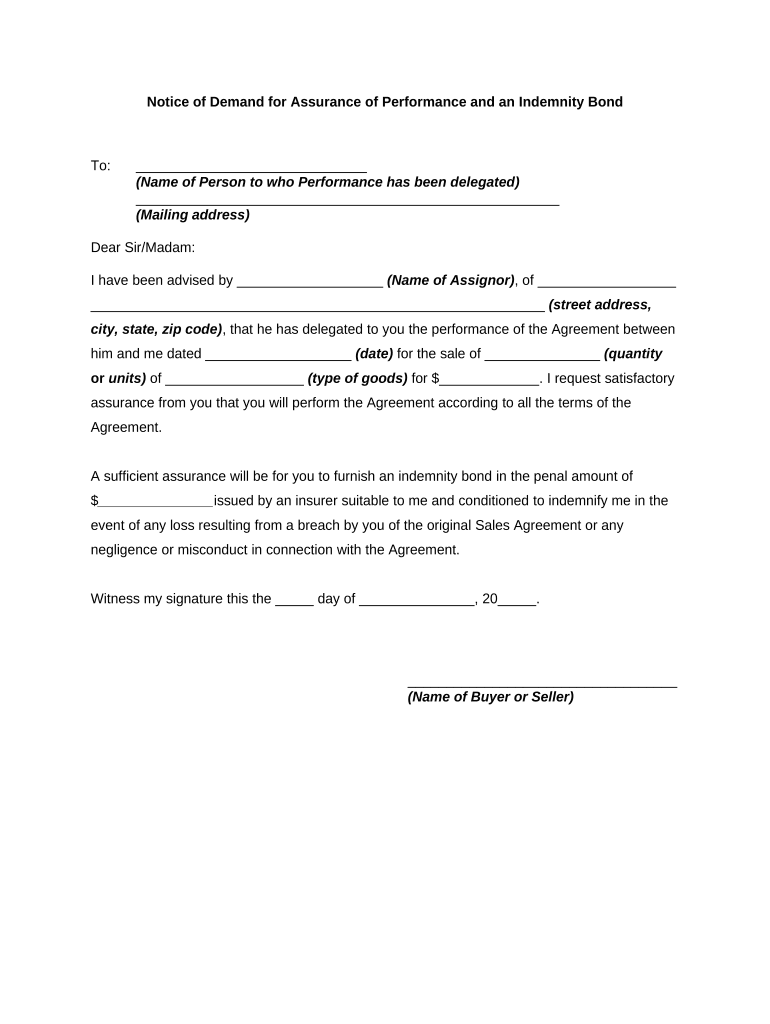
Notice of Demand Bond

This template is fully customizable. Edit the text, fill out the fields, and send it for signature. Give it a try!
Notice of Demand Bond

What a Notice of Demand Bond Is and when it’s used

A Notice of Demand Bond is a formal written claim submitted to a bond obligee, principal, and surety that requests payment or performance under an existing surety bond. The notice identifies the bond, states the alleged default or shortfall, quantifies the amount demanded (if applicable), and cites the contract or bond provision authorizing recovery. Proper notice preserves contractual and statutory rights, begins administrative or claim-handling timelines, and creates a contemporaneous record for insurers, contractors, and courts in disputes over payment, performance, or indemnity.

Why a clear Notice of Demand Bond matters

A precise, timely notice preserves your claim, triggers surety review procedures, and documents the claimant’s position. Clear demands reduce procedural disputes, shorten resolution timelines, and help the surety assess exposure and required remediation under the bond.

Why a clear Notice of Demand Bond matters

Who commonly prepares and receives this notice

Accurate preparation and correct routing ensure contractual notice requirements and preserve statutory remedies for bond-based recovery.

  • General contractors — assert claims for unpaid subcontractor work or recovery under performance bonds.
  • Subcontractors and suppliers — enforce payment bonds for undisputed invoices or nonpayment.
  • Sureties / claims adjusters — receive formal demand to evaluate liability and respond.

Signatory roles and typical authority

Obligee (Claimant)

A claimant is the party asserting loss under the bond. The claimant should be an authorized representative with knowledge of the claim facts and authority to bind the claimant for settlement or litigation decisions; often project managers or company officers.

Surety Representative

A surety signatory is an authorized claims adjuster or legal counsel with delegated authority to investigate, negotiate, and either deny or admit liability on behalf of the surety. Confirm identity and authority before relying on any oral assurances.

Core parts of a professional Notice of Demand Bond

A well-structured notice organizes identification, factual basis, relief requested, and supporting evidence so the surety can triage and respond without unnecessary delay.

Identification

Bond name, bond number, issuing surety, principal, obligee, project name, and contract number so the claim is routed correctly and unambiguously.
Claimant details

Full legal name, contact information, authorized representative, and mailing address for service and follow-up communications.

Statement of default

Concise factual narrative describing the alleged breach, dates of relevant events, and the actions that constitute nonperformance or nonpayment.

Amount demanded

Itemized amount claimed or a statement reserving right to quantify damages with supporting invoices and calculations attached.

Supporting documents

Attach invoices, change orders, lien waivers, correspondence, inspection reports, and photographs that substantiate the claim.

Demand and remedy

Clear statement of the relief sought (payment, completion, or cure) and a reasonable deadline for the surety or principal to respond.

Step-by-step: preparing and sending a Notice of Demand Bond

Follow these steps to create a compliant, clear notice and ensure it reaches the right parties without avoidable delays.

  • 01
    Gather documents: Collect contract, bond, invoices, and supporting evidence.
  • 02
    Draft notice: Populate identification, facts, and demand sections precisely.
  • 03
    Authenticate signer: Confirm signer authority and include contact details.
  • 04
    Serve and record: Send to surety, principal, and obligee; keep proof of service.

How to set up an online workflow for demand notices

Configure a repeatable digital workflow to reduce errors and speed delivery when you send Notice of Demand Bond documents.

Field Configuration
Authentication Method Email link, SMS code, or KBA depending on contract sensitivity
Template Fields Pre-fill bond number, project ID, claimant contact fields
Bulk Send Options Enable bulk send for multiple claimants or sequential routing
Storage & Retention Enable audit trail and long-term storage for compliance

Routing and submission: who to notify and how

Deliver the notice to the surety, the bonded principal, and the contract obligee as required by the bond or contract; maintain evidence of delivery.

  • Prepare notice: Complete the notice and assemble attachments.
  • Send to surety: Email and certified mail per bond instructions.
  • Notify principal: Copy the bonded principal for transparency.
  • Retain proof: Preserve delivery receipts and electronic audit logs.

Digital delivery and integration considerations

Use a platform that supports secure delivery, audit trails, and common integrations to simplify processing and recordkeeping.

  • Security: TLS and AES-256 encryption
  • Integrations: Salesforce, NetSuite, Google Workspace, Box
  • Formats: PDF, DOCX and retained audit trail

Common timing considerations and contract triggers

Notice deadlines can be set by the bond, the underlying contract, or statute; verify applicable timelines before serving a demand to avoid waiver.

Contract notice period:

Follow the contract’s written timeline for notice of default.

Bond-specific requirements:

Many bonds specify notice format and recipient; follow those terms.

Federal projects:

Federal bond claims follow Miller Act procedures and prerequisites.

Preservation of evidence:

Serve notice promptly to preserve rights and documents.

Local rules:

State law or RFP terms may add unique deadlines.

Common mistakes to avoid when preparing a demand

  • Missing or incorrect bond number causes routing delays and potential claim denial if the surety cannot match documentation.
  • Vague descriptions of default without dates or supporting invoices make it hard for the surety to evaluate the claim.
  • Failing to send to all required parties per the bond or contract can waive rights or trigger procedural defenses.
  • Relying on oral notifications instead of documented, verifiable delivery undermines evidence of timely notice.

Consequences of defective or late notice

Statute of Limitations: Loss of suit rights
Claim Denial: Surety may deny on procedural grounds
Waiver Risk: Failure to follow contract steps
Increased Costs: Added legal and collection fees
Counterclaims: Exposure to damages or offsets
Reputational Harm: Disputes can affect future contracting

eSignature vendor comparison for preparing and sending notices

Basic vendor differences affect cost, bulk sending, compliance, and envelope limits; signNow is listed first per platform alignment.

signNow DocuSign Adobe Sign PandaDoc HelloSign
Starting Price $8/user/mo $15/user/mo $14/user/mo $19/user/mo $15/user/mo
Bulk Send Yes Yes Yes Yes No
Audit Trail Yes Yes Yes Yes Yes
HIPAA Compliant Yes Yes Yes No No

Real-world examples of Notice of Demand Bond use

These concise examples show how organizations document and process bond demands in practice.

Optica Ventures LLC

An infrastructure subcontractor documented unpaid change orders and delivered a consolidated demand to the surety.

  • Claimant attached invoices and daily reports.
  • The detailed chronology and attachments allowed the surety to triage the claim and schedule remediation work within weeks, avoiding protracted litigation.

Martin Properties

A property services firm filed a performance-demand after contractor default on punch-list items.

  • The notice included photo evidence and a fixed cure timeline.
  • The firm reports faster resolution and a clear record for subsequent contractor replacement and cost recovery.

Practical tips to improve accuracy and speed

Adopt these practices to reduce disputes, shorten response times, and strengthen evidentiary value of the notice.

Follow contract and bond language precisely
Use the exact notice recipients, delivery methods, and timelines specified in the bond or contract to avoid procedural defenses by the surety.
Attach supporting evidence
Include invoices, change orders, lien waivers, photographs, and inspection reports to allow the surety to evaluate the claim without repeated information requests.
Capture proof of delivery
Use certified mail, courier receipts, and digital audit trails showing timestamps, IP addresses, and signer authentication to document timely service.
Keep records centralized
Store all notices, attachments, and communications in a single secure repository for easy retrieval during claim handling or litigation.

Key milestones from notice to resolution

Track milestones from preparation through surety response so you meet notice, cure, and escalation deadlines.

01

Prepare Claim Package

Assemble notice, invoices, and contract references for delivery.

02

Serve Notice

Deliver per bond/contract; obtain proof of service.

03

Allow Cure Period

Observe timeframes set by bond or contract for remediation.

04

Escalate If Needed

If unresolved, file suit or request formal claim adjudication.

Frequently asked questions about Notice of Demand Bond

Answers to common practical and legal questions about preparing, serving, and enforcing a Notice of Demand Bond.


Need help? Contact support

be ready to get more
Join over 28 million airSlate SignNow users