Establishing secure connection… Loading editor… Preparing document…
Navigation

Fill and Sign the Outstanding in Accordance to the Appropriate Laws of the State of New York Form
Fill and Sign the Outstanding in Accordance to the Appropriate Laws of the State of New York Form

How it works

Open the document and fill out all its fields.
Apply your legally-binding eSignature.
Save and invite other recipients to sign it.

Rate template

4.7
56 votes
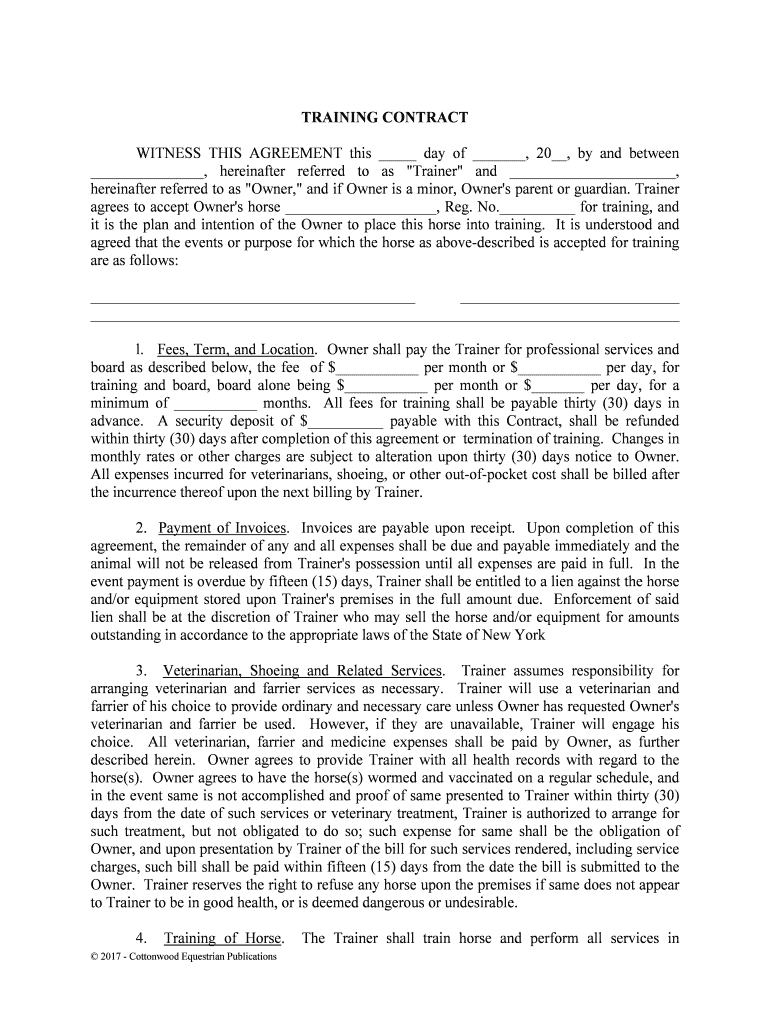
© 2017 - Cottonwood Equestrian Publications TRAINING CONTRACT WITNESS THIS AGREEMENT this _____ day of _______, 20__, by and between _______________, hereinafter referred to as "Trainer" and ______________________, hereinafter referred to as "Owner," and if Owner is a minor, Owner's parent or guardian. Trainer agrees to accept Owner's horse ____________________, Reg. No.__________ for training, and it is the plan and intention of the Owner to place this horse into training. It is unde rstood and agreed that the events or purpose for which the horse as above-described is accepted for tra ining are as follows: ___________________________________________ _____________________________ ______________________________________________________________________________ l. Fees, Term, and Location. Owner shall pay the Trainer for professional services and board as described below, the fee of $___________ per month or $___________ per day, for training and board, board alone being $___________ per month or $_______ per day, for a minimum of ___________ months. All fees for training shall be payable thirty (30) days in advance. A security deposit of $__________ payable with this Contract, shall be refunded within thirty (30) days after completion of this agreement or termination of training. Cha nges in monthly rates or other charges are subject to alteration upon thirty (30) days notice to Owner. All expenses incurred for veterinarians, shoeing, or other out-of-pocket cost shall be billed after the incurrence thereof upon the next billing by Trainer. 2. Payment of Invoices. Invoices are payable upon receipt. Upon completion of this agreement, the remainder of any and all expenses shall be due and payable immediat ely and the animal will not be released from Trainer's possession until all expenses are paid in full. In the event payment is overdue by fifteen (15) days, Trainer shall be entitled to a lien against the horse and/or equipment stored upon Trainer's premises in the full amount due. Enforcement of said lien shall be at the discretion of Trainer who may sell the horse and/or equipment for amounts outstanding in accordance to the appropriate laws of the State of New York 3. Veterinarian, Shoeing and Related Services. Trainer assumes responsibility for arranging veterinarian and farrier services as necessary. Trainer will use a veterinaria n and farrier of his choice to provide ordinary and necessary care unless Owner has requested Owner's veterinarian and farrier be used. However, if they are unavailable, Trainer will engage hi s choice. All veterinarian, farrier and medicine expenses shall be paid by Owner, as furthe r described herein. Owner agrees to provide Trainer with all health records with regard t o the horse(s). Owner agrees to have the horse(s) wormed and vaccinated on a regular schedule, and in the event same is not accomplished and proof of same presented to Trainer within thirty (30) days from the date of such services or veterinary treatment, Trainer is authorized to arrange for such treatment, but not obligated to do so; such expense for same shall be the obligation of Owner, and upon presentation by Trainer of the bill for such services rendered, including service charges, such bill shall be paid within fifteen (15) days from the date the bill i s submitted to the Owner. Trainer reserves the right to refuse any horse upon the premises if same does not appea r to Trainer to be in good health, or is deemed dangerous or undesirable. 4. Training of Horse. The Trainer shall train horse and perform all services in © 2017 - Cottonwood Equestrian Publications accordance with generally accepted professional standards. Trainer cannot and does not guarantee the effect of the training program or that any particular results will be achieved, since this depends a great deal on the individual physical and mental ability of each horse. Trainer shall furnish all labor, provide suitable facilities and care for horse in an adequate manner with feed being determined by the Trainer. The Trainer has complete control over the m anner of training and shall take all precautions for the proper performance thereof. Owner shall submit a fully completed Owner's Information Sheet for each horse on the premises belonging to Owner within forty-eight (48) hours of delivery. 5. Showing of Horse. Unless specifically advised by the Owner not to exhibit said horse, Trainer shall, at Trainer's discretion, have the horse shown at the horse shows of his choic e. Trainer shall provide any necessary transportation to and from said shows at the rate of _____ cents per mile, plus $________ per show with the minimum charge per show being $________. In the event professional horse transportation services are utilized, Owner agrees to pay all said applicable charges. Owner shall pay for any and all entry fees, ground fees, stall and bedding fees, or other related charges incurred while horse is being shown or transported, including any and all lay-up charges in transit. This consists of $_______ per night and/or an allocation of the horse Owner's prorated expenses for all horses being shown by Trainer at the time said expenses were incurred in order to reimburse Trainer for Trainer's and Trainer's employee's expenses, costs of grooms and related expenditures incurred while away from the Farm. _____________________ shall receive all trophies and ribbons. Owner shall receive ______% of all money earnings. Prior to the disbursement of any winnings, the party paying said entry fees shall be entitled to be reimbursed to the extent of _______% of said advances prior to all other such disbursements. 6. Death of Horse. It is hereby agreed that in the event of the death of the horse, sale of the horse, or if the horse becomes unfit to train, Trainer has the option of accepting anot her horse, in accordance with this condition set forth herein within seven (7) days; or, in the alternative, terminating this agreement upon payment of all expenses and fees. 7. Feed, Facilities, and Services. Trainer agrees to provide adequate feed and fac ilities for normal and reasonable care required to maintain the health and well-being of the animals in training. Owner acknowledges Owner has inspected the facilities and finds same in safe and acceptable order. 8. Risk of Loss and Standard of Care. During the time that the horse(s) is/are in custody of Trainer, Trainer shall not be liable for any sickness, disease, estray, theft, death or injury which may be suffered by the horse(s) or any other cause of action whatsoever, arising out of or being connected in any way with the boarding of said horse(s), except in the event of neglige nce on the part of Trainer, its agents, and/or employees. This includes, but is not limi ted to, any personal injury or disability the horse Owner, or Owner's guest, may receive on Trainer's premises. The Owner fully understands that Trainer does not carry any insurance on any horses not owned by it for boarding or for any other purposes, whether public liability, accidental injury, theft or equine mortality insurance and that all risks connected with boarding or for any other © 2017 - Cottonwood Equestrian Publications reason for which the horse(s) in the possession of, and on the premises of Trainer are to be borne by the Owner. The standard of care applicable to Trainer is that of ordinary care of a prudent horse owner and not as a compensated bailee. In no event shall Trainer be held liable t o Owner for equine death or injury in an amount in excess of Five Thousand Dollars ($5,000) per animal. Owner agrees to obtain equine insurance for any animals valued in excess of Five Thousand Dollars ($5,000), at Owner's expense, or forego any claim for amounts in excess of Five Thousand Dollars ($5,000). Owner agrees to disclose this entire agreement to Owner's insurance company and provide Trainer with the company's name, address and policy number. Failure to disclose insurance information shall be at Owner's risk. 9. Inherent Risks and Assumption of Risk. The undersigned acknowledges there are inherent risks associated with equine activities such as described below, and hereby expressly assumes all risks associated with participating in such activities. The inherent risks include, but are not limited to the propensity of equines to behave in ways such as, running, bucking, biti ng, kicking, shying, stumbling, rearing, falling or stepping on, that may result in an injury, harm or death to persons on or around them; the unpredictability of equine’s reaction to such things a s sounds, sudden movement and unfamiliar objects, persons or other animals; certain hazards such as surface and subsurface conditions; collisions with other animals; the limited avail ability of emergency medical care; and the potential of a participant to act in a negligent manner that may contribute to injury to the participant or others, such as failing to maintain c ontrol over the animal or not acting within such participant’s ability. Owner expressly releases Stable from any and all claims for personal injury or property damage, even if caused by negligence (if allowed by the laws of this State) by Sta ble or its representatives, agents or employees. WARNING You are advised that there are inherent risks, including the risk of serious injury or death, while engaging in equine activities. By engaging in equine activities and in accordance with the terms of this agreement you hereby assume all risks of injury or death. 10. Hold Harmless. Owner agrees to hold Trainer harmless from any and all claims arising from damage or injury caused by said horse(s) to anyone, and defend Trainer from any such claims. Owner agrees to disclose any and all hazardous or dangerous propensities of horse(s) boarded with Trainer. Trainer reserves the right to notify owner within seven (7) days of the horse's arrival if said horse, in Trainer's opinion, is dangerous, untrainable, unhealthy, handicapped, or otherwise unfit for training. Upon such notification, Owner shall remove said horse within seven (7) days, and all expenses incurred for the horse's stay shall be paid prior t o departure. Upon payment of all fees, this contract shall be deemed terminated. 11. Emergency Care. Trainer agrees to attempt to contact Owner should Trainer determine veterinary treatment is needed for said horse(s), but, if Trainer is unable to contact Owner, Trainer is then authorized to secure emergency veterinary, and farrier care required for the health and well-being of said horse(s). All costs of such care secured shall be paid by Owne r © 2017 - Cottonwood Equestrian Publications within fifteen (15) days from the date Owner receives notice thereof, or Trainer is authorized, as Owner's agent, to arrange direct billing to Owner. Trainer shall assume that Owner desires surgical care if recommended by a veterinari an in the event of colic, or other life-threatening illness, unless Trainer is instructed herein by Owner or on Owner's Information Sheets, that the horse(s) is/are not surgical candidates. Owner agrees to notify Trainer of any and all change of addresses, emergency telephone numbers, itineraries or other information reasonably necessary to contact Owner in the e vent of an emergency. In the event Owner departs for vacation or is otherwise unavailable, prior to departure Owner shall notify Trainer as to what party is authorized to make decisions in the Owner's place with regard to the health, well-being, and/or medical treatment of the horse(s). l2. Limitation of Actions. Any action or claim brought by Owner against Trainer for breach of this Contract or for loss due to negligence must be brought within one (l) year of the date such claim or loss occurs. 13. Ownership-Coggins Test. Owner warrants that he owns the horse(s) and will provide proof satisfactory to Trainer of the negative Coggins test upon request. 14. Changes or Termination of This Agreement. It is agreed by the Parties that this Agreement may be changed or terminated by Trainer upon thirty (30) days notice, regardless of the rental or training period. All notices must be issued in writing unless otherwise a greed upon by the parties. The posting of updated rate schedules in a conspicuous or open place in Tra iner's office shall constitute notice of any and all rate changes or regulation changes a s may be deemed appropriate by Trainer. 15. Rules and Regulations. The Owner agrees to abide by all the rules and regulations of the Trainer. In the event someone other than the Owner shall call for the horse(s), suc h person shall have written authority signed by the Owner to obtain said horse(s). 16. Right of Lien. The Owner is given notice that Trainer has a right of lien as se t forth in the laws of the State of New York for the amount due for the board and keep of such horse(s), and also for storage and services, and shall have the right, without process of law, to retai n said horse(s) and other property until the amount of said indebtedness is discharged. However, Trainer will not be obligated to retain and/or maintain the horse(s) in question in t he event the amount of the bill exceeds the anticipated unregistered value of the horse(s.) In the e vent Trainer exercises Trainer's lien rights as above-described for non-payment, this Agreement shall constitute a Bill of Sale and authorization to process transfer applications from any breed registration as may be applicable to said horse(s) upon affidavit by Trainer's representative s setting forth the material facts of the default and foreclosure as well as Traine r's compliance with foreclosure procedures as required by law. In the event collection of this account is turned over to an attorney, Owner agrees to pay all attorney's fees, costs, and other related expenses for which a minimum charge of $250.00 will be assessed. 17. Property in Storage on Trainer’s Premises. Owner may store certain tack and equipment on the premises of Trainer at no additional charge to Owner. However, Trainer shal l © 2017 - Cottonwood Equestrian Publications not be responsible for the theft, loss, damage or disappearance of any tack or equipment or other property stored at the facility as same is stored at the Owner's risk. Trainer shall not be liable for the theft, loss, damage, or disappearance of any tack or equipment taken to horse shows or clinics. Vehicles stored upon the premises will be subject to a $_____/day storage cost for all delinquent accounts. 18. Entire Agreement. This contract represents the entire agreement between the parties. No other agreements, promises, or representations, verbal or implied, are included herein unless specifically stated in this written agreement. This contract is made and entered into in the state of Trainer's stable, and shall be enforced and interpreted in accordance with the laws of said State. 19. Enforceability of Contract and Severability. In the event one or more parts of this contract are found to be unenforceable or illegal, the other portions hereof shall be de emed in full force and effect. OWNER (OR AUTHORIZED AGENT) By OWNER'S PARENT OR GUARDIAN (IF OWNER IS A MINOR) By Address: Telephone: (wk) (hm) By © 2017 - Cottonwood Equestrian Publications

Valuable advice on finishing your ‘Outstanding In Accordance To The Appropriate Laws Of The State Of New York’ online

Are you fed up with the inconvenience of managing paperwork? Look no further than airSlate SignNow, the premier eSignature platform for individuals and organizations. Bid farewell to the tedious task of printing and scanning documents. With airSlate SignNow, you can effortlessly complete and sign documents online. Utilize the robust features included in this user-friendly and affordable platform and transform your approach to managing documents. Whether you need to approve documents or gather eSignatures, airSlate SignNow manages everything effortlessly, requiring just a few clicks.

Follow this detailed guide:

  1. Sign in to your account or begin a free trial with our service.
  2. Click +Create to upload a file from your device, cloud storage, or our template library.
  3. Open your ‘Outstanding In Accordance To The Appropriate Laws Of The State Of New York’ in the editor.
  4. Click Me (Fill Out Now) to prepare the document on your end.
  5. Add and assign fillable fields for additional parties (if necessary).
  6. Proceed with the Send Invite settings to request eSignatures from others.
  7. Download, print your version, or convert it into a reusable template.

No need to worry if you have to collaborate with your teammates on your Outstanding In Accordance To The Appropriate Laws Of The State Of New York or send it for notarization—our platform offers everything you need to accomplish such tasks. Register with airSlate SignNow today and take your document management to new levels!

Here is a list of the most common customer questions. If you can’t find an answer to your question, please don’t hesitate to reach out to us.

Need help? Contact Support
New York State Constitution summary
New York Constitution Bill of Rights
New York State Constitution for Kids
New York State landlord guide
New York Constitution pdf
What rights do tenants have without a lease
New York Constitution Article 1
New York Constitution amendments
New York State tax warrant Search
New York State Department of State State tax warrant Notice system
New York City tax warrant search
Pay NYS tax warrant Online

The best way to complete and sign your outstanding in accordance to the appropriate laws of the state of new york form


Save time on document management with airSlate SignNow and get your outstanding in accordance to the appropriate laws of the state of new york form eSigned quickly from anywhere with our fully compliant eSignature tool.

How to Sign a PDF Online How to Sign a PDF Online

How to fill out and sign forms online

Previously, dealing with paperwork required pretty much time and effort. But with airSlate SignNow, document management is quick and easy. Our robust and easy-to-use eSignature solution enables you to easily fill out and eSign your outstanding in accordance to the appropriate laws of the state of new york form online from any internet-connected device.

Follow the step-by-step guidelines to eSign your outstanding in accordance to the appropriate laws of the state of new york form template online:

  • 1.Register for a free trial with airSlate SignNow or log in to your account with password credentials or SSO authentication.
  • 2.Click Upload or Create and import a file for eSigning from your device, the cloud, or our form library.
  • 3.Click on the file name to open it in the editor and utilize the left-side menu to complete all the empty fields appropriately.
  • 4.Drop the My Signature field where you need to approve your form. Provide your name, draw, or import a picture of your regular signature.
  • 5.Click Save and Close to finish modifying your completed document.

Once your outstanding in accordance to the appropriate laws of the state of new york form template is ready, download it to your device, export it to the cloud, or invite other individuals to eSign it. With airSlate SignNow, the eSigning process only takes a few clicks. Use our robust eSignature solution wherever you are to manage your paperwork efficiently!


How to Sign a PDF Using Google Chrome How to Sign a PDF Using Google Chrome

How to complete and sign documents in Google Chrome

Completing and signing paperwork is simple with the airSlate SignNow extension for Google Chrome. Installing it to your browser is a quick and effective way to manage your paperwork online. Sign your outstanding in accordance to the appropriate laws of the state of new york form sample with a legally-binding eSignature in just a couple of clicks without switching between tools and tabs.

Follow the step-by-step guide to eSign your outstanding in accordance to the appropriate laws of the state of new york form template in Google Chrome:

  • 1.Go to the Chrome Web Store, search for the airSlate SignNow extension for Chrome, and install it to your browser.
  • 2.Right-click on the link to a document you need to sign and choose Open in airSlate SignNow.
  • 3.Log in to your account with your credentials or Google/Facebook sign-in option. If you don’t have one, sign up for a free trial.
  • 4.Utilize the Edit & Sign menu on the left to complete your sample, then drag and drop the My Signature option.
  • 5.Upload an image of your handwritten signature, draw it, or simply type in your full name to eSign.
  • 6.Verify all information is correct and click Save and Close to finish editing your paperwork.

Now, you can save your outstanding in accordance to the appropriate laws of the state of new york form sample to your device or cloud storage, email the copy to other individuals, or invite them to electronically sign your form with an email request or a protected Signing Link. The airSlate SignNow extension for Google Chrome improves your document processes with minimum time and effort. Try airSlate SignNow today!


How to Sign a PDF in Gmail How to Sign a PDF in Gmail How to Sign a PDF in Gmail

How to fill out and sign paperwork in Gmail

Every time you get an email containing the outstanding in accordance to the appropriate laws of the state of new york form for approval, there’s no need to print and scan a document or save and re-upload it to another program. There’s a better solution if you use Gmail. Try the airSlate SignNow add-on to promptly eSign any documents right from your inbox.

Follow the step-by-step guidelines to eSign your outstanding in accordance to the appropriate laws of the state of new york form in Gmail:

  • 1.Visit the Google Workplace Marketplace and locate a airSlate SignNow add-on for Gmail.
  • 2.Set up the tool with a related button and grant the tool access to your Google account.
  • 3.Open an email containing an attachment that needs approval and use the S sign on the right sidebar to launch the add-on.
  • 4.Log in to your airSlate SignNow account. Choose Send to Sign to forward the file to other people for approval or click Upload to open it in the editor.
  • 5.Place the My Signature option where you need to eSign: type, draw, or upload your signature.

This eSigning process saves efforts and only takes a couple of clicks. Utilize the airSlate SignNow add-on for Gmail to adjust your outstanding in accordance to the appropriate laws of the state of new york form with fillable fields, sign forms legally, and invite other parties to eSign them al without leaving your inbox. Improve your signature workflows now!


How to Sign a PDF on a Mobile Device How to Sign a PDF on a Mobile Device How to Sign a PDF on a Mobile Device

How to fill out and sign forms in a mobile browser

Need to rapidly fill out and sign your outstanding in accordance to the appropriate laws of the state of new york form on a mobile phone while working on the go? airSlate SignNow can help without the need to install extra software applications. Open our airSlate SignNow solution from any browser on your mobile device and create legally-binding electronic signatures on the go, 24/7.

Follow the step-by-step guide to eSign your outstanding in accordance to the appropriate laws of the state of new york form in a browser:

  • 1.Open any browser on your device and follow the link www.signnow.com
  • 2.Create an account with a free trial or log in with your password credentials or SSO authentication.
  • 3.Click Upload or Create and pick a file that needs to be completed from a cloud, your device, or our form library with ready-made templates.
  • 4.Open the form and complete the empty fields with tools from Edit & Sign menu on the left.
  • 5.Put the My Signature area to the sample, then enter your name, draw, or upload your signature.

In a few easy clicks, your outstanding in accordance to the appropriate laws of the state of new york form is completed from wherever you are. When you're done with editing, you can save the document on your device, build a reusable template for it, email it to other people, or invite them electronically sign it. Make your paperwork on the go quick and productive with airSlate SignNow!


How to Sign a PDF on iPhone How to Sign a PDF on iPhone

How to complete and sign documents on iOS

In today’s corporate environment, tasks must be done rapidly even when you’re away from your computer. With the airSlate SignNow application, you can organize your paperwork and approve your outstanding in accordance to the appropriate laws of the state of new york form with a legally-binding eSignature right on your iPhone or iPad. Install it on your device to conclude contracts and manage documents from just about anywhere 24/7.

Follow the step-by-step guidelines to eSign your outstanding in accordance to the appropriate laws of the state of new york form on iOS devices:

  • 1.Open the App Store, find the airSlate SignNow app by airSlate, and install it on your device.
  • 2.Open the application, tap Create to import a template, and select Myself.
  • 3.Opt for Signature at the bottom toolbar and simply draw your signature with a finger or stylus to eSign the sample.
  • 4.Tap Done -> Save after signing the sample.
  • 5.Tap Save or utilize the Make Template option to re-use this document later on.

This process is so easy your outstanding in accordance to the appropriate laws of the state of new york form is completed and signed in just a few taps. The airSlate SignNow app works in the cloud so all the forms on your mobile device are kept in your account and are available any time you need them. Use airSlate SignNow for iOS to boost your document management and eSignature workflows!


How to Sign a PDF on Android How to Sign a PDF on Android

How to complete and sign paperwork on Android

With airSlate SignNow, it’s simple to sign your outstanding in accordance to the appropriate laws of the state of new york form on the go. Set up its mobile app for Android OS on your device and start enhancing eSignature workflows right on your smartphone or tablet.

Follow the step-by-step guidelines to eSign your outstanding in accordance to the appropriate laws of the state of new york form on Android:

  • 1.Open Google Play, find the airSlate SignNow application from airSlate, and install it on your device.
  • 2.Log in to your account or create it with a free trial, then add a file with a ➕ button on the bottom of you screen.
  • 3.Tap on the imported file and select Open in Editor from the dropdown menu.
  • 4.Tap on Tools tab -> Signature, then draw or type your name to eSign the template. Fill out empty fields with other tools on the bottom if necessary.
  • 5.Use the ✔ key, then tap on the Save option to finish editing.

With a user-friendly interface and full compliance with main eSignature standards, the airSlate SignNow app is the perfect tool for signing your outstanding in accordance to the appropriate laws of the state of new york form. It even operates without internet and updates all record adjustments when your internet connection is restored and the tool is synced. Fill out and eSign documents, send them for approval, and create re-usable templates anytime and from anyplace with airSlate SignNow.

Sign up and try Outstanding in accordance to the appropriate laws of the state of new york form
  • Close deals faster
  • Improve productivity
  • Delight customers
  • Increase revenue
  • Save time & money
  • Reduce payment cycles

